
Best PSU Calculator for Modern PC Builds
Dear Visitor, select your components, and our free PSU Calculator will recommend the appropriate wattage for your PC build. When your system receives the proper amount of power, all components can operate smoothly and perform at their maximum potential.
What is PSU Calculator?
A PSU calculator estimates total system wattage by combining component power profiles, TDP data, transient power spikes, and load distribution. Now the question is, how does the PSU calculator work? Technically, the calculator sums dynamic TDP values, uses predefined wattage tables, and follows a component-based predictive model.
This means each selected component, such as the CPU, GPU, RAM, storage, and motherboard, has a defined power profile stored within the calculation engine. When a user selects a configuration, the system aggregates all these values and generates the total expected power load.
This calculation logic has been tested repeatedly across different build scenarios. Based on these results, most gaming users were able to accurately determine their required PSU wattage using a power supply unit calculator and build their systems accordingly. The outcomes were highly positive, as every hardware component received stable, sufficient power delivery without imbalance or overload.
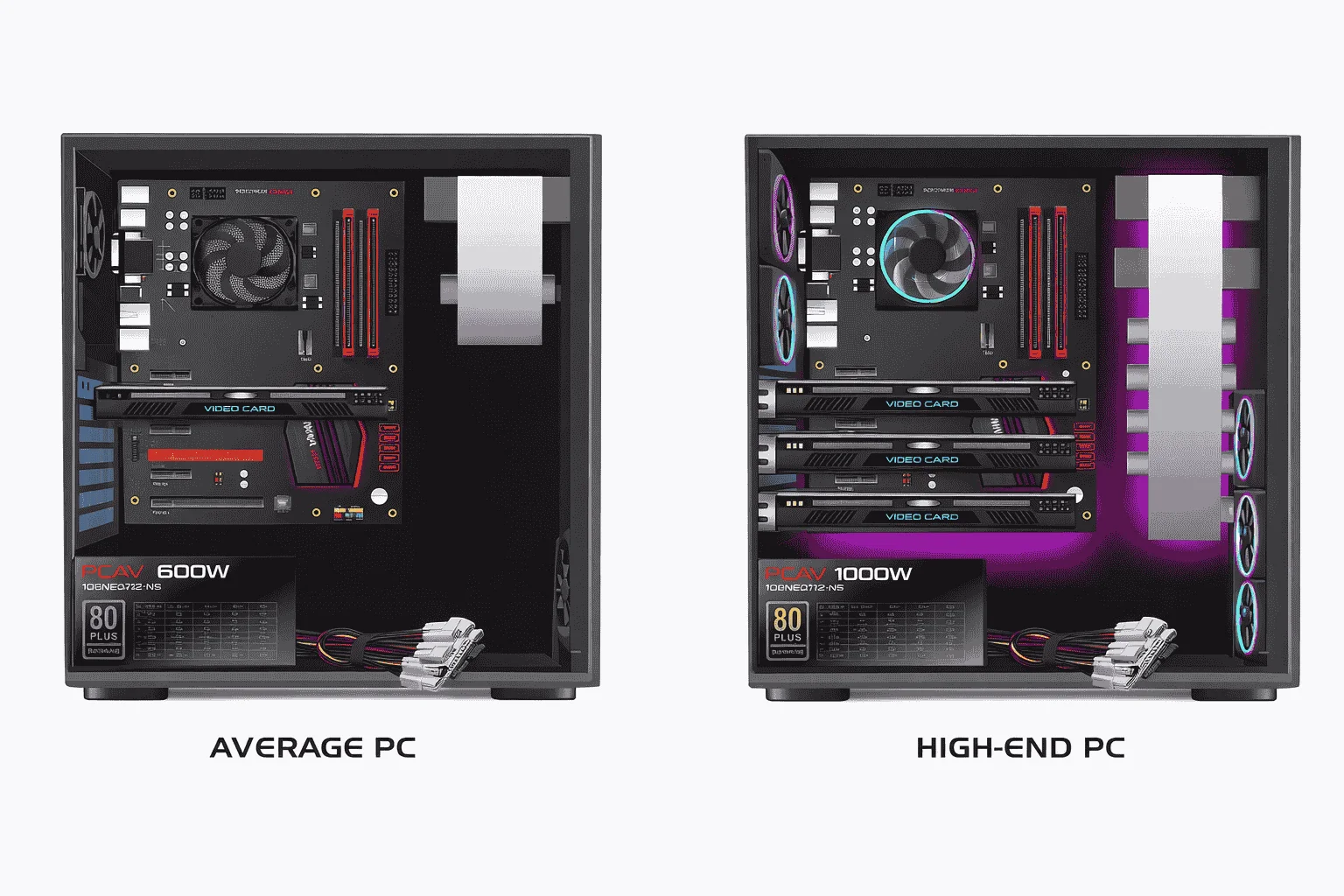
For this reason, I strongly recommend using this PSU calculator at least once before finalizing your PC build. It helps you avoid both underpowered and unnecessarily overpowered power supplies, ensuring a stable, efficient, and reliable system from the start.
Compare Power Consumption with a Power Supply Unit Calculator
In a power supply unit calculator, you can select different motherboard types and specify the graphics card model along with the number of GPUs in your system. This lets you see the estimated wattage consumed by the CPU and GPU separately. If you select only the CPU, the calculator shows results based on the CPU’s specifications.
When you include the GPU, the results will vary depending on the GPU model and the number of GPUs. Each component consumes power independently, and the PSU calculator helps you accurately estimate the total power requirement for your system.
As you increase or change specifications, such as adding more RAM, multiple GPUs, or higher-end components, the calculator’s sidebar will update, showing the recommended PSU wattage. This makes it easier to plan your build and ensure your PSU can handle all components efficiently.
Why the Power Supply Unit Matters in a PC Build?
The primary function of a Power Supply Unit (PSU) is to convert AC wall power into regulated DC voltages and deliver stable, controlled power to all system hardware components. A standard PSU provides 12V, 5V, and 3.3V rails, with modern systems placing the heaviest load on the 12V rail, especially for the CPU and GPU.
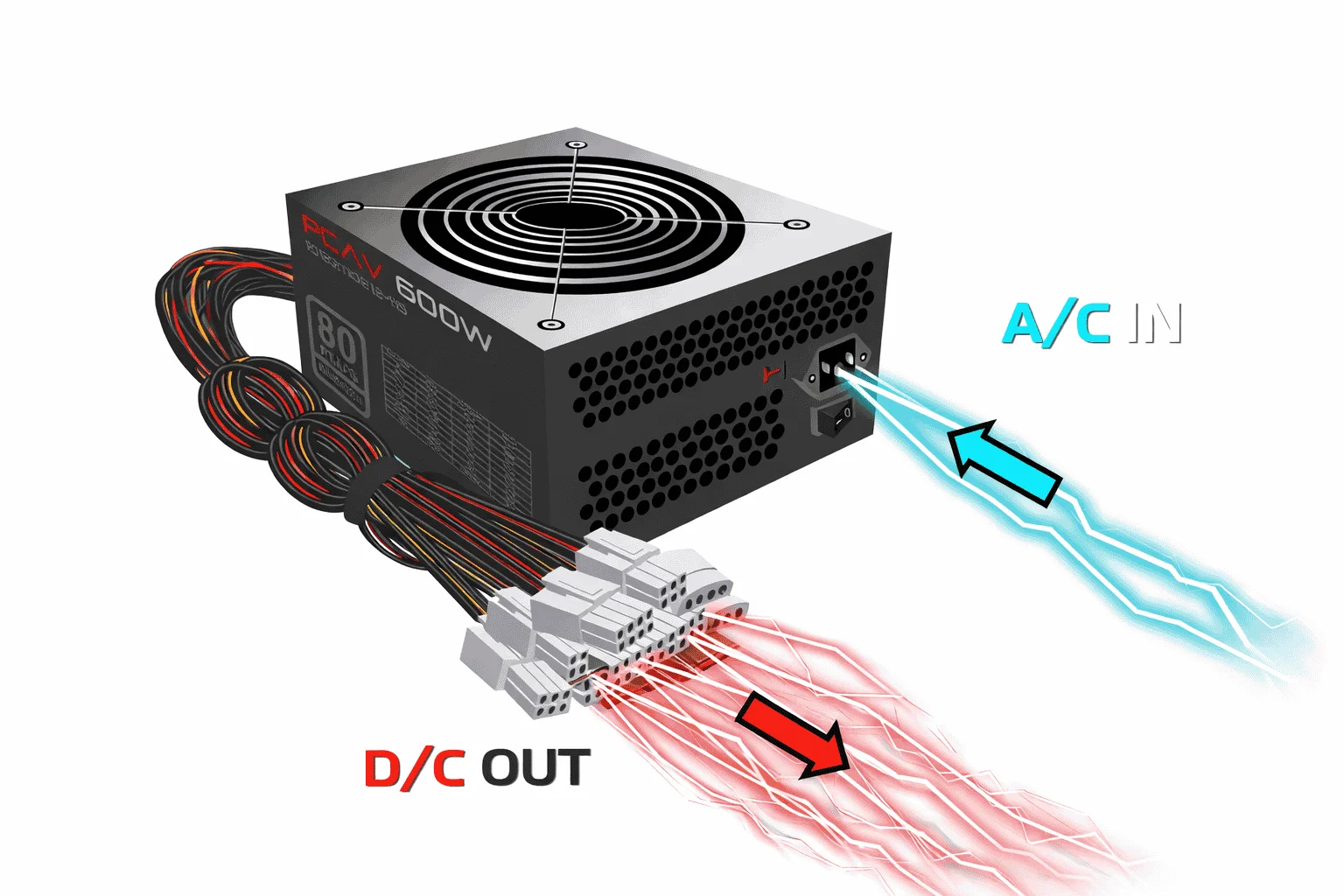
If a PSU cannot deliver the required wattage or maintain proper current stability, it directly impacts the hardware. Under peak load, the CPU and GPU may not receive sufficient power, leading to voltage drops and power fluctuations. This instability can cause performance throttling, sudden frame drops, and overall inconsistent system behavior.
Common technical symptoms of an underpowered or low-quality PSU include:
Types of Power Supply Units (PSU)
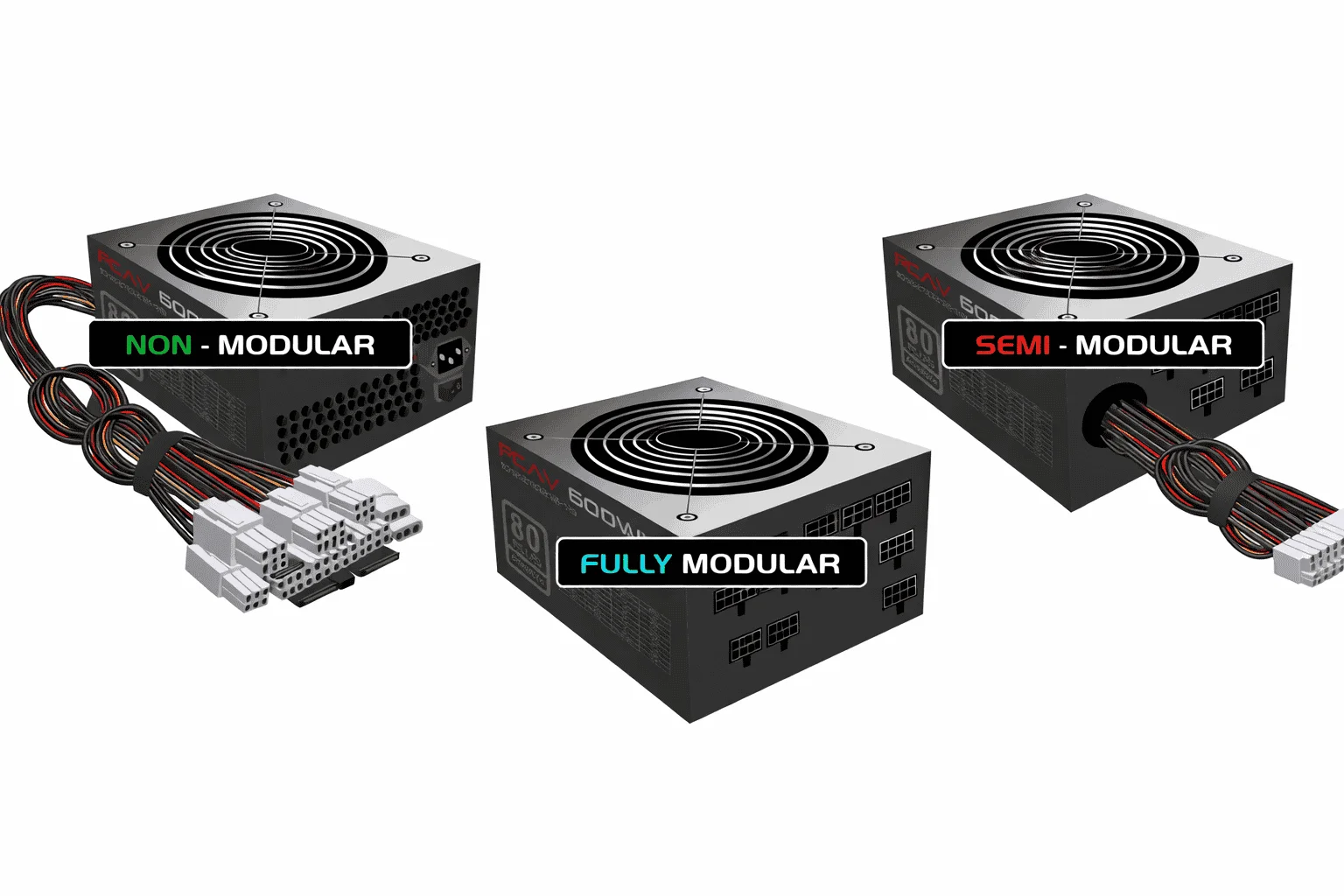
Power supply units (PSUs) in the market come with different modular designs that offer various features for cable management and PC setup. In full modular units, all cables can be detached. In semi-modular units, only some cables are removable. In non-modular units, all cables are fixed. These designs give PC builders flexibility and help keep cables organized, which is especially useful for compact or custom-built computers.
1. Non-Modular PSU
In a non-modular PSU, all power cables are permanently attached to the unit and cannot be removed. The direct impact is that unused cables must remain inside the case, making cable routing more complex and potentially obstructing airflow. This issue becomes more noticeable in compact cases, where extra wiring can create clutter between the GPU and the front airflow path.
2. Semi-Modular PSU
In a semi-modular PSU, essential cables, such as the 24-pin motherboard connector and CPU EPS cable, are permanently attached, while PCIe and SATA cables are detachable. The logic behind this design is that motherboard and CPU cables are required in every system, so they are fixed, whereas GPU and storage connections vary depending on the user’s configuration. This approach eliminates unnecessary cables and results in a cleaner internal layout.
3. Fully Modular PSU
In a fully modular PSU, all cables are detachable, including the motherboard and CPU connectors. The primary advantage is maximum configurational control. The user installs only the cables that are required, which helps optimize airflow and maintain a structured internal layout.
What Is 80 PLUS Certification in Power Supplies?
80 PLUS certification is an international standard for measuring the energy efficiency of a power supply. It means that a PSU operates at a minimum of 80% efficiency, meaning most of the AC power it draws from the wall is converted into usable DC power for PC components, while a smaller portion is wasted as heat.
For example, if a power supply unit is delivering 500W of output power at 80% efficiency, it will draw approximately 625W from the wall. The remaining power is lost as heat. This is why higher efficiency results in less electricity waste and lower heat generation.
The 80 PLUS certification has multiple efficiency levels, such as Bronze, Silver, Gold, Platinum, and Titanium. A higher tier means the power supply unit delivers better efficiency across different load levels (20%, 50%, and 100%). This rating does not define the PSU’s wattage capacity; it only measures how efficiently the unit converts power.
Understanding PSU Connectors and Their Roles in a Computer
PSU connectors (Power Supply Unit connectors) are used in computers to transfer power, supplying the motherboard and other hardware with the correct voltages through various pins. The basic connectors include P1, which is usually the 20- or 24-pin main motherboard power connector; P2, often used for additional CPU power; and P4, a 4-pin or 8-pin connector specifically for CPU power supply.
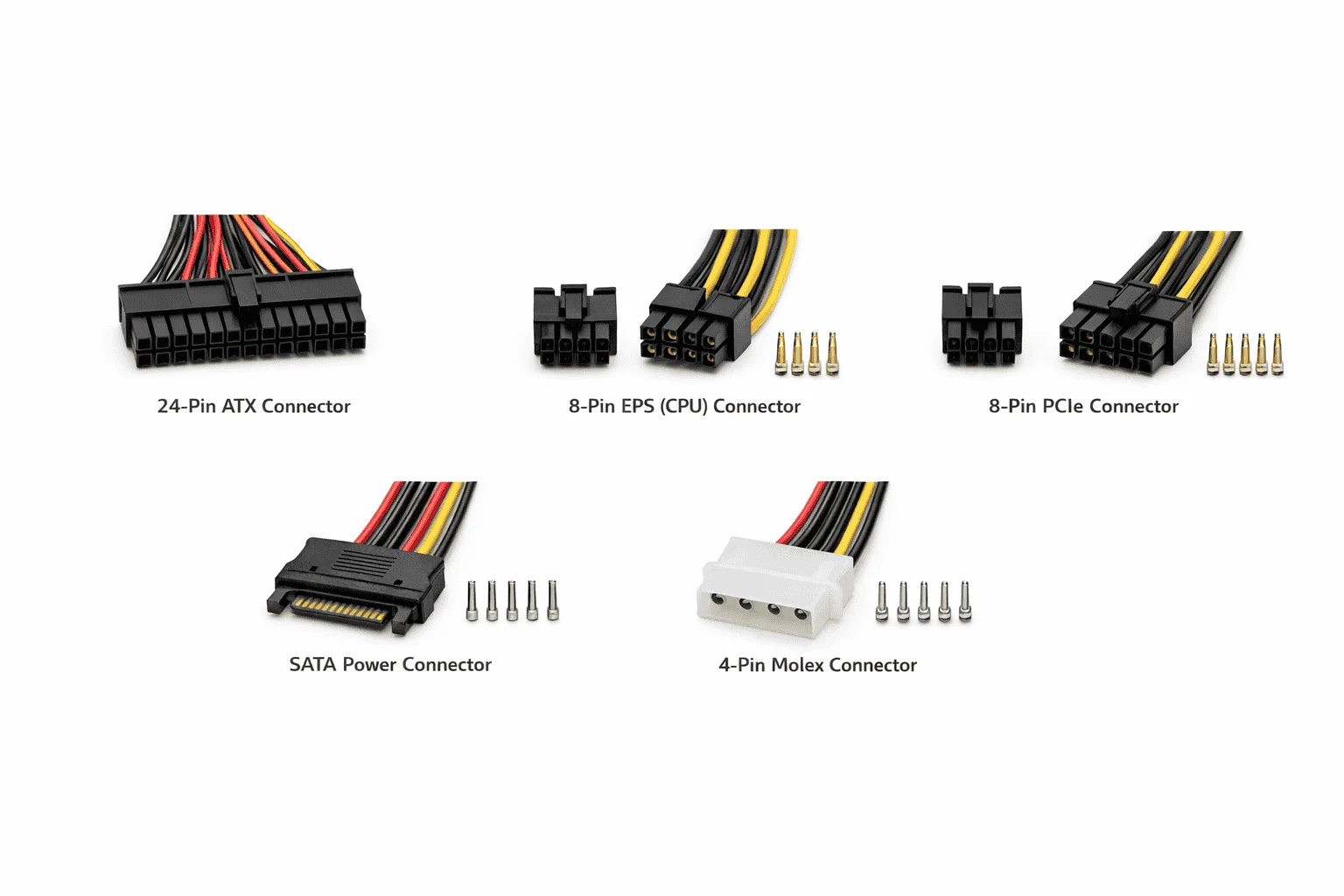
In the market, these connectors are available in different types, such as Molex, which is used for storage devices and older hardware; SATA power connectors for modern hard drives and SSDs; and PCIe power connectors, which provide extra power to graphics cards. The design and pin arrangement of these connectors are tailored to the power requirements of each device to ensure proper distribution of voltage and current, and they come in various sizes and pin configurations.
ATX / EPS / PCIe Connector Specifications
| Connector | Pins | Voltage lines | Primary usage | Supported devices | Reliability | Modern | Notes |
|---|---|---|---|---|---|---|---|
| 24-pin ATX | 24 | +3.3V, +5V, +12V, -12V, +5VSB | Main motherboard power | Modern motherboards | High | Yes | Standard since ATX12V 2.0 |
| 20-pin ATX | 20 | +3.3V, +5V, +12V, -12V, +5VSB | Older motherboard power | Legacy ATX boards (pre-2003) | Medium | No | Often requires separate 4-pin aux |
| 8-pin EPS (CPU) | 8 | +12V (4x12V, 4xGND) | High-power CPU | Workstations, high-end desktops | High | Yes | Can be split into two 4-pin |
| 4-pin CPU (ATX12V) | 4 | +12V (2x12V, 2xGND) | Basic CPU power | Entry/mainstream CPUs | Medium | Partial | Often used alongside 8-pin |
| 6-pin PCIe | 6 | +12V (3x12V, 3xGND) | GPU power | Graphics cards up to 75W | High | Yes | Legacy and some modern GPUs |
| 8-pin PCIe (6+2) | 8 | +12V (3x12V, 5xGND) | GPU power (up to 150W) | Modern GPUs, high-end | High | Yes | Detachable 6+2, very common |
| SATA Power | 15 | +3.3V, +5V, +12V | SATA drives | HDD, SSD, optical drives | High | Yes | L-shaped flat connector |
| Molex (Peripheral) | 4 | +5V, +12V (2xGND) | Legacy peripherals | Old HDD, fans, adapters | Medium | No | Still used for fan hubs/adapters |
| 4-pin Floppy | 4 | +5V, +12V | Floppy drives | Legacy FDD, very old systems | Low | No | Miniature Molex, rarely needed |
| 12-pin PCIe 12VHPWR | 12 | +12V (all 12V, sense pins) | High-power GPU (PCIe 5.0) | RTX 40-series, next-gen GPUs | High | Yes | New standard, up to 600W, small pitch |
| 12+4-pin 12V-2×6 | 16 | +12V (12 pins) + sense (4) | ATX 3.1 / PCIe CEM 5.1 | Latest GPUs, Corsair / Seasonic | High | Yes | Improved 12VHPWR with better sense |
| 8-pin (6+2) dual | 8+8 | +12V (3+3 lines, grounds) | Dual GPU power | High-end GPUs requiring 2 connectors | High | Yes | Two 8-pin PCIe often used |
| Micro-Fit (Molex) | 4/6/8 | +12V or +5V variants | Internal peripheral, adapters | Custom cables, pumps, RGB | Medium | Yes | Common for aftermarket sleeving |
| CPU 8+4 pin EPS | 12 | +12V (8pin + 4pin combos) | Extreme workstation CPU | Threadripper / Xeon boards | High | Yes | Stability for high-core CPUs |
| CPU 8+8 pin EPS | 16 | +12V (dual EPS) | Flagship CPU power | Overclocking, server boards | High | Yes | Maximum stability |
| PCIe 8-pin (solid) | 8 | +12V (3x12V, 5xGND) | Server/older GPU | Some server PSUs, older GPUs | High | Partial | Non-detachable, same pinout |
| Mini-SATA (mSATA) | 7+7 | +3.3V, +5V (varies) | mSATA SSD power/data combo | Legacy mini SSDs, embedded | Medium | No | Often integrated, not modular |
| M.2 Power (from slot) | — | +3.3V (supplied by slot) | M.2 SSD / Wi-Fi cards | Modern NVMe / SATA M.2 drives | High | Yes | No separate cable, slot-powered |
| eSATA Power (ext) | 5 | +5V, +12V combo | External SATA drives | eSATA external enclosures | Medium | No | Rare, often combined with USB |
| 6-pin PCIe (server) | 6 | +12V (heavy gauge) | Server GPU / internal | Dell/HP proprietary GPUs | Medium | Partial | Often same pinout, keyed differently |
| 4-pin Berg (LP4) | 4 | +5V, +12V | Obsolete disk drives | Very old CD / HDD | Low | No | Precursor to standard Molex |
What Is ATX 3.0 and Transient Spike Handling?
ATX 3.0 is an updated power supply standard, officially defined by Intel, to properly support the power requirements of modern dedicated GPUs and CPUs. This standard is specifically designed for systems that can generate sudden, extreme power spikes, something that could be problematic for traditional PSUs.
What Does ATX 3.0 Change?
In traditional ATX standards, PSUs were mostly designed around continuous rated wattage. However, modern GPUs, especially models from NVIDIA’s RTX 40 series, can generate extremely fast transient spikes. For example, if a GPU has a rated board power of 450W, it can demand up to twice that for a very short duration.
CPU vs GPU Power Delivery Difference
A CPU receives power indirectly from the PSU through the motherboard. The EPS connector supplies 12V power to the motherboard’s VRM (Voltage Regulator Module) section, where it is regulated and converted into the precise core voltage required by the CPU.
The GPU operates differently. A graphics card draws an additional 12V power directly from the PSU through dedicated PCIe power connectors. While the PCIe slot itself can provide up to 75W through the motherboard, high-end GPUs require extra dedicated connectors to meet their full power demands.
That’s why high-wattage GPUs typically require multiple 8-pin or newer 16-pin (12VHPWR/12V-2×6) connectors to ensure stable and sufficient power delivery under load.
Power Supply Calculator vs PSU Tier List – Comparison
A PSU calculator and a PSU tier list serve different purposes, but for a PC builder, they function as complementary tools. One determines wattage requirements, while the other evaluates overall PSU quality.
A PSU calculator focuses on estimating the system’s total power draw. It uses component TDP data, aggregates load values, and applies a safety headroom to recommend the required wattage. Its primary role is to determine the minimum safe wattage the system needs for stable operation.
In contrast, a PSU tier list does not focus on wattage. Instead, it evaluates the internal design and build quality of the power supply. Tier lists classify PSU units based on:
Important Note: If a PSU calculator recommends 750W, it does not mean that every 750W PSU will be safe. If a user chooses a low-tier 750W unit with weak voltage regulation, system instability can occur under high-load conditions.
Similarly, even if a PSU is Tier A in terms of quality, insufficient wattage can still lead to system shutdowns or power throttling.
Conclusion
A Power supply unit calculator is essentially an estimation tool that takes your system components, such as the CPU, GPU, drives, and fans, and calculates an approximate wattage requirement. However, relying only on that number is not the right approach. That’s why checking a PSU tier list and going through experienced users’ practical reviews is important, so you can understand the unit’s actual reliability, voltage regulation behavior, and performance under load.
When selecting a power supply, the 80 PLUS certification should also be evaluated because it defines the efficiency level and shows how effectively the PSU converts AC power from the wall into usable DC power. Connector support is equally critical: the 24-pin ATX connector provides base power to the motherboard, the EPS connector delivers 12V directly to the CPU’s VRM section, PCIe connectors supply dedicated power to the GPU under high load, and SATA connectors provide regulated 5V and 12V to storage drives. Since CPU and GPU power delivery structures differ, understanding their load patterns helps in choosing the correct wattage and overall PSU configuration.