Updated GPU Benchmarks 2026 | Comparison chart
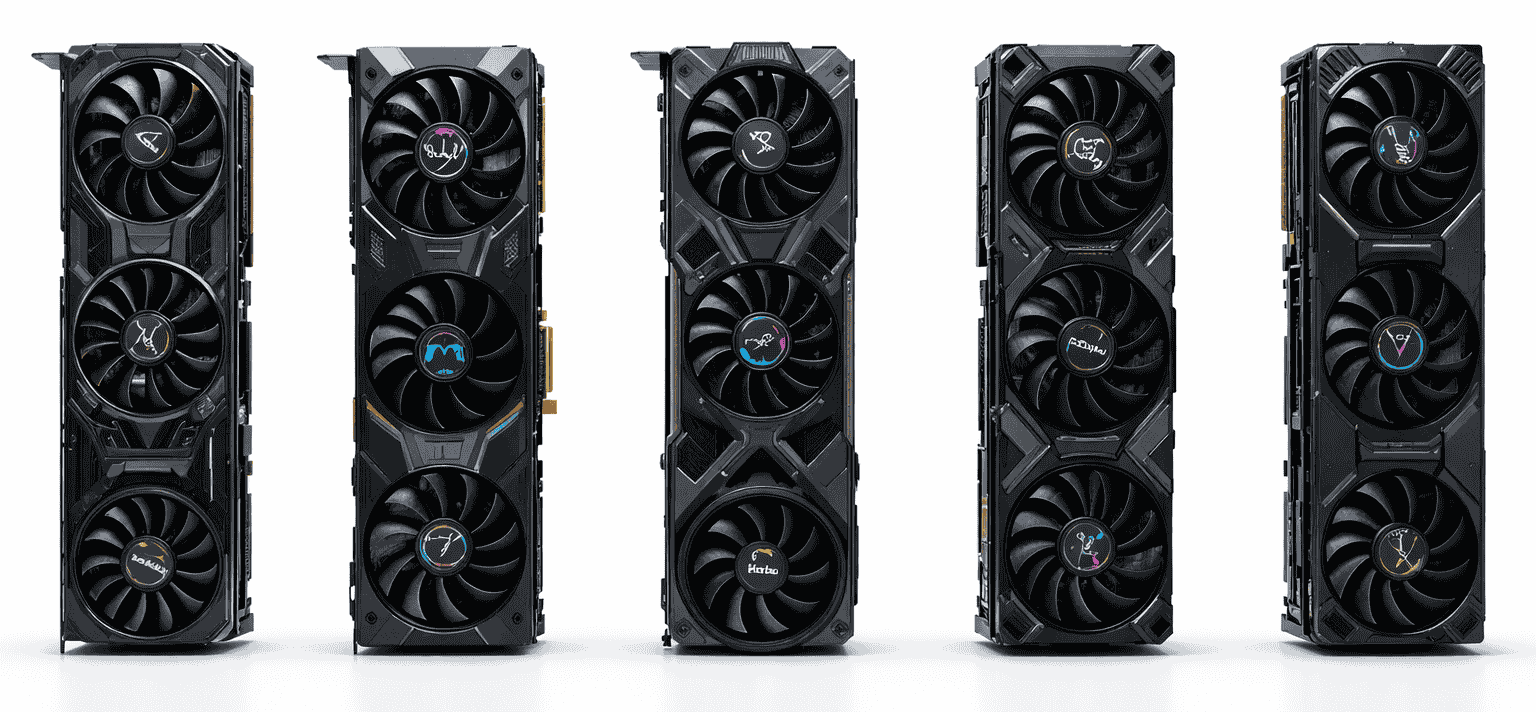
GPU benchmarks often confuse users because the results are presented without enough context to explain what they actually mean. Results change depending on resolution, CPU pairing, memory configuration, drivers, and even the operating system. That’s why running PC GPU benchmarks on your own system often produces different results than what you see in online benchmark charts, or user benchmarks in GPU databases. Without knowing the testing conditions, raw scores can be misleading.
Another common mistake is assuming the fastest GPU in benchmark rankings is automatically the best choice. In reality, the most powerful GPUs can be limited by the rest of the system, especially at lower resolutions like 1080p or 1440p. CPU bottlenecks, VRAM limits, and real-game behavior matter far more than synthetic benchmark numbers alone.
The solution to all these issues is that while PassMark GPU Benchmark is a free GPU benchmark tool that provides performance data in numerical form, it lacks proper interpretation—something we address by offering clear explanations and practical guidelines to help you understand the results accurately.
Latest GPU Benchmarks and Market Updates 2026
GPU benchmarks and the next-generation graphics market are showing some very interesting trends. NVIDIA has officially showcased its upcoming Rubin GPU Architecture, which is considered the company’s next major AI and GPU platform after the current Blackwell generation. According to reports, Rubin GPUs will feature next-generation HBM4 memory, advanced Transformer Engines, sixth-generation NVLink technology, and highly optimized AI inference acceleration. NVIDIA’s focus is no longer limited to gaming; the company is now aggressively shifting toward agentic AI, reasoning models, hyperscale datacenters, and AI factories.
NVIDIA has also introduced the Vera Rubin platform, where Vera CPUs and Rubin GPUs are combined into a rack-scale supercomputing ecosystem. According to NVIDIA’s claims, the Vera Rubin platform can deliver significantly better inference efficiency and lower cost-per-token compared to the Blackwell generation. In the industry, GB300, Vera Rubin NVL72, and future AI racks are being viewed as important parts of next-generation AI infrastructure. Competition around HBM4 memory is also becoming increasingly intense, with Micron, SK Hynix, and Samsung expected to play major roles in the future AI GPU supply chain.
On the other hand, AMD is aggressively expanding its Radeon RX 9000 lineup, and GPUs such as the RX 9070 XT, RX 9070, and RX 9060 XT are generating significant discussion in the gaming market. AMD’s main focus appears to be on improved rasterization performance, better power efficiency, higher VRAM configurations, and a competitive price-to-performance ratio. At the same time, the company is rapidly improving its AI-based upscaling technology, FSR 4. According to recent reports, FSR 4.1 is expected to expand support not only for newer RX 9000 series GPUs but also for older RDNA 3 and RDNA 2 GPUs, which could provide strong long-term ecosystem support for AMD users. Industry analysts also consider the future UDNA architecture to be an important development, as AMD may move toward a more unified direction for gaming and AI GPU technologies.
Meanwhile, Intel is also steadily improving its position in the dedicated GPU market. The company’s Battlemage series, especially the Intel Arc Pro B70, has been appearing frequently in benchmark discussions. Reports suggest that the Big Battlemage G31 chip-based Arc Pro B70 delivers gaming performance close to the RTX 5060 Ti, although its primary focus is believed to be AI and workstation workloads. Intel is also working on its future Xe3 Celestial architecture, which is considered a major part of the company’s next-generation graphics roadmap. In addition, Intel is investing in future memory technologies and AI-centric GPU ecosystems that could play an important role in the future datacenter and AI acceleration race.
GPU Benchmarks by Resolution
GPU tiers make it easier to understand what level of performance to expect. S-Tier GPUs can run games at max settings without upscaling, while A-Tier GPUs reach similar quality with upscaling enabled. B-Tier GPUs are best suited for high settings, while C-Tier GPUs typically require medium settings to maintain smooth performance. D-Tier GPUs are suitable for basic or older games, while E-Tier GPUs are not recommended for modern gaming.
| GPU Model | 1080p Performance | 1440p Performance | 4K Performance |
|---|---|---|---|
| GeForce RTX 5090 | S-Tier (240+ fps) | S-Tier (180+ fps) | S-Tier (120+ fps) |
| GeForce RTX 4090 | S-Tier (220+ fps) | S-Tier (160+ fps) | S-Tier (100+ fps) |
| RTX PRO 6000 Blackwell | S-Tier (230+ fps) | S-Tier (170+ fps) | S-Tier (110+ fps) |
| GeForce RTX 5080 | S-Tier (200+ fps) | A-Tier (140+ fps) | A-Tier (80+ fps) |
| GeForce RTX 4080 SUPER | A-Tier (180+ fps) | A-Tier (130+ fps) | B-Tier (70+ fps) |
| Radeon RX 7900 XTX | A-Tier (190+ fps) | A-Tier (135+ fps) | B-Tier (65+ fps) |
| GeForce RTX 4090 D | A-Tier (185+ fps) | A-Tier (130+ fps) | B-Tier (68+ fps) |
| GeForce RTX 4070 Ti SUPER | A-Tier (170+ fps) | A-Tier (120+ fps) | C-Tier (55+ fps) |
| RTX PRO 5000 72GB Blackwell | A-Tier (175+ fps) | A-Tier (125+ fps) | B-Tier (62+ fps) |
| GeForce RTX 4070 Ti | A-Tier (160+ fps) | B-Tier (110+ fps) | C-Tier (50+ fps) |
| Radeon RX 7900 XT | A-Tier (165+ fps) | B-Tier (115+ fps) | C-Tier (55+ fps) |
| GeForce RTX 4070 SUPER | A-Tier (150+ fps) | B-Tier (105+ fps) | C-Tier (45+ fps) |
| GeForce RTX 3090 Ti | A-Tier (155+ fps) | B-Tier (105+ fps) | C-Tier (50+ fps) |
| Radeon RX 6950 XT | A-Tier (160+ fps) | B-Tier (110+ fps) | C-Tier (48+ fps) |
| GeForce RTX 3090 | A-Tier (150+ fps) | B-Tier (100+ fps) | C-Tier (45+ fps) |
| Radeon PRO W7900 | A-Tier (145+ fps) | B-Tier (100+ fps) | C-Tier (42+ fps) |
| GeForce RTX 5070 Ti | B-Tier (145+ fps) | B-Tier (100+ fps) | C-Tier (42+ fps) |
| Radeon RX 7900 GRE | B-Tier (140+ fps) | B-Tier (95+ fps) | D-Tier (40+ fps) |
| Radeon RX 7800 XT | B-Tier (135+ fps) | B-Tier (90+ fps) | D-Tier (38+ fps) |
| GeForce RTX 4070 | B-Tier (130+ fps) | B-Tier (85+ fps) | D-Tier (35+ fps) |
| GeForce RTX 3080 Ti | B-Tier (135+ fps) | B-Tier (90+ fps) | D-Tier (38+ fps) |
| Radeon RX 6800 XT | B-Tier (130+ fps) | B-Tier (85+ fps) | D-Tier (35+ fps) |
| RTX 5000 Ada Generation | B-Tier (125+ fps) | B-Tier (85+ fps) | D-Tier (34+ fps) |
| GeForce RTX 3080 12GB | B-Tier (125+ fps) | B-Tier (80+ fps) | D-Tier (32+ fps) |
| GeForce RTX 5070 | C-Tier (140+ fps) | C-Tier (95+ fps) | D-Tier (38+ fps) |
| Radeon RX 9070 XT | C-Tier (135+ fps) | C-Tier (90+ fps) | D-Tier (36+ fps) |
| GeForce RTX 3070 Ti | B-Tier (120+ fps) | C-Tier (75+ fps) | E-Tier (28+ fps) |
| GeForce RTX 3070 | C-Tier (110+ fps) | C-Tier (70+ fps) | E-Tier (25+ fps) |
| Radeon PRO W7800 | C-Tier (115+ fps) | C-Tier (75+ fps) | D-Tier (30+ fps) |
| nVidia L40 | C-Tier (120+ fps) | C-Tier (80+ fps) | D-Tier (32+ fps) |
| Radeon RX 7700 XT | C-Tier (115+ fps) | C-Tier (75+ fps) | E-Tier (30+ fps) |
| Radeon RX 6900 XT | C-Tier (120+ fps) | C-Tier (80+ fps) | D-Tier (32+ fps) |
| GeForce RTX 4060 Ti 16GB | C-Tier (105+ fps) | C-Tier (65+ fps) | E-Tier (25+ fps) |
| Radeon RX 6800 | C-Tier (110+ fps) | C-Tier (70+ fps) | E-Tier (26+ fps) |
| GeForce RTX 2080 Ti | D-Tier (100+ fps) | D-Tier (60+ fps) | E-Tier (20+ fps) |
| GeForce RTX 4060 Ti | C-Tier (100+ fps) | D-Tier (60+ fps) | E-Tier (22+ fps) |
| Radeon RX 6700 XT | C-Tier (100+ fps) | D-Tier (65+ fps) | E-Tier (25+ fps) |
| GeForce RTX 3060 Ti | C-Tier (95+ fps) | D-Tier (60+ fps) | E-Tier (20+ fps) |
| GeForce RTX 5060 Ti 16GB | D-Tier (110+ fps) | D-Tier (70+ fps) | E-Tier (25+ fps) |
| GeForce RTX 5060 Ti 8GB | D-Tier (105+ fps) | D-Tier (65+ fps) | E-Tier (22+ fps) |
| Radeon RX 6750 XT | D-Tier (95+ fps) | D-Tier (58+ fps) | E-Tier (18+ fps) |
| Radeon RX 7600 XT | C-Tier (90+ fps) | D-Tier (55+ fps) | E-Tier (18+ fps) |
| GeForce RTX 4060 | D-Tier (85+ fps) | D-Tier (50+ fps) | E-Tier (15+ fps) |
| Radeon RX 7600 | D-Tier (80+ fps) | D-Tier (48+ fps) | E-Tier (14+ fps) |
| Intel Arc A770 16GB | D-Tier (75+ fps) | D-Tier (45+ fps) | E-Tier (12+ fps) |
| GeForce RTX 3060 12GB | D-Tier (70+ fps) | E-Tier (40+ fps) | E-Tier (10+ fps) |
| Radeon RX 6650 XT | D-Tier (70+ fps) | E-Tier (38+ fps) | E-Tier (9+ fps) |
| GeForce RTX 4090 Laptop GPU | B-Tier (140+ fps) | C-Tier (95+ fps) | D-Tier (35+ fps) |
| GeForce RTX 5080 Laptop GPU | B-Tier (135+ fps) | C-Tier (90+ fps) | D-Tier (33+ fps) |
| Radeon RX 7900M | C-Tier (120+ fps) | D-Tier (75+ fps) | E-Tier (25+ fps) |
| GeForce RTX 4070 Laptop GPU | C-Tier (110+ fps) | D-Tier (70+ fps) | E-Tier (22+ fps) |
| GeForce RTX 2080 SUPER | E-Tier (65+ fps) | E-Tier (35+ fps) | E-Tier (8+ fps) |
| GeForce RTX 3060 8GB | E-Tier (60+ fps) | E-Tier (30+ fps) | E-Tier (7+ fps) |
| Intel Arc A750 | E-Tier (65+ fps) | E-Tier (35+ fps) | E-Tier (8+ fps) |
| GeForce RTX 2070 SUPER | E-Tier (60+ fps) | E-Tier (32+ fps) | E-Tier (6+ fps) |
| Radeon RX 6600 XT | E-Tier (62+ fps) | E-Tier (33+ fps) | E-Tier (7+ fps) |
| GeForce RTX 3050 8GB | E-Tier (55+ fps) | E-Tier (25+ fps) | E-Tier (4+ fps) |
| GeForce RTX 2060 SUPER | E-Tier (50+ fps) | E-Tier (22+ fps) | E-Tier (3+ fps) |
| Radeon RX 6600 | E-Tier (52+ fps) | E-Tier (24+ fps) | E-Tier (4+ fps) |
| GeForce GTX 1080 Ti | E-Tier (55+ fps) | E-Tier (28+ fps) | E-Tier (5+ fps) |
| RTX A5000 | E-Tier (70+ fps) | E-Tier (40+ fps) | E-Tier (10+ fps) |
| GeForce RTX 4060 Laptop GPU | E-Tier (85+ fps) | E-Tier (50+ fps) | E-Tier (12+ fps) |
| GeForce RTX 3070 Ti Laptop GPU | D-Tier (95+ fps) | E-Tier (55+ fps) | E-Tier (15+ fps) |
| Radeon RX 6850M XT | D-Tier (90+ fps) | E-Tier (52+ fps) | E-Tier (14+ fps) |
| GeForce RTX 3070 Laptop GPU | D-Tier (90+ fps) | E-Tier (50+ fps) | E-Tier (13+ fps) |
| GeForce RTX 5060 Laptop GPU | D-Tier (95+ fps) | E-Tier (55+ fps) | E-Tier (16+ fps) |
| GeForce RTX 5050 | E-Tier (75+ fps) | E-Tier (40+ fps) | E-Tier (9+ fps) |
| Radeon RX 6650 XT | D-Tier (70+ fps) | E-Tier (38+ fps) | E-Tier (9+ fps) |
| RTX A5500 Laptop GPU | E-Tier (65+ fps) | E-Tier (35+ fps) | E-Tier (8+ fps) |
| GeForce RTX 3050 6GB | E-Tier (45+ fps) | E-Tier (18+ fps) | E-Tier (2+ fps) |
| GeForce GTX 1660 SUPER | E-Tier (50+ fps) | E-Tier (20+ fps) | E-Tier (2+ fps) |
| GeForce GTX 1070 Ti | E-Tier (48+ fps) | E-Tier (18+ fps) | E-Tier (1+ fps) |
| Radeon RX 6500 XT | E-Tier (40+ fps) | E-Tier (12+ fps) | E-Tier (1+ fps) |
| RTX 6000 Ada Generation | C-Tier (120+ fps) | C-Tier (80+ fps) | D-Tier (32+ fps) |
| RTX 4500 Ada Generation | D-Tier (95+ fps) | E-Tier (55+ fps) | E-Tier (18+ fps) |
| Radeon AI PRO R9700 | C-Tier (115+ fps) | D-Tier (75+ fps) | E-Tier (28+ fps) |
| RTX 4000 Ada Generation | E-Tier (70+ fps) | E-Tier (40+ fps) | E-Tier (10+ fps) |
| Radeon RX 9070 | D-Tier (100+ fps) | D-Tier (65+ fps) | E-Tier (22+ fps) |
| Radeon RX 9070 GRE | D-Tier (95+ fps) | D-Tier (60+ fps) | E-Tier (20+ fps) |
| GeForce RTX 5060 | D-Tier (90+ fps) | D-Tier (55+ fps) | E-Tier (18+ fps) |
| Radeon RX 9060 XT 16GB | D-Tier (85+ fps) | E-Tier (50+ fps) | E-Tier (15+ fps) |
| RTX A6000 | D-Tier (105+ fps) | D-Tier (65+ fps) | E-Tier (22+ fps) |
| RTX A4500 | E-Tier (75+ fps) | E-Tier (42+ fps) | E-Tier (11+ fps) |
| RTX A5500 | E-Tier (80+ fps) | E-Tier (45+ fps) | E-Tier (12+ fps) |
| Quadro RTX 8000 | E-Tier (60+ fps) | E-Tier (32+ fps) | E-Tier (7+ fps) |
| Intel Arc B580 | E-Tier (70+ fps) | E-Tier (38+ fps) | E-Tier (9+ fps) |
| Intel Arc Pro B60 | E-Tier (55+ fps) | E-Tier (28+ fps) | E-Tier (6+ fps) |
| Intel Arc A770M | E-Tier (65+ fps) | E-Tier (35+ fps) | E-Tier (8+ fps) |
| Intel Arc Pro A60 | E-Tier (50+ fps) | E-Tier (25+ fps) | E-Tier (5+ fps) |
| GRID RTX6000-6Q | D-Tier (90+ fps) | E-Tier (50+ fps) | E-Tier (14+ fps) |
| NVIDIA A10 | D-Tier (85+ fps) | E-Tier (48+ fps) | E-Tier (13+ fps) |
| TITAN V | E-Tier (60+ fps) | E-Tier (32+ fps) | E-Tier (7+ fps) |
| TITAN RTX | E-Tier (65+ fps) | E-Tier (35+ fps) | E-Tier (8+ fps) |
| Quadro GV100 | E-Tier (55+ fps) | E-Tier (28+ fps) | E-Tier (6+ fps) |
| NVIDIA TITAN Xp | E-Tier (50+ fps) | E-Tier (25+ fps) | E-Tier (5+ fps) |
| GeForce RTX 4050 Laptop GPU | E-Tier (70+ fps) | E-Tier (35+ fps) | E-Tier (8+ fps) |
| Radeon RX 7600M XT | E-Tier (75+ fps) | E-Tier (40+ fps) | E-Tier (9+ fps) |
| GeForce RTX 5050 Laptop GPU | E-Tier (65+ fps) | E-Tier (32+ fps) | E-Tier (7+ fps) |
| RTX A4000 Laptop GPU | E-Tier (60+ fps) | E-Tier (30+ fps) | E-Tier (6+ fps) |
| GeForce GTX 1650 SUPER | E-Tier (38+ fps) | E-Tier (11+ fps) | E-Tier (0+ fps) |
| Intel Arc A380 | E-Tier (30+ fps) | E-Tier (8+ fps) | E-Tier (0+ fps) |
| Radeon VII | E-Tier (45+ fps) | E-Tier (20+ fps) | E-Tier (3+ fps) |
| Tesla V100 | E-Tier (40+ fps) | E-Tier (18+ fps) | E-Tier (2+ fps) |
| Quadro P6000 | E-Tier (42+ fps) | E-Tier (19+ fps) | E-Tier (3+ fps) |
1080p GPU Benchmarks Analysis
Competitive high-end games like Counter-Strike 2 and Fortnite quickly reach CPU limits, causing high-end and mid-range GPUs to deliver similar frame rates. In contrast, demanding games such as Cyberpunk 2077 and Microsoft Flight Simulator 2024 reveal system bottlenecks beyond raw GPU strength, including CPU throughput and engine complexity. Here is a GPU benchmark chart that visually compares the performance of different graphics cards across various 1080p game tests.
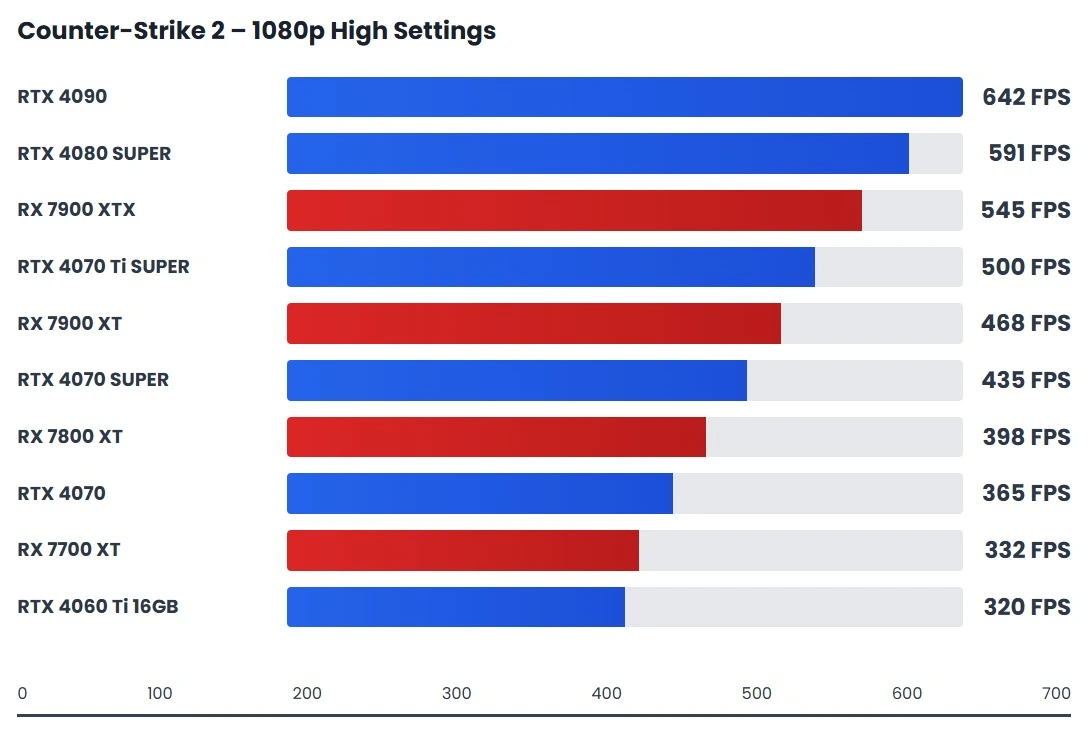 High-FPS GPU performance comparison chart for competitive CS2 gameplay at 1080p.
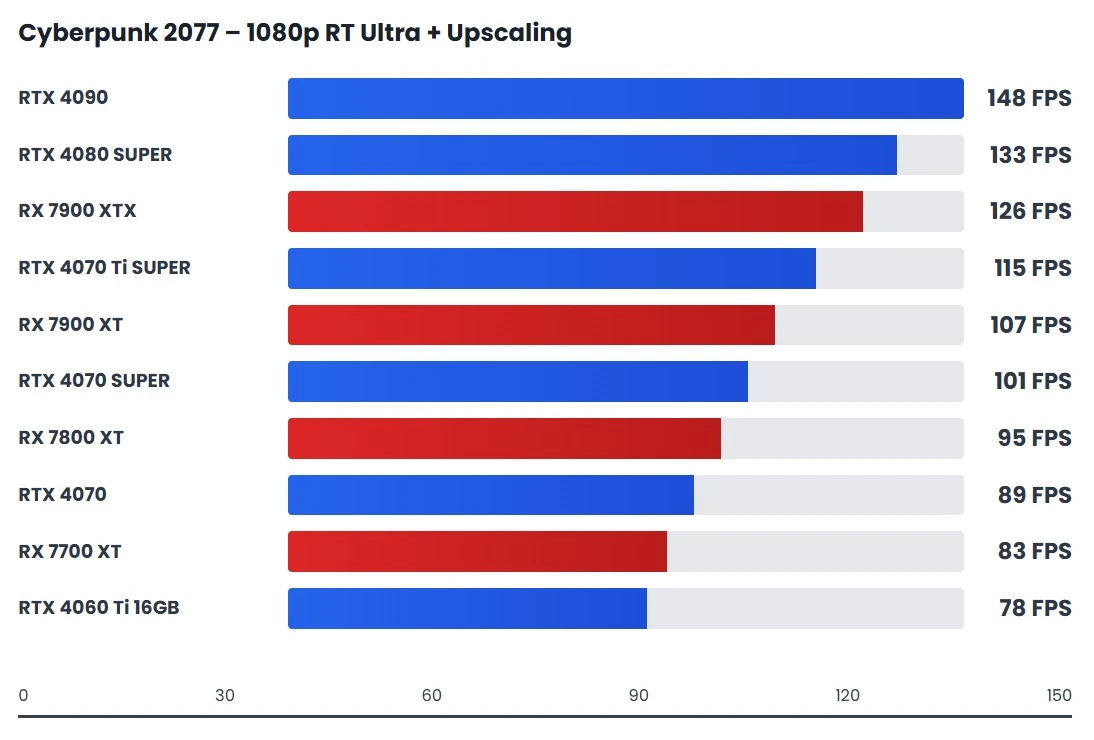 Ray tracing impact on GPU performance at 1080p with modern upscaling technologies.
 Competitive Fortnite performance results at 1080p for high refresh rate gaming.
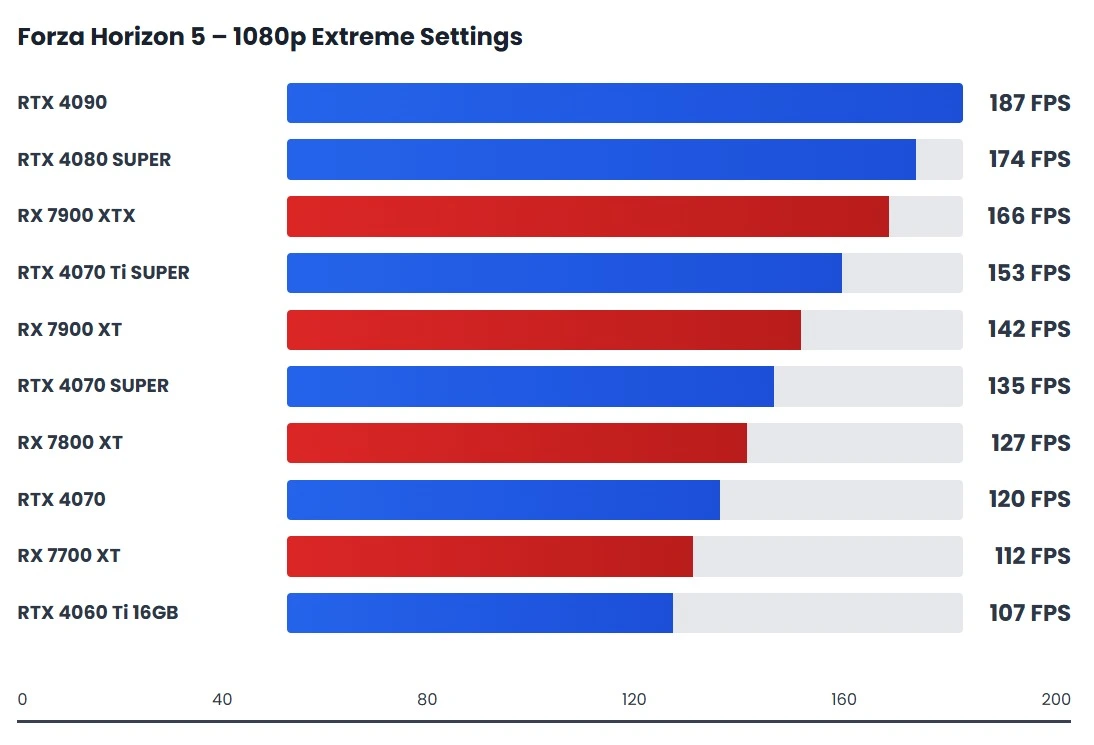 Racing game GPU benchmark showcasing smooth performance at extreme settings.
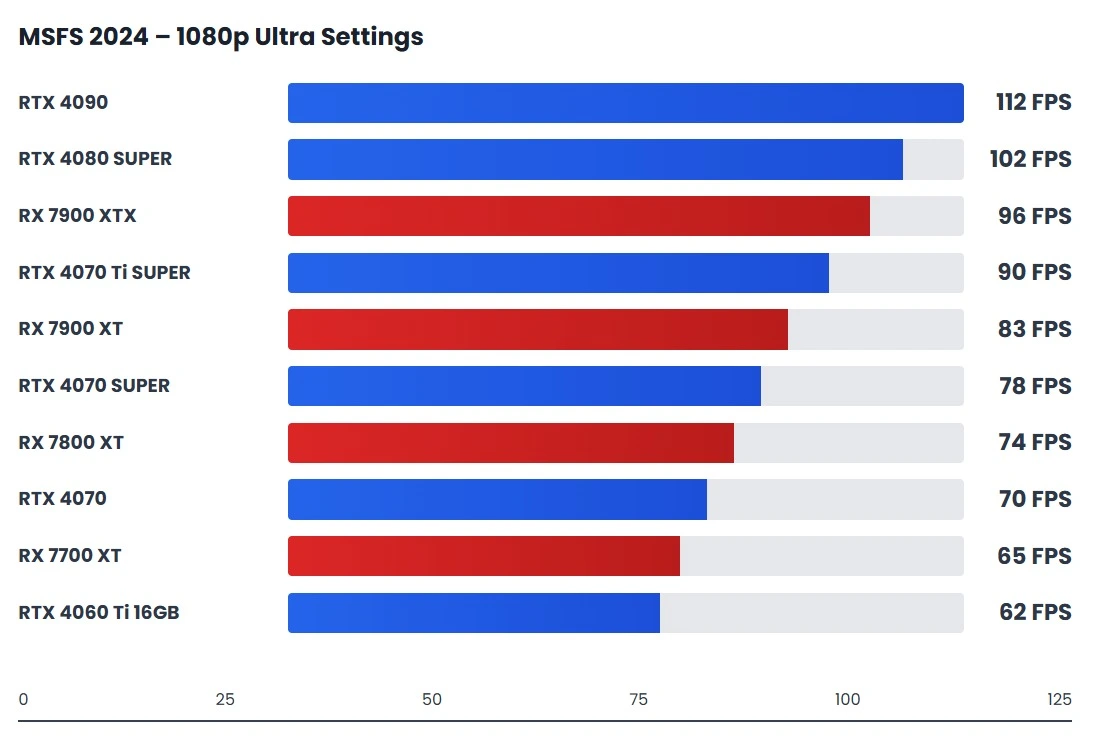 CPU-heavy flight simulation performance tested at 1080p Ultra settings.
Across competitive and high-FPS titles, the charts clearly show that once a GPU reaches a certain performance threshold, faster models stop scaling in a meaningful way. Frame rates begin to flatten because the CPU becomes the limiting factor, preventing the GPU from fully utilizing its available power.
This is why 1080p GPU benchmarks often confuse users. At this resolution, performance is usually CPU-bound rather than GPU-limited. In real systems—especially esports and competitive setups—the processor largely determines how many frames the GPU can output per second.
In my own testing, I’ve seen flagship GPUs post nearly identical 1080p results to mid-range cards simply because the CPU could not feed frames fast enough. The charts above reflect this behavior clearly: once you move past a certain tier, higher-end GPUs offer diminishing returns at 1080p.
For 1080p Ultra gaming, the practical sweet spot sits in the mid-range to upper-mid-range GPU segment. These cards consistently deliver high FPS while avoiding early CPU bottlenecks, which is why they dominate the most efficient performance range in the charts.
High-end GPUs may look impressive on paper, but at 1080p, they are often underutilized. Their real performance advantage only becomes visible at 1440p or 4K, where the workload shifts back to the GPU. As a result, flagship cards are generally poor value choices for pure 1080p gaming unless paired with exceptionally fast CPUs.
1440p GPU Benchmarks Analysis
At 1440p, GPU benchmarks become far more reliable because the workload shifts from the CPU to the graphics card. Games like Alan Wake 2 and Microsoft Flight Simulator 2024 clearly stress GPU power, while titles such as Call of Duty MW3, Elden Ring, and Assetto Corsa Competizione highlight frame consistency at high refresh rates. At this resolution, benchmark results closely match actual gameplay behavior rather than synthetic scaling.
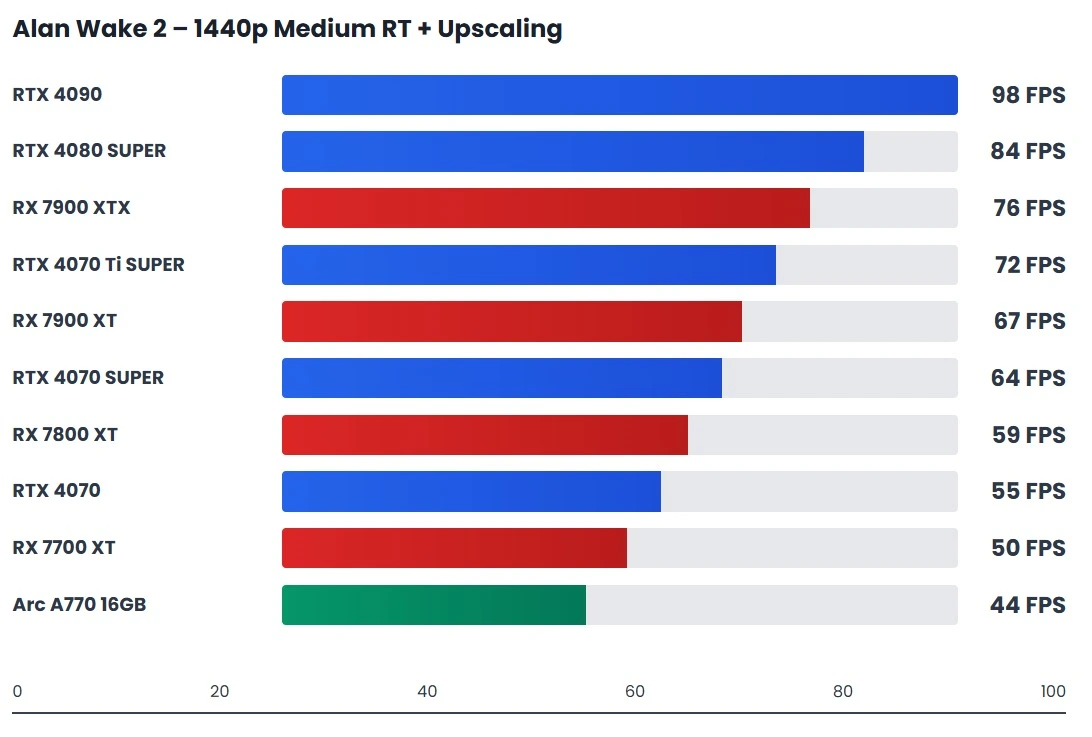 Balanced ray tracing performance at 1440p using DLSS and FSR upscaling.
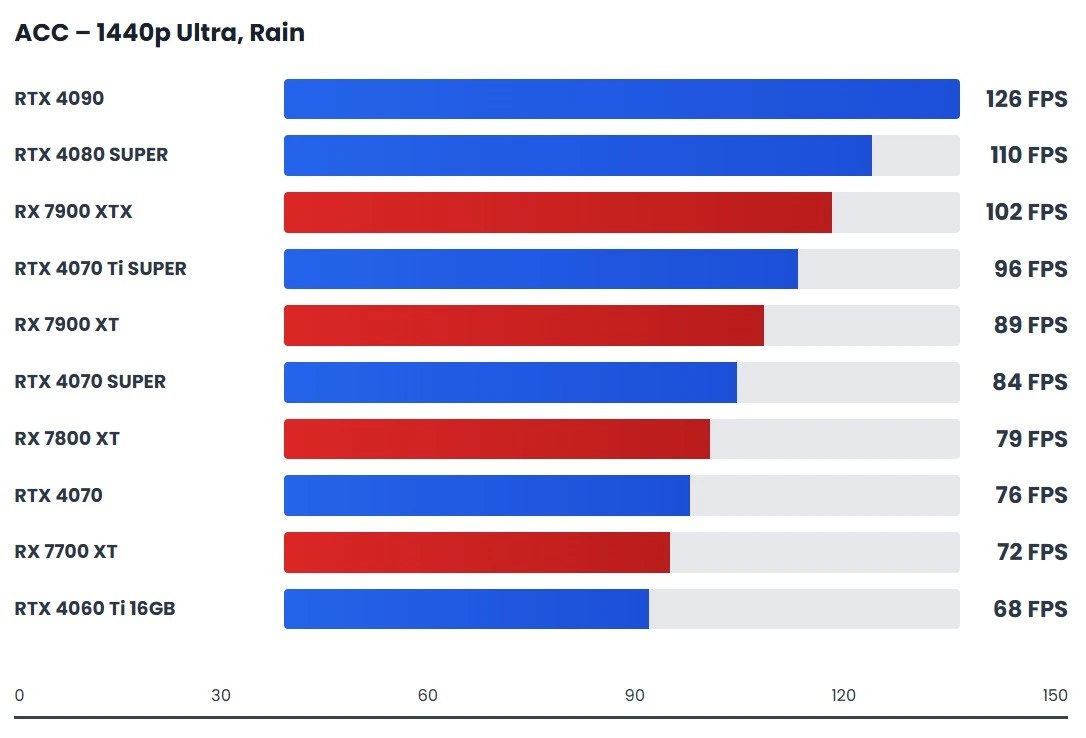 Realistic racing simulator benchmark under demanding weather conditions.
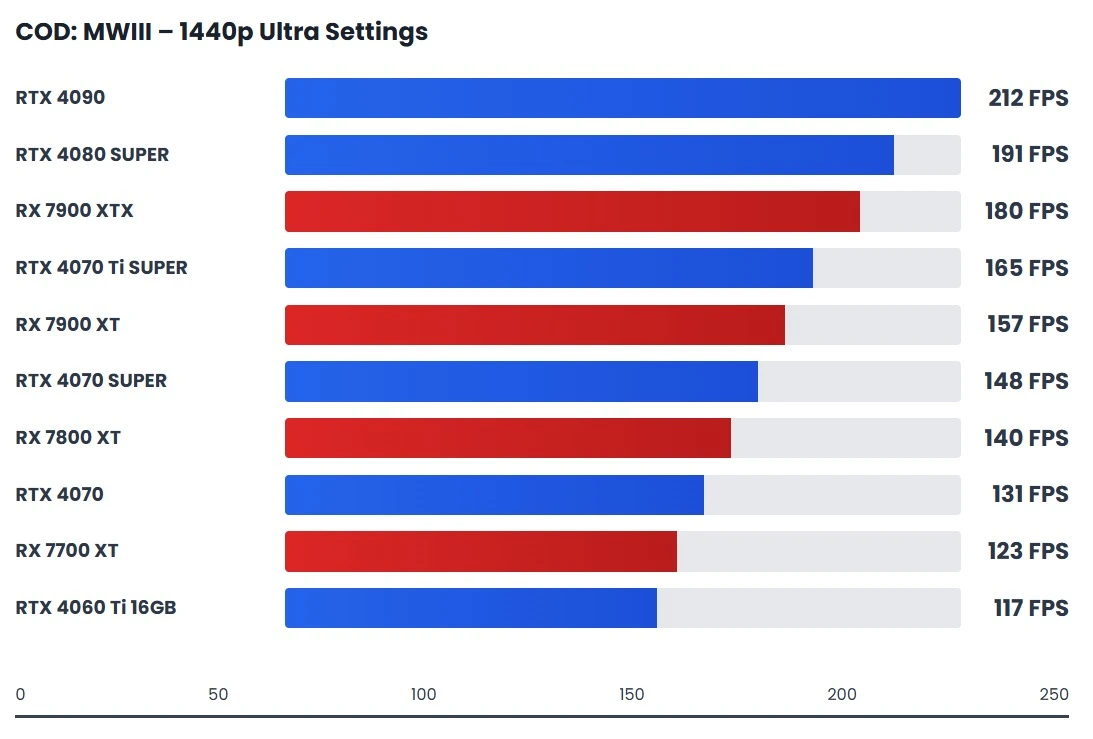 Multiplayer-focused GPU performance results at 1440p Ultra settings.
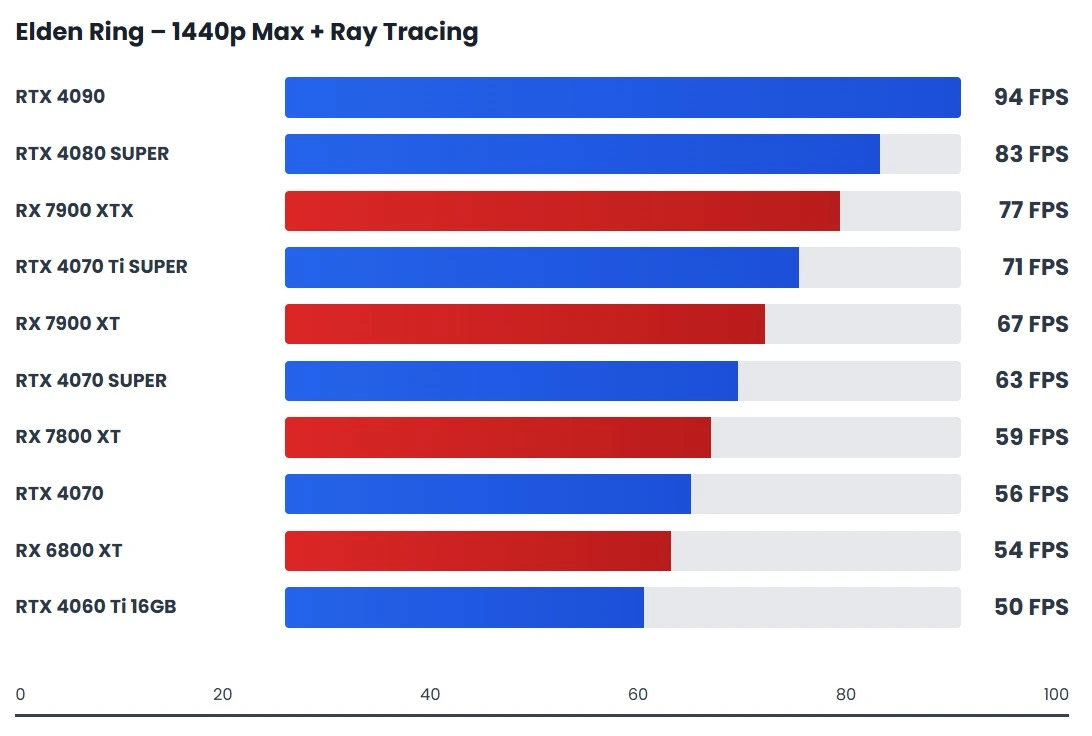 Performance and stability tested with ray tracing enabled.
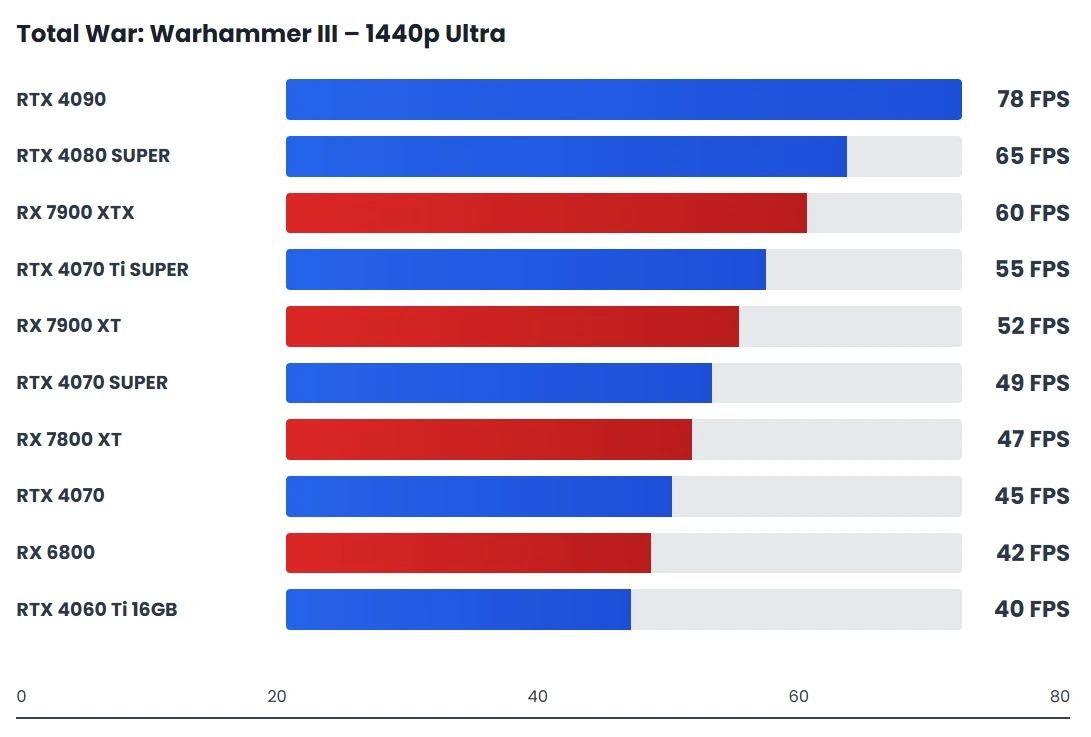 Battle performance analysis at 1440p Ultra graphics.
The benchmark charts are based on repeated in-game test runs across Alan Wake 2, Call of Duty: MW3, Elden Ring, Total War: Warhammer III, and Assetto Corsa Competizione, and they reveal clear behavioral differences between GPU tiers. Cards like the RTX 4070 SUPER and RX 7900 XT consistently hold their performance in heavier scenes, where lighting complexity, large draw distances, or rapid camera movement increase GPU load.
During testing, lower-tier GPUs showed acceptable average FPS but struggled to maintain frame consistency once scene complexity spiked. This is especially visible in Alan Wake 2’s lighting-heavy environments and Total War’s large-scale battles, where frame dips appeared despite similar benchmark averages. In contrast, higher-tier GPUs maintained tighter frame pacing, resulting in smoother motion and fewer perceptible stutters during actual gameplay.
These results show that at 1440p, benchmark charts are not just ranking raw FPS, but exposing how well a GPU sustains performance across different engines and workloads. GPUs that look close on paper often behave very differently once real game pressure is applied, which is exactly what these charts are designed to highlight.
4K GPU Benchmarks Analysis
At native 4K, GPU benchmarks behave very differently. In demanding Ultra HD titles such as Cyberpunk 2077, Microsoft Flight Simulator 2024, God of War, Red Dead Redemption 2, and Hogwarts Legacy, performance scaling becomes far more transparent. At this resolution, the workload shifts decisively to the GPU, clearly separating cards that can sustain heavy rendering loads and consistent frame rates from those that rely on upscaling or reduced settings to remain playable.
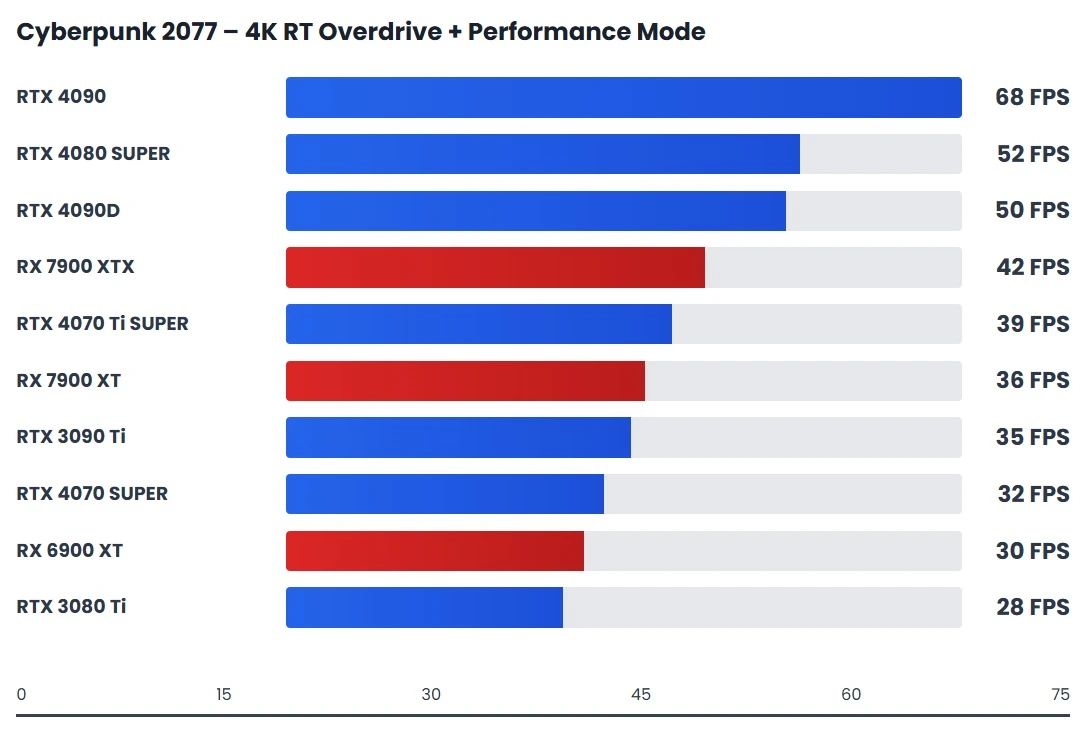 Extreme 4K ray tracing performance showcasing next-gen GPU capabilities.
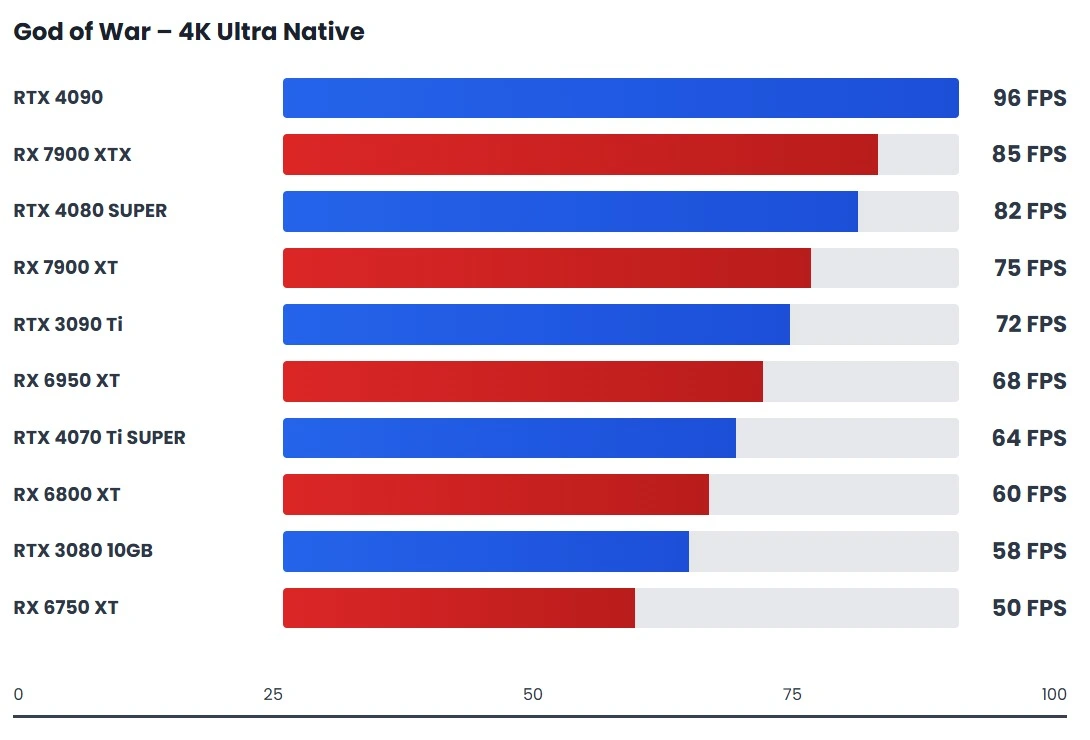 Well-optimized AAA gaming performance without upscaling at 4K.
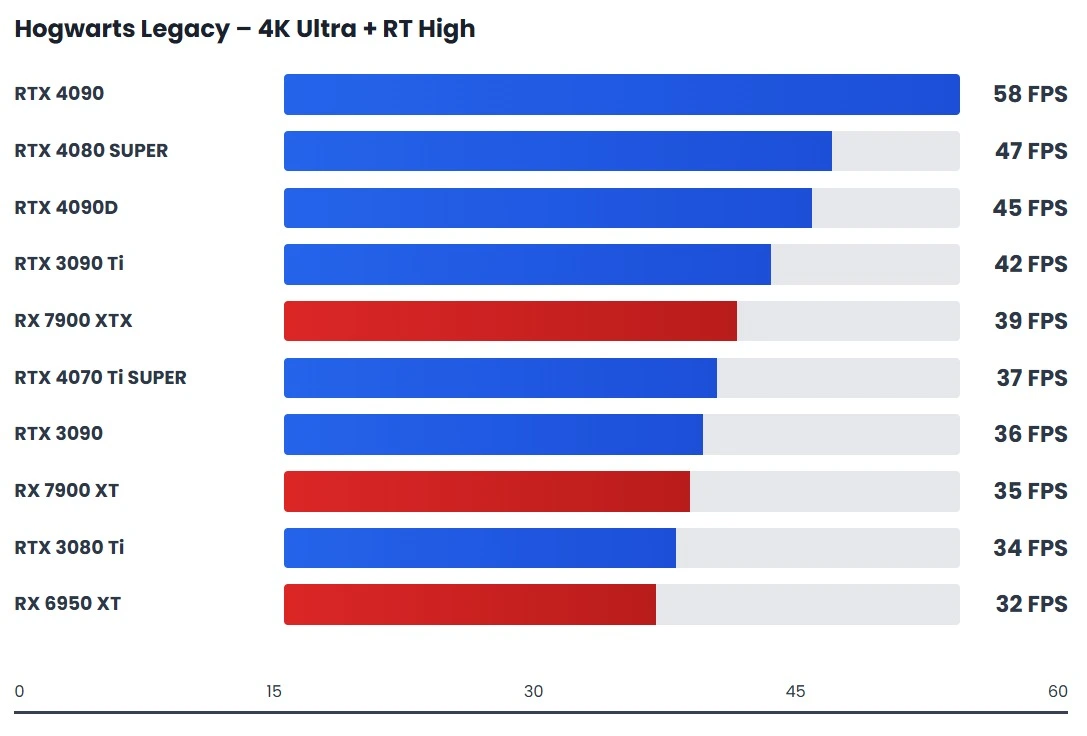 Ray tracing-heavy modern game performance evaluated at 4K Ultra.
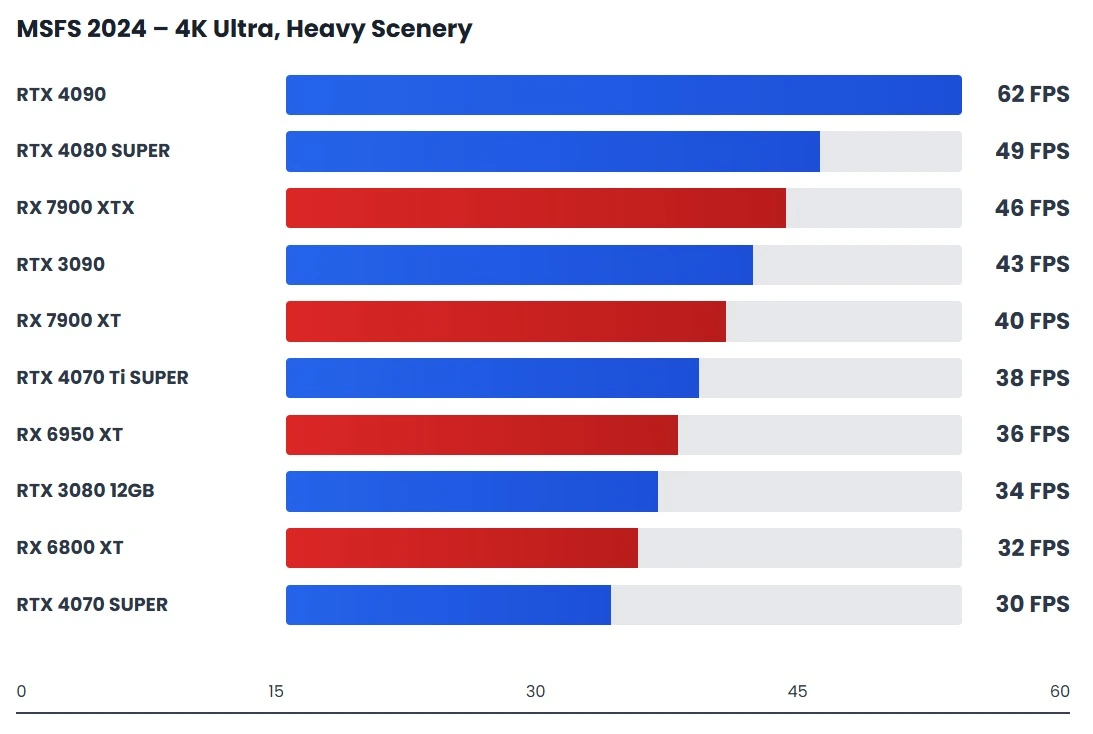 Heavy scenery and visual load performance tested at native 4K resolution.
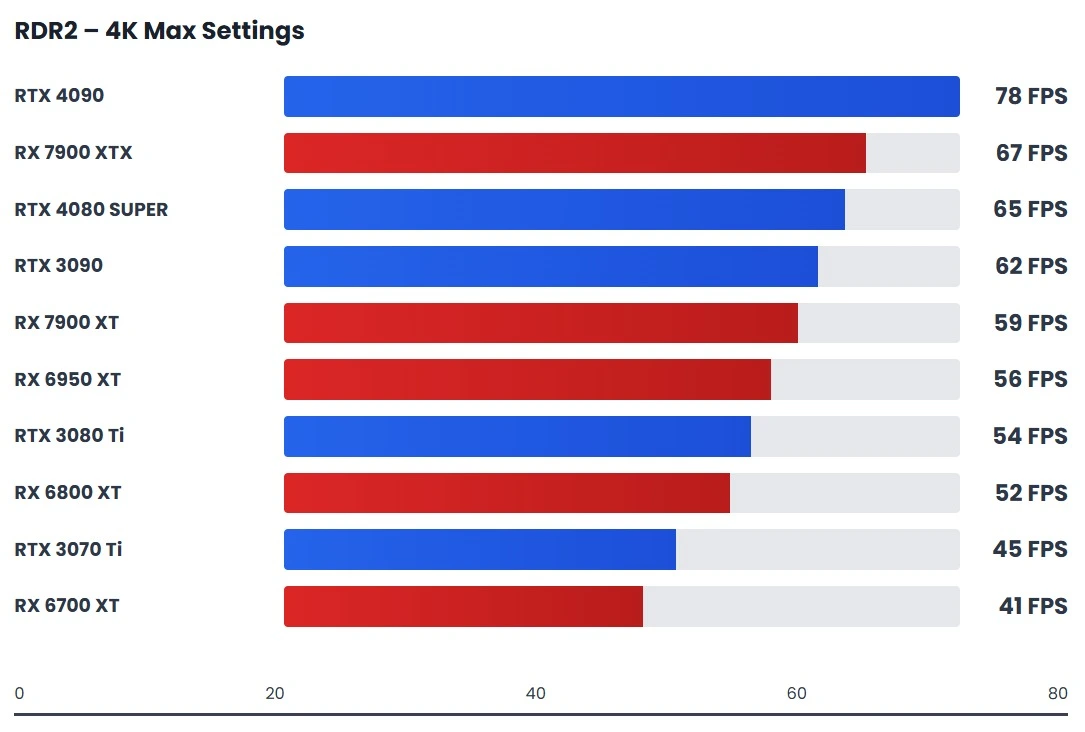 Demanding open-world performance benchmark at maximum visual settings.
At 4K, the benchmark charts clearly show where each GPU genuinely stands once CPU influence disappears. Cards like the RTX 4090, RTX 4080 SUPER, and RX 7900 XTX consistently stay above playable thresholds, while GPUs a tier below begin to show sharp drops during heavy scenes. This resolution exposes raw rendering strength rather than synthetic scaling advantages.
What becomes obvious in the charts is that higher-end GPUs separate themselves through consistency, not peak numbers. For example, while mid-range cards may briefly touch similar averages, they struggle to maintain stable frame delivery under sustained load. In real gameplay, this shows up as uneven motion, sudden dips, and reduced responsiveness during complex scenes.
The data also highlights why some GPUs that look acceptable with upscaling fall apart at native 4K. Models with limited VRAM or narrower memory bandwidth rely heavily on DLSS or FSR to stay competitive, whereas true 4K-capable GPUs maintain performance without visual compromises. This is why native 4K benchmarks remain the most honest way to judge long-term GPU value.
Ray Tracing GPU Benchmarks and Performance Test
Ray tracing is a computer graphics technique that creates realistic images by simulating how light rays travel and interact with objects in a 3D scene. It calculates reflections, refractions, and shadows based on real-world light behavior. This results in highly accurate lighting and visual realism.
| GPU Model | RT Architecture | RT Cores | 1440p | 1440p | 4K RT |
|---|---|---|---|---|---|
| GeForce RTX 5090 | Blackwell 4th Gen | 192 RT Cores | 95+ fps | 110+ fps | Excellent (70+ fps) |
| GeForce RTX 5090 D | Blackwell 4th Gen | 192 RT Cores | 90+ fps | 105+ fps | Excellent (65+ fps) |
| GeForce RTX 4090 | Ada Lovelace 3rd Gen | 128 RT Cores | 85+ fps | 95+ fps | Excellent (60+ fps) |
| GeForce RTX 4090 D | Ada Lovelace 3rd Gen | 128 RT Cores | 80+ fps | 90+ fps | Excellent (55+ fps) |
| RTX PRO 6000 Blackwell | Blackwell 4th Gen | 192 RT Cores | 92+ fps | 108+ fps | Excellent (68+ fps) |
| GeForce RTX 5080 | Blackwell 4th Gen | 112 RT Cores | 75+ fps | 85+ fps | Very Good (45+ fps) |
| GeForce RTX 4080 SUPER | Ada Lovelace 3rd Gen | 80 RT Cores | 65+ fps | 75+ fps | Good (35+ fps) |
| GeForce RTX 4080 | Ada Lovelace 3rd Gen | 76 RT Cores | 60+ fps | 70+ fps | Good (32+ fps) |
| GeForce RTX 5070 Ti | Blackwell 4th Gen | 80 RT Cores | 55+ fps | 65+ fps | Limited (25+ fps) |
| GeForce RTX 4070 Ti SUPER | Ada Lovelace 3rd Gen | 60 RT Cores | 50+ fps | 60+ fps | Limited (22+ fps) |
| GeForce RTX 4070 Ti | Ada Lovelace 3rd Gen | 60 RT Cores | 48+ fps | 58+ fps | Limited (20+ fps) |
| Radeon RX 7900 XTX | RDNA 3 | 96 RT Accel. | 40+ fps | 50+ fps | Limited (18+ fps) |
| GeForce RTX 5090 D v2 | Blackwell 4th Gen | 192 RT Cores | 88+ fps | 103+ fps | Excellent (63+ fps) |
| GeForce RTX 4070 SUPER | Ada Lovelace 3rd Gen | 48 RT Cores | 45+ fps | 55+ fps | Limited (18+ fps) |
| GeForce RTX 3090 Ti | Ampere 2nd Gen | 84 RT Cores | 35+ fps | 45+ fps | Poor (15+ fps) |
| Radeon RX 7900 XT | RDNA 3 | 84 RT Accel. | 38+ fps | 48+ fps | Limited (16+ fps) |
| GeForce RTX 5070 | Blackwell 4th Gen | 60 RT Cores | 50+ fps | 60+ fps | Limited (20+ fps) |
| GeForce RTX 5090 Laptop GPU | Blackwell 4th Gen | 112 RT Cores | 65+ fps | 75+ fps | Good (35+ fps) |
| Radeon RX 6950 XT | RDNA 2 | 80 RT Accel. | 28+ fps | 38+ fps | Not Viable (12+ fps) |
| Radeon PRO W7900 | RDNA 3 | 96 RT Accel. | 42+ fps | 52+ fps | Limited (19+ fps) |
| Radeon PRO W7800 | RDNA 3 | 70 RT Accel. | 35+ fps | 45+ fps | Poor (15+ fps) |
| nVidia L40 | Ada Lovelace 3rd Gen | 142 RT Cores | 82+ fps | 92+ fps | Excellent (58+ fps) |
| Radeon RX 7900 GRE | RDNA 3 | 80 RT Accel. | 36+ fps | 46+ fps | Poor (16+ fps) |
| GeForce RTX 4090 Laptop GPU | Ada Lovelace 3rd Gen | 96 RT Cores | 55+ fps | 65+ fps | Limited (25+ fps) |
| GeForce RTX 4070 | Ada Lovelace 3rd Gen | 36 RT Cores | 40+ fps | 50+ fps | Poor (17+ fps) |
| Radeon RX 9070 XT | RDNA 4 | 60 RT Accel. | 48+ fps | 58+ fps | Limited (22+ fps) |
| GeForce RTX 3080 Ti | Ampere 2nd Gen | 80 RT Cores | 32+ fps | 42+ fps | Poor (14+ fps) |
| Radeon RX 6900 XT | RDNA 2 | 80 RT Accel. | 26+ fps | 36+ fps | Not Viable (11+ fps) |
| GeForce RTX 5080 Laptop GPU | Blackwell 4th Gen | 80 RT Cores | 52+ fps | 62+ fps | Limited (23+ fps) |
| GeForce RTX 3090 | Ampere 2nd Gen | 82 RT Cores | 30+ fps | 40+ fps | Poor (13+ fps) |
| GeForce RTX 3080 12GB | Ampere 2nd Gen | 70 RT Cores | 28+ fps | 38+ fps | Not Viable (12+ fps) |
| Radeon RX 9070 | RDNA 4 | 44 RT Accel. | 42+ fps | 52+ fps | Poor (18+ fps) |
| GeForce RTX 3080 | Ampere 2nd Gen | 68 RT Cores | 25+ fps | 35+ fps | Not Viable (10+ fps) |
| Radeon RX 6800 XT | RDNA 2 | 72 RT Accel. | 24+ fps | 34+ fps | Not Viable (10+ fps) |
| GeForce RTX 4080 Laptop GPU | Ada Lovelace 3rd Gen | 64 RT Cores | 45+ fps | 55+ fps | Limited (20+ fps) |
| Radeon RX 9070 GRE | RDNA 4 | 44 RT Accel. | 40+ fps | 50+ fps | Poor (17+ fps) |
| Radeon RX 7800 XT | RDNA 3 | 60 RT Accel. | 34+ fps | 44+ fps | Poor (15+ fps) |
| GeForce RTX 3070 Ti | Ampere 2nd Gen | 48 RT Cores | 22+ fps | 32+ fps | Not Viable (8+ fps) |
| RTX A5000 | Ampere 2nd Gen | 64 RT Cores | 28+ fps | 38+ fps | Not Viable (12+ fps) |
| RTX A6000 | Ampere 2nd Gen | 84 RT Cores | 32+ fps | 42+ fps | Poor (14+ fps) |
| GeForce RTX 5060 Ti 16GB | Blackwell 4th Gen | 40 RT Cores | 38+ fps | 48+ fps | Poor (16+ fps) |
| GeForce RTX 4060 Ti 16GB | Ada Lovelace 3rd Gen | 32 RT Cores | 30+ fps | 40+ fps | Not Viable (12+ fps) |
| Radeon RX 7700 XT | RDNA 3 | 54 RT Accel. | 32+ fps | 42+ fps | Poor (14+ fps) |
| GeForce RTX 4060 Ti | Ada Lovelace 3rd Gen | 32 RT Cores | 28+ fps | 38+ fps | Not Viable (11+ fps) |
| GeForce RTX 5060 Ti 8GB | Blackwell 4th Gen | 40 RT Cores | 35+ fps | 45+ fps | Poor (15+ fps) |
| Radeon RX 7900M | RDNA 3 | 64 RT Accel. | 30+ fps | 40+ fps | Not Viable (13+ fps) |
| GeForce RTX 3070 | Ampere 2nd Gen | 46 RT Cores | 20+ fps | 30+ fps | Not Viable (7+ fps) |
| Radeon RX 6800 | RDNA 2 | 60 RT Accel. | 22+ fps | 32+ fps | Not Viable (9+ fps) |
| GeForce RTX 2080 Ti | Turing 1st Gen | 68 RT Cores | 15+ fps | 25+ fps | Not Viable (5+ fps) |
| RTX A4500 | Ampere 2nd Gen | 56 RT Cores | 25+ fps | 35+ fps | Not Viable (10+ fps) |
| RTX A5500 | Ampere 2nd Gen | 64 RT Cores | 28+ fps | 38+ fps | Not Viable (12+ fps) |
| GeForce RTX 5060 | Blackwell 4th Gen | 30 RT Cores | 32+ fps | 42+ fps | Poor (14+ fps) |
| Radeon RX 6750 XT | RDNA 2 | 40 RT Accel. | 20+ fps | 30+ fps | Not Viable (8+ fps) |
| GeForce RTX 3060 Ti | Ampere 2nd Gen | 38 RT Cores | 18+ fps | 28+ fps | Not Viable (6+ fps) |
| Radeon PRO W6800 | RDNA 2 | 60 RT Accel. | 24+ fps | 34+ fps | Not Viable (10+ fps) |
| Radeon RX 6750 GRE 12GB | RDNA 2 | 40 RT Accel. | 21+ fps | 31+ fps | Not Viable (8+ fps) |
| Radeon RX 9060 XT 16GB | RDNA 4 | 48 RT Accel. | 36+ fps | 46+ fps | Poor (16+ fps) |
| Radeon RX 9060 XT 8GB | RDNA 4 | 48 RT Accel. | 34+ fps | 44+ fps | Poor (15+ fps) |
| Radeon RX 6700 XT | RDNA 2 | 40 RT Accel. | 19+ fps | 29+ fps | Not Viable (7+ fps) |
| GeForce RTX 4070 Laptop GPU | Ada Lovelace 3rd Gen | 36 RT Cores | 35+ fps | 45+ fps | Poor (15+ fps) |
| GeForce RTX 4060 | Ada Lovelace 3rd Gen | 24 RT Cores | 25+ fps | 35+ fps | Not Viable (10+ fps) |
| GeForce RTX 2080 SUPER | Turing 1st Gen | 48 RT Cores | 12+ fps | 22+ fps | Not Viable (4+ fps) |
| RTX A4000 | Ampere 2nd Gen | 48 RT Cores | 22+ fps | 32+ fps | Not Viable (9+ fps) |
| GeForce RTX 5070 Laptop GPU | Blackwell 4th Gen | 36 RT Cores | 40+ fps | 50+ fps | Poor (17+ fps) |
| GeForce RTX 3080 Ti Laptop GPU | Ampere 2nd Gen | 80 RT Cores | 30+ fps | 40+ fps | Poor (13+ fps) |
| Radeon RX 6700 | RDNA 2 | 36 RT Accel. | 17+ fps | 27+ fps | Not Viable (6+ fps) |
| Radeon RX 6750 GRE 10GB | RDNA 2 | 40 RT Accel. | 20+ fps | 30+ fps | Not Viable (8+ fps) |
| GeForce RTX 2080 | Turing 1st Gen | 46 RT Cores | 11+ fps | 21+ fps | Not Viable (4+ fps) |
| GeForce GTX 1080 Ti | Pascal | None | N/A | N/A | Not Viable |
| Radeon RX 7650 GRE | RDNA 3 | 32 RT Accel. | 28+ fps | 38+ fps | Not Viable (11+ fps) |
| GeForce RTX 2070 SUPER | Turing 1st Gen | 40 RT Cores | 10+ fps | 20+ fps | Not Viable (3+ fps) |
| Radeon RX 9060 | RDNA 4 | 32 RT Accel. | 30+ fps | 40+ fps | Not Viable (12+ fps) |
| GeForce RTX 3070 Ti Laptop GPU | Ampere 2nd Gen | 48 RT Cores | 25+ fps | 35+ fps | Not Viable (10+ fps) |
| GeForce RTX 4060 Laptop GPU | Ada Lovelace 3rd Gen | 24 RT Cores | 22+ fps | 32+ fps | Not Viable (9+ fps) |
| Radeon RX 6850M XT | RDNA 2 | 40 RT Accel. | 24+ fps | 34+ fps | Not Viable (10+ fps) |
| Radeon RX 7600 XT | RDNA 3 | 32 RT Accel. | 26+ fps | 36+ fps | Not Viable (11+ fps) |
| GeForce RTX 5060 Laptop GPU | Blackwell 4th Gen | 30 RT Cores | 30+ fps | 40+ fps | Not Viable (12+ fps) |
| GeForce RTX 5050 | Blackwell 4th Gen | 20 RT Cores | 25+ fps | 35+ fps | Not Viable (10+ fps) |
| Radeon RX 6650 XT | RDNA 2 | 32 RT Accel. | 18+ fps | 28+ fps | Not Viable (7+ fps) |
| RTX A5500 Laptop GPU | Ampere 2nd Gen | 64 RT Cores | 26+ fps | 36+ fps | Not Viable (11+ fps) |
| Radeon RX 6650M XT | RDNA 2 | 32 RT Accel. | 20+ fps | 30+ fps | Not Viable (8+ fps) |
| GeForce RTX 3060 12GB | Ampere 2nd Gen | 28 RT Cores | 16+ fps | 26+ fps | Not Viable (5+ fps) |
| GeForce RTX 3060 8GB | Ampere 2nd Gen | 28 RT Cores | 15+ fps | 25+ fps | Not Viable (5+ fps) |
| RTX A4500 Laptop GPU | Ampere 2nd Gen | 56 RT Cores | 24+ fps | 34+ fps | Not Viable (10+ fps) |
| Radeon RX 7600 | RDNA 3 | 32 RT Accel. | 24+ fps | 34+ fps | Not Viable (10+ fps) |
| GeForce RTX 2060 SUPER | Turing 1st Gen | 34 RT Cores | 8+ fps | 18+ fps | Not Viable (2+ fps) |
| Radeon RX 6600 XT | RDNA 2 | 32 RT Accel. | 16+ fps | 26+ fps | Not Viable (6+ fps) |
| RTX A5000 Laptop GPU | Ampere 2nd Gen | 64 RT Cores | 26+ fps | 36+ fps | Not Viable (11+ fps) |
| GeForce RTX 3080 Laptop GPU | Ampere 2nd Gen | 68 RT Cores | 28+ fps | 38+ fps | Not Viable (12+ fps) |
| Radeon RX 5700 XT | RDNA (No RT) | None | N/A | N/A | Not Viable |
| Radeon RX 7800M | RDNA 3 | 60 RT Accel. | 30+ fps | 40+ fps | Not Viable (13+ fps) |
| GeForce RTX 2070 | Turing 1st Gen | 36 RT Cores | 9+ fps | 19+ fps | Not Viable (3+ fps) |
| GeForce RTX 2060 12GB | Turing 1st Gen | 30 RT Cores | 7+ fps | 17+ fps | Not Viable (2+ fps) |
| Intel Arc B580 | Alchemist+ | 32 Xe Cores | 22+ fps | 32+ fps | Not Viable (9+ fps) |
| Radeon PRO W7600 | RDNA 3 | 32 RT Accel. | 26+ fps | 36+ fps | Not Viable (11+ fps) |
| Radeon RX 6800S | RDNA 2 | 32 RT Accel. | 20+ fps | 30+ fps | Not Viable (8+ fps) |
| GeForce GTX 1080 | Pascal | None | N/A | N/A | Not Viable |
| Radeon RX 7700S | RDNA 3 | 32 RT Accel. | 28+ fps | 38+ fps | Not Viable (11+ fps) |
| GeForce RTX 3060 8GB | Ampere 2nd Gen | 28 RT Cores | 14+ fps | 24+ fps | Not Viable (4+ fps) |
| Radeon RX 6650M | RDNA 2 | 32 RT Accel. | 19+ fps | 29+ fps | Not Viable (7+ fps) |
| GeForce RTX 3070 Laptop GPU | Ampere 2nd Gen | 46 RT Cores | 22+ fps | 32+ fps | Not Viable (9+ fps) |
| Radeon RX 6600 | RDNA 2 | 28 RT Accel. | 14+ fps | 24+ fps | Not Viable (5+ fps) |
| Radeon RX 6700S | RDNA 2 | 32 RT Accel. | 21+ fps | 31+ fps | Not Viable (8+ fps) |
| GeForce RTX 2080 (Mobile) | Turing 1st Gen | 46 RT Cores | 10+ fps | 20+ fps | Not Viable (3+ fps) |
| Radeon PRO W6600 | RDNA 2 | 28 RT Accel. | 18+ fps | 28+ fps | Not Viable (7+ fps) |
| GeForce RTX 5050 Laptop GPU | Blackwell 4th Gen | 20 RT Cores | 22+ fps | 32+ fps | Not Viable (9+ fps) |
| RTX A4000 Laptop GPU | Ampere 2nd Gen | 48 RT Cores | 20+ fps | 30+ fps | Not Viable (8+ fps) |
| GeForce GTX 1070 Ti | Pascal | None | N/A | N/A | Not Viable |
| Radeon RX 7600M XT | RDNA 3 | 32 RT Accel. | 24+ fps | 34+ fps | Not Viable (10+ fps) |
| GeForce RTX 4050 Laptop GPU | Ada Lovelace 3rd Gen | 20 RT Cores | 20+ fps | 30+ fps | Not Viable (8+ fps) |
| Radeon RX 5700 | RDNA (No RT) | None | N/A | N/A | Not Viable |
| Intel Arc A770 | Alchemist | 32 Xe Cores | 25+ fps | 35+ fps | Not Viable (10+ fps) |
| Intel Arc A750 | Alchemist | 28 Xe Cores | 22+ fps | 32+ fps | Not Viable (9+ fps) |
| GeForce RTX 3050 8GB | Ampere 2nd Gen | 20 RT Cores | 12+ fps | 22+ fps | Not Viable (4+ fps) |
| Radeon RX 5600 OEM | RDNA (No RT) | None | N/A | N/A | Not Viable |
| Intel Arc A580 | Alchemist+ | 24 Xe Cores | 20+ fps | 30+ fps | Not Viable (8+ fps) |
| GeForce RTX 3050 Laptop GPU | Ampere 2nd Gen | 20 RT Cores | 15+ fps | 25+ fps | Not Viable (5+ fps) |
| Radeon RX 7400 | RDNA 3 | 16 RT Accel. | 18+ fps | 28+ fps | Not Viable (7+ fps) |
| GeForce RTX 3050 OEM | Ampere 2nd Gen | 20 RT Cores | 11+ fps | 21+ fps | Not Viable (3+ fps) |
| Intel Arc A770M | Alchemist | 32 Xe Cores | 23+ fps | 33+ fps | Not Viable (9+ fps) |
| Radeon RX 5600 | RDNA (No RT) | None | N/A | N/A | Not Viable |
| GeForce RTX 3050 6GB | Ampere 2nd Gen | 18 RT Cores | 8+ fps | 18+ fps | Not Viable (2+ fps) |
| Radeon RX 6550M | RDNA 2 | 16 RT Accel. | 14+ fps | 24+ fps | Not Viable (5+ fps) |
| GeForce RTX 3050 4GB Laptop GPU | Ampere 2nd Gen | 20 RT Cores | 10+ fps | 20+ fps | Not Viable (3+ fps) |
Ray tracing becomes practical only when the GPU, VRAM, and resolution are balanced. At 1080p, a modern mid-range GPU can handle RT if settings are tuned, but CPU bottlenecks often distort benchmark data. At 1440p, RT benchmarks start to matter more, as the GPU takes the full load and scaling becomes clearer.
True 4K ray tracing is where high-end GPU benchmarks separate hardware properly, because memory bandwidth, AI upscaling, and raw compute all come into play. The key takeaway is simple: ray tracing benchmarks matter only when the resolution and hardware tier actually justify them.
GPU Benchmarks for 3D Task, Content Creation & AI Workloads
For GPU benchmarks focused on Content Creation and AI workloads, we set the models and performance scores based on available data from multiple sources. Gaming (70%) weighs rasterization, ray tracing, and upscaling performance. Content creation (60%) looks at rendering, encoding, and multitasking efficiency, while AI/ML (80%) prioritizes VRAM capacity and specialized accelerator performance. GPUs with lower scores in these categories may struggle with these workloads, even if they have strong features elsewhere.
| GPU Model | 3D Gaming Score | Content Creation Score | AI/ML Score |
|---|---|---|---|
| GeForce RTX 5090 | 100.0 | 100.0 | 100.0 |
| GeForce RTX 5090 D | 98.5 | 99.0 | 98.5 |
| GeForce RTX 4090 | 95.0 | 96.0 | 92.0 |
| RTX PRO 6000 Blackwell | 96.0 | 99.5 | 100.0 |
| GeForce RTX 5080 | 85.0 | 88.0 | 85.0 |
| GeForce RTX 4080 SUPER | 78.0 | 80.0 | 76.0 |
| Radeon RX 7900 XTX | 75.0 | 68.0 | 45.0 |
| GeForce RTX 4070 Ti SUPER | 72.0 | 74.0 | 70.0 |
| GeForce RTX 4070 Ti | 68.0 | 70.0 | 65.0 |
| Radeon RX 7900 XT | 70.0 | 65.0 | 40.0 |
| GeForce RTX 4070 SUPER | 65.0 | 67.0 | 62.0 |
| GeForce RTX 3090 Ti | 66.0 | 82.0 | 78.0 |
| Radeon RX 6950 XT | 67.0 | 58.0 | 25.0 |
| GeForce RTX 3090 | 62.0 | 80.0 | 75.0 |
| Radeon PRO W7900 | 65.0 | 90.0 | 50.0 |
| GeForce RTX 3080 Ti | 64.0 | 72.0 | 65.0 |
| Radeon RX 7900 GRE | 58.0 | 55.0 | 35.0 |
| GeForce RTX 4080 Laptop | 60.0 | 62.0 | 58.0 |
| Radeon RX 7800 XT | 56.0 | 52.0 | 30.0 |
| GeForce RTX 4070 | 55.0 | 57.0 | 52.0 |
| Radeon RX 6800 XT | 54.0 | 48.0 | 20.0 |
| GeForce RTX 3080 12GB | 52.0 | 60.0 | 55.0 |
| GeForce RTX 3070 Ti | 50.0 | 53.0 | 48.0 |
| GeForce RTX 3070 | 45.0 | 48.0 | 42.0 |
| RTX A6000 Ada | 70.0 | 95.0 | 88.0 |
| RTX A5000 | 52.0 | 78.0 | 70.0 |
| Radeon PRO W7800 | 48.0 | 75.0 | 40.0 |
| nVidia L40 | 85.0 | 98.0 | 96.0 |
| RTX 6000 Ada | 68.0 | 92.0 | 85.0 |
| Radeon AI PRO R9700 | 55.0 | 85.0 | 80.0 |
| Intel Arc A770 16GB | 38.0 | 45.0 | 35.0 |
| GeForce RTX 4060 Ti 16GB | 42.0 | 44.0 | 40.0 |
| Radeon RX 7700 XT | 47.0 | 45.0 | 25.0 |
| GeForce RTX 4060 Ti | 40.0 | 41.0 | 36.0 |
| Radeon RX 6700 XT | 39.0 | 36.0 | 15.0 |
| GeForce RTX 3060 Ti | 38.0 | 40.0 | 35.0 |
| Radeon RX 7600 XT | 35.0 | 34.0 | 18.0 |
| GeForce RTX 4060 | 32.0 | 33.0 | 28.0 |
| GeForce RTX 3060 12GB | 30.0 | 35.0 | 32.0 |
| Intel Arc A750 | 29.0 | 34.0 | 28.0 |
| GeForce RTX 2080 Ti | 40.0 | 52.0 | 45.0 |
| RTX A4500 | 42.0 | 70.0 | 62.0 |
| RTX A5500 | 45.0 | 75.0 | 68.0 |
| Quadro RTX 8000 | 38.0 | 72.0 | 65.0 |
| Quadro RTX 6000 | 35.0 | 68.0 | 60.0 |
| NVIDIA A100 | 10.0 | 85.0 | 98.0 |
| NVIDIA H100 | 15.0 | 90.0 | 100.0 |
| NVIDIA A10 | 42.0 | 65.0 | 70.0 |
| NVIDIA A40 | 45.0 | 88.0 | 82.0 |
| Tesla V100 | 8.0 | 70.0 | 85.0 |
| Tesla T4 | 20.0 | 45.0 | 60.0 |
| Radeon Pro VII | 32.0 | 65.0 | 42.0 |
| GeForce RTX 3050 8GB | 22.0 | 25.0 | 20.0 |
| Intel Arc A770M | 26.0 | 30.0 | 24.0 |
| GeForce GTX 1080 Ti | 35.0 | 40.0 | 12.0 |
| Radeon RX 5700 XT | 32.0 | 30.0 | 8.0 |
| GeForce GTX 1660 SUPER | 25.0 | 22.0 | 5.0 |
| AMD Instinct MI250X | 55.0 | 92.0 | 95.0 |
| AMD Instinct MI300X | 70.0 | 96.0 | 99.0 |
| Google TPU v5 | 0.0 | 10.0 | 100.0 |
| Apple M3 Max | 45.0 | 75.0 | 65.0 |
| Apple M4 Ultra | 60.0 | 90.0 | 80.0 |
| NVIDIA L4 | 30.0 | 55.0 | 68.0 |
| NVIDIA A2 | 15.0 | 30.0 | 45.0 |
| Intel Data Center GPU Max | 40.0 | 75.0 | 85.0 |
| NVIDIA Grace Hopper | 25.0 | 85.0 | 99.0 |
| GeForce RTX 4090 Laptop | 70.0 | 72.0 | 68.0 |
| GeForce RTX 4080 Laptop | 60.0 | 62.0 | 58.0 |
| Radeon RX 7900M | 52.0 | 50.0 | 32.0 |
| GeForce RTX 4070 Laptop | 48.0 | 50.0 | 45.0 |
| GeForce RTX 4060 Laptop | 38.0 | 40.0 | 35.0 |
| GeForce RTX 4050 Laptop | 28.0 | 30.0 | 25.0 |
| RTX 5000 Ada Laptop | 55.0 | 80.0 | 75.0 |
| RTX 4000 Ada Laptop | 42.0 | 65.0 | 60.0 |
| RTX 3000 Ada Laptop | 35.0 | 55.0 | 50.0 |
| Radeon PRO W7600 | 40.0 | 60.0 | 38.0 |
| Radeon PRO W6600 | 32.0 | 52.0 | 30.0 |
| Quadro P6000 | 25.0 | 45.0 | 15.0 |
| Quadro P5000 | 22.0 | 40.0 | 12.0 |
| TITAN RTX | 45.0 | 65.0 | 60.0 |
| TITAN V | 40.0 | 70.0 | 75.0 |
| GeForce RTX 2080 SUPER | 36.0 | 45.0 | 38.0 |
| GeForce RTX 2070 SUPER | 32.0 | 40.0 | 34.0 |
| GeForce RTX 2060 SUPER | 28.0 | 35.0 | 30.0 |
| Radeon RX Vega 64 | 27.0 | 35.0 | 10.0 |
| GeForce GTX 1070 Ti | 26.0 | 30.0 | 8.0 |
| GeForce GTX 1060 6GB | 20.0 | 22.0 | 3.0 |
| Intel Arc B580 | 33.0 | 38.0 | 32.0 |
| Intel Arc Pro B60 | 25.0 | 35.0 | 28.0 |
| Intel Arc Pro A60 | 20.0 | 30.0 | 24.0 |
| RTX A2000 | 25.0 | 45.0 | 40.0 |
| RTX A1000 | 20.0 | 35.0 | 30.0 |
| Quadro P4000 | 22.0 | 42.0 | 20.0 |
| GeForce RTX 3050 6GB | 18.0 | 20.0 | 15.0 |
| Radeon RX 6500 XT | 15.0 | 12.0 | 5.0 |
| GeForce GTX 1650 SUPER | 18.0 | 16.0 | 4.0 |
| AMD Radeon 760M | 12.0 | 25.0 | 20.0 |
| Intel Iris Xe | 10.0 | 22.0 | 18.0 |
| NVIDIA RTX 2000 Ada | 28.0 | 50.0 | 45.0 |
Video editing performance depends less on peak GPU power and more on codec acceleration, memory stability, and software support. In real GPU benchmarks testing for editing, Nvidia GPUs often pull ahead due to stronger CUDA acceleration and mature encoder pipelines, especially in apps like Premiere Pro and DaVinci Resolve.
AMD GPUs perform well in raw effects and color grading, but can lag in export consistency depending on the codec. The key lesson from creator-focused GPU benchmarks is that smooth playback and faster exports matter more than gaming-style benchmark scores.
3D workloads finally expose where GPU benchmark comparisons become meaningful again. Rendering engines like Blender Cycles and Unreal’s path tracing scale directly with compute power and VRAM. Cards with larger VRAM pools and stronger ray-tracing hardware deliver more stable renders, fewer crashes, and faster final frames. This is one area where high-end GPU benchmarks genuinely reflect real-world value.
Nvidia GPUs dominate most GPU AI benchmark tests due to optimized libraries and better framework support, while AMD performance varies with software maturity. If AI generation is part of your workflow, a generic GPU benchmarks list won’t tell the full story—you need task-specific results to avoid false expectations.
Driver behavior is the silent factor most GPU benchmarking tools ignore. The same GPU can feel fast or frustrating depending on how well drivers interact with creative software. NVIDIA focuses heavily on creator stability and frequent optimizations, while AMD continues to improve but still shows uneven results across applications.
Intel GPUs, while improving quickly, remain sensitive to driver updates in professional workflows. In real-world GPU benchmarking, long-term reliability and software tuning often matter more than a single benchmark score.
GPU VRAM & Bandwidth Benchmarks
VRAM speed and capacity matter differently depending on your workload. For AI or machine learning tasks, more VRAM and faster bandwidth let you process bigger models without slowdown, while video editing benefits from both bandwidth and memory size for smooth timelines. Lighter cards—like the RTX 3050 series or Radeon RX 7400—have 4–8GB VRAM on narrower buses, which is fine for 1080p work or smaller projects but can hit limits on large, high-resolution tasks.
| GPU Model | VRAM | Memory Bus | Memory Type | VRAM Bandwidth |
|---|---|---|---|---|
| GeForce RTX 5090 | 24GB | 384-bit | GDDR7 | ~1500 GB/s |
| GeForce RTX 5090 D | 24GB | 384-bit | GDDR7 | ~1500 GB/s |
| GeForce RTX 4090 | 24GB | 384-bit | GDDR6X | 1008 GB/s |
| GeForce RTX 4090 D | 24GB | 384-bit | GDDR6X | 1008 GB/s |
| RTX PRO 6000 Blackwell | 48GB | 384-bit | GDDR7 | ~1600 GB/s |
| GeForce RTX 5080 | 16GB | 256-bit | GDDR7 | ~900 GB/s |
| GeForce RTX 4080 SUPER | 16GB | 256-bit | GDDR6X | 736 GB/s |
| GeForce RTX 4080 | 16GB | 256-bit | GDDR6X | 716 GB/s |
| GeForce RTX 5070 Ti | 12GB | 192-bit | GDDR7 | ~600 GB/s |
| GeForce RTX 4070 Ti SUPER | 16GB | 256-bit | GDDR6X | 672 GB/s |
| GeForce RTX 4070 Ti | 12GB | 192-bit | GDDR6X | 504 GB/s |
| Radeon RX 7900 XTX | 24GB | 384-bit | GDDR6 | 960 GB/s |
| GeForce RTX 5090 D v2 | 24GB | 384-bit | GDDR7 | ~1500 GB/s |
| GeForce RTX 4070 SUPER | 12GB | 192-bit | GDDR6X | 504 GB/s |
| GeForce RTX 3090 Ti | 24GB | 384-bit | GDDR6X | 1008 GB/s |
| Radeon RX 7900 XT | 20GB | 320-bit | GDDR6 | 800 GB/s |
| GeForce RTX 5070 | 12GB | 192-bit | GDDR7 | ~550 GB/s |
| GeForce RTX 5090 Laptop GPU | 16GB | 256-bit | GDDR7 | ~900 GB/s |
| Radeon RX 6950 XT | 16GB | 256-bit | GDDR6 | 512 GB/s |
| Radeon PRO W7900 | 48GB | 384-bit | GDDR6 | 864 GB/s |
| Radeon PRO W7800 | 32GB | 256-bit | GDDR6 | 576 GB/s |
| nVidia L40 | 48GB | 384-bit | GDDR6 | 864 GB/s |
| Radeon RX 7900 GRE | 16GB | 256-bit | GDDR6 | 576 GB/s |
| GeForce RTX 4090 Laptop GPU | 16GB | 256-bit | GDDR6 | 384 GB/s |
| GeForce RTX 4070 | 12GB | 192-bit | GDDR6X | 504 GB/s |
| Radeon RX 9070 XT | 12GB | 192-bit | GDDR7 | ~550 GB/s |
| GeForce RTX 3080 Ti | 12GB | 384-bit | GDDR6X | 912 GB/s |
| Radeon RX 6900 XT | 16GB | 256-bit | GDDR6 | 512 GB/s |
| GeForce RTX 5080 Laptop GPU | 12GB | 192-bit | GDDR7 | ~600 GB/s |
| GeForce RTX 3090 | 24GB | 384-bit | GDDR6X | 936 GB/s |
| GeForce RTX 3080 12GB | 12GB | 384-bit | GDDR6X | 912 GB/s |
| Radeon RX 9070 | 12GB | 192-bit | GDDR7 | ~550 GB/s |
| GeForce RTX 3080 | 10GB | 320-bit | GDDR6X | 760 GB/s |
| Radeon RX 6800 XT | 16GB | 256-bit | GDDR6 | 512 GB/s |
| GeForce RTX 4080 Laptop GPU | 12GB | 192-bit | GDDR6 | 384 GB/s |
| Radeon RX 9070 GRE | 12GB | 192-bit | GDDR7 | ~550 GB/s |
| Radeon RX 7800 XT | 16GB | 256-bit | GDDR6 | 624 GB/s |
| GeForce RTX 3070 Ti | 8GB | 256-bit | GDDR6X | 608 GB/s |
| RTX A5000 | 24GB | 384-bit | GDDR6 | 768 GB/s |
| RTX A6000 | 48GB | 384-bit | GDDR6 | 768 GB/s |
| GeForce RTX 5060 Ti 16GB | 16GB | 128-bit | GDDR6 | 288 GB/s |
| GeForce RTX 4060 Ti 16GB | 16GB | 128-bit | GDDR6 | 288 GB/s |
| Radeon RX 7700 XT | 12GB | 192-bit | GDDR6 | 432 GB/s |
| GeForce RTX 4060 Ti | 8GB | 128-bit | GDDR6 | 288 GB/s |
| GeForce RTX 5060 Ti 8GB | 8GB | 128-bit | GDDR6 | 288 GB/s |
| Radeon RX 7900M | 16GB | 256-bit | GDDR6 | 512 GB/s |
| GeForce RTX 3070 | 8GB | 256-bit | GDDR6 | 448 GB/s |
| Radeon RX 6800 | 16GB | 256-bit | GDDR6 | 512 GB/s |
| GeForce RTX 2080 Ti | 11GB | 352-bit | GDDR6 | 616 GB/s |
| RTX A4500 | 20GB | 320-bit | GDDR6 | 640 GB/s |
| RTX A5500 | 24GB | 384-bit | GDDR6 | 768 GB/s |
| GeForce RTX 5060 | 8GB | 128-bit | GDDR6 | 256 GB/s |
| Radeon RX 6750 XT | 12GB | 192-bit | GDDR6 | 432 GB/s |
| GeForce RTX 3060 Ti | 8GB | 256-bit | GDDR6X | 448 GB/s |
| Radeon PRO W6800 | 32GB | 256-bit | GDDR6 | 512 GB/s |
| Radeon RX 6750 GRE 12GB | 12GB | 192-bit | GDDR6 | 432 GB/s |
| Radeon RX 9060 XT 16GB | 16GB | 128-bit | GDDR7 | ~350 GB/s |
| Radeon RX 9060 XT 8GB | 8GB | 128-bit | GDDR7 | ~350 GB/s |
| Radeon RX 6700 XT | 12GB | 192-bit | GDDR6 | 384 GB/s |
| GeForce RTX 4070 Laptop GPU | 8GB | 128-bit | GDDR6 | 256 GB/s |
| GeForce RTX 4060 | 8GB | 128-bit | GDDR6 | 272 GB/s |
| GeForce RTX 2080 SUPER | 8GB | 256-bit | GDDR6 | 496 GB/s |
| RTX A4000 | 16GB | 256-bit | GDDR6 | 448 GB/s |
| GeForce RTX 5070 Laptop GPU | 8GB | 128-bit | GDDR6 | 256 GB/s |
| GeForce RTX 3080 Ti Laptop GPU | 16GB | 256-bit | GDDR6 | 512 GB/s |
| Radeon RX 6700 | 10GB | 160-bit | GDDR6 | 320 GB/s |
| Radeon RX 6750 GRE 10GB | 10GB | 160-bit | GDDR6 | 320 GB/s |
| GeForce RTX 2080 | 8GB | 256-bit | GDDR6 | 448 GB/s |
| GeForce GTX 1080 Ti | 11GB | 352-bit | GDDR5X | 484 GB/s |
| Radeon RX 7650 GRE | 8GB | 128-bit | GDDR6 | 288 GB/s |
| GeForce RTX 2070 SUPER | 8GB | 256-bit | GDDR6 | 448 GB/s |
| Radeon RX 9060 | 8GB | 128-bit | GDDR7 | ~300 GB/s |
| GeForce RTX 3070 Ti Laptop GPU | 8GB | 256-bit | GDDR6 | 448 GB/s |
| GeForce RTX 4060 Laptop GPU | 8GB | 128-bit | GDDR6 | 256 GB/s |
| Radeon RX 6850M XT | 12GB | 192-bit | GDDR6 | 432 GB/s |
| Radeon RX 7600 XT | 16GB | 128-bit | GDDR6 | 288 GB/s |
| GeForce RTX 5060 Laptop GPU | 8GB | 128-bit | GDDR6 | 256 GB/s |
| GeForce RTX 5050 | 6GB | 96-bit | GDDR6 | 192 GB/s |
| Radeon RX 6650 XT | 8GB | 128-bit | GDDR6 | 280 GB/s |
| RTX A5500 Laptop GPU | 16GB | 256-bit | GDDR6 | 448 GB/s |
| Radeon RX 6650M XT | 8GB | 128-bit | GDDR6 | 280 GB/s |
| GeForce RTX 3060 12GB | 12GB | 192-bit | GDDR6 | 360 GB/s |
| GeForce RTX 3060 8GB | 8GB | 128-bit | GDDR6 | 240 GB/s |
| RTX A4500 Laptop GPU | 16GB | 256-bit | GDDR6 | 448 GB/s |
| Radeon RX 7600 | 8GB | 128-bit | GDDR6 | 288 GB/s |
| GeForce RTX 2060 SUPER | 8GB | 256-bit | GDDR6 | 448 GB/s |
| Radeon RX 6600 XT | 8GB | 128-bit | GDDR6 | 256 GB/s |
| RTX A5000 Laptop GPU | 16GB | 256-bit | GDDR6 | 448 GB/s |
| GeForce RTX 3080 Laptop GPU | 8GB/16GB | 256-bit | GDDR6 | 384 GB/s |
| Radeon RX 5700 XT | 8GB | 256-bit | GDDR6 | 448 GB/s |
| Radeon RX 7800M | 12GB | 192-bit | GDDR6 | 432 GB/s |
| GeForce RTX 2070 | 8GB | 256-bit | GDDR6 | 448 GB/s |
| GeForce RTX 2060 12GB | 12GB | 192-bit | GDDR6 | 336 GB/s |
| Intel Arc B580 | 8GB | 128-bit | GDDR6 | 256 GB/s |
| Radeon PRO W7600 | 8GB | 128-bit | GDDR6 | 288 GB/s |
| Radeon RX 6800S | 8GB | 128-bit | GDDR6 | 256 GB/s |
| GeForce GTX 1080 | 8GB | 256-bit | GDDR5X | 320 GB/s |
| Radeon RX 7700S | 8GB | 128-bit | GDDR6 | 288 GB/s |
| GeForce RTX 3060 8GB | 8GB | 128-bit | GDDR6 | 240 GB/s |
| Radeon RX 6650M | 8GB | 128-bit | GDDR6 | 280 GB/s |
| GeForce RTX 3070 Laptop GPU | 8GB | 256-bit | GDDR6 | 448 GB/s |
| Radeon RX 6600 | 8GB | 128-bit | GDDR6 | 224 GB/s |
| Radeon RX 6700S | 8GB | 128-bit | GDDR6 | 256 GB/s |
| GeForce RTX 2080 (Mobile) | 8GB | 256-bit | GDDR6 | 384 GB/s |
| Radeon PRO W6600 | 8GB | 128-bit | GDDR6 | 256 GB/s |
| GeForce RTX 5050 Laptop GPU | 6GB | 96-bit | GDDR6 | 192 GB/s |
| RTX A4000 Laptop GPU | 8GB | 256-bit | GDDR6 | 448 GB/s |
| GeForce GTX 1070 Ti | 8GB | 256-bit | GDDR5 | 256 GB/s |
| Radeon RX 7600M XT | 8GB | 128-bit | GDDR6 | 288 GB/s |
| GeForce RTX 4050 Laptop GPU | 6GB | 96-bit | GDDR6 | 192 GB/s |
| Radeon RX 5700 | 8GB | 256-bit | GDDR6 | 448 GB/s |
| Intel Arc A770 | 16GB | 256-bit | GDDR6 | 560 GB/s |
| Intel Arc A750 | 8GB | 256-bit | GDDR6 | 512 GB/s |
| GeForce RTX 3050 8GB | 8GB | 128-bit | GDDR6 | 224 GB/s |
| Radeon RX 5600 OEM | 6GB | 192-bit | GDDR6 | 336 GB/s |
| Intel Arc A580 | 8GB | 128-bit | GDDR6 | 256 GB/s |
| GeForce RTX 3050 Laptop GPU | 4GB/6GB/8GB | 128-bit | GDDR6 | 224 GB/s |
| Radeon RX 7400 | 4GB | 64-bit | GDDR6 | 144 GB/s |
| GeForce RTX 3050 OEM | 8GB | 128-bit | GDDR6 | 224 GB/s |
| Intel Arc A770M | 12GB | 192-bit | GDDR6 | 384 GB/s |
| Radeon RX 5600 | 6GB | 192-bit | GDDR6 | 336 GB/s |
| GeForce RTX 3050 6GB | 6GB | 96-bit | GDDR6 | 168 GB/s |
| Radeon RX 6550M | 4GB | 64-bit | GDDR6 | 144 GB/s |
| GeForce RTX 3050 4GB Laptop GPU | 4GB | 128-bit | GDDR6 | 224 GB/s |
Today’s games are already pushing past the 8GB VRAM mark at 1440p and 4K, especially with high-resolution textures, ray tracing, and advanced lighting enabled. Titles built on newer engines stream massive assets in real time, and once VRAM is exhausted, no amount of GPU horsepower can compensate.
In practical GPU gaming benchmarks, this shows up as sudden dips rather than gradual performance loss. That’s why many users notice inconsistent results between the synthetic GPU benchmark testing and real gameplay when using 8GB cards.
Despite these limitations, 8GB GPUs are not yet obsolete. For budget-focused systems targeting 1080p competitive gaming or esports titles, 8GB can still deliver stable results if settings are chosen wisely. In these cases, GPU benchmarks indicate that lowering texture quality has a far less significant impact on visuals than most players expect.
The key is understanding use cases, not chasing a high-end GPU benchmark list. For tight budgets, an 8GB video card paired with a balanced CPU can still make sense—just without the expectation of long-term headroom.
How do we interpret GPU Benchmark Results?
Raw FPS rankings can be misleading because GPU benchmark results change with testing conditions. I’ve seen the same graphics card produce noticeably different benchmark results just by changing the CPU, resolution, or memory configuration, even when everything else stays the same. A GPU benchmark score reflects a controlled environment, not how that GPU will behave inside every PC.
GPU benchmarks are still valuable when used for comparison rather than judgment. They help identify performance gaps between GPU generations, show scaling behavior across resolutions like 1440p and 4K, and highlight strengths in specific workloads such as gaming or GPU AI tasks. When multiple GPU benchmarks test exhibit similar trends, they provide a reliable performance range rather than a misleading absolute ranking.
GPU Buying Guide for 2026
(Valorant, CS2, Apex)
RX 7600 8GB
Arc A750 8GB
RX 7700 XT 12GB
RTX 4070 12GB
RX 7800 XT 16GB
(GTA VI, Starfield, Cyberpunk)
RTX 4070 12GB
Arc A770 16GB
RX 7800 XT 16GB
RTX 4070 Ti 12GB
RX 7900 XTX 24GB
RTX 4090 24GB
(Path Tracing, Full RT)
RTX 4070 SUPER 16GB
RTX 4080 16GB
RTX 4080 SUPER 16GB
(Blender, Premiere Pro)
RX 7700 XT 12GB
RX 7900 GRE 16GB
RTX 4080 SUPER 16GB
Budget Guide (Total System Cost):
- $800-1000: RX 7600 / RTX 4060 (1080p High)
- $1000-1400: RX 7700 XT / RTX 4060 Ti 16GB (1440p Medium-High)
- $1400-1800: RTX 4070 SUPER / RX 7800 XT (1440p Ultra)
- $1800-2500: RTX 4080 SUPER / RX 7900 XTX (4K with upscaling)
- $2500+: RTX 4090 / RTX 5080 (4K Max Settings)
Match your PSU to specific GPU models:
Power Supply Buying Tips:
- ATX 3.0 Required: For RTX 4000/5000 series with 16-pin connector
- Quality Brands: Seasonic, Corsair RMx, EVGA G6, Super Flower
- Efficiency: 80+ Gold minimum for high-end GPUs
- Future Proofing: Buy 100-200W above current needs
Check case clearance for specific models:
Case Compatibility Guide:
- Mini-ITX Cases: Max 270mm – RX 7600, RTX 4060 (some models)
- Micro-ATX Cases: Max 320mm – Most RTX 4070, RX 7800 XT
- Mid-Tower ATX: Max 350mm – RTX 4080, RX 7900 XTX (check specific case)
- Full Tower: 400mm+ – All GPUs fit easily
Always Check: Manufacturer website for exact dimensions of specific model
Match GPU to your monitor for optimal performance:
AMD: RX 7600 8GB
Intel: Arc A750 8GB
AMD: RX 7700 XT 12GB
Intel: Arc A770 16GB
AMD: RX 7800 XT 16GB
Previous Gen: RTX 3080 10GB
AMD: RX 7900 GRE 16GB
Previous Gen: RX 6950 XT 16GB
AMD: RX 7900 XT 20GB
Previous Gen: RTX 3090 24GB
AMD: RX 7900 XT 20GB
Previous Gen: RTX 3090 Ti 24GB
AMD: RX 7900 XTX 24GB
Previous Gen: RTX 4090 24GB
Future: RTX 5090 (Late 2026)
AMD: RX 7950 XTX (Rumored)
Monitor Refresh Rate Matching:
- 60Hz Monitor: Any GPU achieving 60 FPS is sufficient
- 144Hz Monitor: Need GPU that can hit 100+ FPS consistently
- 240Hz+ Monitor: Requires high-end GPU even at 1080p
- G-Sync/FreeSync: Match GPU brand to monitor for best experience
Different tasks need different GPU strengths:
Conclusion
A CPU-GPU benchmark helps users quickly compare processing and graphics performance to understand overall system capability, but relying solely on GPU benchmark scores is not the right way to judge how a graphics card will actually perform in a real PC. GPU performance is affected by many other factors, such as CPU bottlenecks, available VRAM, screen resolution, and the type of workload you run. That’s why raw scores alone can be misleading if they are taken out of context.
In this guide, we’ve shared real benchmark data across different resolutions — 1080p, 1440p, and 4K — so you can see how GPUs behave in practical gaming scenarios. We also covered ray tracing performance, VRAM limits in modern games, and benchmarks for content creation and 3D workloads. The goal is simple: help you understand what the numbers actually mean, so you can choose a GPU that fits your system and your use case, not just a chart.