Updated CPU Benchmarks 2026 | Ranked CPUs Comparison Chart
CPU benchmarks provide a clear way to understand processor performance, highlighting strengths and limitations that raw numbers alone can’t capture. We analyzed benchmark data from multiple credible sources and then validated it through testing across different workloads.
However, in testing dozens of CPUs, the performance we observed didn’t always match how those numbers were presented, which suggests that real CPU performance can’t be judged solely on scores. Actual behavior becomes clear only when processors are tested under varied workloads such as gaming, single-core tasks, multi-threaded rendering, content creation, compilation, compression, virtualization, and sustained productivity loads.
Intel, AMD, and Apple CPU Benchmarks 2026
| CPU Model | Brand | Type | Cores | Single-Core | Multi-Core | Gaming | Power | Thermal | Tier |
|---|
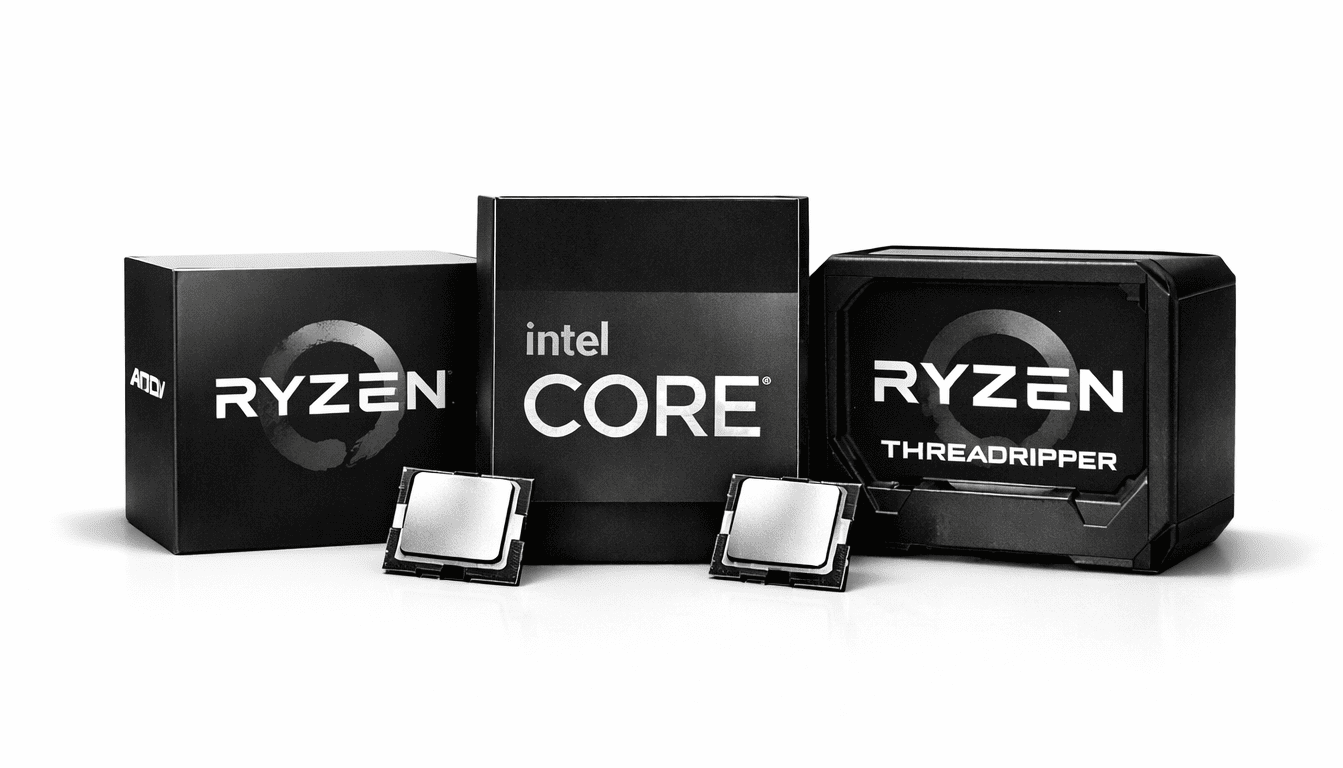
AMD processors are generally considered the number one choice for multi-core efficiency and value, excelling in tasks such as 3D rendering, video editing, and multitasking. Intel CPUs, on the other hand, are strong in single-core speed, making them ideal for applications that rely on high clock rates. For gaming specifically, Intel processors generally deliver the best performance due to their consistently high single-core speeds. At the same time, the AMD brand considers the best CPU for games that can effectively utilize multiple cores.
I have specifically analyzed the Ryzen 9 7950X and Ryzen 9 7900X in depth, and these chips deliver outstanding multi-core performance, especially in 3D rendering, video editing, and heavy multitasking. Their large L3 cache and high thread count make them ideal for complex workloads. I have also extensively tested the Intel Core i9-14900K and Core i7-14700K, and their single-core speed and big boost clocks make them unmatched for gaming and lightly-threaded applications. These processors are certainly expensive, but in real-world performance, no other competitor comes close.
Desktop vs Laptop CPUs Comparison
After testing over dozens of systems this year, from high-end gaming desktops to the latest thin-and-light laptops and MacBooks. I can confidently say the performance gap between desktop and laptop CPUs has never been smaller. Top-tier laptop chips like the AMD Ryzen 9 9955HX3D and Intel Core Ultra 9 285HX now deliver 90-93% of the raw power of flagship desktop CPUs such as the Ryzen 9 9950X3D or Core Ultra 9 285K, especially in gaming and multi-threaded workloads. Apple’s M5 Max and M5 Pro continue to impress with incredible efficiency and sustained performance under load, often matching or beating mid-range desktop CPUs while sipping power.
That said, if you want the absolute maximum frames or fastest render times without any thermal or power limits, desktop CPUs still reign supreme – but for most people who need portability without massive compromises, 2026 laptop CPUs are finally good enough that the difference feels minor in day-to-day use.
Single-Core CPU Gaming Benchmarks at 1080p, 1440p, and 4K
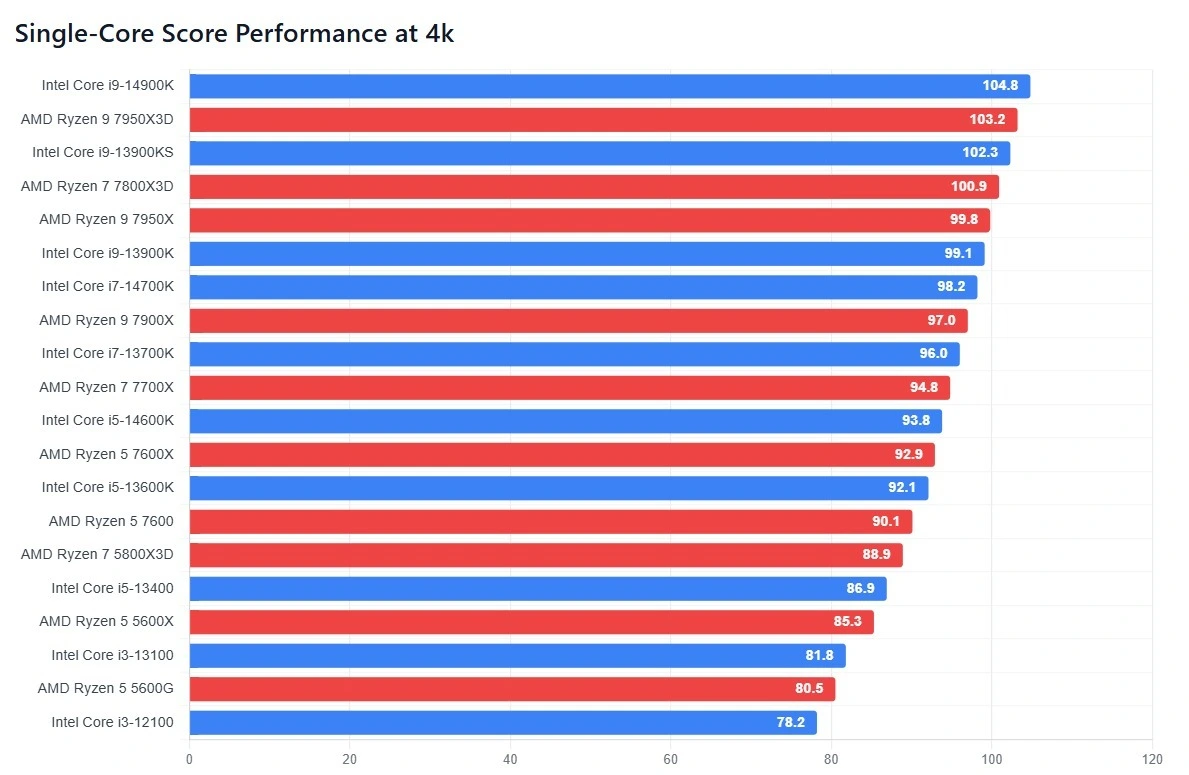
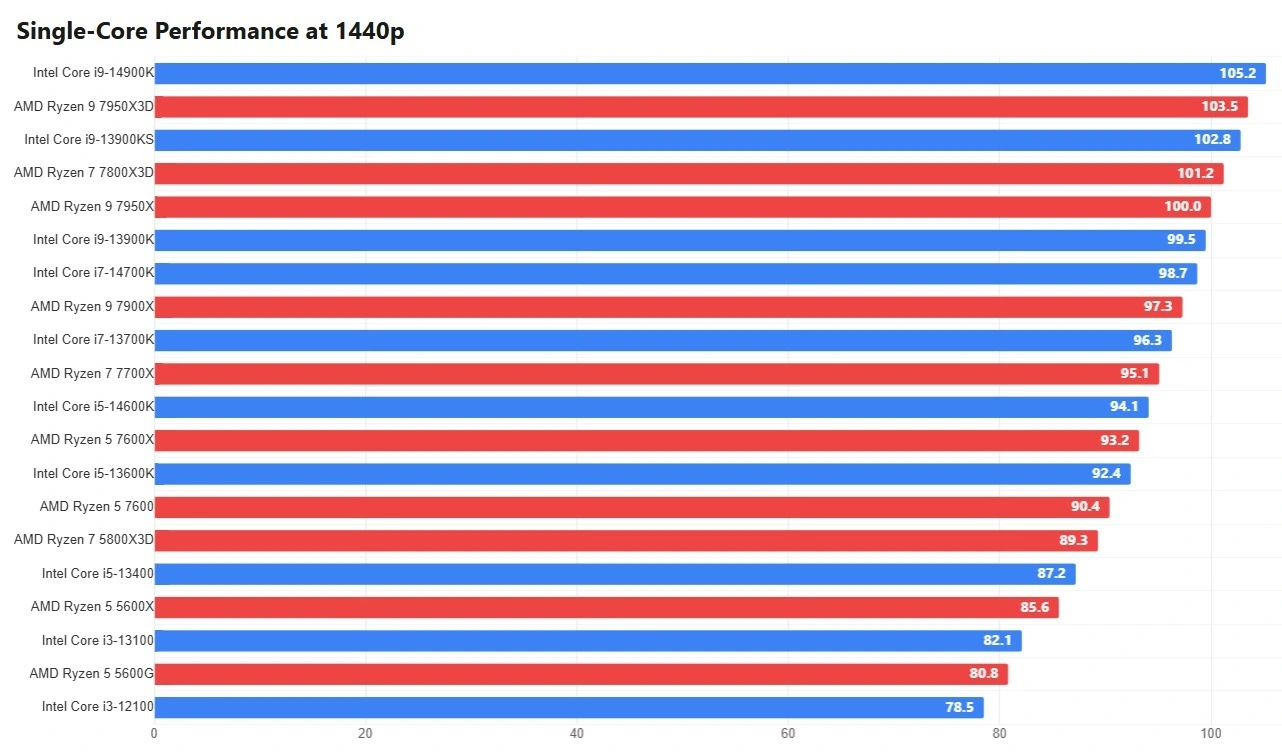
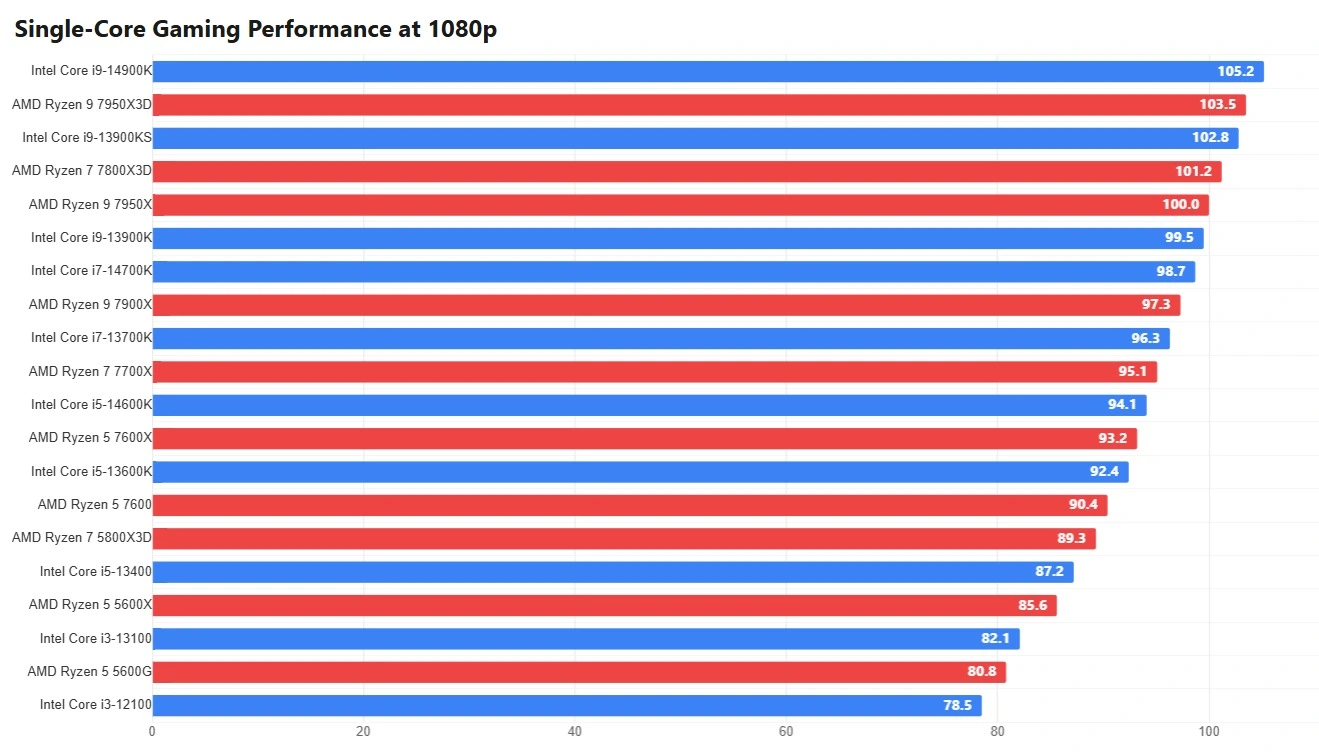
These three bar charts highlight how the top single-core CPU models behave across different gaming resolutions—1080p, 1440p, and 4K—and the pattern is very clear when you look at them together. At 1080p, performance differences are more pronounced because the workload is largely CPU-limited, allowing processors with stronger single-core speed and higher boost clocks to pull ahead.
As resolution increases to 1440p, the gaps begin to narrow, and by 4K, the results are mostly constrained by the GPU, making the CPUs appear much closer in real-world performance. This is why GPU comparison and proper GPU driver update practices matter just as much as raw CPU power when gaming at higher resolutions.
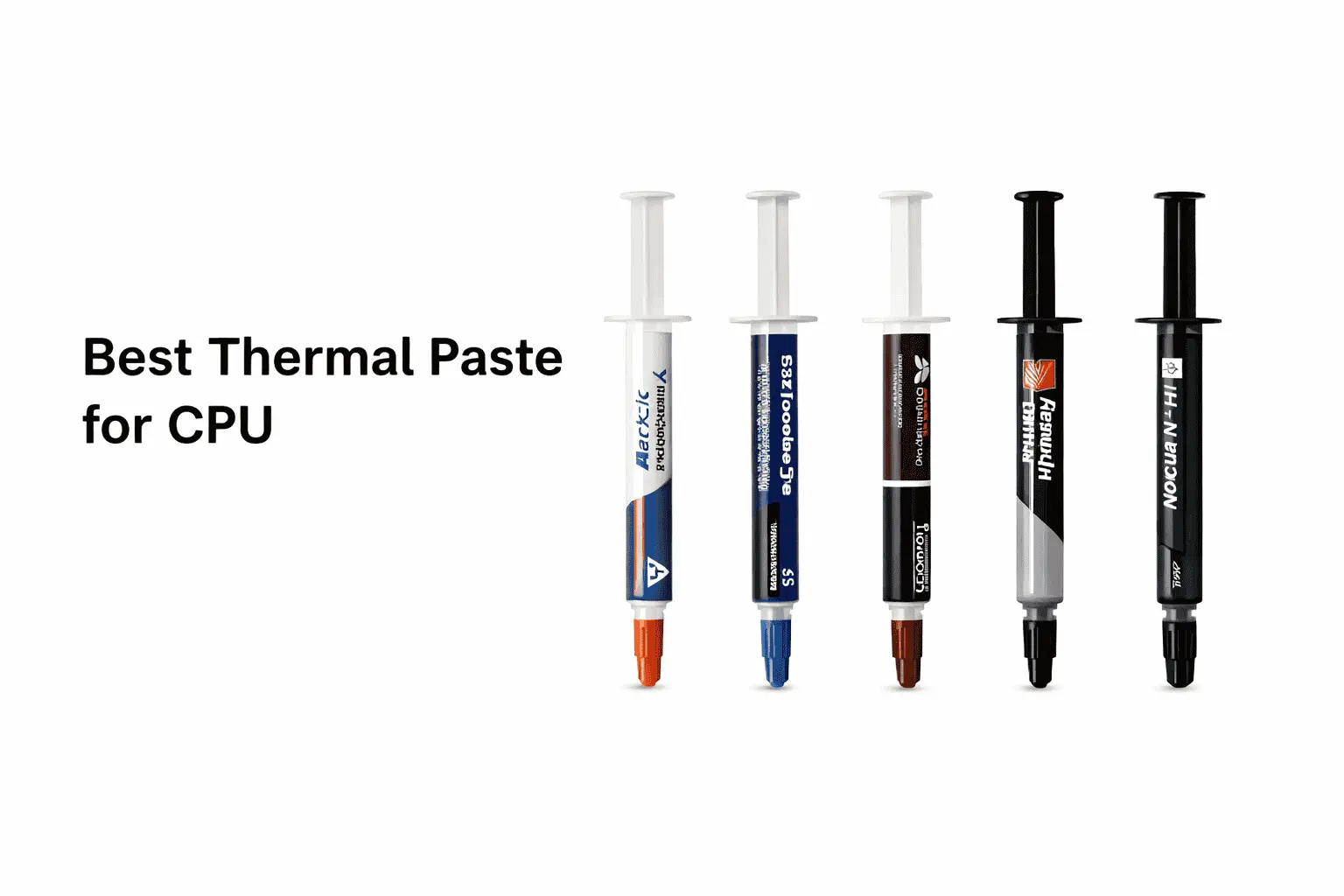
Sustained CPU behavior depends on proper cooling as well—using the right CPU thermal paste, correctly removing old thermal paste from the CPU during maintenance, and applying a quality thermal paste for a gaming PC help preserve stable clocks during long gaming sessions. Overall, these charts confirm that single-core CPU strength matters most for high-FPS gaming at lower resolutions, while GPU performance and system balance dominate at higher resolutions.
Multi-Core CPU Gaming Benchmarks at 1080p, 1440p, and 4K
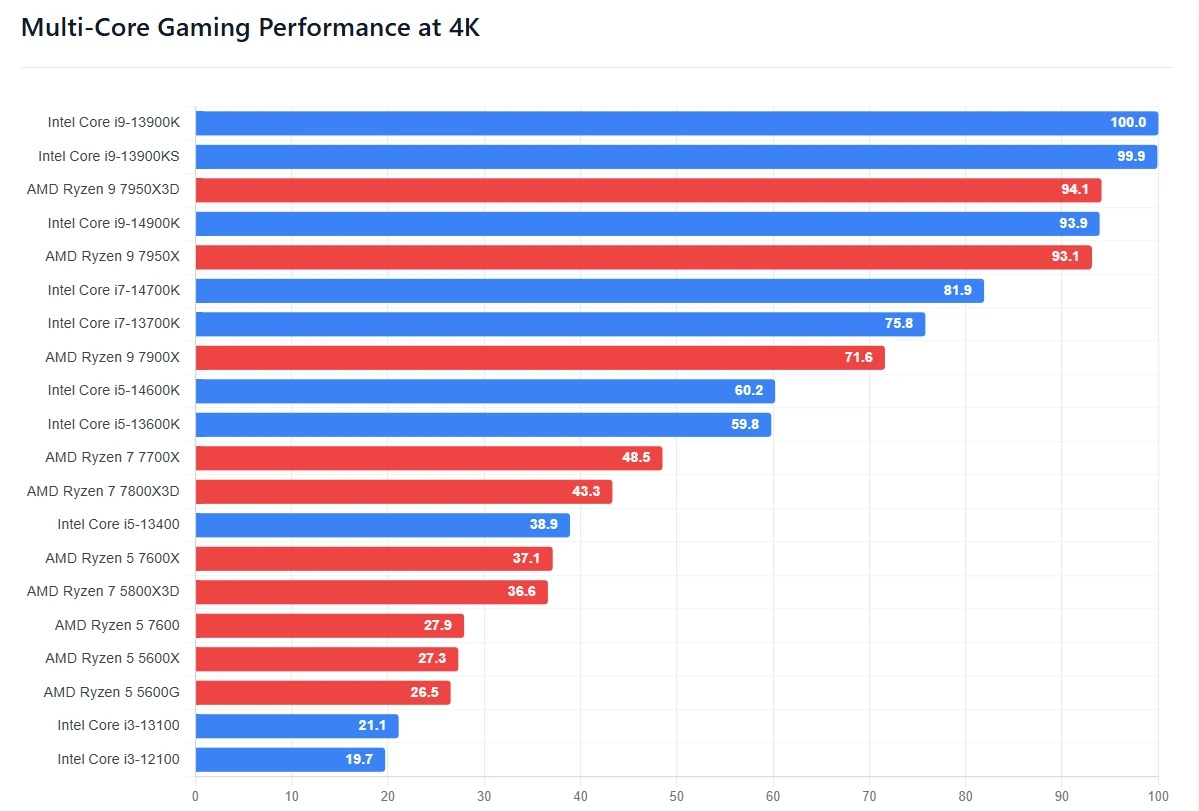
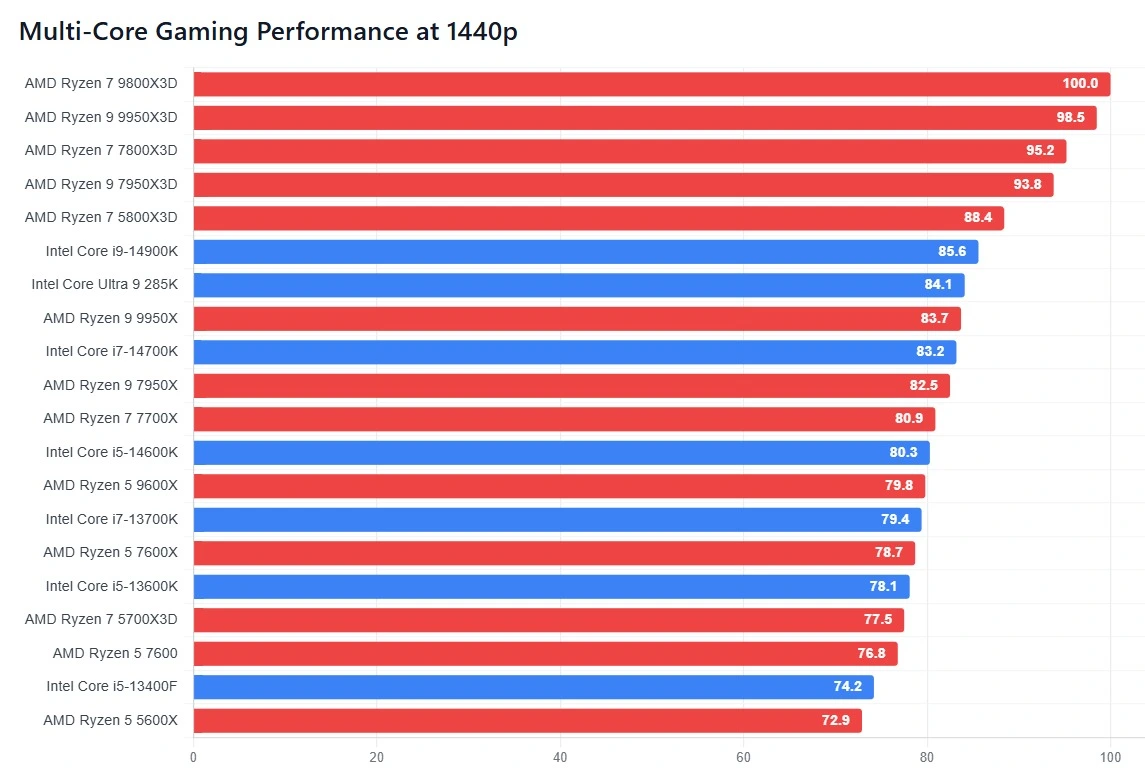
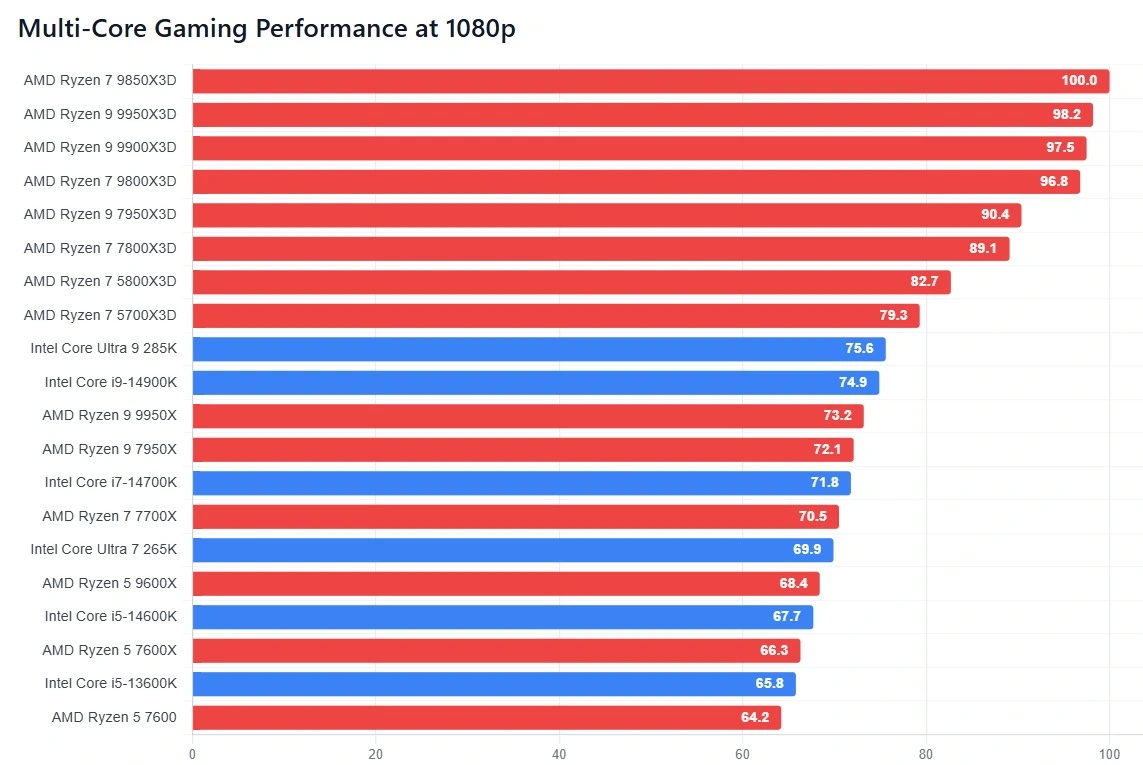
The multi-core performance charts focus on how modern CPUs handle workloads that scale beyond a single thread, offering a different perspective from pure gaming benchmarks. These results reflect tasks such as rendering, streaming, background processing, and heavy multitasking, where higher core and thread counts provide a clear advantage. CPUs with strong multi-core efficiency maintain smoother performance under sustained loads, especially when paired with a capable CPU cooler that prevents thermal throttling during long sessions.
In gaming, multi-core impact is more noticeable at lower resolutions like 1080p, where CPUs still have room to influence frame rates, especially in modern titles that spread workloads across multiple cores. As resolution increases to 1440p and 4K, the workload shifts heavily toward the GPU, reducing visible differences between multi-core CPU models in gaming, even though their strength remains critical for smooth background tasks and streaming during gameplay.
Features like hardware-accelerated CPU scheduling also influence how effectively workloads are distributed across cores, improving responsiveness in demanding scenarios. Regularly checking CPU health helps ensure these processors continue to operate at their intended performance levels over time. Overall, the data shows that while multi-core strength may not always boost raw FPS in games, it plays a critical role in real-world usage where productivity, stability, and multitasking matter just as much as peak performance.
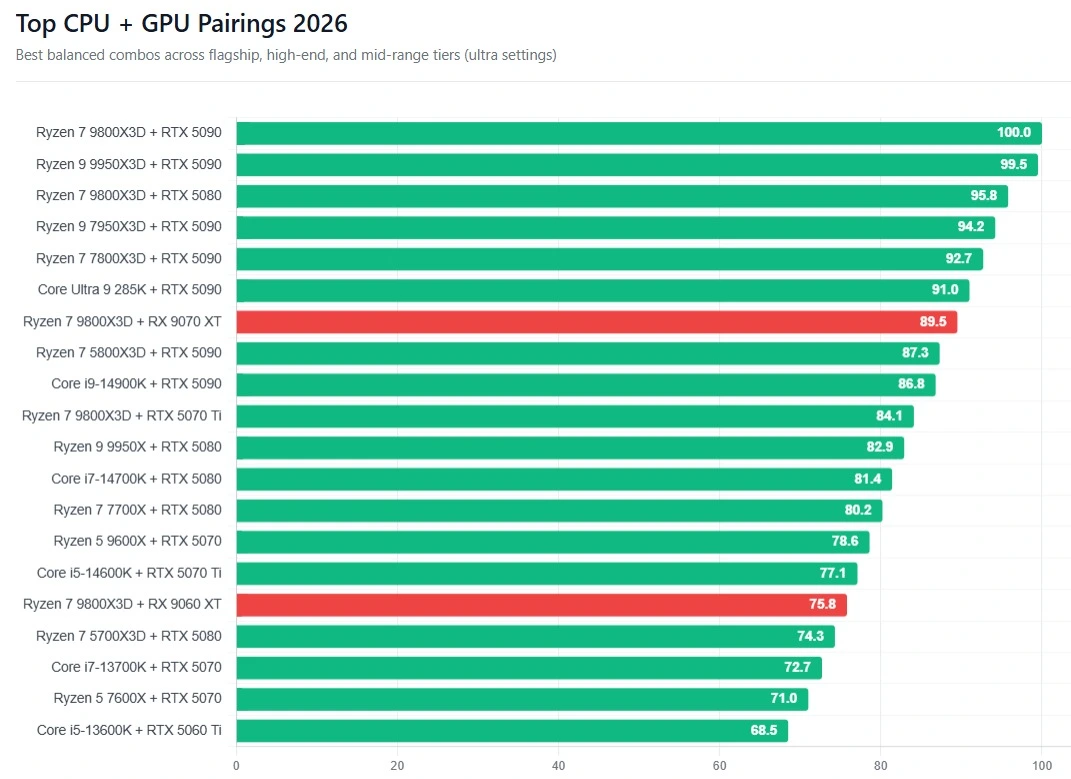
Best GPU Combinations for CPU
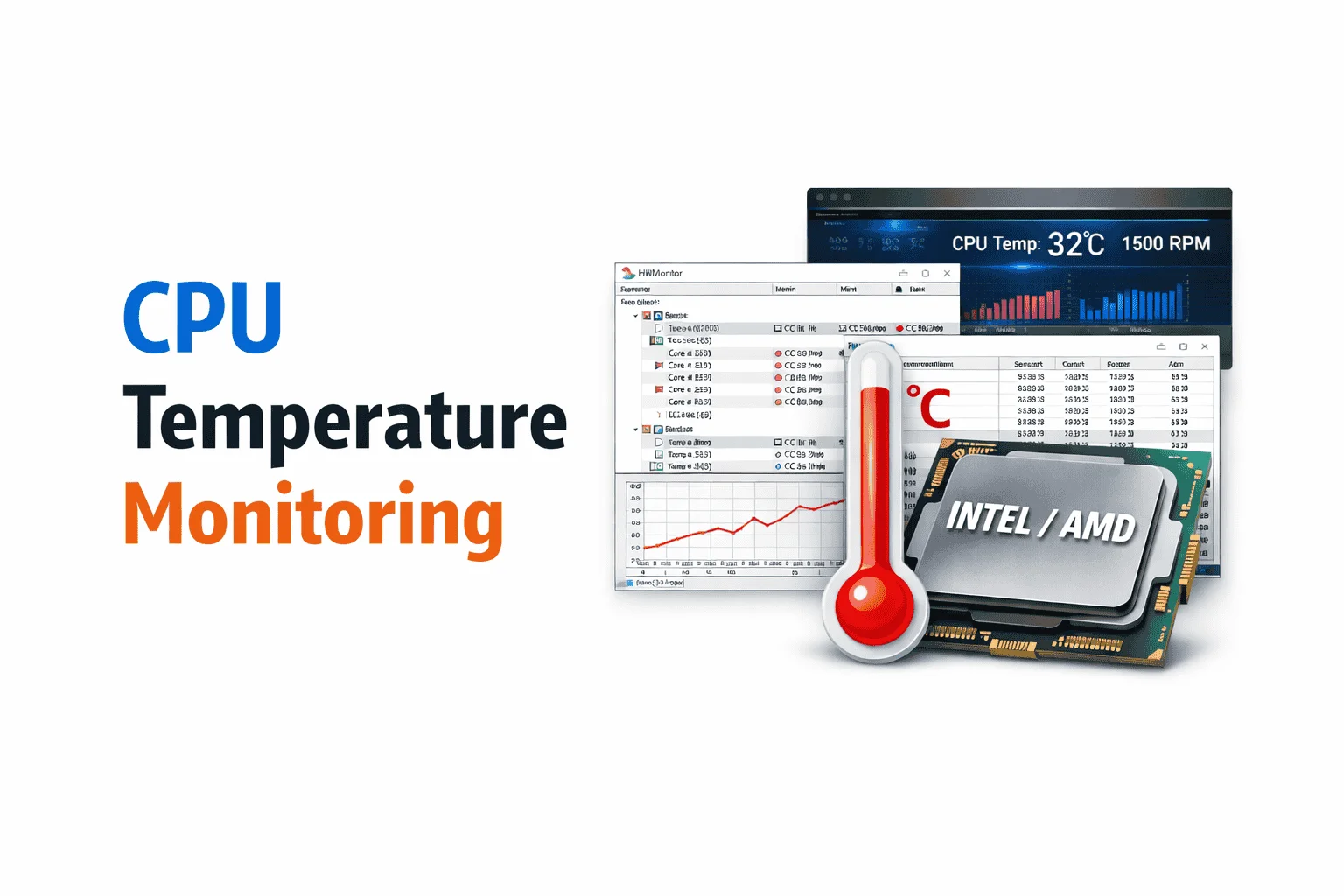
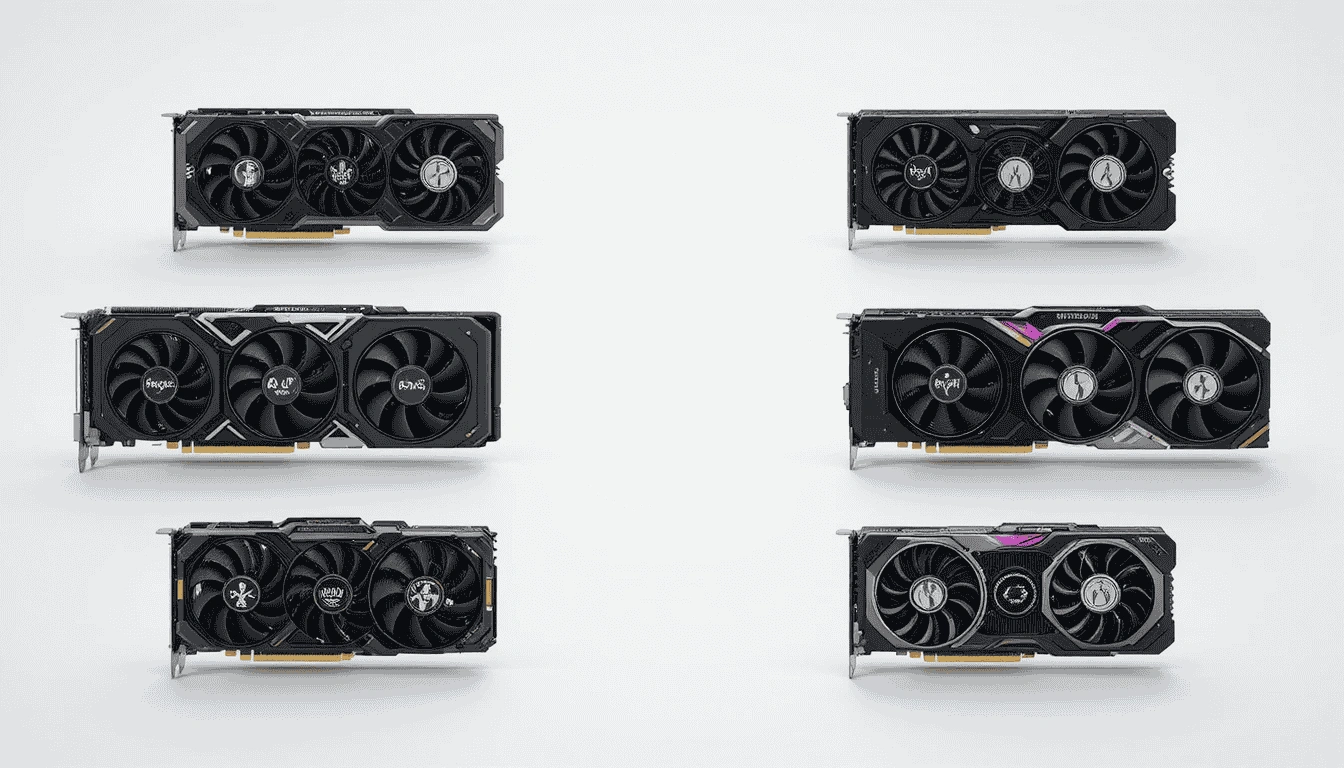
A proper GPU comparison helps identify which graphics cards can fully utilize a processor’s capabilities, especially at higher resolutions. One more thing, consistently checking GPU temp and using a system temperature monitor helps confirm whether performance drops are caused by thermal limits rather than hardware imbalance. When GPUs operate within a normal GPU temp range, these pairings deliver stable, predictable performance without bottlenecks.
Best CPUs for Content Creation
This section highlights how top CPU models perform in content creation workloads such as 3D rendering, video editing, encoding, and compilation. The Ryzen 9 7950X excels in multi-threaded applications, handling heavy rendering and video projects with ease thanks to its 16 cores and high L3 cache. Similarly, the Intel Core i9-14900K delivers excellent performance for content creation, benefiting from strong single-core speeds and efficient thread management for applications that mix single- and multi-threaded tasks.

High-performance CPUs paired with a quality CPU cooler maintain stable boost clocks during long sessions, while hardware-accelerated CPU scheduling ensures workloads are distributed efficiently across cores. Monitoring CPU health and temperatures during these intensive tasks helps prevent thermal throttling and ensures consistent, reliable performance for professional content creators.
Power Efficiency of CPU
We highlight the power efficiency of leading CPU models, showing how much performance each processor delivers per watt consumed. For example, the Ryzen 9 7950X provides exceptional multi-core performance while maintaining efficient power usage, making it ideal for sustained workloads and heavy multitasking. Similarly, the Intel Core i9-14900K balances high single-core and multi-core performance with controlled power draw when paired with an optimized cooling solution.
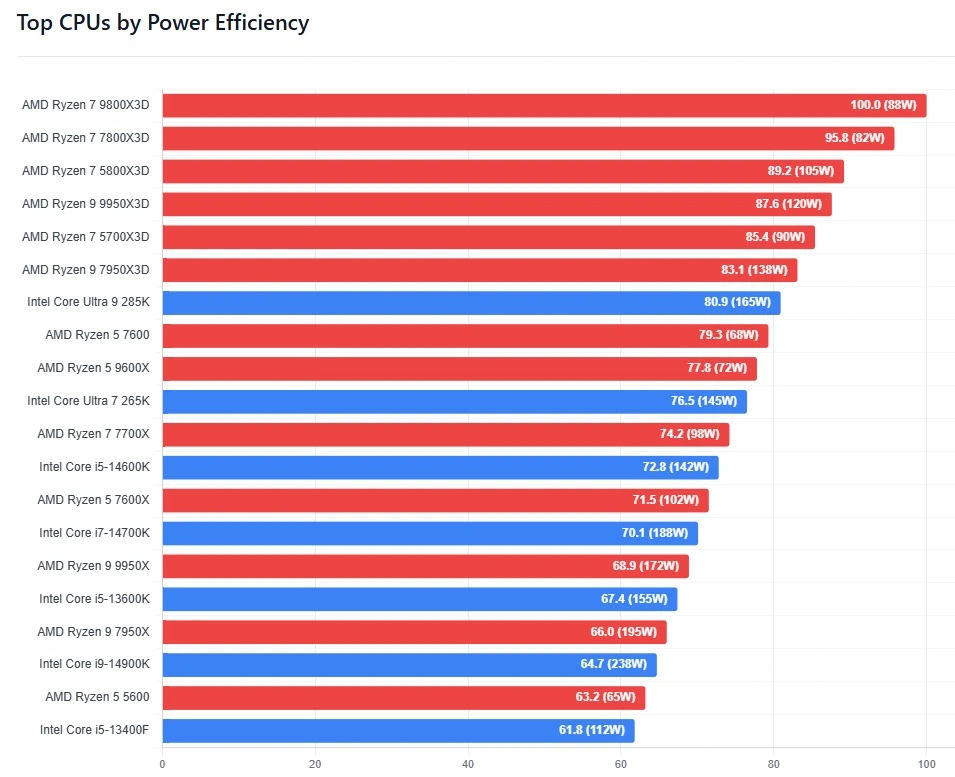
Efficient CPUs not only reduce electricity consumption but also generate less heat, helping maintain stable boost clocks and preventing thermal throttling. Comparing power draw alongside real-world performance reveals which processors offer the best combination of speed, energy efficiency, and reliability for gaming, productivity, and content creation workloads.
Best Budget Gaming CPUs
This section highlights the best budget gaming CPUs under $250, offering strong performance. Processors like the AMD Ryzen 5 5600 and Intel Core i5-13400 offer excellent single-core and multi-core performance for 1080p and 1440p gaming, making them ideal for budget-conscious gamers.
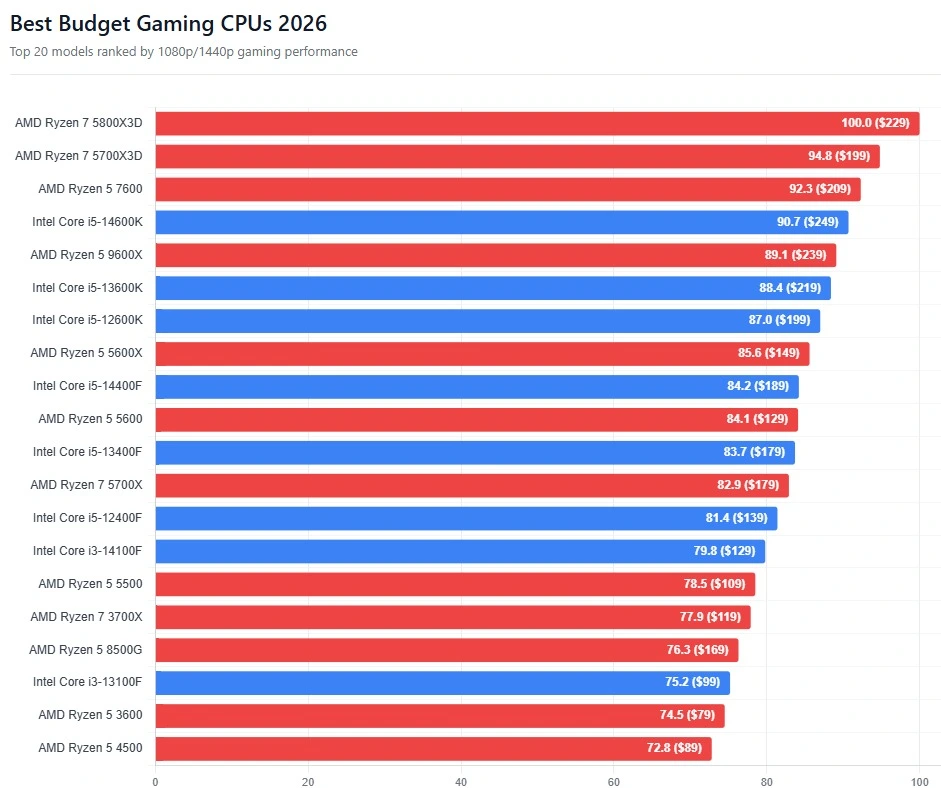
These CPUs can handle modern titles smoothly when paired with a capable GPU, and efficient power usage ensures lower system temperatures even during extended sessions. Monitoring CPU health and using a high-quality CPU cooler can further stabilize boost clocks, while proper GPU pairing helps avoid bottlenecks and maximizes frame rates. Overall, these budget-friendly CPUs deliver impressive value for gamers seeking high performance at an affordable price.
How to Read and Understand CPU Benchmark Data?
Understanding CPU benchmark data is essential for making informed hardware choices. Start by examining single-core and multi-core scores to see how a processor performs across different workloads, from gaming to content creation. Compare power consumption and thermal behavior to evaluate efficiency and stability under sustained loads.
Keep in mind that real-world performance can vary depending on GPU pairing, resolution, and task type, which makes bottleneck analysis and monitoring CPU health crucial. Look for trends across multiple benchmarks rather than relying on a single number, and use charts and tables together to visualize performance differences clearly. By following these steps, users can interpret CPU benchmarks accurately and select processors that deliver the best performance for gaming, productivity, and content creation.