DDR4 vs DDR5 RAM | Which Is Better for Gaming in 2026?
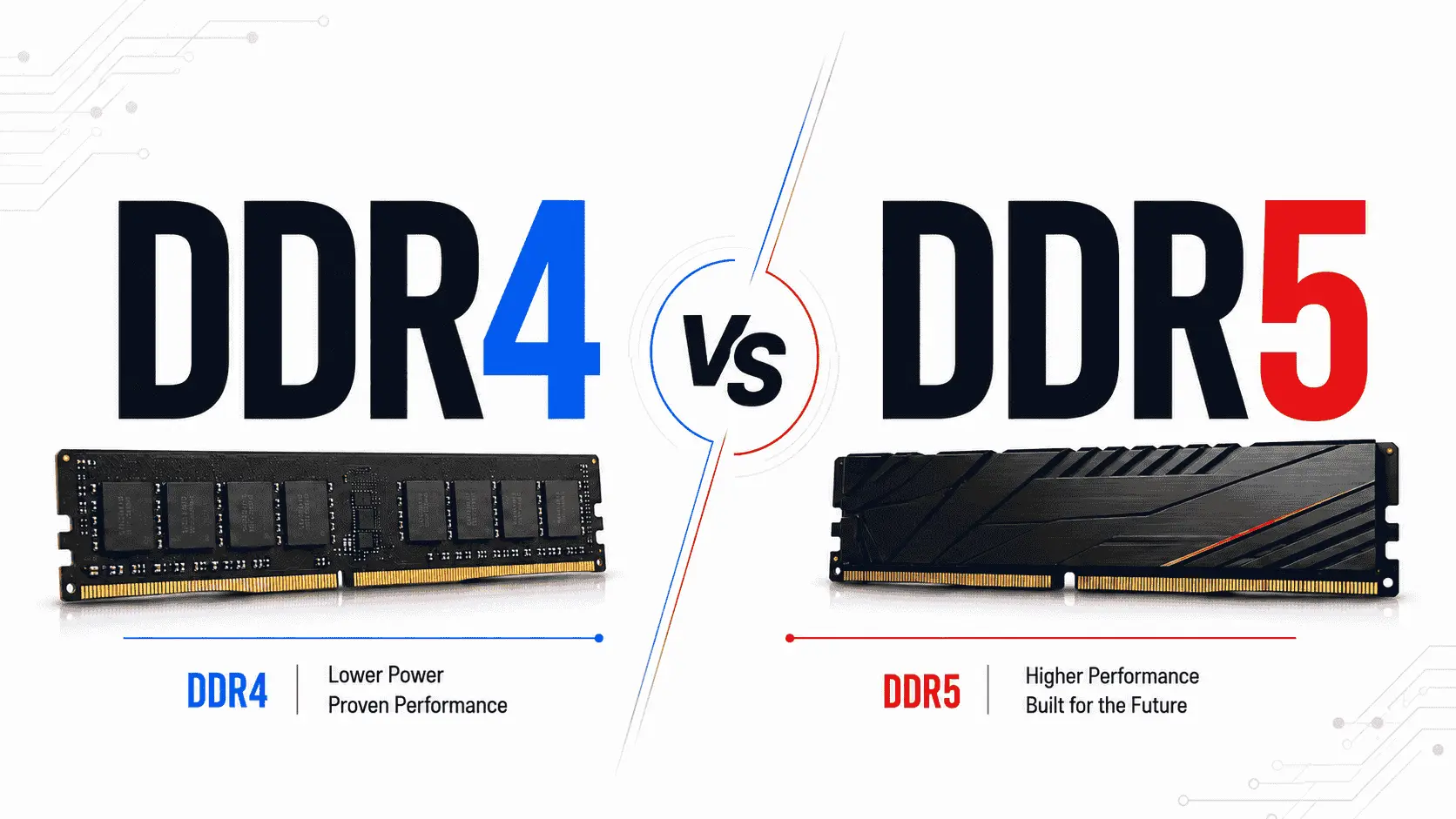
DDR4 vs DDR5: which is better for gaming? This question matters more now because RAM prices, motherboard support, and modern game requirements have changed. DDR4 is still common in budget and older gaming PCs because it is stable, widely supported, and strong enough for many esports titles. DDR5 is the newer standard, offering higher bandwidth, better power handling, and more capacity to meet future CPU and gaming demands.
DDR5 has a clear speed advantage. DDR5 commonly starts at 4800 MT/s, while standard DDR4 usually tops out at 3200 MT/s. But gaming performance does not depend on RAM speed alone. The final result changes with the processor, graphics card, resolution, game engine, RAM timing, and overall system balance.
Top DDR4 and DDR5 RAM Kits for Gaming
RAM prices have been unstable recently, especially for DDR5. One major reason is the rising demand for AI servers, data centers, and high-bandwidth memory. Memory manufacturers are giving more attention to enterprise and AI-related demand, which can affect the supply and pricing of consumer DDR5 kits. TrendForce has also reported strong DDR5 price pressure due to tight DRAM supply and server demand, while recent market reports show that DDR5 prices in 2026 are still much higher than mid-2025 levels.
Based on our experience, the RAM kits listed below offer a practical mix of budget and premium options. Some kits are better for simple gaming upgrades, while others are suitable for high-end gaming, streaming, editing, multitasking, and future-ready PC builds. You will find both non-RGB and RGB options, so you can choose according to your performance needs and build style.
DDR4 vs DDR5 Gaming Performance
RAM does not work like a graphics card, so it will not improve every game in the same way. Its main job is to help the CPU access game data quickly. This data can include map information, physics, NPC behavior, textures, background tasks, and instructions that the CPU needs before the GPU can draw the next frame.
In gaming, DDR4 and DDR5 usually show their difference in four areas: average FPS, 1% lows, frame pacing, and asset streaming. Average FPS tells how fast the game is running. 1% lows show how stable the game feels during heavy scenes. Frame pacing decides whether the game feels smooth or uneven. Asset streaming affects how quickly the game loads textures, objects, and world details while you move through the map.
How DDR4 Feels in Gaming?
DDR5 has higher bandwidth than DDR4, so it can move more data between the RAM and CPU. This helps more in CPU-limited games, high-FPS esports titles, open-world games, ray tracing presets, and modern games that push more data through the system memory. DDR4 vs DDR5 gaming testing showed around a 20% average uplift for DDR5 in its 12-game test, but the gap changed from game to game. Some titles barely reacted, while others clearly benefited from DDR5 bandwidth.
DDR4 still gives a good gaming experience when the system is balanced. A PC with a decent CPU, a strong GPU, SSD storage, and 16GB or 32GB of DDR4 RAM can run many modern games without a problem. In esports games like CS2, Valorant, Fortnite, Apex Legends, and Rainbow Six Siege, DDR4 can still perform well, especially if the player is using a mid-range GPU and playing at 1080p or 1440p.
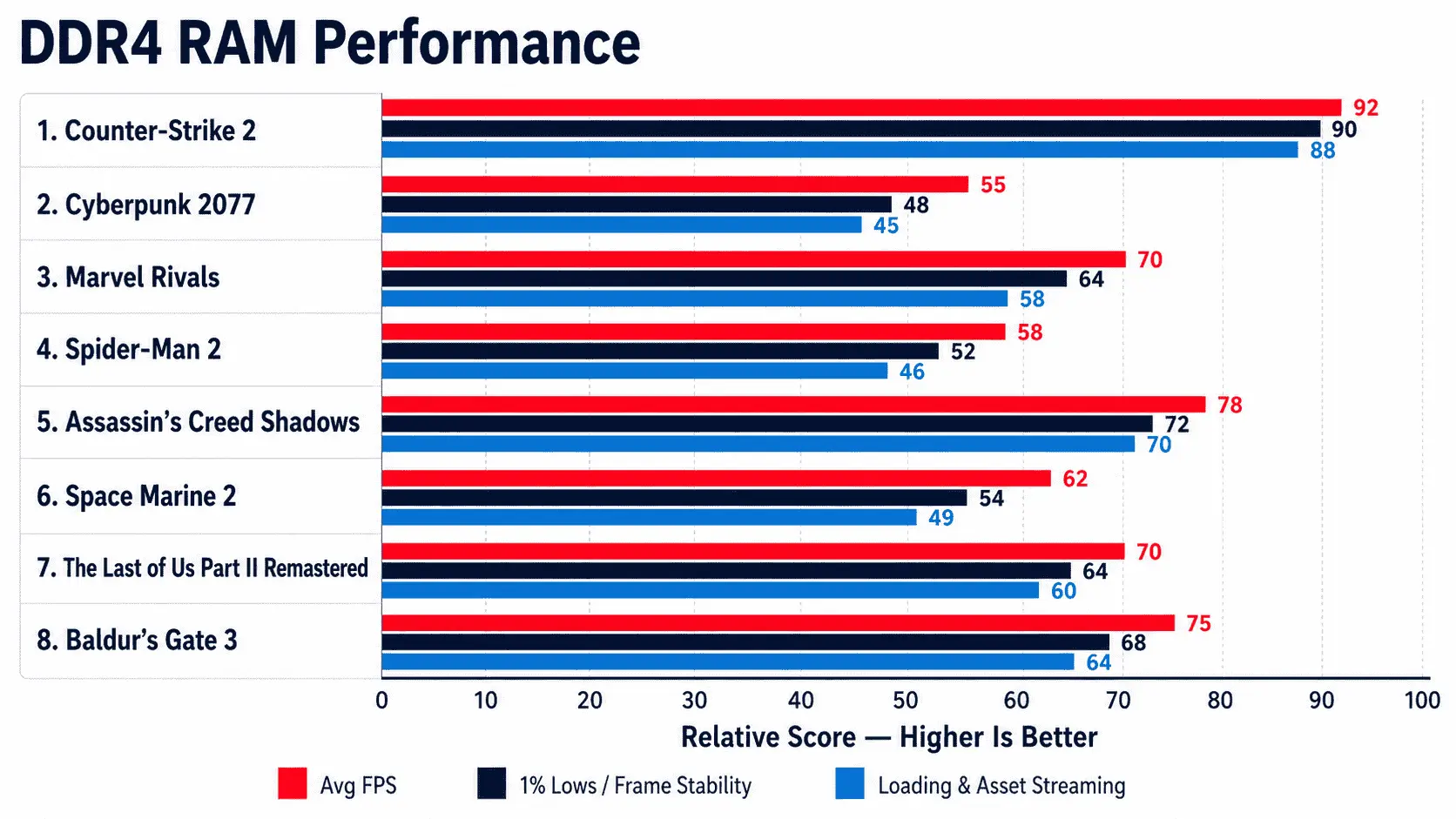
The main weakness of DDR4 appears when the CPU needs more memory bandwidth. This can happen in crowded maps, open-world areas, ray tracing scenes, and high-refresh-rate gaming. In these cases, the game may still run, but 1% lows can drop more often. This is where players feel small pauses, uneven movement, or frame dips during action.
DDR4 also depends heavily on RAM speed and latency. A good DDR4 3200MHz or 3600MHz dual-channel kit can still perform well, but slower DDR4 or single-channel DDR4 can hold the system back. For gaming, dual-channel memory is important because it provides the CPU with higher memory bandwidth.
Game loading is a slightly different point. Loading screens mostly depend on SSD speed, CPU performance, and how the game engine handles files. DDR4 will not make loading terrible if the PC has an SSD. The difference becomes more visible after the game loads, especially when the game is streaming new areas, textures, and objects during gameplay.
How DDR5 Feels in Gaming?
DDR5 feels stronger in games that need more bandwidth from the memory system. It helps the CPU send and receive data faster, which can improve FPS and frame consistency. The difference is more noticeable when the system uses a powerful GPU and the game is not fully GPU-limited.
In simple words, DDR5 is more useful when the CPU is trying to push high frame rates. At 1080p competitive settings, the GPU often finishes its work quickly, so the CPU and RAM become more important. In this type of setup, DDR5 can create a clear performance gap.
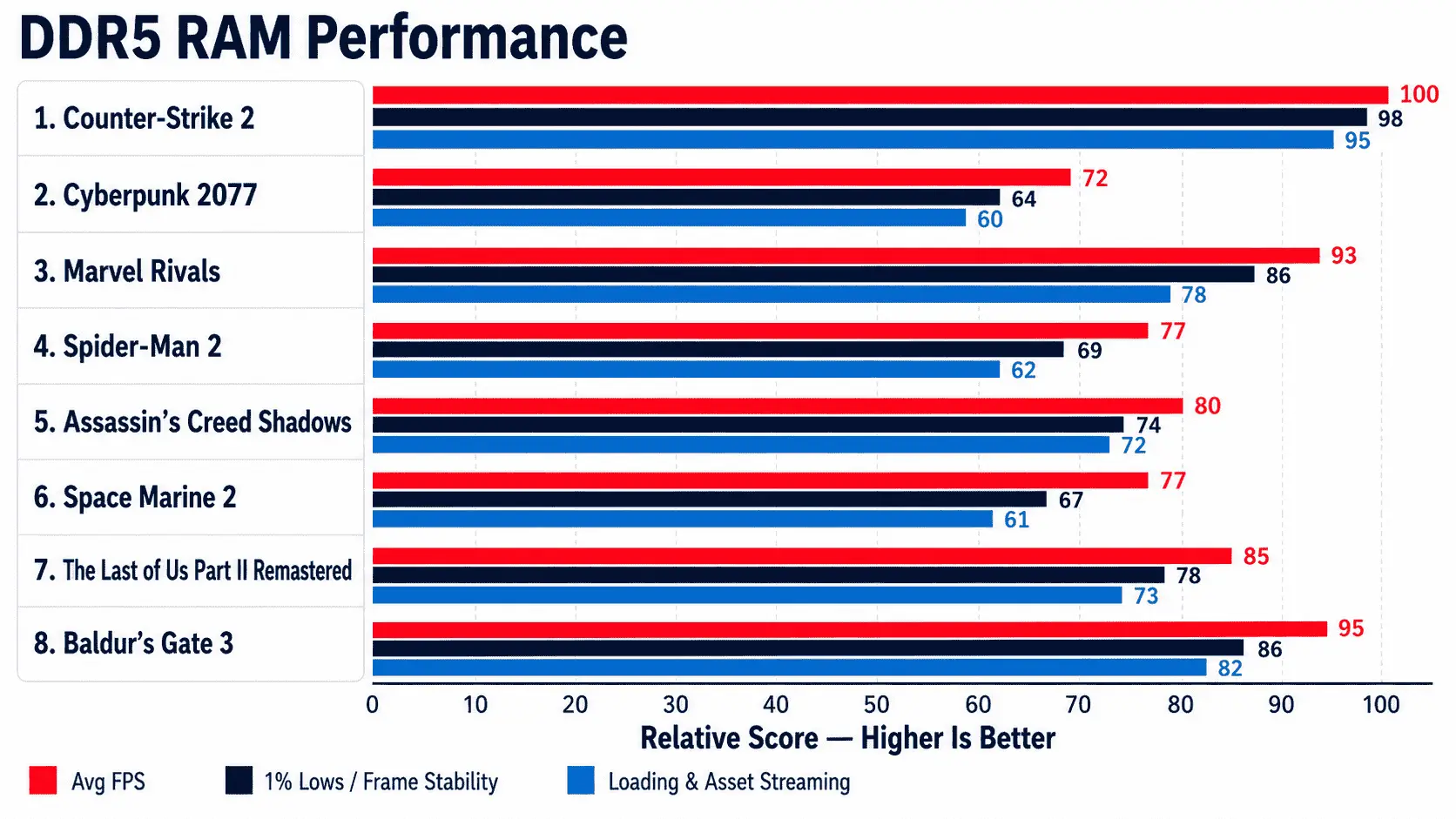
At 1440 p.m., the gap becomes more game-dependent. Some games still benefit from DDR5, while others become more GPU-limited. At 4K, the graphics card usually carries most of the load, so the DDR4 vs DDR5 difference can become smaller unless the game is CPU-heavy or memory-sensitive.
DDR5 also makes more sense for new gaming PCs because newer platforms are moving toward DDR5 support. It gives better bandwidth, better capacity scaling, and better long-term value for future CPUs and games.
DDR4 vs DDR5 in Ray Tracing Games
Ray tracing mostly depends on the GPU, especially the GPU’s ray tracing cores, VRAM, and rendering power. RAM does not replace the GPU in ray tracing. However, ray tracing can increase the amount of scene data the system has to manage. Reflections, lighting, object data, geometry, and world detail can all increase the pressure on the CPU and memory system.
This is why DDR5 can show stronger results in some ray-tracing games. Cyberpunk 2077 and Spider-Man 2 both showed a 33% DDR5 advantage in our ray tracing tests.
For a gamer, the practical meaning is simple. If the game is GPU-limited, DDR5 will not suddenly fix low ray tracing FPS. But if the CPU and memory are also limiting performance, DDR5 can help the system hold higher and more stable frame rates.
What About Game Loading Times?
DDR4 and DDR5 do not decide loading speed alone. If a PC uses an old hard drive, loading will be slow even with DDR5. If a PC uses a good NVMe SSD, loading will be fast even with DDR4.
RAM becomes more important after the game starts. Once assets are loaded, the game keeps useful data in memory so it can access it again quickly. In open-world games, RAM also helps when the game loads new areas while the player is moving. If the system has too little RAM, Windows may move data to the pagefile on storage, and that can cause stutter.
For gaming in 2026, 16GB is still usable in many titles, but 32GB is the safer choice for a new build. Our testing found that many games still run well on 16GB, but 8GB often causes poor frame-time behavior. It also concluded that 32GB is the current sweet spot for gamers, especially for modern titles and systems with lower-VRAM GPUs.
How are DDR4 and DDR5 Made Differently?
DDR4 and DDR5 are both DRAM technologies, but they are not built with the same internal structure. DDR4 was designed for stable performance on older platforms, while DDR5 was designed to handle higher bandwidth, larger memory capacity, and newer CPU demands. The difference is not only in speed. It also comes from chip design, power delivery, data channels, and how each RAM module handles memory requests.
Memory Chip Design
DDR4 and DDR5 both store data inside DRAM cells. A DRAM cell uses a tiny capacitor and transistor to hold data temporarily while the computer is running. The basic job is the same, but DDR5 improves how data is organized and moved inside the memory module.
DDR4 modules usually work as one 64-bit channel per DIMM. DDR5 keeps the same total 64-bit data width, but it divides the module into two independent 32-bit subchannels. This helps the memory controller manage smaller data requests more efficiently instead of waiting on one wider channel for every operation. Kingston also explains that DDR5 uses two independent 32-bit subchannels to improve efficiency and memory access handling.
DDR5 also increases the number of internal banks from 16 to 32 and doubles the minimum burst length from 8 to 16. In simple words, DDR5 can keep more memory pages active and move more data per operation. This is one reason DDR5 can offer higher bandwidth than DDR4, even when latency numbers look higher on paper.
Power Management
DDR4 and DDR5 also manage power differently. In DDR4 systems, most of the voltage regulation is handled by the motherboard. The motherboard supplies and controls the power needed by the RAM module.
DDR5 moves power management closer to the RAM itself by using a PMIC, which stands for Power Management Integrated Circuit. This chip sits on the DDR5 module and helps regulate power directly on the RAM stick. DDR5 also operates at a lower standard voltage than DDR4, with DDR5 commonly using 1.1V while DDR4 commonly uses 1.2V.
This does not mean DDR5 will always make a gaming PC use much less total power, because the CPU and GPU still consume most of the system power. The real benefit is cleaner and more controlled power delivery to the memory module. This matters more at higher speeds, where signal quality and voltage stability become harder to manage.
Data Channels
Data channel design is one of the clearest differences between DDR4 and DDR5. DDR4 uses one 64-bit channel on a standard non-ECC DIMM. DDR5 divides that into two 32-bit subchannels while keeping the same total width.
This split allows the CPU memory controller to access data in a more flexible way. For example, if the system needs smaller chunks of data, DDR5 can handle those requests through separate subchannels instead of treating the whole module like one large path. This improves efficiency, especially when modern CPUs are handling many small tasks at the same time.
DDR5 also uses a longer burst length. Burst length means how much data RAM sends in one read or write command. DDR4 uses a burst length of 8, while DDR5 uses a burst length of 16. This helps DDR5 move data in a way that better matches modern CPU cache-line behavior.
Capacity Potential
DDR5 is also designed for higher memory capacity. DDR4 has been strong for many years, but its platform and module design are more limited for future memory scaling. DDR5 supports denser memory chips and larger module capacities, which makes it better suited for future systems.
This matters because modern PC usage has changed. A gamer may run the game, Discord, browser tabs, recording software, RGB software, launchers, and background apps at the same time. Some newer AAA games also recommend more memory than older titles, especially when high-resolution textures and open-world environments are involved.
For today’s gaming, 16GB can still work in many systems, but 32GB has become the safer choice for a new gaming PC. DDR5 makes this easier because many DDR5 kits commonly start at 32GB in the consumer market. Wired also notes that many consumer DDR5 kits commonly start at 32GB, while 16GB DDR4 kits have been common for older builds.
Conclusion
The DDR4 vs DDR5 choice depends on your current system, budget, and gaming goals. DDR4 is still a strong option for budget gamers, older platforms, and users who already have a DDR4 motherboard. It can handle esports titles, many AAA games, and daily PC use without forcing a full platform upgrade.
DDR5 is the better choice for new gaming builds, high-FPS gaming, ray tracing titles, multitasking, and future upgrades. It offers higher bandwidth, better capacity support, and stronger value for newer CPU platforms. If you are building a PC from scratch, DDR5 makes more sense. If your DDR4 system is already balanced, upgrading the GPU or moving to 32GB DDR4 may give better value than replacing the whole platform.