How Does Multiplayer Gaming Build Social Connections?
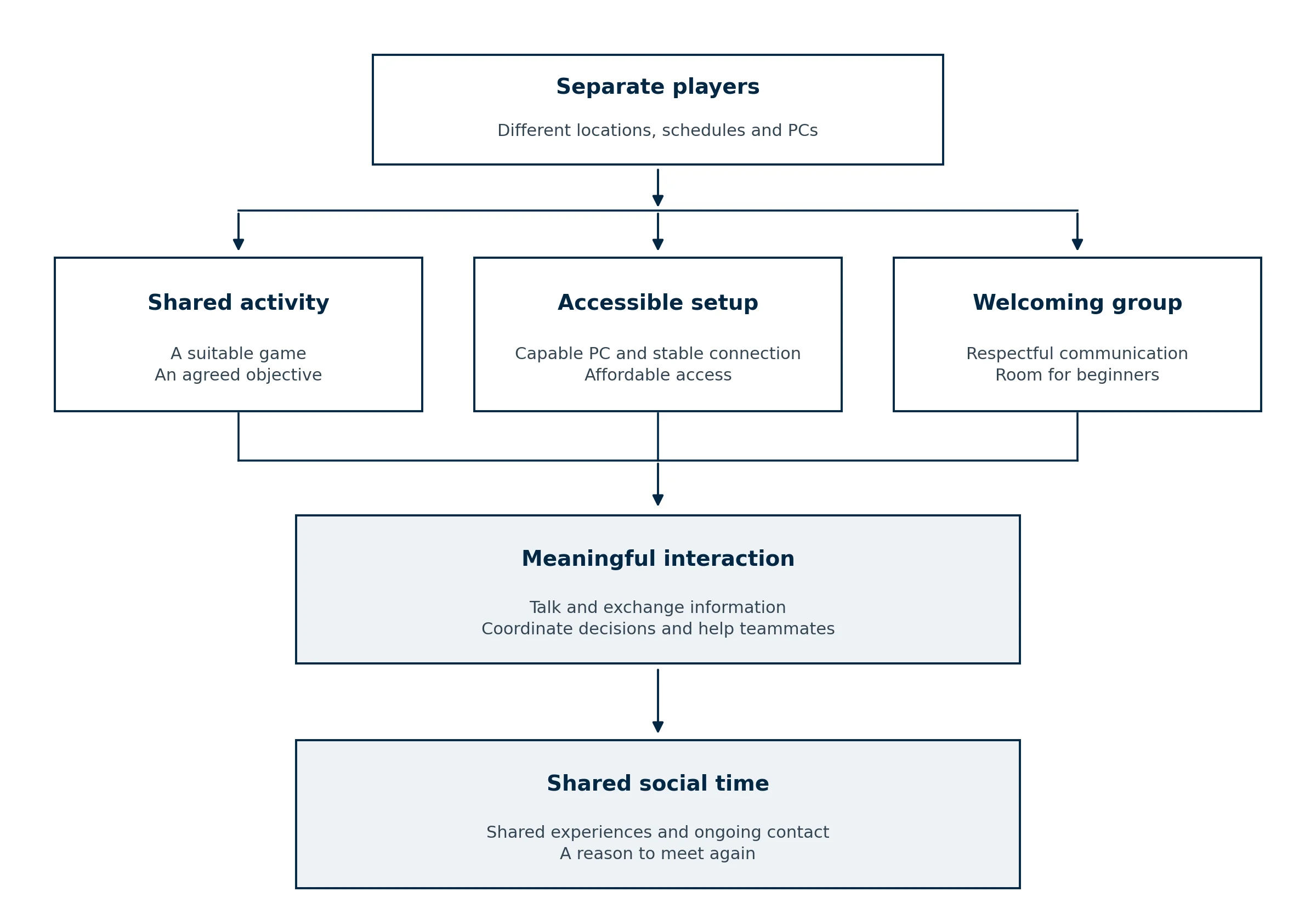
Multiplayer gaming can turn an evening at a computer into time spent with friends. A shared mission gives people something to discuss, decisions to make together, and a reason to return. For friends living in different cities, regular sessions offer a practical way to maintain contact. Making those sessions accessible also means choosing games everyone can comfortably afford. Players exploring paid surveys as a small contribution toward their gaming budget can consult resources such as Best Paying Survey Sites 2021, while checking current eligibility and payout terms before committing their time.
Once everyone can join, the quality of the interaction matters more than the cost of the game. Being heard, contributing to a team, and learning without pressure to perform perfectly can make a session worth repeating. Solo games offer their own rewards, including privacy and freedom to play at your own pace. Multiplayer adds an opportunity to share the experience, supported by a suitable game, a reliable PC setup, and people who make room for one another.
Why shared goals give players a reason to connect
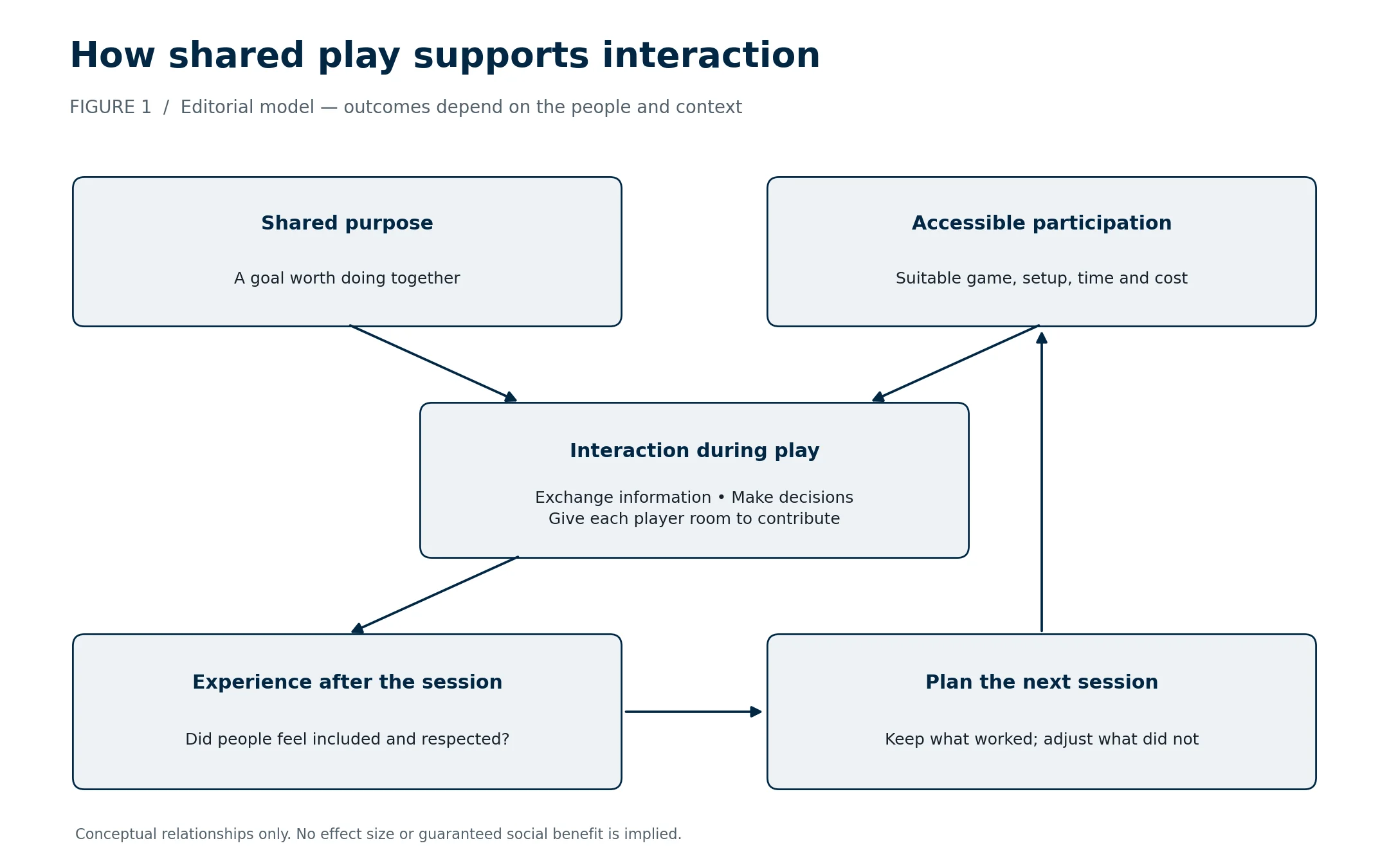
Cooperative play creates practical reasons to communicate. One player might find a route, another manage resources, and a third protect the team while it completes an objective. Each person holds information or performs an action that helps someone else. Conversation follows from the task instead of depending entirely on finding something to say.
Consider a fictional three-player expedition. A newcomer spots a useful supply cache, an experienced teammate explains how to reach it, and another player changes the route to keep everyone together. The newcomer has contributed before mastering every control. That is a useful principle for choosing a social game: participation should be possible before expertise.
Repeated sessions also provide continuity. Players remember an improvised escape, revisit an unfinished objective, or joke about a harmless mistake. These references give the next conversation a starting point. A scheduled return creates another opportunity to talk, although it does not guarantee friendship.
There is no universal rule that cooperation is more sociable than competition. Some friends enjoy racing, sports games, or competing against each other. The useful question is whether the format encourages the interactions the group wants. A ranked match may suit a focused team while leaving little room for a relaxed catch-up.
What research says about social gaming
A 2023 systematic review of social gaming examined 263 publications. Its scope included interactions involving players and spectators, rather than only online co-op games. The review mapped social experiences and outcomes alongside factors involving game design, participants, and the context of play.
Its limitations matter. The authors identified gaps in how social outcomes were measured and a shortage of studies observing play in everyday settings. The review supports taking the social dimension of games seriously, but it does not establish that every multiplayer session strengthens relationships.
A separate systematic review of online gaming communities included 24 studies involving 15,451 players. It reported predominantly positive socio-relational findings involving friendship, social skills, and social capital. Social capital refers to resources available through relationships, such as help, information, and supportive connections.
That review also identified variation linked to community characteristics and cooperative activity. For some players, increased online social capital came at the expense of offline social capital. Online contact therefore deserves attention on its own terms, while also considering whether it leaves room for other valued relationships.
Neither publication supplies a universal effect size for friendship or proves that gaming alone causes better social outcomes. The practical implication is to examine the experience itself: can people contribute, do they feel respected, and do they want to return?
Choose a multiplayer format that fits the group
“Multiplayer” describes several different arrangements. A game can support cooperative missions, competitive teams, public matchmaking, or local play on one screen. Those formats place different demands on communication, available time, and hardware.
| Play format | Useful when the group wants | What to check first |
|---|---|---|
| Private online co-op | Shared progress with familiar people | Party size, save ownership, and joining rules |
| Team competition | Coordinated play against opponents | Skill differences and expectations about ranking |
| Local multiplayer | Time together in the same room | Controller support and screen readability |
| Persistent community server | A place to return over several sessions | Moderation, server access, and ongoing costs |
| Turn-based multiplayer | More time to discuss decisions | Turn limits and whether asynchronous play is supported |
| Streamed local co-op | Remote access to a supported local multiplayer game | Host performance, connection quality, and input support |
A useful starting point is the least flexible requirement in the group. If one person has an older laptop, one has limited free time, and another dislikes competitive pressure, those constraints should shape the shortlist. Selecting a demanding game first and expecting everyone to adapt can prevent the gathering from happening.
Before purchasing, confirm the exact edition and supported platforms. Cross-play, which allows different platforms to play together, is distinct from cross-progression, which carries progress between platforms. Neither should be assumed from the presence of a multiplayer label. Check the developer’s current support information for the game and mode you intend to use.
Also check what happens when someone arrives late or misses a week. Drop-in support and flexible progression can be useful for irregular schedules. A campaign tied to one host’s save may require more coordination than a game built around separate matches.
A reliable PC setup helps everyone participate
Hardware does not create friendship, but technical interruptions can consume the time set aside for it. A player who repeatedly crashes or struggles to follow the action may spend more of the evening troubleshooting than participating. The goal is dependable performance in the chosen game, not identical computers or maximum graphics settings.
Start with the developer’s published requirements, including operating system, storage, and any mandatory account or anti-cheat requirements. Then check performance information for the resolution and settings each person intends to use. A result measured at low settings cannot establish how the same machine will behave at a higher graphical preset.
Match the processor to the workload
The CPU handles game calculations and prepares work for the graphics processor. The workload varies between games, and running a local game server adds another consideration. Compare processors using relevant game tests rather than assuming that more cores always produce proportionally more frames.
For a group session, test the game with the applications you actually intend to keep open. A machine that runs acceptably by itself may behave differently when recording software or other workloads are added. That test is more useful than buying a processor solely because it occupies a higher position in a general ranking.
Choose graphics settings that preserve playability
The GPU renders the game’s visuals. Resolution and demanding graphical effects influence its workload. Intel’s guide to balancing PC components explains why processor and graphics performance need to be considered together.
Agree on acceptable performance before chasing visual quality. A slower-paced cooperative game and a fast competitive shooter may justify different targets. Test demanding scenes, not just the menu or an empty starting area. If lower graphics settings make a session comfortable, that may remove the immediate need for an upgrade.
Check memory, storage, and connectivity
RAM holds data that active applications need. Follow the game’s requirements and consider the other applications running alongside it; a single capacity recommendation cannot cover every game and workload. Intel’s gaming RAM guide also explains why memory compatibility with the processor and board matters.
Leave time for installation and updates before friends arrive. Check available storage against the launcher’s installation requirements rather than relying only on the download size. Where the developer requires an SSD, treat it as a requirement when evaluating the PC.
The motherboard determines important compatibility and connection options. Before replacing it, identify a specific need: processor support, suitable memory slots, storage expansion, or connections for your peripherals. Intel’s motherboard buying guide details these functions. An expensive board is not a general solution for poor multiplayer performance.
For social play, a working microphone and comfortable audio levels deserve a test too. Ask a friend whether speech is understandable and whether game sounds drown it out. Fixing an incorrect input selection or excessive microphone gain can be more useful to the conversation than buying new hardware.
Separate low frame rates from network lag
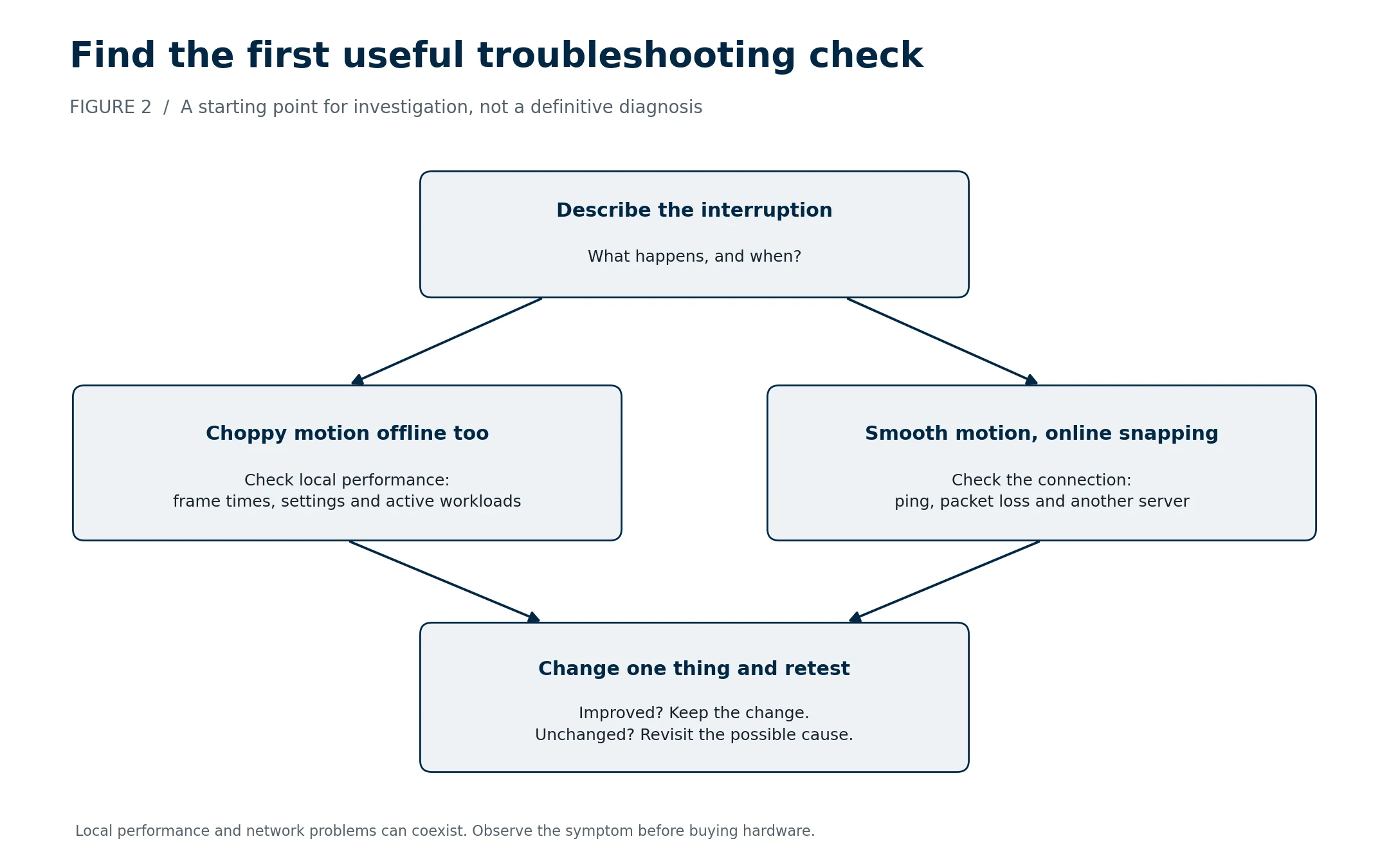
Players often use “lag” to describe several different problems. Low frame rates concern how the PC produces images. Network delay concerns communication with another machine or server. Local input delay concerns the time between an action and its visible response. Similar sensations can therefore require different fixes.
Intel’s explanation of input lag distinguishes local hardware and software latency from network problems. Its packet-loss troubleshooting guide explains how missing network data can contribute to disruptions such as rubberbanding, where a character appears to snap back to an earlier position.
| Symptom | Possible cause to investigate | Useful first check |
|---|---|---|
| Choppy motion in offline and online play | Local performance or frame pacing | Compare frame times at lower graphics settings |
| Smooth animation but players snap between positions | Connection or server disruption | Check the game’s ping and packet-loss display |
| Voice breaks up while a download runs | Network congestion or an audio problem | Pause transfers and retest the microphone |
| Trouble appears only on one server | Server load or the route to that server | Compare another suitable server |
| Delayed controls during offline play | Input, rendering, or display latency | Compare input devices and display settings |
These are investigation paths, not definitive diagnoses. Several problems can occur together. Change one setting at a time so you can tell whether it helped.
Trying Ethernet can help determine whether a local wireless connection contributes to a problem. It cannot remove every delay between your home and a distant server. Likewise, a faster graphics card will not repair packet loss elsewhere on the network.
Frame rate also needs careful interpretation. At a perfectly even 60 frames per second, each frame occupies about 16.67 milliseconds. At 120 FPS, the interval is about 8.33 milliseconds. These values come from dividing 1,000 milliseconds by FPS; they describe frame intervals, not total input delay or network ping.
| Even frame rate | Calculated interval per frame |
|---|---|
| 30 FPS | 33.33 ms |
| 60 FPS | 16.67 ms |
| 90 FPS | 11.11 ms |
| 120 FPS | 8.33 ms |
| 144 FPS | 6.94 ms |
Averages can conceal uneven delivery. A session may show a reasonable average while occasional long frames interrupt movement. Observe the moment the problem occurs rather than treating one average number as a complete description.
Keep shared gaming affordable
The most inclusive choice is one everyone can comfortably access. Start with games the group already owns, then compare the full cost of another option. Required expansions, subscriptions, server rental, and additional controllers can matter more than the advertised base price.
Some supported games offer another route. Valve’s Steam Remote Play Together allows one player to own and run a compatible local multiplayer game while others join remotely. It streams the game rather than installing a separate copy for every guest. Check support for the selected game, and test the host’s performance and the connections before planning a longer session.
Before spending time on any offer, check country eligibility, payout thresholds, reward options, and data collection terms. Do not make a planned purchase depend on a payout that has not arrived. Choosing an affordable shared activity is more dependable than expecting surveys to cover the difference.
When buying through a digital marketplace such as Eneba, inspect the specific listing. Confirm the activation platform, permitted region, edition, included content, final checkout price, and applicable support terms. A familiar game title does not establish that every listing is interchangeable. The same checks help prevent a group from buying different products and discovering the mismatch at the scheduled start time.
Build a group people want to return to
A useful invitation explains the expected experience. “Beginner-friendly co-op for about an hour” helps someone decide whether to join. It also gives experienced players a clear expectation about pace. Avoid describing a session as casual if newcomers will be judged against competitive standards.
Make room for different forms of contribution. Someone might enjoy navigation, planning, gathering supplies, or explaining an objective. Rotate responsibilities where the game allows it, and ask before taking over a task another person is learning. Efficient completion is not always the group’s main goal.
Communication should be accessible without making voice chat compulsory. Text, in-game markers, and other supported signals may suit players who cannot speak freely or prefer quieter participation. Agree on a few useful signals before a difficult section instead of introducing a complicated system during it.
Set boundaries early. Do not share private messages or publish someone’s voice without their agreement. Use moderation, reporting, and blocking features when needed. A community’s response to repeated harassment is more informative than a claim that everyone is welcome.
Respect leaving times as well. A player should be able to stop without being blamed for letting the group down. If the current activity regularly overruns, choose shorter rounds or agree on a stopping point before beginning.
A practical plan for the next session
For a group with one hour available, the following schedule is a planning example, not a research-based optimum. Adjust it to the game and the people involved.
| Part of the session | Suggested time | Purpose |
|---|---|---|
| Join and check audio | 5 minutes | Confirm everyone can connect and communicate |
| Agree on the objective | 5 minutes | Set expectations and divide responsibilities |
| Play together | 40 minutes | Leave most of the session for the shared activity |
| Finish and plan the return | 10 minutes | Stop without rushing and agree on the next step |
| Total | 60 minutes | A defined commitment everyone can assess |
Installations and large updates belong before this schedule. Send the game name, edition, meeting time, and joining instructions in advance. If a technical problem prevents someone from participating, have a fallback the whole group can access rather than leaving that person troubleshooting alone.
Afterward, ask one useful question: what would make the next session easier to enjoy? The answer might involve difficulty, timing, audio, or the choice of game. It may have nothing to do with buying better components.
Conclusion
Multiplayer gaming can provide a recurring place for shared attention, conversation, and cooperation. Its social value depends on whether people can participate comfortably and feel respected while doing so. Research identifies promising social outcomes alongside meaningful limitations, so the quality of the group matters more than the multiplayer label. Choose an activity everyone can access, resolve technical barriers with targeted checks, and keep the commitment manageable. A successful evening is one people want to repeat, whether or not the team wins.