Best Motherboard for Gaming We Have Tested
Ten AMD and Intel picks with verified specifications and published gaming results
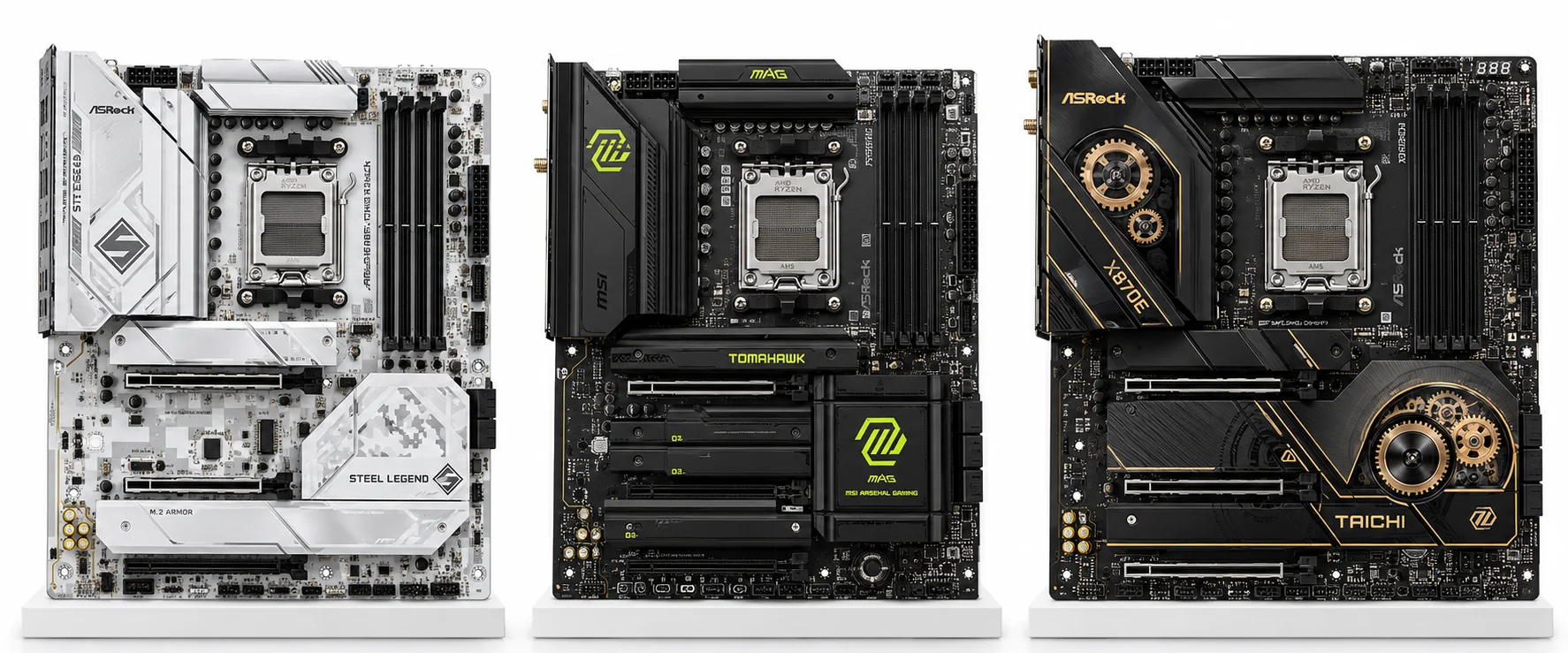
For most AM5 builders, the ASRock B850 Steel Legend WiFi is the best motherboard for gaming in this shortlist. Its $209.99 checked price buys four M.2 sockets, useful USB connectivity, and enough expansion for a conventional single-GPU PC. For an Intel Core Ultra build at standard CPU settings, the $139.99 ASRock B860 Steel Legend WiFi is the strongest value option here.
Choose the CPU platform first, then pay for the connections your system will use. The ten boards below cover mainstream towers, compact cases, fast external storage, and add-in cards. The order reflects different buying needs, not a universal FPS ranking; stock and pricing make some specialist picks conditional.
Best Motherboard for Gaming To Buy
M.2 Total / Gen5: Number of M.2 SSD slots / number supporting PCIe 5.0. Maximum PCIe speeds and slot availability depend on the installed CPU and lane-sharing configuration; check the board manual before choosing your SSD layout.
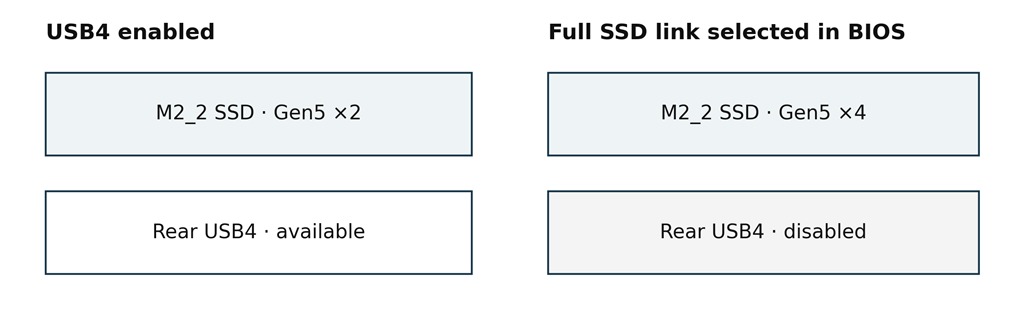
‡ MSI MAG X870E TOMAHAWK WIFI: M2_2 shares bandwidth with the rear USB4 ports. With M2_2 populated, its link runs at up to PCIe 5.0 x2; selecting x4 mode in BIOS disables those USB4 ports.
How were the recommendations and gaming results assessed?
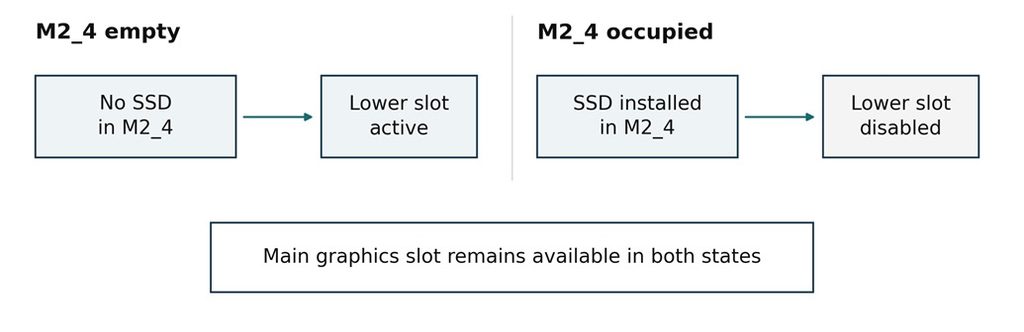
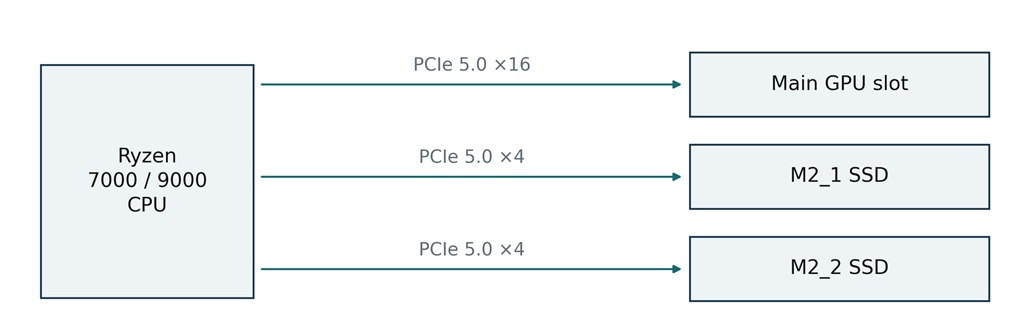
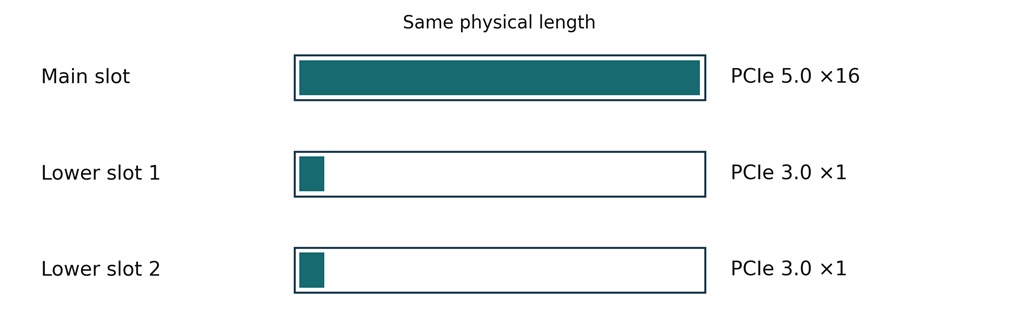
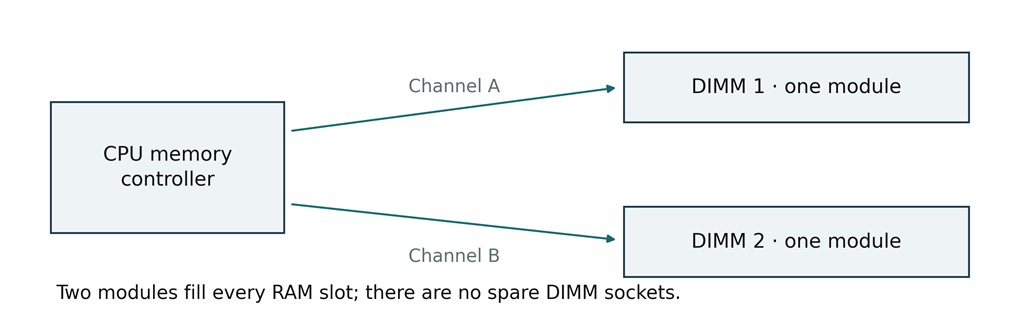
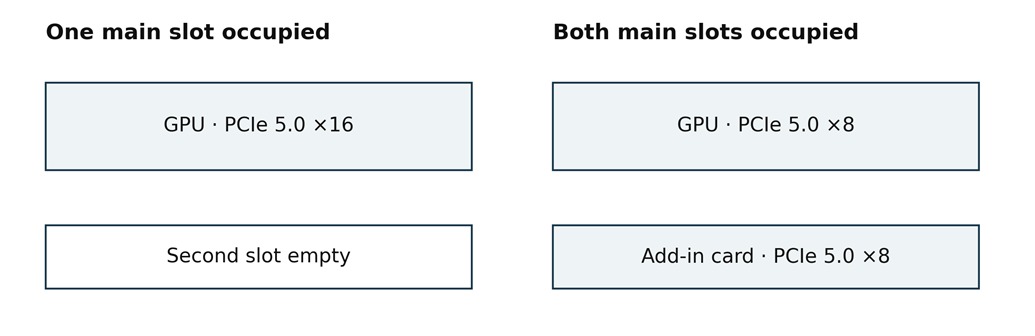
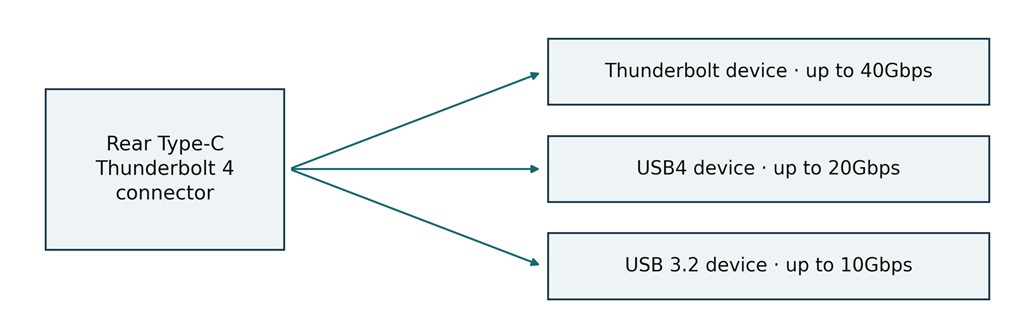
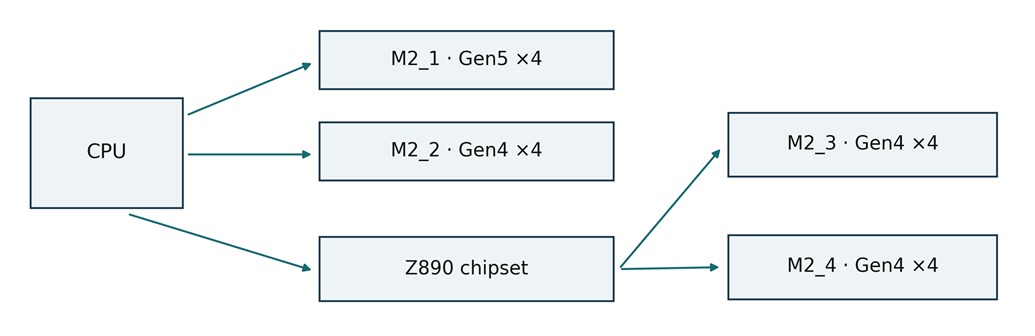
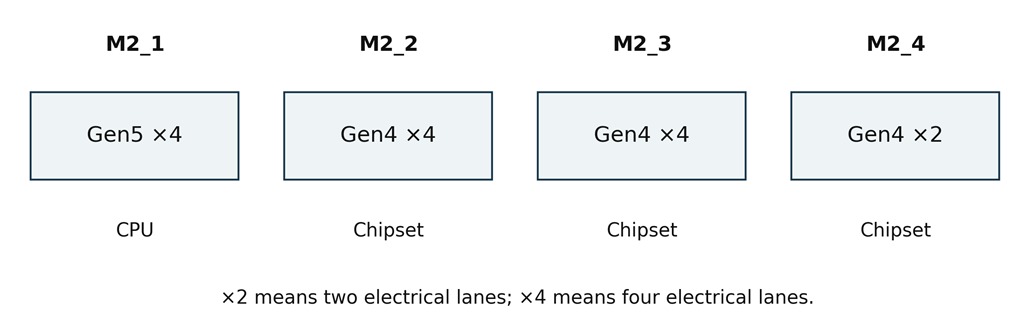
This is a research-based buying guide. No hands-on testing was performed for this article. Specifications were checked against manufacturer pages and documentation; gaming measurements are attributed to the publications that ran the tests. The original figures explain documented connection rules and are simplified schematics, not photographs or circuit diagrams.
The selection favors boards with independent test coverage and a clear use case: adequate power delivery, useful storage and peripheral connections, practical installation features, and a price that makes sense for the intended system. It is a curated shortlist, not a claim that every motherboard on sale was tested. Existing B650, X670, or older Intel systems may still meet their owner’s needs without replacement.
What can the FPS numbers tell you?
A motherboard supplies power, firmware settings, and communication paths; the CPU and graphics card execute the game workload. Differences in CPU power limits, memory settings, firmware, or thermal throttling can affect FPS. Once a board supports the intended configuration properly, a more expensive chipset does not automatically produce faster games.
The seven AMD sections use Tom’s Hardware results from a Ryzen 9 9900X and RTX 4080 test platform. The two Z890 sections use a later Core Ultra 7 270K Plus platform and F1 25 rather than F1 24. The B860 section uses Tech4Gamers’ RTX 3090 system and has incomplete settings disclosure. Do not compare these three groups as if they were one controlled CPU or motherboard test.
Results were published on different dates, with different firmware and potentially different software revisions. Small differences may reflect configuration or measurement variation. Reported minimum FPS is not equivalent to a 1% low, and upscaled 1080p tests do not predict native 1440p or 4K performance. CPU/GPU examples in this guide are compatibility examples unless accompanied by an attributed measurement.
How to read the specifications?
Gen5 means PCIe 5.0; ×4 means four electrical lanes. Physical slot length and electrical width are different. DDR5 numbers are transfer rates in MT/s, and figures marked OC are advertised overclocking ceilings, not guaranteed speeds with every CPU or four installed modules. Front USB entries describe internal headers and require a matching case port.
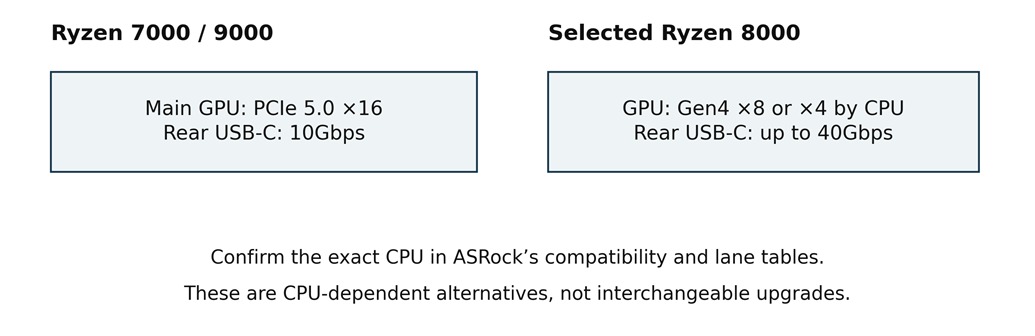
The AM5 slot and storage maxima assume a suitable Ryzen 7000 or 9000 processor unless stated otherwise. Ryzen 8000 models can change lane counts, PCIe generation, and port availability. For every purchase, verify the exact CPU support entry, minimum BIOS, board revision, and memory kit. Review feedback below comes from named independent reviewers; it is not presented as a survey of all owners.
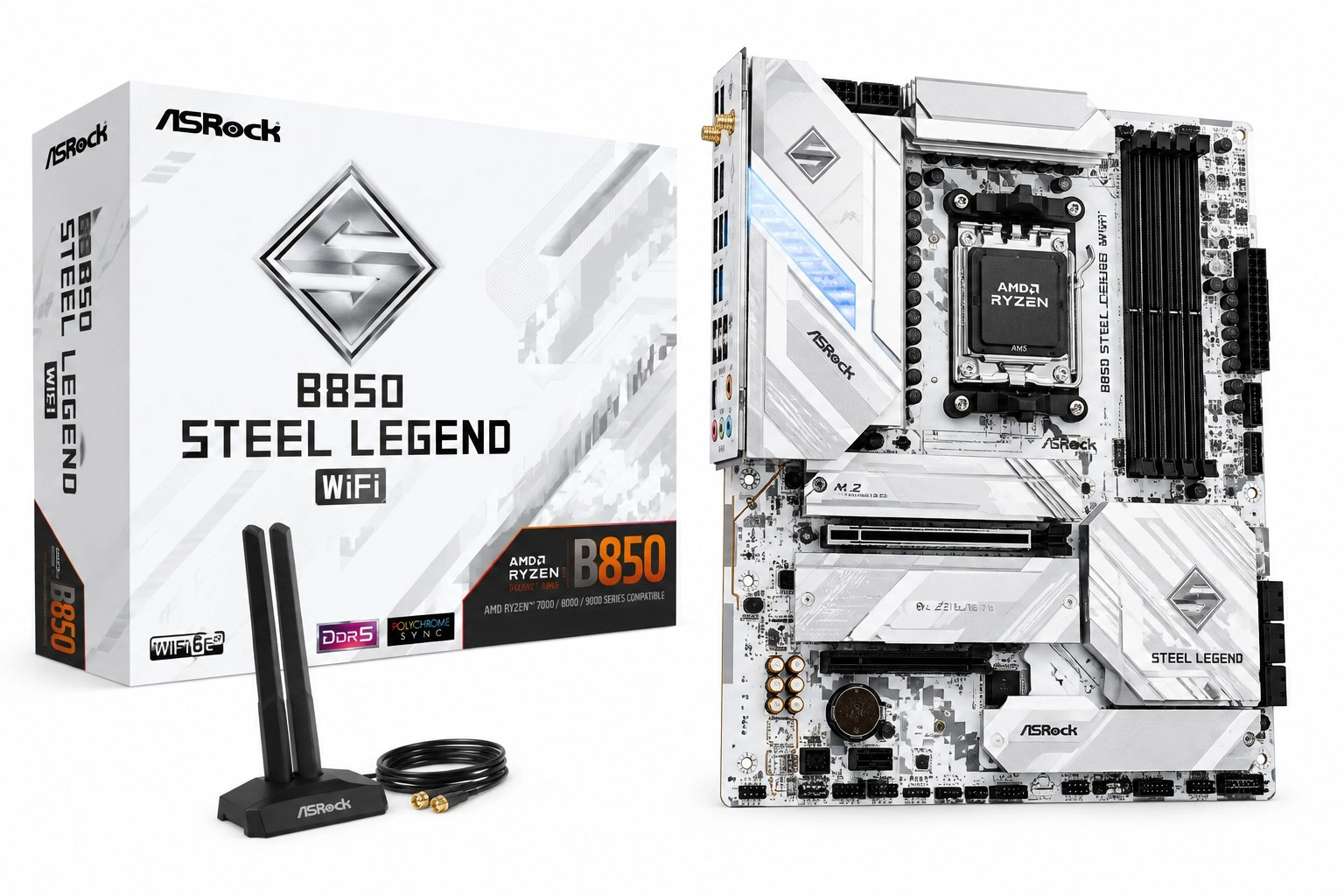
1. ASRock B850 Steel Legend WiFi
Best motherboard for gaming overall AM5 value
Specification Details
| Specification | Verified detail |
| Socket and size | AM5; AMD B850; Ryzen 7000, 8000 and 9000; ATX 305 × 244 mm |
| Memory | 4 DDR5 DIMMs; up to 256GB; advertised 8000+ MT/s OC |
| Power delivery | 14+2+1 design; 80A DrMOS for Vcore and SoC |
| Expansion | Main PCIe 5.0 ×16; lower PCIe 4.0 ×4; lower slot disabled by M2_4 |
| Storage | 4 M.2: 1 × PCIe 5.0 ×4, 3 × PCIe 4.0 ×4; 4 SATA 6Gb/s |
| Network and audio | 2.5GbE; Wi-Fi 7 at 160MHz; Bluetooth 5.4; Realtek ALC4082 |
| Rear USB | 11 ports: 2 C + 2 A at 10Gbps, 3 A at 5Gbps, 4 USB 2.0 |
| Front USB and recovery | 20Gbps USB-C header; BIOS Flashback |
The B850 Steel Legend WiFi is the strongest starting point for an ordinary AM5 gaming tower in this shortlist. Its four M.2 sockets, capable power delivery, and 2.5Gb Ethernet cover a single graphics card, a large game library, and a fast home network. The white finish is distinctive, but the useful purchase is the connection set behind it.
ASRock announced its B850 family in January 2025. At the checked Newegg price of $209.99, this board costs less than the B850 Tomahawk II while retaining four SSD sockets. Choose MSI instead if you can use 5Gb Ethernet or two Gen5 SSDs. The Steel Legend’s fourth M.2 socket disables its lower expansion slot, so a capture card can change that value calculation.
Tom’s Hardware’s August 2025 review found gaming performance broadly typical of its comparison group, with weaker results in some memory-sensitive productivity tests. That is useful evidence for a gaming recommendation, not proof that every workload performs identically. A Ryzen 7 9800X3D gaming build is a sensible compatibility example, subject to the CPU support list and BIOS; the FPS below were measured with a 9900X.
Sources: Manufacturer specifications · Independent review · Price and availability
Release evidence: B850 family announced 6 January 2025; independent review published 4 August 2025.
Reasons to buy
- Four M.2 sockets and good onboard audio at a mainstream AM5 price.
- A 20Gbps front USB-C header suits cases with a matching port.
- BIOS Flashback helps when a supported CPU needs a newer firmware version.
Reasons to avoid
- M2_4 and the lower expansion slot cannot be used together.
- No USB4; Ethernet is 2.5Gb rather than 5Gb.
Published gaming results
Published test system: AMD Ryzen 9 9900X, ASUS TUF Gaming GeForce RTX 4080 16GB, and a listed base kit of 32GB DDR5-6000 CL36. Source: Tom’s Hardware.
| Game | Average FPS | Minimum FPS |
| Cyberpunk 2077 | 135 | 98 |
| F1 24 | 169 | 123 |
Cyberpunk 2077: 1920 × 1080, Ultra ray tracing, DLSS Balanced. F1 24: 1920 × 1080, Ultra High, TAA, 16× AF, Great Britain dry. Minimum FPS is the reported minimum, not a 1% low.
These results support normal gaming operation on the review system. They do not justify upgrading from another adequate AM5 board for a small FPS change.
Sources: Published gaming tests · Figure based on official specifications
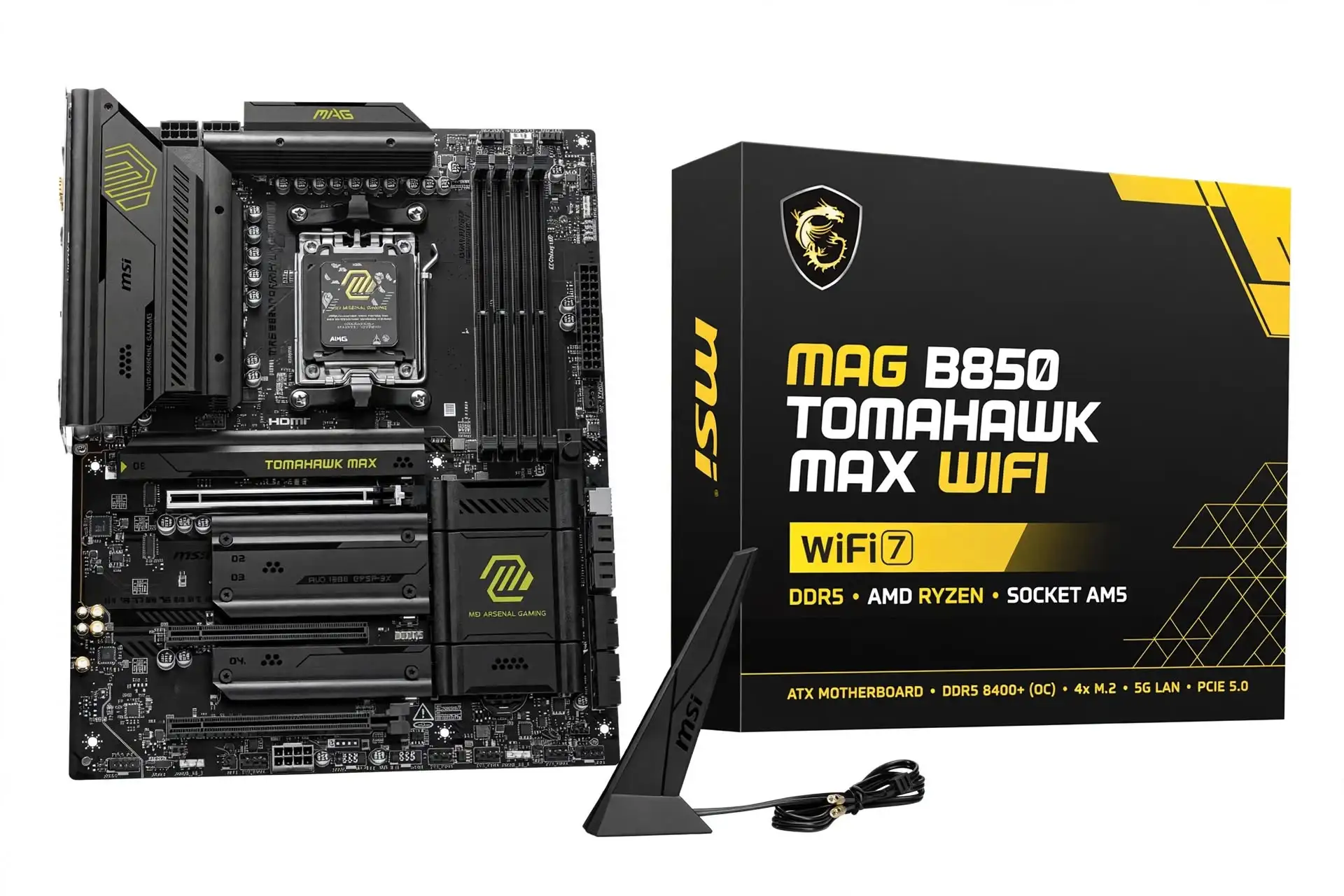
2. MSI MAG B850 TOMAHAWK MAX WIFI II
Best AM5 pick for dual Gen5 SSDs
Specification Details
| Specification | Verified detail |
| Socket and size | AM5; AMD B850; Ryzen 7000, 8000 and 9000; ATX 304.8 × 243.84 mm |
| Memory and power | 4 DDR5 DIMMs; 256GB; 8400+ MT/s OC; 14+2+1 power design with 80A stages |
| Expansion | Main PCIe 5.0 ×16; lower slots PCIe 3.0 ×1 and PCIe 4.0 ×4 |
| Storage | 4 M.2: 2 × PCIe 5.0 ×4, 1 × PCIe 4.0 ×4, 1 × PCIe 4.0 ×2; 4 SATA |
| Lane sharing | M2_3 occupied: PCI_E3 becomes ×2; forcing PCI_E3 to ×4 disables M2_3 |
| Network and audio | 5GbE; Wi-Fi 7 at 320MHz; Bluetooth 5.4; Realtek ALC4080 |
| Rear USB | 10 ports: 3 C + 2 A at 10Gbps, 1 A at 5Gbps, 4 USB 2.0 |
| Front USB and recovery | 20Gbps USB-C header; Flash BIOS and Clear CMOS; 64MB BIOS ROM |
The second-generation B850 Tomahawk MAX is worth the step up when storage and networking are real requirements and is also called a best motherboard for gaming. Two CPU-connected Gen5 M.2 sockets let it host a fast system SSD and a second high-bandwidth drive without using the main graphics slot’s lanes on the specified Ryzen 7000/9000 configuration. A 5Gb wired controller is useful for a matching local network or NAS.
MSI’s March 2026 manual identifies this as a newer revision, so check the complete MAX WIFI II name when shopping. The checked $259.99 Newegg listing puts it $50 above the Steel Legend. That premium buys connectivity and tuning facilities, including an independent clock generator; it does not establish a meaningful gaming lead.
Tom’s Hardware’s review describes an incremental refresh with broadly average gaming results. Rear USB-C is limited to 10Gbps even though there is a 20Gbps front header. The remaining compromise is lower-slot sharing: using M2_3 reduces PCI_E3 to two lanes. Buy it for two fast SSDs and 5GbE, after checking any add-in card’s bandwidth needs.
Sources: Manufacturer specifications · Independent review · Price and availability
Release evidence: 2026 refresh; MSI manual first release dated March 2026. Exact worldwide retail release day is unconfirmed.
Reasons to buy
- Two CPU-connected Gen5 M.2 sockets on a mainstream chipset.
- 5Gb Ethernet and a 320MHz Wi-Fi 7 implementation.
- Firmware recovery buttons and useful memory and clock tuning controls.
Reasons to avoid
- No USB4 and no 20Gbps rear USB-C port.
- The lower expansion slot shares bandwidth with M2_3.
Published gaming results
Published test system: AMD Ryzen 9 9900X, ASUS TUF Gaming GeForce RTX 4080 16GB, and a listed base kit of 32GB DDR5-6000 CL36. Source: Tom’s Hardware.
| Game | Average FPS | Minimum FPS |
| Cyberpunk 2077 | 136 | 107 |
| F1 24 | 168 | 124 |
Cyberpunk 2077: 1920 × 1080, Ultra ray tracing, DLSS Balanced. F1 24: 1920 × 1080, Ultra High, TAA, 16× AF, Great Britain dry. Minimum FPS is the reported minimum, not a 1% low.
Against the Steel Legend’s 135 FPS in Cyberpunk and 169 FPS in F1 24, these averages provide no consistent gaming advantage. Spend the premium only if the extra connections solve a need.
Sources: Published gaming tests · Figure based on official specifications
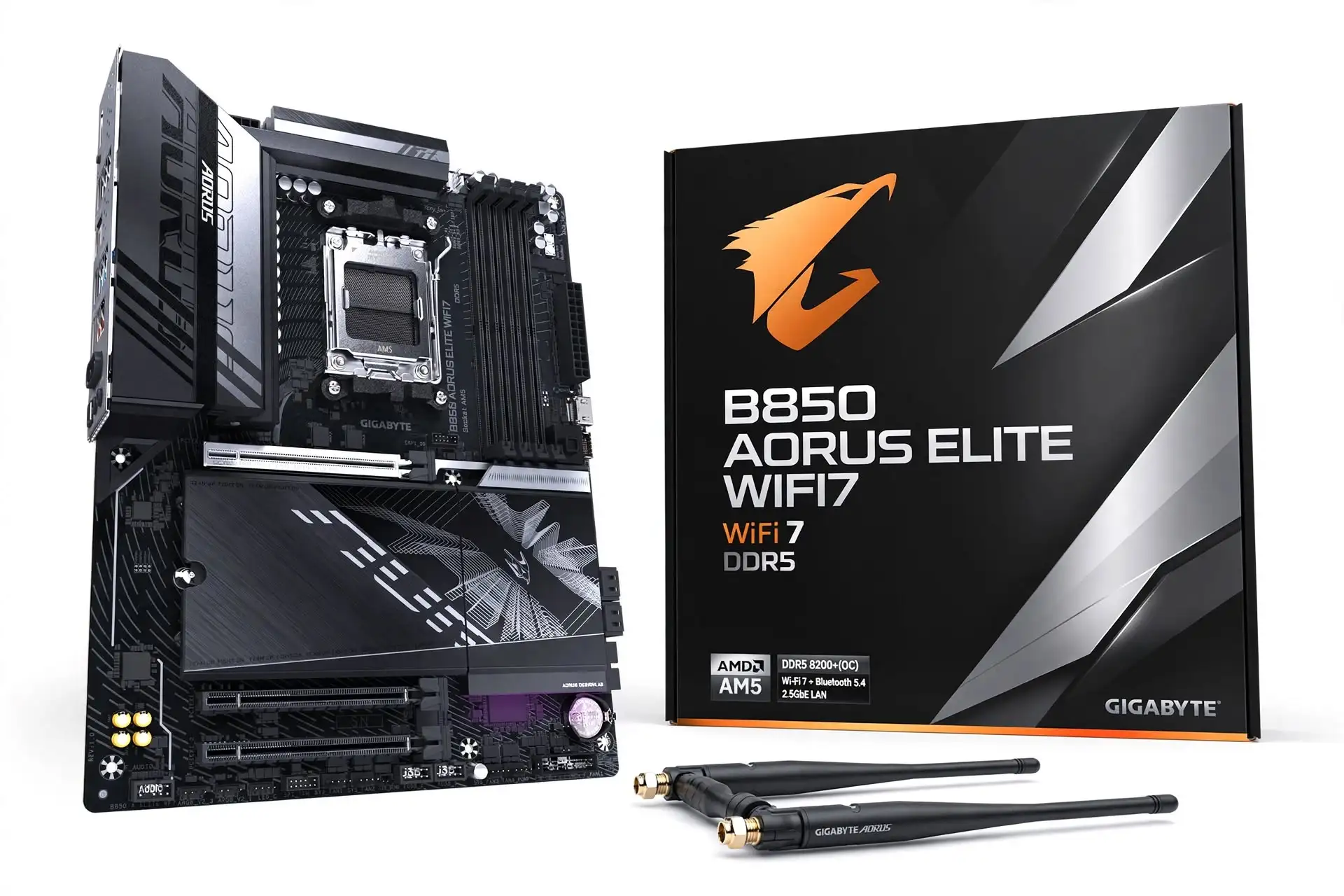
3. Gigabyte B850 AORUS ELITE WIFI7
Best for a busy rear USB panel
Specification Details
| Specification | Verified detail |
| Socket and size | AM5; AMD B850; Ryzen 7000, 8000 and 9000; ATX 305 × 244 mm; rev. 1.x |
| Memory and power | 4 DDR5 DIMMs; 256GB; 8200 MT/s OC; 14 Vcore stages rated 80A |
| Expansion | Main PCIe 5.0 ×16; two full-length lower slots, each electrically PCIe 3.0 ×1 |
| Storage | 3 M.2: 1 × PCIe 5.0 ×4, 2 × PCIe 4.0 ×4; 4 SATA 6Gb/s |
| Networking | 2.5GbE; Wi-Fi 7 at 160MHz; Bluetooth 5.4 |
| Audio revision | Rev. 1.1: Realtek ALC1220; Rev. 1.0: unspecified Realtek codec on the official page |
| Rear USB | 12 ports: 1 C + 2 A at 10Gbps, 5 A at 5Gbps, 4 USB 2.0 |
| Front USB and recovery | 20Gbps USB-C header; Q-Flash Plus |
A keyboard, mouse, controller receiver, webcam, microphone, and external drive can exhaust a modest rear panel. The B850 AORUS ELITE WIFI7 gives that kind of gaming setup twelve rear USB ports. Its three M.2 sockets are sufficient for many builds, although competing boards in this guide offer four.
The board belongs to Gigabyte’s January 2025 B850 launch. The exact black Wi-Fi 7 model was listed at $229.99 by Newegg when checked, matching its original review price. It is competitive if rear USB count matters, but the $30 step to the Tomahawk II is worthwhile when you need 5Gb networking or a fourth SSD socket.
The independent review found relatively weak gaming results within a close comparison group rather than a clear platform failure. The more important buying checks are physical: both lower full-length slots have only one electrical lane, and audio hardware differs by board revision. Ask the retailer for the revision if the onboard codec is part of your decision.
Sources: Manufacturer specifications · Independent review · Price and availability
Release evidence: Gigabyte B800 launch announcement dated 8 January 2025; this model reviewed 14 January 2025.
Reasons to buy
- Twelve rear USB ports reduce dependence on an external hub.
- A Gen5 graphics slot and Gen5 system-drive socket.
- Q-Flash Plus and quick-release hardware simplify assembly and recovery.
Reasons to avoid
- Only three M.2 sockets; lower expansion slots are PCIe 3.0 ×1.
- Audio specifications depend on the printed hardware revision.
Published gaming results
Published test system: AMD Ryzen 9 9900X, ASUS TUF Gaming GeForce RTX 4080 16GB, and a listed base kit of 32GB DDR5-6000 CL36. Source: Tom’s Hardware.
| Game | Average FPS | Minimum FPS |
| Cyberpunk 2077 | 132 | 100 |
| F1 24 | 162 | 119 |
Cyberpunk 2077: 1920 × 1080, Ultra ray tracing, DLSS Balanced. F1 24: 1920 × 1080, Ultra High, TAA, 16× AF, Great Britain dry. Minimum FPS is the reported minimum, not a 1% low.
The published averages trail several AM5 peers in these tests. They justify checking current BIOS behavior, but they do not support a fixed FPS penalty across other CPUs, graphics cards, or games.
Sources: Published gaming tests · Figure based on official specifications
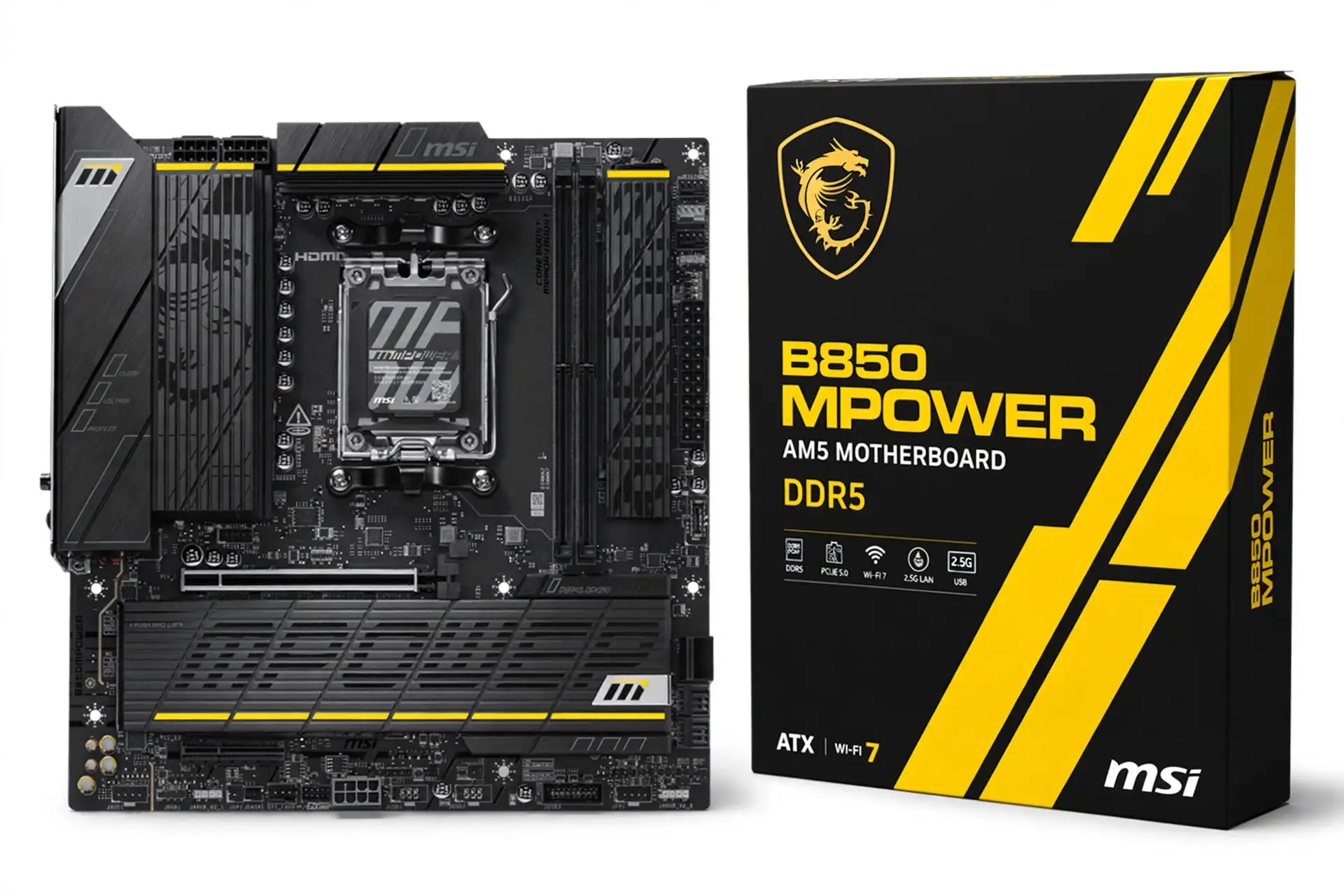
4. MSI B850MPOWER
Best Micro ATX option for memory tuning
Specification Details
| Specification | Verified detail |
| Socket and size | AM5; AMD B850; Ryzen 7000, 8000 and 9000; Micro ATX 243.84 × 243.84 mm |
| Memory | 2 DDR5 DIMMs; 128GB; Ryzen 9000 advertised 8400+ MT/s OC |
| Power and expansion | 12 Vcore 60A stages; main PCIe 5.0 ×16; lower PCIe 4.0 ×4 |
| Storage | 4 M.2: 2 × PCIe 5.0 ×4, 1 × PCIe 4.0 ×4, 1 rear-mounted PCIe 4.0 ×2; 2 SATA |
| Network and audio | 5GbE; Wi-Fi 7 at 320MHz; Bluetooth 5.4; Realtek ALC4080 |
| Rear USB | 9 ports: 1 C at 20Gbps, 1 C + 3 A at 10Gbps, 4 A at 5Gbps |
| Front USB | 10Gbps USB-C header |
| Tuning and recovery | Independent clock generator; EZ Dashboard; Flash BIOS and Clear CMOS |
The B850MPOWER uses only two memory slots on a Micro ATX board. That layout targets memory tuning while preserving four M.2 sockets, 5Gb Ethernet and a useful 20Gbps rear USB-C port. It is a more specialized choice than a basic compact gaming board, particularly if you enjoy adjusting memory timings and validating stability.
MSI previewed the model at Computex in May 2025, and Tom’s Hardware reviewed it in December. MSI’s US store lists it at $229.99 but showed it out of stock when checked. Treat that as a target price, not an immediately available deal. A large reseller markup would undermine its appeal against an ATX B850 model.
The review’s Ryzen 9 9900X sample ran the tested DDR5-7200 configuration, while the DDR5-8000 kit did not pass its stability test. That matters more than the headline 10200+ MT/s claim, which MSI ties to selected Ryzen 8000 configurations. Two DIMM slots also mean a later capacity upgrade may require replacing both modules.
Sources: Manufacturer specifications · Independent review · Price and availability
Release evidence: Publicly previewed at Computex in May 2025; independent review published 30 December 2025. Exact global retail launch day unconfirmed.
Reasons to buy
- Two-DIMM layout and dedicated controls for memory enthusiasts.
- Four M.2 sockets, including two Gen5 links, in Micro ATX.
- 5Gb Ethernet and 20Gbps rear USB-C at its listed target price.
Reasons to avoid
- Out of stock at the checked MSI store; avoid inflated resale pricing.
- Only two RAM slots and two SATA ports; one M.2 socket is on the rear.
Published gaming results
Published test system: AMD Ryzen 9 9900X, ASUS TUF Gaming GeForce RTX 4080 16GB, and a listed base kit of 32GB DDR5-6000 CL36. Source: Tom’s Hardware.
| Game | Average FPS | Minimum FPS |
| Cyberpunk 2077 | 141 | 108 |
| F1 24 | 166 | 124 |
Cyberpunk 2077: 1920 × 1080, Ultra ray tracing, DLSS Balanced. F1 24: 1920 × 1080, Ultra High, TAA, 16× AF, Great Britain dry. Minimum FPS is the reported minimum, not a 1% low.
Cyberpunk performance was strong in the published comparison, while F1 24 was ordinary. Neither result proves that extreme memory tuning is necessary for a good gaming experience.
Sources: Published gaming tests · Figure based on official specifications
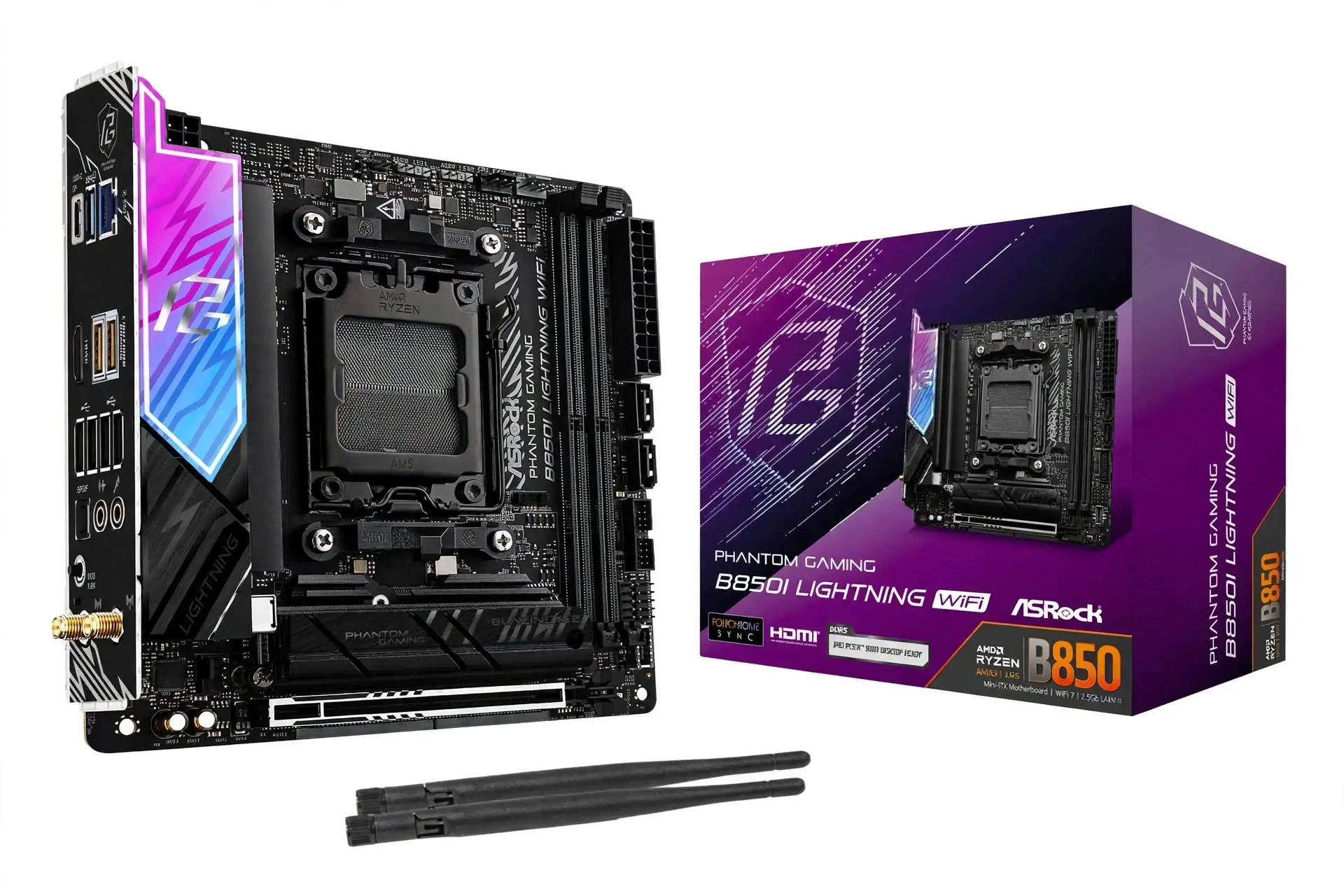
5. ASRock B850I Lightning WiFi
Best compact AM5 option near its original price
Specification Details
| Specification | Verified detail |
| Socket and size | AM5; AMD B850; Ryzen 7000, 8000 and 9000; Mini ITX 170 × 170 mm |
| Memory and power | 2 DDR5 DIMMs; 128GB; 8200+ MT/s OC; 10+1+1 design with 110A Vcore stages |
| Expansion and storage | 1 PCIe 5.0 ×16; 2 M.2: PCIe 5.0 ×4 + PCIe 4.0 ×4; 2 SATA |
| Networking | Killer E3100G 2.5GbE; Wi-Fi 6E; Bluetooth 5.2 |
| Audio | Realtek ALC1220 |
| Rear USB | 8 ports: 1 C + 2 A at 10Gbps, 1 A at 5Gbps, 4 USB 2.0 |
| USB caveat | Rear USB-C supports up to 40Gbps with selected CPUs; do not assume this with Ryzen 7000/9000 |
| Front USB and recovery | 5Gbps USB-C header; BIOS Flashback |
A 170mm-square Mini ITX board lets a gaming PC fit into cases that cannot take Micro ATX. The B850I Lightning WiFi retains a full graphics slot, two SSD sockets, and a substantial power-delivery design. The limitation is expansion: once a graphics card is installed, there is no second PCIe slot for a capture card or network adapter.
This early-2025 model was reviewed at $209.99, a much more persuasive value than the checked $295.99 third-party Newegg listing. At the higher price, it becomes a conditional recommendation: compare local stock, warranty, and other Mini ITX options before ordering. Its compact size, rather than higher frame rates, must justify the premium.
Tom’s Hardware found strong gaming results in its test group, but the USB specification needs care. Selected Ryzen 8000 processors can expose the faster rear USB-C mode, while the same processors can reduce graphics-link capabilities. Choosing a CPU purely to unlock one port can therefore weaken the balance of a dedicated-GPU gaming build.
Sources: Manufacturer specifications · Independent review · Price and availability
Release evidence: Part of the January 2025 B850 generation; independent review published 18 February 2025.
Reasons to buy
- Mini ITX dimensions with a Gen5 graphics slot and Gen5 SSD socket.
- Onboard ALC1220 audio and BIOS Flashback.
- At roughly its original $210 price, a practical small-system foundation.
Reasons to avoid
- The checked marketplace price is substantially above its review price.
- Two SSD sockets, one expansion slot, and only 5Gbps front USB-C.
Published gaming results
Published test system: AMD Ryzen 9 9900X, ASUS TUF Gaming GeForce RTX 4080 16GB, and a listed base kit of 32GB DDR5-6000 CL36. Source: Tom’s Hardware.
| Game | Average FPS | Minimum FPS |
| Cyberpunk 2077 | 142 | 99 |
| F1 24 | 172 | 121 |
Cyberpunk 2077: 1920 × 1080, Ultra ray tracing, DLSS Balanced. F1 24: 1920 × 1080, Ultra High, TAA, 16× AF, Great Britain dry. Minimum FPS is the reported minimum, not a 1% low.
The tested compact board did not impose an obvious gaming handicap. A finished small case still needs enough CPU and GPU cooling; an open review bench does not establish your enclosure’s temperatures.
Sources: Published gaming tests · Figure based on official specifications
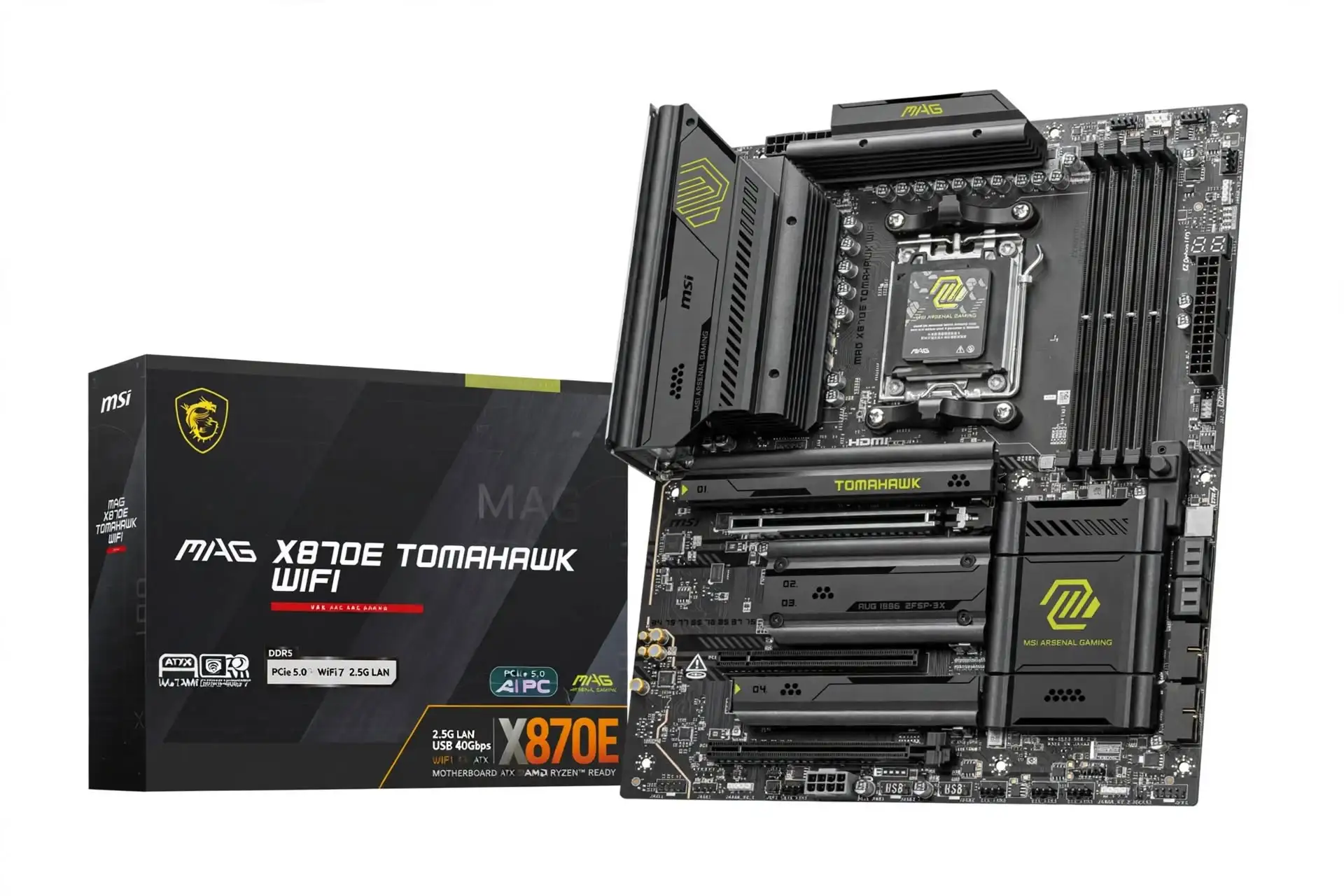
6. MSI MAG X870E TOMAHAWK WIFI
Best ATX AM5 option for USB4
Specification Details
| Specification | Verified detail |
| Socket and size | AM5; AMD X870E; Ryzen 7000, 8000 and 9000; ATX 304.8 × 243.84 mm |
| Memory and power | 4 DDR5 DIMMs; 256GB; 8400+ MT/s OC; 14+2+1 design with 80A stages |
| Expansion | Main PCIe 5.0 ×16; lower PCIe 3.0 ×1 and PCIe 4.0 ×4 |
| Storage | 4 M.2: 2 Gen5-capable CPU sockets + 2 PCIe 4.0 ×4; 4 SATA |
| Lane sharing | M2_2 runs PCIe 5.0 ×2 with USB4 active; forcing M2_2 to ×4 disables rear USB4 |
| Network and audio | 5GbE; Wi-Fi 7 at 320MHz; Bluetooth 5.4; Realtek ALC4080 |
| Rear USB | 12 ports: 2 C at 40Gbps, 1 C + 2 A at 10Gbps, 3 A at 5Gbps, 4 USB 2.0 |
| Front USB and recovery | 20Gbps USB-C header; Flash BIOS, Clear CMOS and diagnostic code display |
The X870E Tomahawk adds two rear USB4 ports to a familiar ATX layout. It suits a gaming and work machine that also uses fast external storage or a compatible dock. The 5Gb network controller, four SSD sockets, and diagnostic display can be useful daily; the chipset label alone is not a reason to replace a good B850 board.
MSI announced the original X870E TOMAHAWK WIFI in January 2025. Its checked $329.99 price is $70 above the B850 Tomahawk II. Pay that difference for USB4 and the broader connection set. The wider Taichi is an alternative if stock returns at a competitive price, but the Tomahawk is the available ATX choice at the checked retailer.
Tom’s Hardware’s June 2025 review reported competitive performance and a substantial feature set. Its high F1 24 result is encouraging, but the important design limitation is documented by MSI: M2_2 shares the available CPU lane allocation with USB4. Running that SSD at its full four-lane Gen5 mode requires disabling the rear USB4 ports.
Sources: Manufacturer specifications · Independent review · Price and availability
Release evidence: Announced 6 January 2025; independent review published 6 June 2025. This section covers the original WIFI model, not MAX or PZ.
Reasons to buy
- Two 40Gbps rear USB4 ports in a standard ATX form factor.
- 5Gb Ethernet, 320MHz Wi-Fi 7 and twelve rear USB ports.
- Diagnostic code display and recovery buttons ease troubleshooting.
Reasons to avoid
- The second Gen5 SSD socket and USB4 have a bandwidth trade-off.
- The extra cost brings little benefit to a simple one-SSD gaming PC.
Published gaming results
Published test system: AMD Ryzen 9 9900X, ASUS TUF Gaming GeForce RTX 4080 16GB, and a listed base kit of 32GB DDR5-6000 CL36. Source: Tom’s Hardware.
| Game | Average FPS | Minimum FPS |
| Cyberpunk 2077 | 141 | 105 |
| F1 24 | 178 | 129 |
Cyberpunk 2077: 1920 × 1080, Ultra ray tracing, DLSS Balanced. F1 24: 1920 × 1080, Ultra High, TAA, 16× AF, Great Britain dry. Minimum FPS is the reported minimum, not a 1% low.
F1 24 was faster here than on several B850 boards in the published comparison. Different firmware and test dates prevent treating that gap as a guaranteed X870E chipset advantage.
Sources: Published gaming tests · Figure based on official specifications
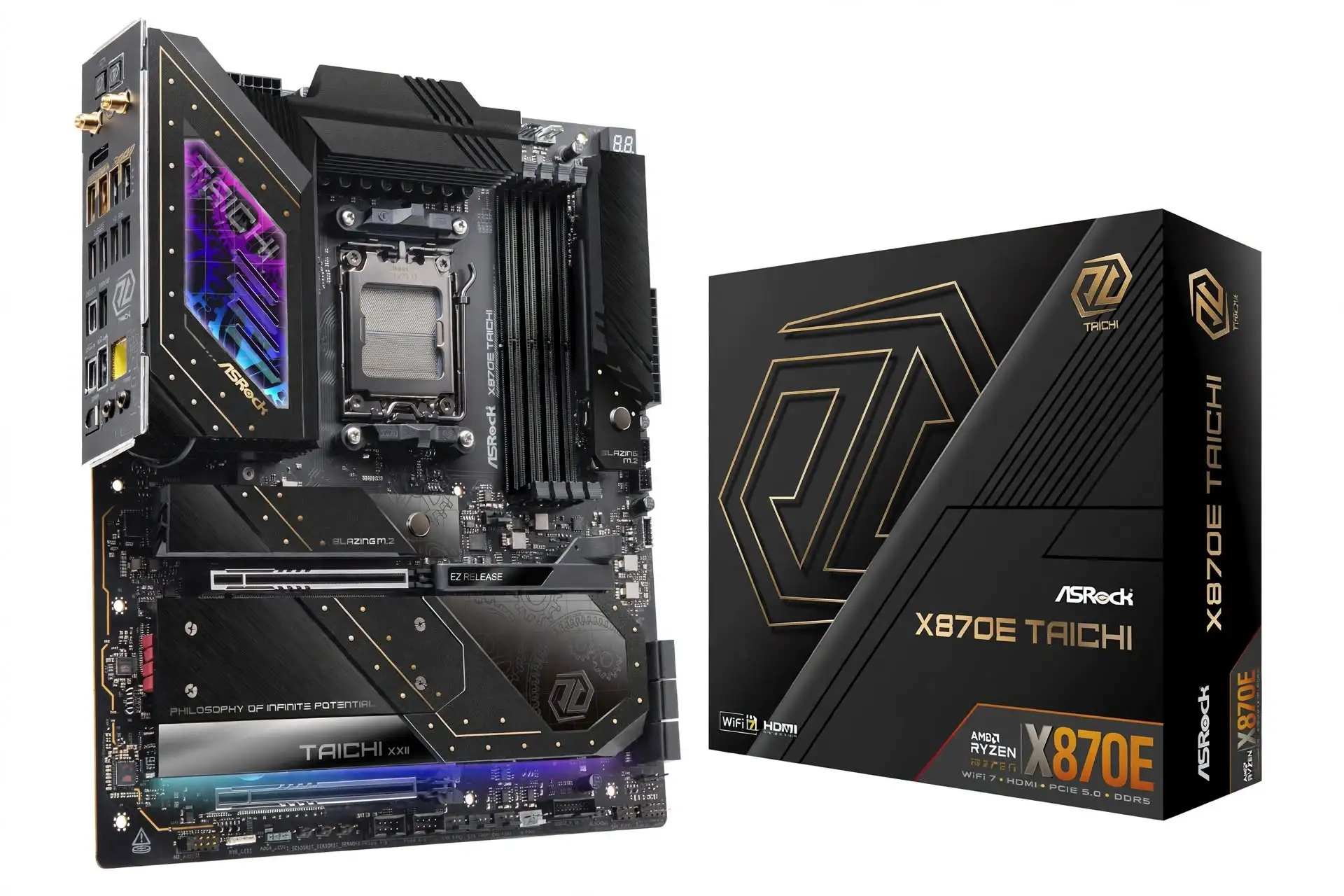
7. ASRock X870E Taichi
Best for substantial add-in expansion
Specification Details
| Specification | Verified detail |
| Socket and size | AM5; AMD X870E; Ryzen 7000, 8000 and 9000; E-ATX 305 × 267 mm |
| Memory and power | 4 DDR5 DIMMs; 256GB; 8200+ MT/s OC; 24+2+1 design with 110A power stages |
| Expansion | Two PCIe 5.0 slots: ×16 with one slot used, or ×8/×8 with both |
| Storage | 4 M.2: 1 × PCIe 5.0 ×4, 3 × PCIe 4.0 ×4; 6 SATA 6Gb/s |
| Networking | 5GbE; Wi-Fi 7 at 160MHz; Bluetooth 5.4 |
| Audio | Realtek ALC4082 plus ESS SABRE9219 DAC |
| Rear USB | 12 ports: 2 C at 40Gbps, 5 A at 10Gbps, 3 A at 5Gbps, 2 USB 2.0 |
| Front USB and recovery | 20Gbps USB-C header; BIOS Flashback; Clear CMOS; Dr. Debug; onboard power/reset |
The Taichi earns its place through expansion flexibility, six SATA ports and a richer analog-audio implementation. Its second CPU-connected slot can accept a demanding adapter while the primary slot runs at eight lanes. That layout is more useful to a gaming and content-creation workstation than to a basic one-GPU, one-SSD system.
ASRock introduced this X870E generation in September 2024. The October review used a $499.99 price, but the exact Newegg product page was out of stock when checked; a discounted search listing was not a confirmed purchasable offer. Keep it on a specialist shortlist if stock returns at a competitive price. For an immediate build, the available X870E Tomahawk is easier to recommend. Taichi Lite, White and OCF are different products.
Tom’s Hardware’s review highlighted its extensive features rather than a special gaming lead. The published game results sit close to less expensive boards. Its large power-delivery specification therefore should not be interpreted as extra FPS; choose it because you need its slot arrangement, ports, troubleshooting controls or audio hardware.
Sources: Manufacturer specifications · Independent review · Price and availability
Release evidence: ASRock X870E launch announcement dated 30 September 2024; independent review published 21 October 2024.
Reasons to buy
- CPU-connected ×8/×8 expansion for suitable add-in cards.
- Six SATA ports, two USB4 ports, and 5Gb networking.
- ALC4082 audio with a separate ESS DAC and extensive diagnostic controls.
Reasons to avoid
- Out of stock at the checked retailer; its 267mm width also needs a compatible case.
- Only one Gen5 M.2 socket; using the second main slot reduces the GPU link to ×8.
Published gaming results
Published test system: AMD Ryzen 9 9900X, ASUS TUF Gaming GeForce RTX 4080 16GB, and a listed base kit of 32GB DDR5-6000 CL36. Source: Tom’s Hardware.
| Game | Average FPS | Minimum FPS |
| Cyberpunk 2077 | 135 | 98 |
| F1 24 | 166 | 124 |
Cyberpunk 2077: 1920 × 1080, Ultra ray tracing, DLSS Balanced. F1 24: 1920 × 1080, Ultra High, TAA, 16× AF, Great Britain dry. Minimum FPS is the reported minimum, not a 1% low.
The Steel Legend matches the reported Cyberpunk average at a much lower original market position. Taichi spending is justified by expansion and features, not these game averages.
Sources: Published gaming tests · Figure based on official specifications
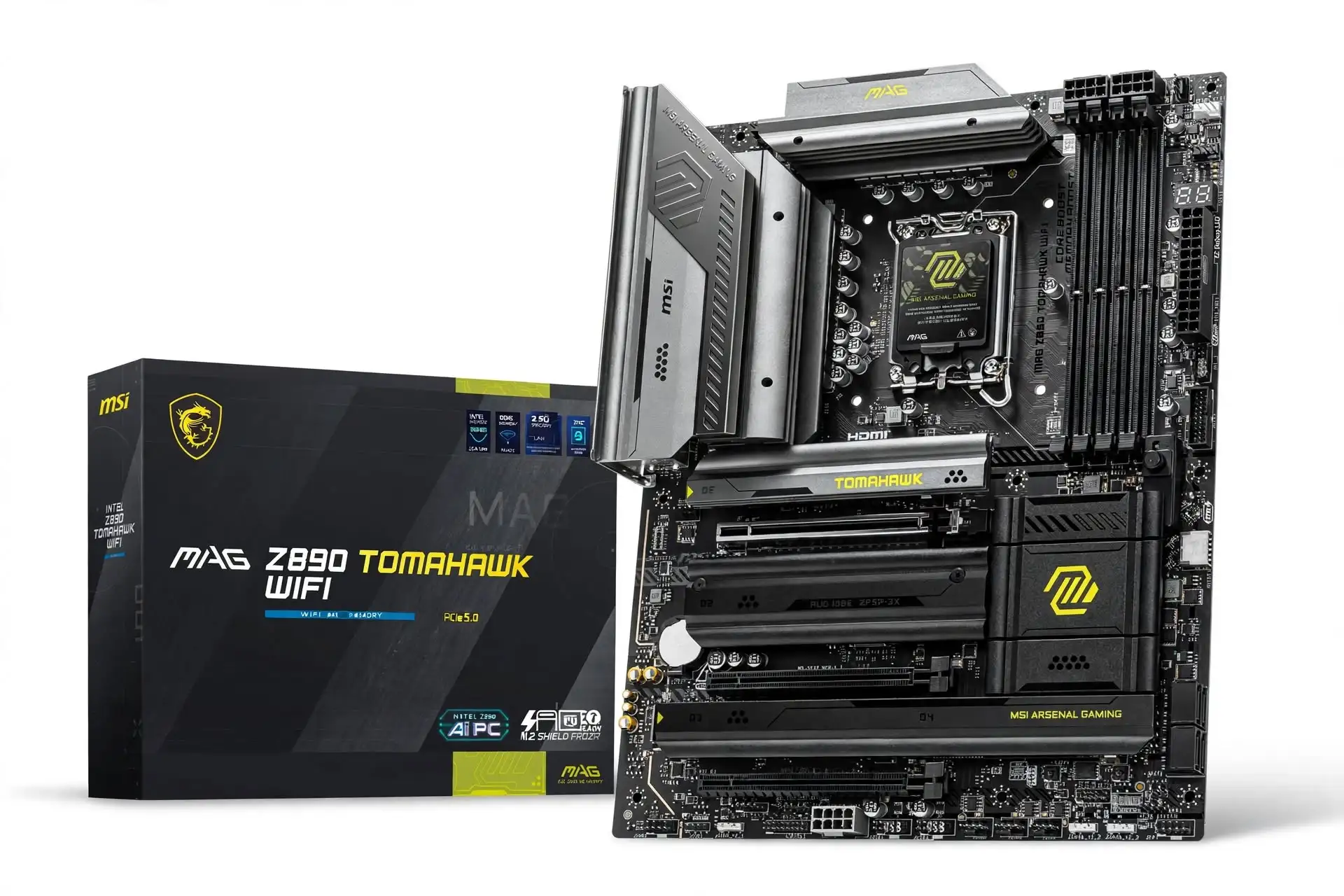
8. MSI MAG Z890 TOMAHAWK WIFI II
Best Intel Z890 value in this shortlist
Specification Details
| Specification | Verified detail |
| Socket and size | LGA1851; Intel Z890; Core Ultra desktop Series 2; ATX 304.8 × 243.84 mm |
| Memory and power | 4 DDR5 DIMMs; 256GB; 9200+ MT/s OC; 16 Vcore stages rated 90A |
| Expansion | Main PCIe 5.0 ×16; two lower PCIe 4.0 ×4 slots |
| Storage | 4 M.2: 1 × PCIe 5.0 ×4, 3 × PCIe 4.0 ×4; M2_4 also supports SATA; 4 SATA ports |
| Network and audio | Killer E5000B 5GbE; Wi-Fi 7 at 160MHz; Bluetooth 5.4; Realtek ALC1220P |
| Rear USB | 9 ports: 1 Thunderbolt 4 C, 1 C + 3 A at 10Gbps, 4 A at 5Gbps |
| Thunderbolt port limits | 40Gbps Thunderbolt device; up to 20Gbps USB4 device; up to 10Gbps USB 3.2 device |
| Front USB and recovery | 20Gbps USB-C header with up to 27W PD; Flash BIOS, Clear CMOS and diagnostic display |
The Z890 Tomahawk WIFI II is the practical Intel choice here when you need 5Gb networking, four SSD sockets, and CPU tuning support. Its LGA1851 socket targets Core Ultra desktop Series 2, not older LGA1700 Core processors. Check firmware support for the exact CPU, including the later 200S Plus models.
This 2026 refresh was reviewed in July and was listed at $229.99 by Newegg when checked. Against the checked PRIME Z890-P WIFI offer, MSI provides faster wired networking and more diagnostic hardware for less money. It is still unnecessary spending if a cheaper B860 board already has the required ports and you will use standard CPU settings.
Tom’s Hardware found competitive gaming performance with a Core Ultra 7 270K Plus. The motherboard has four memory slots despite an inconsistent count in the review text; MSI’s specification is authoritative here. Also distinguish Thunderbolt mode from USB mode: the same rear Type-C connector has different limits for different device protocols.
Sources: Manufacturer specifications · Independent review · Price and availability
Release evidence: 2026 refresh, reviewed 17 July 2026; an exact worldwide retail release day was not established.
Reasons to buy
- 5Gb Ethernet, four M.2 sockets and useful diagnostic controls.
- Z890 tuning features for a compatible unlocked processor.
- Thunderbolt 4 and a front USB-C header with up to 27W charging.
Reasons to avoid
- Rear USB4 devices are limited to 20Gbps on the Thunderbolt connector.
- Not compatible with LGA1700 processors; BIOS checks still apply within LGA1851.
Published gaming results
Published test system: Intel Core Ultra 7 270K Plus, ASUS TUF Gaming GeForce RTX 4080 16GB, and a listed 32GB DDR5-7600 CL38 base kit. Source: Tom’s Hardware.
| Game | Average FPS | Minimum FPS |
| Cyberpunk 2077 | 145 | 124 |
| F1 25 | 186 | 94 |
Cyberpunk 2077: 1920 × 1080, Ultra ray tracing, DLSS Balanced. F1 25: 1920 × 1080, Ultra High, DLSS Balanced, 16× AF, Texas. Minimum FPS is not a 1% low.
The 145 FPS Cyberpunk average is close to the PRIME’s 144 FPS on the same listed CPU/GPU class. F1 25 uses a different game version from the AMD F1 24 tests, so those tables cannot rank Intel against AMD.
Sources: Published gaming tests · Figure based on official specifications
9. ASUS PRIME Z890-P WIFI
Intel alternative for more expansion slots
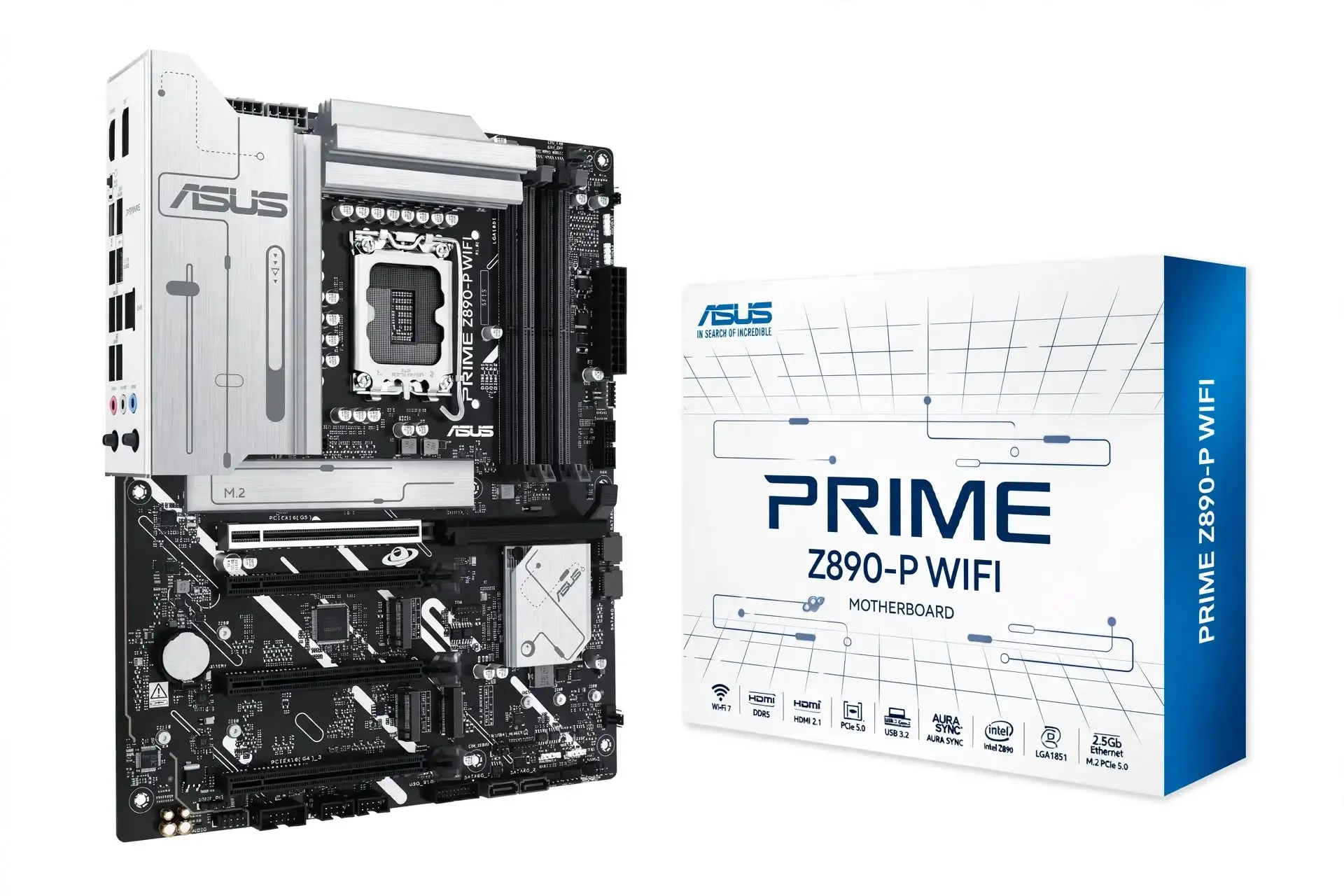
Specification Details
| Specification | Verified detail |
| Socket and size | LGA1851; Intel Z890; Core Ultra desktop Series 2; ATX 305 × 244 mm |
| Memory and power | 4 DDR5 DIMMs; 256GB; 8666+ MT/s OC; CUDIMM support; 14 Vcore stages rated 80A |
| Expansion | Main PCIe 5.0 ×16; two lower PCIe 4.0 ×4 and one PCIe 4.0 ×1 slot |
| Storage | 4 M.2: CPU PCIe 5.0 ×4 + CPU PCIe 4.0 ×4 + 2 chipset PCIe 4.0 ×4; 4 SATA |
| Networking | 2.5GbE; Wi-Fi 7 at 160MHz; Bluetooth 5.4 |
| Audio | Realtek 7.1-channel HD audio; codec model not identified on the official specification page |
| Rear USB | 8 ports: 1 Thunderbolt 4 C at 40Gbps, 1 A at 10Gbps, 2 A at 5Gbps, 4 USB 2.0 |
| Front USB and recovery | 10Gbps USB-C header; BIOS FlashBack |
The PRIME Z890-P WIFI is an option for a build that needs several add-in cards without moving to a premium Intel board. Its lower slots provide two four-lane links and one single-lane link, while two of its M.2 sockets connect directly to the CPU. A thick graphics card can still obstruct nearby slots, so electrical capability is only the first fit check.
ASUS announced the Z890 family in October 2024. This model’s May 2026 review used a $229.99 price; the checked $241.89 Newegg offer came from a third-party seller shipping from China. Compare warranty, delivery, and final cost with the MSI Tomahawk II. At a similar or higher total price, the PRIME needs a specific slot-layout advantage to justify its slower Ethernet.
Tom’s Hardware reported strong game results, but its nominal DDR5-7600 test kit would not boot; other tested kits at 7200 and 8200 worked. That is a reason to use the memory support list and a returnable matched kit, not to claim universal incompatibility. The source does not clearly identify the replacement memory configuration for each game run.
Sources: Manufacturer specifications · Independent review · Price and availability
Release evidence: ASUS Z890 family announced 14 October 2024; this model reviewed 13 May 2026.
Reasons to buy
- Four physical full-length expansion slots with useful lower-slot lane options.
- Four M.2 sockets, including two connected directly to the CPU.
- Thunderbolt 4 and BIOS FlashBack without a flagship-board price.
Reasons to avoid
- Only eight rear USB ports, 2.5Gb Ethernet and 10Gbps front USB-C.
- The review found a kit-specific memory boot issue; the checked offer was a marketplace import.
Published gaming results
Published test system: Intel Core Ultra 7 270K Plus and ASUS TUF Gaming GeForce RTX 4080 16GB. The nominal DDR5-7600 kit did not boot; the exact game-run replacement memory is not specified. Source: Tom’s Hardware.
| Game | Average FPS | Minimum FPS |
| Cyberpunk 2077 | 144 | 121 |
| F1 25 | 197 | 102 |
Cyberpunk 2077: 1920 × 1080, Ultra ray tracing, DLSS Balanced. F1 25: 1920 × 1080, Ultra High, DLSS Balanced, 16× AF, Texas. Reported minima are not 1% lows.
The 197 FPS F1 25 average is a strong result in that review. The memory-reporting limitation means it should not be used to claim an isolated 11 FPS motherboard advantage over the MSI.
Sources: Published gaming tests · Figure based on official specifications
10. ASRock B860 Steel Legend WiFi
Best low-cost Intel option at stock CPU settings
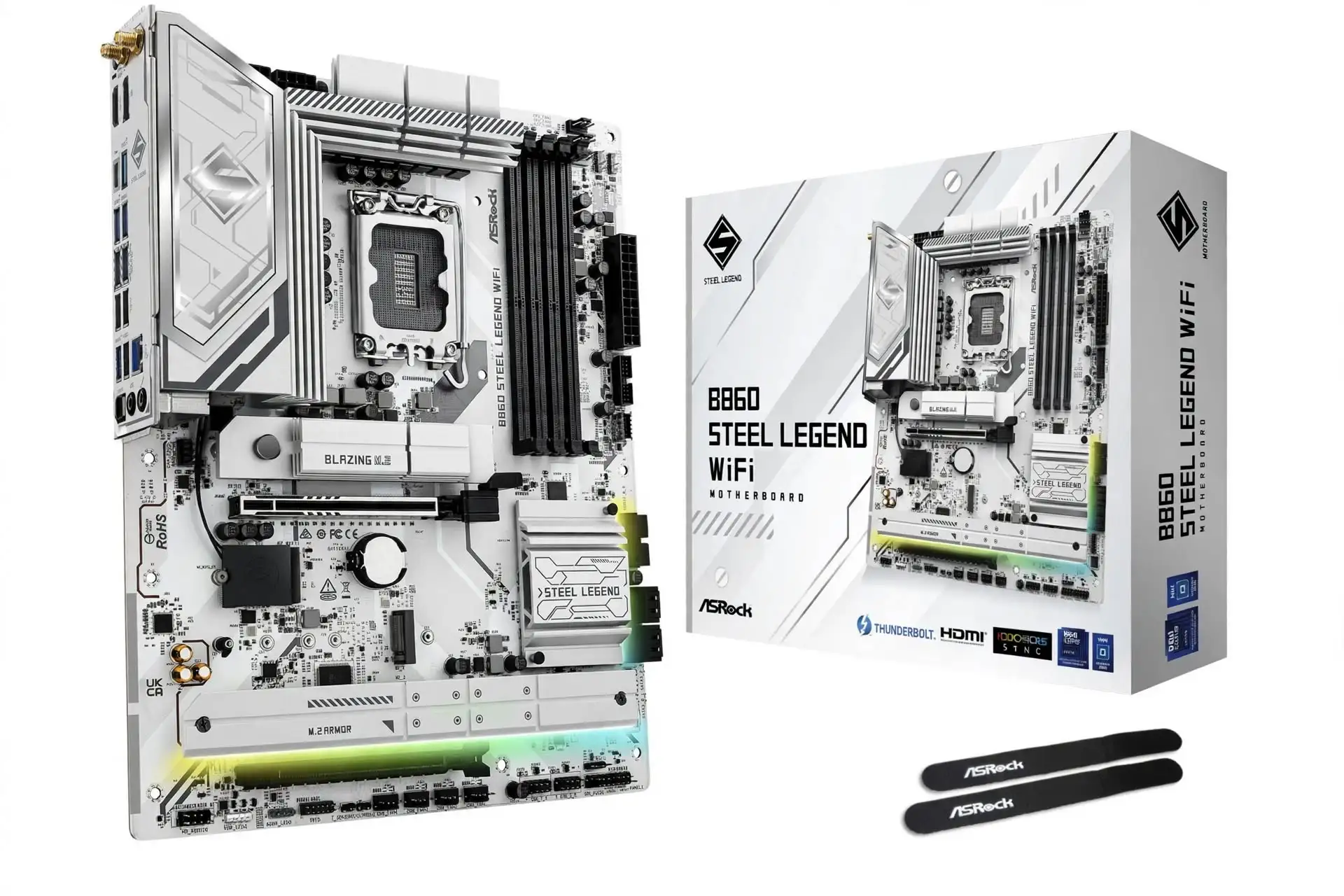
Specification Details
| Specification | Verified detail |
| Socket and size | LGA1851; Intel B860; Core Ultra desktop Series 2; ATX 305 × 244 mm |
| Memory and power | 4 DDR5 DIMMs; 256GB; 8666 MT/s OC; CUDIMM support; 14 Vcore stages rated 80A |
| Expansion | Main PCIe 5.0 ×16; lower PCIe 4.0 ×2 |
| Storage | 4 M.2: 1 × PCIe 5.0 ×4, 2 × PCIe 4.0 ×4, 1 × PCIe 4.0 ×2; 4 SATA |
| Network and audio | 2.5GbE; Wi-Fi 6E; Bluetooth 5.3; Realtek ALC1220 |
| Rear USB | 10 ports: 1 Thunderbolt 4 C at 40Gbps, 2 A at 10Gbps, 4 A at 5Gbps, 3 USB 2.0 |
| Front USB and recovery | 20Gbps USB-C header; BIOS Flashback |
| Overclocking | Memory overclocking supported; CPU multiplier overclocking is not supported |
The B860 Steel Legend WiFi makes a strong case for saving money on the motherboard when CPU multiplier overclocking isn’t needed. It includes Thunderbolt 4, four M.2 sockets, and a 20Gbps front USB-C header. A compatible Core Ultra processor can still use its normal boost behavior; B860’s restriction doesn’t lock the CPU to its base clock.
The board arrived with ASRock’s January 2025 B860 family. The checked $139.99 Newegg price, sold and shipped by Newegg, is the lowest in this shortlist. For an existing LGA1851 build plan, that leaves more money for the graphics card or storage. The compromise is modest expansion bandwidth and Wi-Fi 6E rather than Wi-Fi 7.
PC Gamer’s June 2025 review awarded 92/100 and praised the value and cooling, while criticizing the dated firmware interface. Tech4Gamers separately tested a Core Ultra 7 265K system and found closely matched gaming results against other B860 boards. Those are independent review observations; they do not establish a statistically representative owner-satisfaction score.
Sources: Manufacturer specifications · Independent review · Price and availability
Release evidence: ASRock B860 family announced 6 January 2025; Tech4Gamers review dated 19 March 2025.
Reasons to buy
- Very low checked price with Thunderbolt 4 and four SSD sockets.
- 20Gbps front USB-C, ALC1220 audio, and BIOS Flashback.
- Memory tuning remains available without paying for Z890.
Reasons to avoid
- No CPU multiplier overclocking; the lower expansion slot is only PCIe 4.0 ×2.
- The fourth M.2 socket is ×2; wireless is Wi-Fi 6E.
Published gaming results
Published test system: Intel Core Ultra 7 265K at stock settings, MSI GeForce RTX 3090 Gaming X Trio 24GB, and 32GB XPG DDR5-7200 CL34 with XMP. Source: Tech4Gamers.
| Game and preset | Reported FPS | Minimum FPS |
| Cyberpunk 2077 · Ultra | 117 | Not reported |
| Far Cry 6 · Ultra | 141 | Not reported |
| Forza Horizon 5 · Extreme | 133 | Not reported |
The review’s game charts identify these presets but do not specify resolution, ray tracing, or upscaling details. The figures are reported FPS; averages, minima, and 1% lows are not separately defined.
The source reports only a 0–1 FPS Cyberpunk spread across its four B860 boards. These partially documented tests support a within-review observation, not a comparison with the RTX 4080 results elsewhere in this guide.
Sources: Published gaming tests · Figure based on official specifications
What to check before buying a gaming motherboard
Write down your CPU, case, graphics card, SSDs, and external devices before comparing boards. A board that meets that list at a lower total price is usually a better purchase than one with features you cannot use.
Match the socket to the exact CPU
AM5 is for the AMD processors listed in each board’s support table. These Intel boards use LGA1851 for Core Ultra desktop Series 2; they do not accept LGA1700 Core i5, i7, or i9 processors. A matching brand name is not sufficient.
Check the minimum BIOS version before ordering
Find the exact CPU model on the manufacturer’s support list, including any suffix. Ask which BIOS ships with the board if the CPU is newer. A dedicated Flashback function can update supported firmware without a working CPU, but follow that board’s instructions.
Budget for the whole platform
Compare CPU, motherboard, DDR5, cooler, and any adapters together. Switching platforms can cost more than the motherboard price suggests. Choose a higher motherboard tier only when it preserves required performance or adds a connection you will use.
Verify case and cooler clearance
ATX, Micro ATX, and Mini ITX describe different footprints. E-ATX widths vary: the Taichi is about 267mm wide. Check cable grommets, radiator space, memory height, GPU thickness, and the slots that a large cooler or graphics card can cover.
Buy a matched memory kit
Use the manufacturer’s qualified vendor list for your CPU generation and the intended module count. Two modules are generally easier to run at high speeds than four. EXPO and XMP are overclocking profiles, so enable the intended profile and test stability; do not treat the printed maximum as a guarantee.
Judge power delivery by the workload
VRM means voltage regulator module. It converts power for the CPU. Phase count and current ratings help describe the design, but cooling, firmware limits, and actual thermal tests matter too. A large advertised amperage total is not an FPS score.
Draw an SSD and expansion plan
Count how many drives and add-in cards will be installed, then check every sharing footnote. Some M.2 sockets disable a PCIe slot or reduce its lane width. For a capture card, compare its electrical requirement with the slot’s bandwidth, not its physical length.
Connections and ownership checks
1. USB-C describes the connector shape. A rear Type-C port might support 5, 10, 20, or 40Gbps, and some Thunderbolt ports have different USB-mode limits. Confirm the port, cable, and device protocol. Check front-header speed separately from rear-panel speed.
2. A 5GbE controller needs compatible networking equipment to transfer at 5Gbps. It does not increase an internet plan’s speed or guarantee lower game-server latency. Wi-Fi 7 features depend on the router, channel width, operating system, and local spectrum availability; 160MHz and 320MHz implementations differ.
3. Match the case’s USB ports, fan and pump connections, and lighting connectors to the manual. A 5V three-pin addressable RGB header is different from a 12V four-pin RGB header. If you use a USB headset or external DAC, an expensive onboard audio chip may add little value.
4. BIOS Flashback, diagnostic LEDs, or a postcode display can reduce troubleshooting time. Verify regional warranty coverage, return terms, included Wi-Fi antennas, and the precise model suffix. An imported, refurbished unit or different board revision should not be priced as if it were the same local retail product.
5. Install the current appropriate BIOS and drivers, verify normal operation, then change one setting at a time. Record memory settings and test for errors. Unstable RAM can cause crashes or data corruption even if a short game benchmark completes.
Conclusion
For a conventional AM5 gaming tower, start with ASRock B850 Steel Legend WiFi. Move to the MSI B850 Tomahawk MAX WIFI II when two Gen5 SSDs or 5Gb networking are worth the extra cost, and choose the X870E Tomahawk when you need USB4 in an ATX case. Compact builders should compare the B850MPOWER and B850I against actual stock and pricing, because their specialist strengths do not justify any markup.
For Intel, the B860 Steel Legend WiFi is the best motherboard for gaming at the checked $139.99 price if CPU multiplier overclocking is unnecessary. The Z890 Tomahawk WIFI II is the stronger step up for tuning and 5Gb networking. Whichever platform you choose, verify the CPU support list, plan the SSD and expansion slots, and keep enough budget for the graphics card that will do the rendering.