IT Onboarding and Equipment Management Best Practices
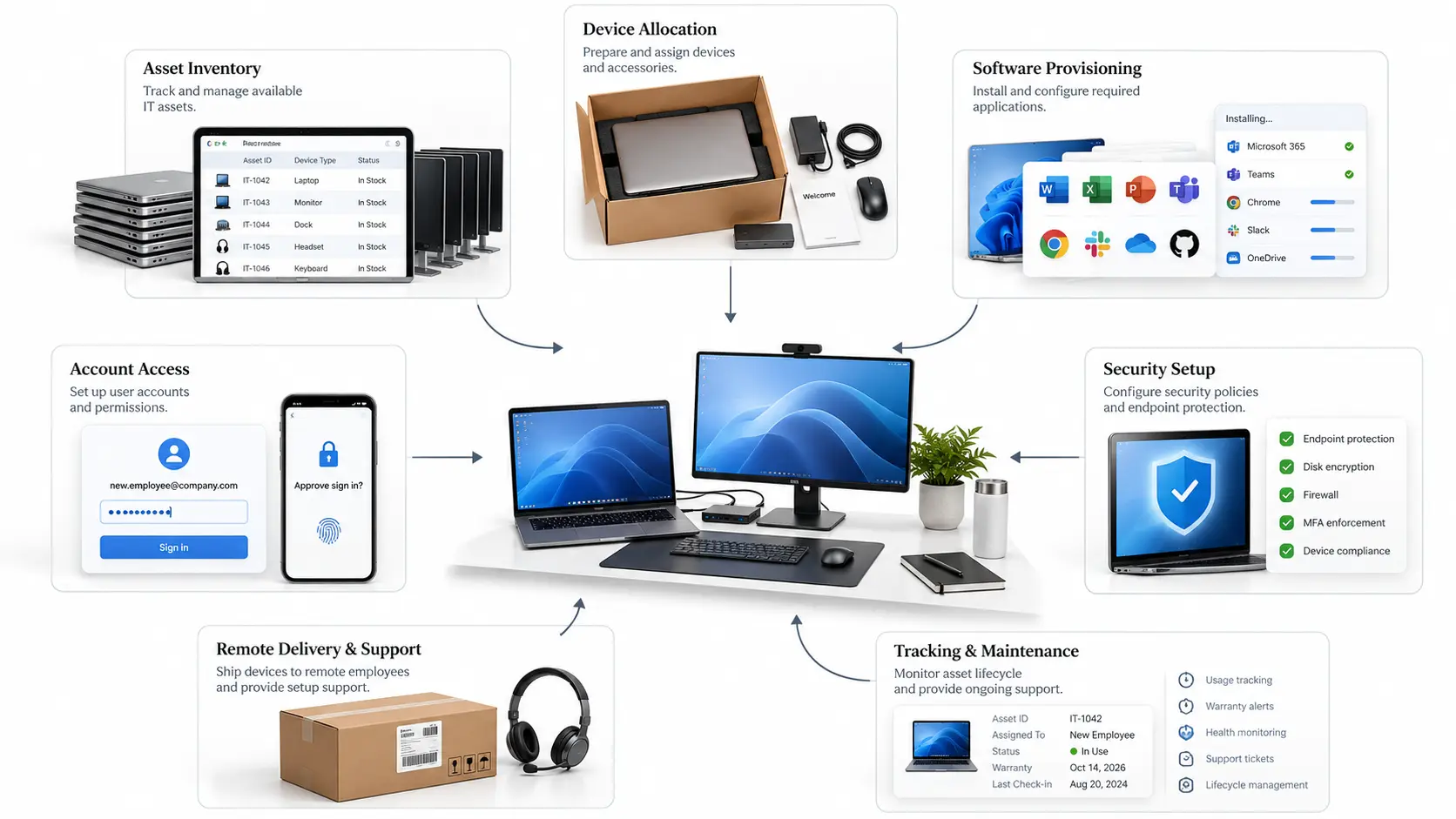
IT onboarding and equipment management help businesses prepare new employees by providing the right computers, software, and system access before they begin working. A structured onboarding process allows IT teams to assign devices, install necessary applications, manage employee accounts, and apply security settings without unnecessary delays.
It also helps organizations track company equipment, control technology costs, and reduce problems caused by missing or outdated devices. By combining IT asset management, standardized setup procedures, and automation, businesses can make employee onboarding faster, more organized, and secure.
Why IT Asset Management Matters During Employee Onboarding
IT asset management is the process of tracking, maintaining, and managing a company’s technology throughout its lifecycle. These assets include laptops, desktop computers, monitors, mobile devices, software licenses, and other equipment employees use for their work.
When a new employee joins a company, the IT department needs to arrange a suitable computer, configure accounts, install software, and provide access to company systems. Managing these tasks becomes difficult when equipment records are incomplete or stored in different locations.
A centralized IT asset management system helps businesses identify available devices, track equipment assignments, and maintain accurate inventory records. It also makes employees accountable for company-owned equipment and helps IT teams plan maintenance and replacements.
The National Institute of Standards and Technology includes hardware and software inventory management in its NIST Framework. Maintaining these records also helps organizations identify assets that require security updates or additional protection.
Common IT Challenges During New Employee Onboarding
IT departments often face equipment shortages, software access delays, and security problems when preparing technology for new employees. These issues can prevent employees from completing their work during their first few days.
1. Delayed Equipment Allocation
A new employee may arrive at the office without a laptop, monitor, or other necessary equipment. This usually happens when IT teams do not have updated inventory records or receive hiring information too late. Preparing and reserving equipment before the employee’s start date can prevent these delays.
2. Incomplete Software Access
Employees need access to email, communication platforms, project management tools, and software related to their departments. If accounts are not created in advance, employees may spend their first day waiting for permissions instead of completing assigned tasks.
3. Poor Asset Tracking
When equipment information is maintained through manual records or separate spreadsheets, IT teams may lose track of device assignments. This makes it difficult to identify available computers, locate missing equipment, or recover devices when employees leave.
4. Security Configuration Issues
Computers without updated operating systems, encryption, endpoint protection, or secure authentication can expose company information to security risks. IT teams should check these requirements before assigning devices to employees.
A documented onboarding process helps businesses address these problems before they affect daily operations.
Create a Standardized IT Onboarding Process
A standardized IT onboarding process allows organizations to follow the same equipment preparation, account creation, and security procedures for every new employee. It also helps IT departments understand which tasks must be completed and who is responsible for them.
The process should begin before the employee’s official start date. Once HR confirms the joining date and job role, the IT team can review hardware requirements, reserve equipment, prepare login credentials, and install necessary applications.
Businesses can use a new employee onboarding and setup guide to organize these activities. A checklist helps IT administrators manage device preparation, software access, security settings, and first-day technology checks without overlooking important steps.
For example, if a company hires five employees for different departments, the IT team can prepare a separate checklist for each employee based on their responsibilities. This makes it easier to track progress and confirm that all equipment and accounts are ready before work begins.
Improve Hardware Allocation With Centralized Asset Tracking
Hardware allocation involves selecting and assigning suitable devices to employees according to their work requirements. Not every department needs computers with the same specifications, so IT teams should review the software and tasks each employee will handle.
A centralized asset management system provides information about available devices, their condition, and their current assignments. IT administrators can review serial numbers, hardware specifications, warranty details, purchase dates, maintenance records, and the employees responsible for each device.
For example, when an employee leaves the company, IT staff can update the device’s status, arrange its return, and inspect it before assigning it to another employee. This reduces unnecessary purchases and keeps company equipment properly accounted for.
Match Computer Specifications to Employee Workloads
Choosing the right computer is an important part of IT onboarding because employees depend on their devices to run business applications. HR employees commonly use payroll systems, employee databases, spreadsheets, and recruitment platforms, while software developers may need computers that can handle programming tools, testing environments, and multiple applications simultaneously.
The CPU handles processing tasks, RAM supports multitasking, and SSD storage improves application loading and file access. A dedicated GPU becomes more important for employees working with video editing, 3D design, CAD applications, and other graphics-intensive software. Regular administrative work usually does not require an expensive graphics card.
Before purchasing new devices, IT administrators should review the company’s Workplace Technology requirements and match computer specifications with employee responsibilities. They should also check software requirements and compare hardware performance rather than selecting devices based only on price or model names.
For example, assigning a basic office laptop to a video editor may cause slow rendering and application delays. Similarly, purchasing a high-end workstation for an employee who only manages email and spreadsheets may increase costs without improving productivity.
Selecting suitable hardware helps employees work efficiently while allowing businesses to control their equipment budgets.
Streamline Software Provisioning and Access Management
Along with hardware, employees need access to the software and digital systems required for their responsibilities. IT teams should prepare these applications before employees begin working.
Different departments require different software. Marketing employees may use content management systems, analytics platforms, and design applications. Finance teams often need accounting software, payroll systems, and financial reporting tools.
Businesses can simplify this process by creating role-based software access profiles. Instead of selecting applications separately for every employee, IT administrators can maintain a standard set of approved applications and permissions for each job role.
Software license management is also necessary because businesses pay for many applications through monthly or annual subscriptions. IT teams should track available licenses, assigned users, and unused accounts to avoid unnecessary costs.
Employees should only receive access to applications and information required for their work. This makes software management easier and reduces the risk of unauthorized access to sensitive company data.
Strengthen IT Security From the First Day
IT security should be part of the onboarding process before employees receive access to company systems. Every new computer and user account introduces another device or identity that the organization needs to protect.
Before assigning equipment, IT administrators should install operating system updates, enable disk encryption, configure endpoint protection, and verify that the device meets company security requirements. These checks are important when preparing reused equipment or devices purchased from different suppliers.
Employee accounts should also use multifactor authentication and role-based access permissions. For example, a marketing employee does not normally need access to confidential payroll records, while an HR employee may require access to employee information.
IT teams should document security configurations and verify that employees can access approved systems without receiving unnecessary permissions. A consistent onboarding checklist makes these tasks easier to review.
Security awareness training is another important step. New employees should understand how to create secure passwords, identify suspicious emails, protect company devices, and report technical problems.
These measures help businesses protect their information while allowing employees to use company technology safely.
Use Automation to Reduce Manual IT Tasks
Managing IT onboarding manually can become difficult when companies hire multiple employees within a short period. IT administrators may need to prepare several devices, create accounts, assign software licenses, and update equipment records at the same time.
Automation helps reduce repetitive work by allowing certain setup tasks to follow predefined instructions. For example, identity management systems can create user accounts and assign approved access based on employee roles.
Device management tools can also install applications, apply security policies, and configure company computers. Microsoft’s documentation explains how Microsoft Intune supports device enrollment and management through defined policies and configurations.
However, asset tracking, identity management, and device configuration are different activities. Businesses may need integrated tools to manage all three rather than expecting one application to perform every task.
IT administrators should continue reviewing completed setups, handling exceptions, and confirming that employees can use their assigned systems. Automation reduces manual work, but it does not replace proper supervision.
Support Remote and Hybrid Employee Onboarding
Remote and hybrid employees need the same technology support as people working in a physical office. The main difference is that equipment must often be delivered, configured, and maintained without direct access to the employee’s location.
IT departments should prepare and ship laptops, accessories, and other required equipment before the employee’s start date. Shipment details, serial numbers, and assigned asset records should be stored in the company’s inventory system.
Employees also need clear instructions for activating their devices, connecting to company networks, setting up multifactor authentication, and accessing approved applications. Remote support sessions can help employees resolve setup problems without visiting an office.
For example, a remote employee may receive a company laptop with approved software and security policies already configured. Once the employee signs in using company credentials, the IT team can verify access and address any remaining issues.
Accurate asset tracking also helps companies monitor equipment distributed across different locations. This information becomes useful when devices require repairs, replacements, or recovery after an employee leaves.
Measure and Continuously Improve Onboarding Performance
Businesses should evaluate their IT onboarding procedures to identify delays and improve equipment management. Without tracking performance, IT departments may repeatedly face the same problems without understanding their causes.
Useful measurements include equipment readiness, account activation time, completed onboarding tasks, technical support requests, and the time required to resolve initial setup problems.
For example, if most new employees receive their laptops on time but regularly experience delays accessing project management software, the problem may be related to account provisioning rather than equipment allocation.
IT managers can review these records to identify which processes need improvement. Employee feedback is also valuable because new hires may report difficulties that are not visible in technical reports.
Regularly reviewing asset records, support tickets, and onboarding results helps organizations improve their procedures as the number of employees increases.
Conclusion
Effective IT onboarding and equipment management help businesses prepare employees with suitable computers, necessary software, and secure system access from their first working day. A structured approach reduces delays, improves asset tracking, and makes it easier for IT departments to manage equipment across different teams and locations.
Businesses should maintain accurate inventory records, choose hardware according to employee workloads, standardize onboarding procedures, and automate repetitive setup tasks where appropriate. Regular security checks and performance reviews also help keep company technology reliable.
By managing these responsibilities properly, organizations can reduce unnecessary equipment expenses, improve employee productivity, and maintain an organized IT environment as their workforce grows.