What Is 1% Low FPS in Gaming?
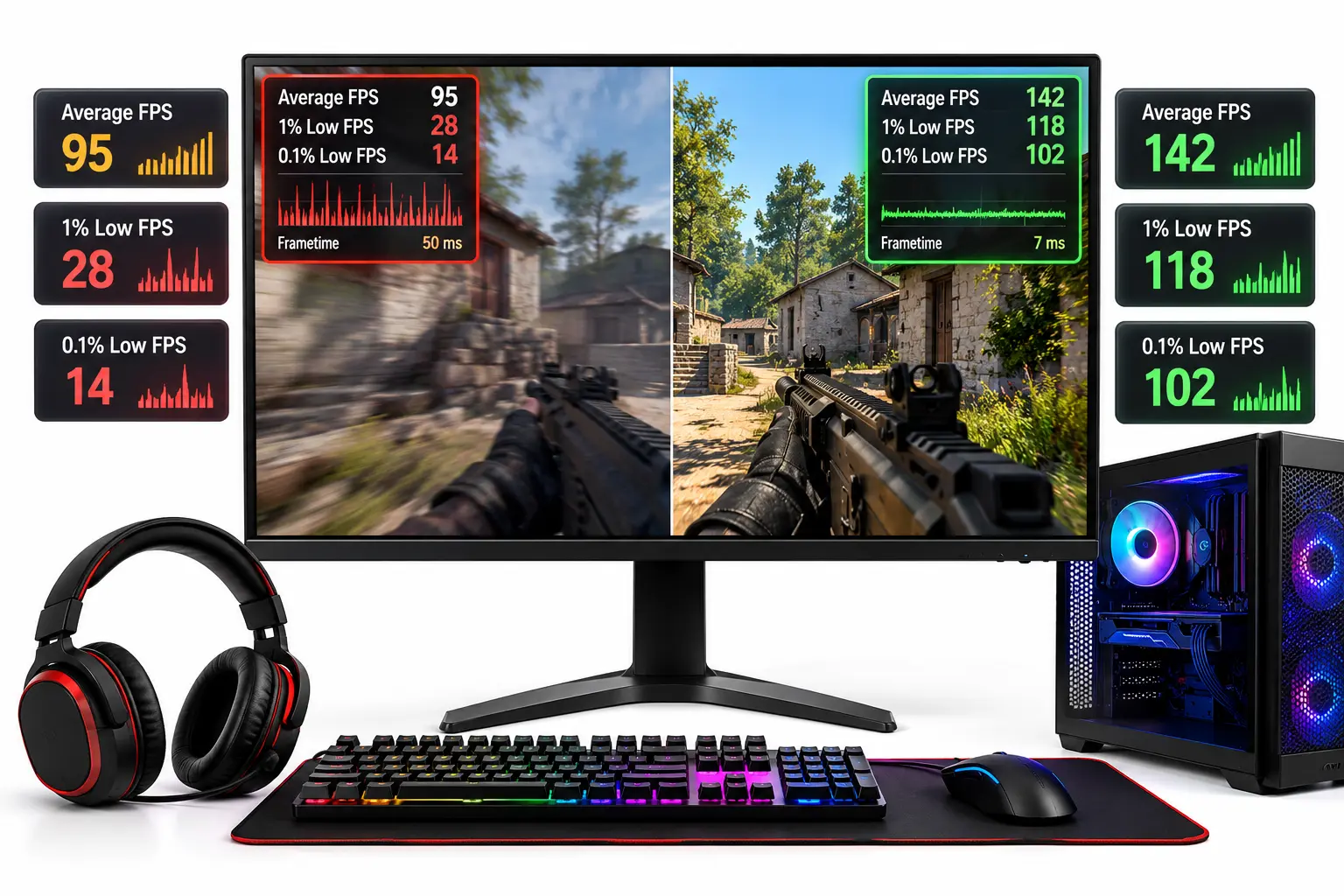
Low FPS in gaming means a game runs at a low frame rate, moving appear choppy, slow, or less smooth. FPS (Frames Per Second) refers to the number of images your computer produces every second while running a game. For example, a game running at 30 FPS produces 30 frames per second, while at 60 FPS, it produces 60 frames, resulting in generally smoother movement.
1% low FPS measures the slowest 1% of frames recorded during gameplay. It shows how much the game’s performance drops during slower moments, even when the average FPS stays high.
What Does FPS Mean in Gaming?
FPS stands for Frames Per Second. It measures how many individual images your computer produces every second while running a game. Each image is called a frame, and when these frames appear in quick succession, they create the movement seen on the screen.
For example, at 30 FPS, your computer produces approximately 30 frames every second. At 60 FPS, it produces twice as many frames in the same amount of time. A higher frame rate generally moves appear smoother and can improve how quickly the game responds to player input.
Understanding Different FPS Rates
Not every game requires the same frame rate. A slow-paced adventure game may remain enjoyable at 30 FPS, while competitive shooters benefit from higher and more consistent frame rates.
| Frame Rate | Time Per Frame | Gaming Experience |
|---|---|---|
| 30 FPS | 33.3 ms | Playable, but movement appears less fluid |
| 60 FPS | 16.7 ms | Smooth for most casual and single-player games |
| 120 FPS | 8.3 ms | More fluid movement and faster visual feedback |
| 144 FPS | 6.9 ms | Well suited to high-refresh-rate gaming |
| 240 FPS | 4.2 ms | Provides additional responsiveness on capable systems |
These values assume frames are delivered at regular intervals. A game averaging 60 FPS does not necessarily produce a new frame every 16.7 milliseconds. Some frames may take longer to render, so the average alone cannot describe the full experience.
The monitor’s refresh rate also matters. A 60Hz monitor can refresh its image 60 times per second, while a 144Hz monitor can refresh 144 times. Producing more FPS than the monitor’s refresh rate can still reduce input latency, but the monitor cannot display every independently rendered frame.
What Is 1% Low FPS and How Is It Calculated?
1% low FPS measures how slowly a game performs during its worst-rendering moments. A common calculation examines the slowest 1% of frames recorded during a benchmark and calculates a frame-rate value from them.
Suppose a gaming benchmark records 10,000 frames. The software identifies the 100 frames that took the longest to render and uses their performance to calculate the 1% low FPS. If the result is 42 FPS while the overall average is 110 FPS, the game performed considerably worse during those slower frames.
This does not mean the entire game ran at 42 FPS for 1% of the playing time. The measurement concerns recorded frames, and their duration may vary. Some tools also calculate 1% lows differently, using percentile cutoffs or time-based measurements rather than averaging the slowest frames.
For that reason, benchmarks should use the same measurement method when comparing settings or hardware. The CapFrameX explanation of performance metrics describes these calculation differences in detail.
Average FPS vs. 1% Low FPS: What’s the Difference?
Average FPS measures overall rendering speed during a gaming session, while 1% low FPS helps show whether that performance remains consistent during demanding moments. Consider two computers running the same game at identical graphics settings.
| Performance Metric | PC A | PC B |
|---|---|---|
| Average FPS | 110 FPS | 95 FPS |
| 1% Low FPS | 38 FPS | 82 FPS |
| Likely Experience | Faster overall, but noticeable frame drops | Lower average, but steadier gameplay |
PC A produces more frames on average, but its 1% low FPS drops to 38. That indicates some frames took substantially longer to complete. PC B has a lower average frame rate, but its 1% low remains closer to the average, suggesting more consistent frame delivery.
In practice, PC B may feel smoother despite reporting fewer average frames. The difference becomes noticeable when moving the camera quickly, entering a demanding area, or participating in an intense battle.
What Is 0.1% Low FPS?
The 0.1% low FPS metric examines an even smaller portion of the slowest frames. While 1% lows help describe broader frame-rate consistency, 0.1% lows are more sensitive to severe, infrequent interruptions.
A game could report 120 average FPS, 95 FPS for its 1% low, and 25 FPS for its 0.1% low. This may indicate that most gameplay remains smooth but a few frames experience significant delays. Since this measurement involves very few frames, longer and repeated benchmarks are needed before concluding.
Why Does a Game Stutter Even With High FPS?
A game can display high FPS and still stutter because frames are not always delivered at equal intervals. The time required to render or present each frame is called frame time, measured in milliseconds.
At a steady 60 FPS, each frame has approximately 16.7 milliseconds available. If one frame suddenly takes 50 milliseconds, the screen must wait much longer for the next image. This interruption can appear as a brief freeze, even if the average FPS counter continues showing a relatively high number.
The key difference is that FPS measures rendering speed, while frame-time measurements show how consistently frames arrive. A frame-time graph is useful because two games with similar 1% lows can behave differently. One might experience several small interruptions, while the other suffers one concentrated sequence of slow frames.
What Causes Low FPS and Poor 1% Lows?
Several components affect how quickly a game processes and renders frames. The cause depends on whether the computer is struggling throughout gameplay or experiencing occasional performance drops.
1. CPU Bottleneck
The CPU processes game logic, physics, player movements, and instructions sent to the graphics card. If it cannot complete this work quickly enough, the GPU may have to wait, reducing frame production.
For example, a game might run smoothly in an empty area but suddenly lose FPS when dozens of characters appear on screen. Such a pattern can indicate that the processor is struggling with additional calculations. High average FPS combined with poor 1% lows can occur when CPU-heavy scenes create inconsistent frame times.
2. GPU Limitations and Insufficient VRAM
The GPU handles graphics rendering, including lighting, shadows, textures, and visual effects. Running demanding games at high resolutions or maximum settings can reduce average FPS when the graphics card reaches its processing limit.
Insufficient video memory (VRAM) can create a different problem. When the game cannot keep all required graphical assets in VRAM, transferring data may cause frame-time spikes. Lowering texture quality or other memory-intensive settings can help determine whether VRAM pressure is contributing to the issue.
3. System RAM and Background Applications
System RAM temporarily stores information required by the game and operating system. When available memory becomes insufficient, the computer may need to access slower storage more frequently, interrupting gameplay.
Background applications can also consume CPU time, RAM, and storage bandwidth. Recording software, browser tabs, downloads, and other active programs may cause additional delays, depending on the computer’s available resources.
4. Shader Compilation and Asset Loading
Some games compile graphical shaders or load new assets during gameplay. These operations may temporarily interrupt frame delivery, even on computers with powerful CPUs and GPUs.
For example, a game might stutter the first time a new area or effect appears but run smoothly when the same scene is repeated. That pattern can indicate shader compilation or asset-loading behaviour rather than a permanently underpowered computer. In some cases, a game update is needed to resolve the underlying issue.
5. Thermal Throttling
CPUs and GPUs generate heat while gaming. If temperatures reach a component’s operating limits, the system may reduce clock speeds to protect the hardware, which can lower FPS.
A useful clue is performance becoming worse after prolonged gameplay rather than immediately after launching the game. Monitoring temperatures, clock speeds, and power limits can help determine whether cooling is responsible.
How to Check 1% Low FPS While Gaming
The easiest way to evaluate frame-rate consistency is to record an actual gaming session rather than relying only on the FPS counter displayed in the corner of the screen.
Tools such as NVIDIA FrameView and CapFrameX can capture FPS and frame-time measurements. They provide more useful information than a simple average FPS counter when investigating stuttering.
For a reliable comparison, select a repeatable section of a game and record approximately 60–90 seconds of gameplay. Keep the resolution, graphics settings, power mode, and test route unchanged. Repeat the capture three times and compare the results rather than depending on a single run.
The objective is to record average FPS, 1% low FPS, and frame times under comparable conditions. If one capture produces unusually poor results while the others remain consistent, investigate that run before assuming the hardware has a performance problem.
How to Identify the Cause From Your FPS Results
Average FPS and 1% lows are most useful when combined with GPU usage, CPU activity, memory usage, and temperature measurements.
| Benchmark Pattern | What to Investigate |
|---|---|
| Average FPS is low, GPU usage remains near maximum | Graphics settings, resolution, ray tracing, and GPU performance |
| Average FPS is high, but 1% lows are poor | CPU spikes, RAM/VRAM pressure, shader compilation, and background activity |
| FPS drops in crowded scenes, GPU usage falls | CPU limitations or game-engine processing |
| Performance worsens after extended gameplay | Thermal throttling or power restrictions |
These patterns are diagnostic clues, not definitive proof. For example, low GPU usage does not automatically mean the CPU is too weak, and high memory usage does not always indicate a shortage.
A practical test is to reduce the resolution while keeping the same gameplay scene. If average FPS improves significantly, the workload was likely limited by GPU rendering performance. If performance changes very little, CPU processing or another limit may be more important.
You can also use a PC bottleneck calculator to estimate whether your CPU and GPU are reasonably matched for the intended resolution and workload. However, an estimated bottleneck cannot replace actual frame-time measurements.
How to Improve Low FPS and 1% Lows
The most effective solution depends on the performance limitation identified during testing. Changing every graphics setting at once makes it difficult to determine which adjustment actually helped.
If the GPU is consistently overloaded, begin by reducing ray tracing, shadows, or resolution. If the game is CPU-limited, lowering settings related to crowd density, simulation, or view distance may help. Insufficient VRAM may require lower texture settings, while RAM-related issues may benefit from closing background applications or correcting the memory configuration.
An FPS cap can also improve consistency when the computer frequently fluctuates between higher and lower frame rates. For example, a system moving unpredictably between 90 and 140 FPS may feel steadier with a sustainable frame-rate limit. However, a cap cannot eliminate stutters caused by shader compilation, insufficient memory, or other interruptions.
After each change, run the same benchmark again. Compare the average FPS, 1% low FPS, and frame-time graph to determine whether the adjustment improved performance or merely changed the average number.
For additional adjustments that do not require buying new components, refer to this guide on fixing PC bottlenecks without upgrading hardware.
What Is a Good 1% Low FPS for Gaming?
There is no universal 1% low FPS target because the result depends on the game, hardware, frame-rate target, and measurement method. The most useful comparison is between the average FPS and the 1% low FPS measured during the same benchmark.
For instance, a game averaging 120 FPS with a 1% low of 100 FPS is generally showing better frame-rate consistency than a game averaging 120 FPS with a 1% low of 35 FPS. However, neither result guarantees perfectly smooth gameplay, since the timing and frequency of individual interruptions also matter.
A practical goal is to maintain a 1% low close to the average while meeting the frame rate needed for the game and display. When assessing improvements, prioritize repeatable results and consistent frame delivery rather than chasing the highest possible average FPS.
Does Internet Lag Cause Low FPS?
Internet lag and low FPS are different problems. Network lag occurs when communication between the game and server is delayed, while low FPS occurs when the computer cannot produce frames quickly or consistently enough.
For example, if another player suddenly changes position while the scene around them continues moving smoothly, the problem may involve network latency. If the entire image becomes choppy, the problem is more likely related to frame rendering or presentation.
A slow internet connection does not ordinarily reduce the computer’s rendering FPS directly. Checking FPS and network latency separately helps avoid troubleshooting the wrong problem.
Conclusion
Low FPS affects how smoothly a game runs, but average FPS alone cannot reveal every interruption. The 1% low FPS measurement provides a clearer view of slow frames that may cause stuttering during gameplay.
For useful results, compare average FPS and 1% lows from repeated tests, inspect frame-time spikes, and investigate the component or software activity associated with those drops. Improving consistency can make gameplay feel better even when the average frame rate changes very little.