How to Use the Phonetic Spelling of Your Name for Better Communication in Online Gaming
To use the phonetic spelling of your name in online gaming, add a simple pronunciation guide to your gaming profile, Discord biography, or team chat. This helps other players pronounce your username or real name during multiplayer matches and voice conversations. Clear communication is key in online gaming, and making your name easier to pronounce can help teammates interact with you more comfortably.
What Is Phonetic Spelling?
Phonetic spelling represents a word or name according to how it sounds rather than how it is traditionally written. It gives readers a simple way to understand pronunciation, particularly when a name contains unfamiliar letters or sound combinations.
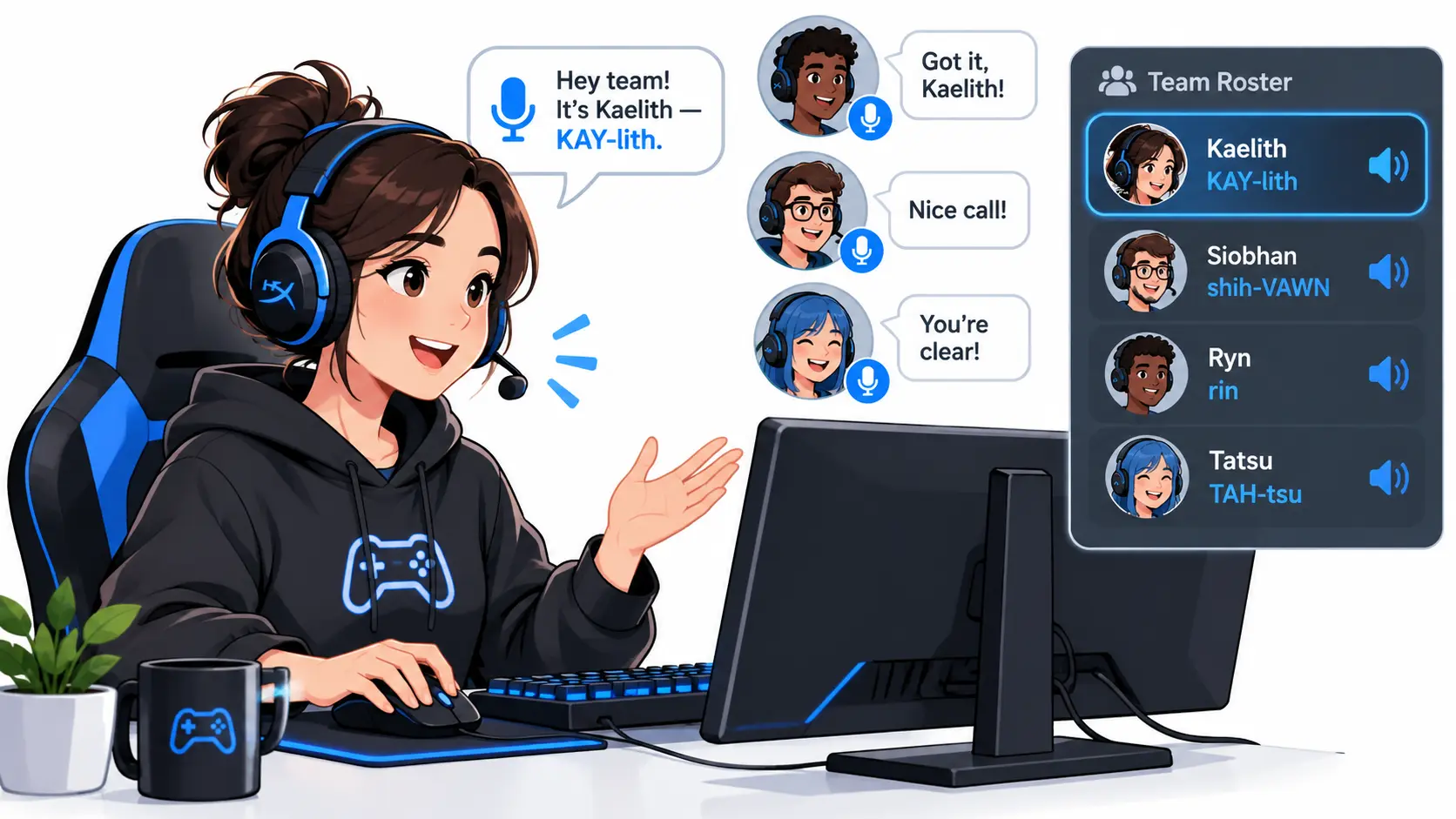
For example, someone named “Sean” can write the pronunciation as “Shawn” to help English-speaking players understand how to say it. Similarly, “Siobhan” can be written approximately as “shih-VAWN” to communicate its pronunciation.
These informal spelling guides use familiar letters and syllables instead of complicated symbols. For more precise pronunciation, linguists use the International Phonetic Alphabet (IPA), which represents individual speech sounds through standardized symbols. You can refer to the official IPA chart to understand how these symbols represent different sounds.
For gaming profiles and team introductions, however, simple phonetic spellings are usually easier to understand because players can read them quickly without learning a separate phonetic system.
Why Name Pronunciation Matters in Online Gaming
Multiplayer games require players to communicate clearly, particularly when they are working together in competitive environments. In team-based shooters, strategy games, and multiplayer online battle arenas, teammates frequently address each other when sharing locations, requesting assistance, or coordinating their next moves.
When someone cannot pronounce another player’s username, they may use an incorrect version or avoid addressing that person directly. This can make introductions uncomfortable and create unnecessary confusion during voice conversations.
Correct pronunciation also shows respect for other players. International gaming communities bring together people with different languages, accents, and cultural backgrounds. Making an effort to pronounce someone’s name correctly supports a more welcoming environment, which aligns with the principles outlined in the official Xbox standards.
A pronunciation guide is a small addition to your profile, but it can make communication more comfortable for everyone involved.
1. Make Your Gaming Username Easier to Pronounce
Gamers often choose usernames based on fictional characters, personal interests, cultural references, or creative combinations of letters. These usernames can look distinctive, but their pronunciation is not always obvious.
For example, consider a username such as “Kaelith.” Some players might pronounce it as “KAY-lith,” while others may interpret the same spelling differently. Adding a pronunciation guide removes this uncertainty.
You can include the pronunciation beside your username in your gaming profile, Discord server biography, or community introduction. For example, if your intended pronunciation is “KAY-lith,” simply write it underneath your username.
This approach is useful when joining a new gaming community because other members can understand your preferred pronunciation before starting a voice conversation.
2. Improve Communication During Multiplayer Matches
Fast communication is important in competitive multiplayer games. Players often have only a few seconds to communicate enemy positions, request support, or coordinate their movements with teammates.
Knowing how to pronounce teammates’ names makes these conversations more natural. Instead of struggling with an unfamiliar username, players can address each other directly and focus on the match.
For example, in a team-based shooter, a player might need to call out a teammate’s name while requesting assistance. If everyone already understands the correct pronunciation, there is less hesitation during the conversation.
Although phonetic spelling does not improve FPS or reduce network latency, it can remove one small communication barrier during gameplay.
3. Add Pronunciation to Your Gaming Profiles
Gaming profiles are one of the easiest places to share pronunciation information. Many platforms provide biography sections, status messages, or customizable profile descriptions where you can include a short explanation.
You can use a simple format:
Username: ZephyrKnight
Pronunciation: ZEF-er Knight
This gives other players a quick reference without requiring a lengthy explanation. For longer usernames, separating syllables with hyphens makes the pronunciation easier to follow.
Capitalizing the stressed syllable can also help readers understand which part of the name receives the strongest emphasis. Keep the explanation short so teammates can understand it at a glance.
You can use the same format in Discord profiles, gaming forums, tournament registrations, and community introductions.
4. Use Phonetic Spelling During Voice Chat Introductions
Voice chat is an important part of multiplayer gaming because it allows teammates to communicate without interrupting gameplay to type messages.
However, joining a new team or gaming server can make introductions uncomfortable when your username is difficult to pronounce. Sharing a written pronunciation guide before starting a conversation can make this process easier.
For example, you can introduce yourself by saying your preferred name aloud and writing its pronunciation in the group chat. This allows other players to connect the written username with its spoken version.
Your microphone and audio settings also affect how clearly teammates hear you. Check that your correct input device is selected, your microphone level is suitable, and background noise is not interfering with conversations. Discord’s official voice guide provides additional help with microphone and voice settings.
A pronunciation guide helps people understand your name, while properly configured audio equipment helps them hear you clearly.
5. Support International Gaming Communities
Online games connect players who speak different languages and use different writing systems. Names originating from Arabic, Japanese, Korean, Chinese, and other languages may contain sounds that English speakers do not commonly use.
A simple pronunciation guide can help international teammates understand these names without requiring them to learn another language.
However, English spelling cannot accurately represent every sound. Some names require a more detailed explanation or a short audio example to communicate their pronunciation correctly.
It is also important to ask people how they prefer their names to be pronounced rather than assuming that a familiar-looking spelling is correct. Respecting these preferences helps create better interactions across international gaming communities.
6. Help Streamers and Esports Players Avoid Pronunciation Mistakes
Name pronunciation also matters in gaming livestreams, esports tournaments, and online content creation. Streamers frequently read usernames aloud when welcoming viewers, responding to comments, or acknowledging subscribers.
An unfamiliar username can be difficult to pronounce during a live broadcast, particularly when the streamer needs to respond quickly. Providing a pronunciation guide in a profile or chat introduction gives content creators a simple reference.
The same approach can help esports commentators and tournament organizers when introducing competitors. Knowing how to pronounce participants’ names correctly makes introductions more professional and shows respect for the players.
If you regularly participate in livestreams or gaming events, adding a pronunciation guide to your public profile can save time and prevent repeated mistakes.
How to Create the Phonetic Spelling of Your Name
Creating a pronunciation guide does not require advanced linguistic knowledge. You only need to identify how your name sounds and represent those sounds using familiar letters.
Start by saying your name aloud at a natural speaking speed. Pay attention to its individual syllables and identify which part receives the strongest emphasis. For longer names, separate the syllables with hyphens so readers can understand the pronunciation more easily.
Next, choose letter combinations that people in your intended audience are likely to recognize. Capitalize the stressed syllable to make the pronunciation clearer. For example, you can write “Muhammad” as “moo-HAM-mad” if that accurately represents your preferred pronunciation.
If you need help creating a readable pronunciation guide, you can use the phonetic spelling of your name to generate a written version. Check the result against how you actually pronounce your name and make any necessary adjustments.
Finally, ask a friend or teammate to read the guide aloud. If they pronounce it correctly without additional explanation, your spelling is probably clear enough for a gaming profile.
How to Avoid Common Pronunciation Mistakes
One common mistake is making pronunciation guides unnecessarily complicated. Adding too many symbols or unfamiliar phonetic characters can confuse players who simply want to know how to address you.
Another mistake is assuming that English vowel combinations sound the same to everyone. Players from different language backgrounds may interpret the same letters differently, so testing your guide with someone unfamiliar with your name can help identify problems.
You should also avoid changing your original username simply because other players find it difficult to pronounce. A phonetic guide is an additional explanation, not a replacement for your preferred name or its traditional spelling.
Most importantly, pronunciation should be based on the person’s preference. If someone corrects you, make an effort to use the pronunciation they provide rather than repeatedly using an incorrect version.
The Role of PC Performance in Online Gaming Communication
Clear communication and stable PC performance contribute to a better multiplayer gaming experience, but they solve different problems.
Your CPU, GPU, RAM, and other system components affect how smoothly your games and background applications run. For example, running a demanding game alongside Discord, a browser, and recording software can increase system resource usage.
If your game starts experiencing FPS drops or stuttering while you communicate with teammates, check your system’s resource usage instead of assuming that the issue is related to voice communication. CPU and GPU limitations can vary depending on the game, resolution, and graphics settings.
Intel explains how component imbalance affects gaming performance in its bottleneck guide. Microsoft’s gaming analysis also discusses performance limitations that can affect PC games.
If you want to understand whether your processor or graphics card is limiting your gaming performance, read our guide on CPU/GPU bottlenecks. It explains common symptoms, diagnostic methods, and ways to identify the component responsible for poor performance.
Remember that a pronunciation guide cannot fix microphone problems, network issues, or hardware limitations. Each problem requires the appropriate solution.
Conclusion
Clear communication is an important part of online gaming, whether you participate in competitive matches, casual multiplayer sessions, or international gaming communities. Knowing how to pronounce teammates’ names correctly makes introductions easier and helps players communicate more comfortably.
Using the phonetic spelling of your name gives other players a simple way to understand your preferred pronunciation. You can add it to your gaming profile, share it in Discord, or include it when joining a new team.
Alongside a properly configured microphone and a balanced gaming PC, these small improvements can make multiplayer sessions more enjoyable. You do not need to change your username or simplify your original name. A short pronunciation guide is enough to help teammates address you correctly and build better connections.