Best GPU Under $300 for Gaming in 2026
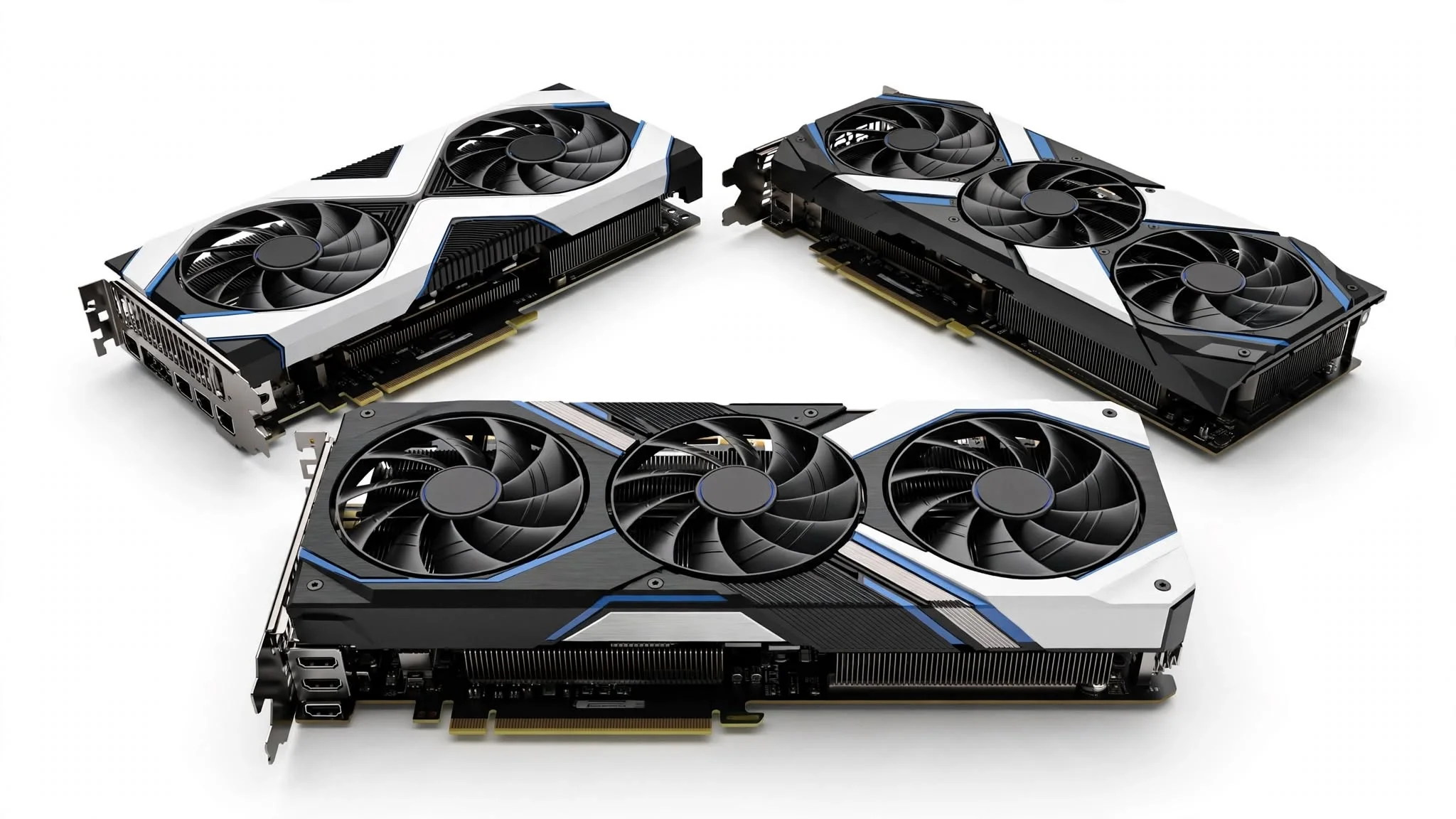
For most gamers, the best GPU under $300 is the Radeon RX 9060 XT 8GB because it delivers strong 1080p performance and handles 1440p gaming with appropriate settings. If you want more video memory, the Intel Arc B580 is a better-value alternative with 12GB of VRAM, but it requires a modern system with Resizable BAR enabled.
The right choice also depends on the exact model price, your case size, power supply, and the games you play. We recommend buying the least expensive reliable version of your selected GPU instead of paying more for lighting or a small factory overclock. Every graphics card reviewed below can be a good purchase, but it should cost less than $300 at checkout to qualify for this list.
Top 10 Best GPUs Under $300 — Check Their Latest Prices
AMD officially set the Radeon RX 9060 XT 8GB price at $299, with 8GB of GDDR6 memory and a 150W starting board-power rating. This makes it the fastest class of card that technically qualifies for the article, but only when an Amazon seller offers it near the official price. AMD RX 9060 XT specifications and pricing
Intel lists the Arc B580 with 12GB of GDDR6 memory, a 192-bit interface, 456GB/s memory bandwidth, and 190W total board power. Its larger memory capacity makes it attractive for 1440p gaming, although it should be installed in a system with Resizable BAR enabled. Intel Arc B580 specifications
The Amazon title for the XFX model is currently listed as “XFX Speedster SWFT210 Radeon RX 7600 Graphics Card with 8GB GDDR6 HDMI 3xDP, AMD RDNA.” XFX Speedster SWFT210 Amazon listing
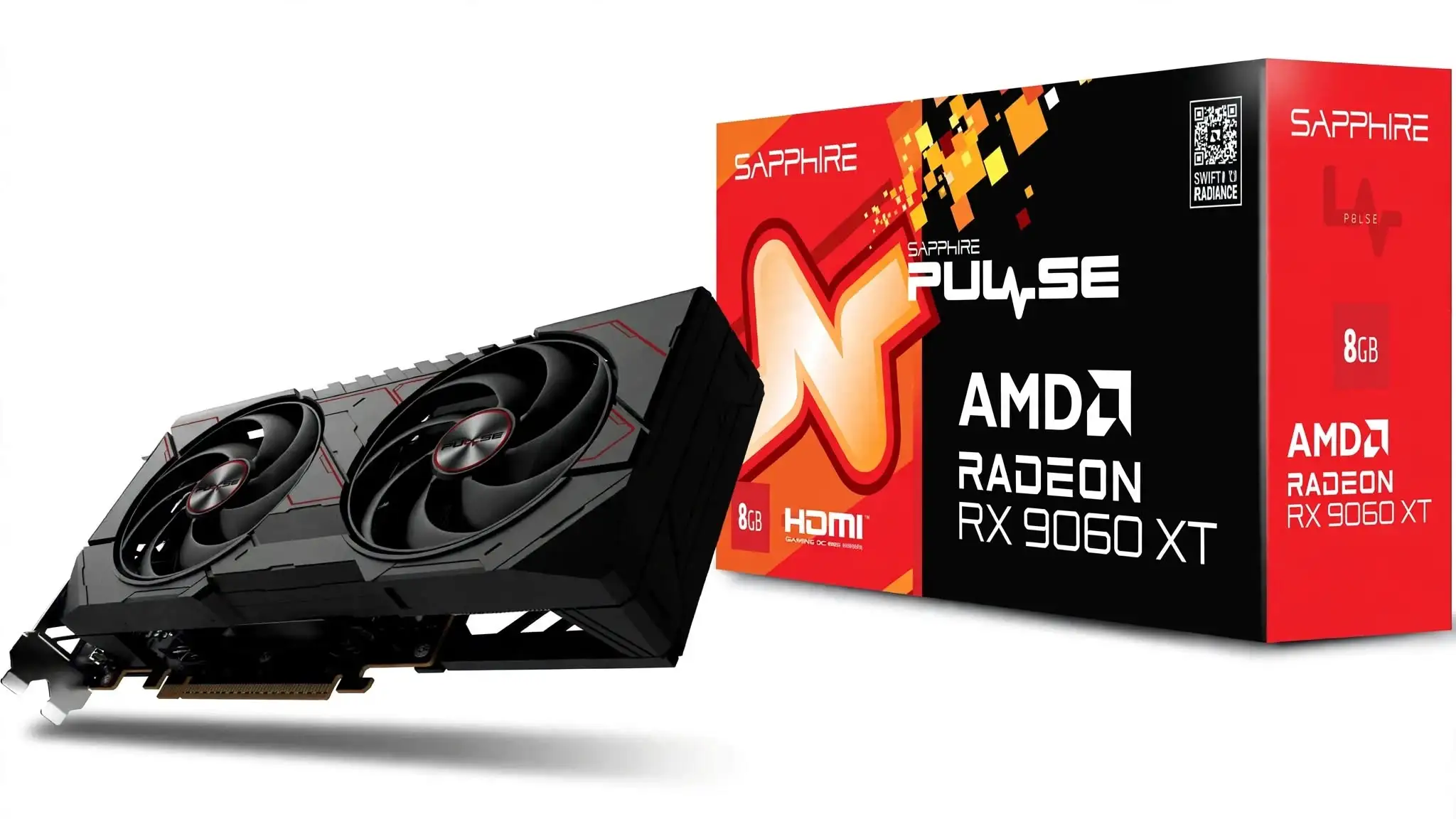
1. SAPPHIRE PULSE AMD Radeon RX 9060 XT OC 8GB
Specification Details
| Exact model | SAPPHIRE PULSE AMD Radeon RX 9060 XT OC 8GB |
| Product SKU | 11350-04-20G |
| GPU | AMD Radeon RX 9060 XT |
| Architecture | AMD RDNA 4 |
| Compute units | 32 |
| Stream processors | 2,048 |
| Ray accelerators | 32 |
| AI accelerators | 64 |
| Game clock | Up to 2,700MHz |
| Boost clock | Up to 3,290MHz |
| Video memory | 8GB GDDR6 |
| Memory speed | 20Gbps effective |
| Memory interface | 128-bit |
| Memory bandwidth | Up to 320GB/s |
| Infinity Cache | 32MB |
| PCIe interface | PCI Express 5.0 x16 |
| Typical board power | 170W |
| Recommended power supply | 450W or higher |
| Power connector | One 8-pin PCIe connector |
| Cooling design | Dual-X dual-fan cooling |
| Card dimensions | 244 × 124 × 46.1mm |
| Slot size | Approximately 2.3 slots |
| Display connections | Two HDMI 2.1b and one DisplayPort 2.1a |
| Maximum supported displays | Three |
| Media support | AV1 encode and decode |
| Supported operating systems | Windows 10, Windows 11 and Linux |
| Main gaming technologies | AMD FSR 4, HYPR-RX, Radeon Anti-Lag and ray tracing |
Remarks-
The SAPPHIRE PULSE Radeon RX 9060 XT OC 8GB is our leading choice for the best GPU under $300, provided it is available near its original $299 price. It combines current-generation RDNA 4 features with a compact dual-fan cooler, making it suitable for gamers who want strong 1080p performance without rebuilding their entire PC around a large, power-hungry graphics card.
What stands out about this card is how sensibly Sapphire has balanced performance, size, and power requirements. It is not an oversized premium model carrying an unnecessary cooler and decorative features. Its 244mm length makes it easier to install in compact and mid-tower cases, while the Dual-X cooling system is more substantial than the basic cooling found on many entry-level graphics cards. The card also avoids proprietary power connectors and runs through a standard eight-pin PCIe connection, which makes upgrading an existing gaming PC much simpler.
Its gaming value is strongest at 1080p. The RX 9060 XT has enough rendering performance for high or ultra settings in many current games, while competitive games can take advantage of high-refresh-rate monitors. The card can also handle 1440p gaming, but medium-to-high settings and selective use of FSR may be required in demanding releases. FSR 4 can improve performance at supported resolutions, but it should be treated as a useful option rather than a replacement for sufficient native rendering power.
The factory-overclocked Sapphire model reaches a boost clock of up to 3,290MHz, compared with AMD’s 3,130MHz reference specification. This does not transform it into a different performance class, but it gives the card a modest advantage without requiring the owner to perform manual overclocking. Published testing of the RX 9060 XT family also shows relatively manageable power consumption and temperatures, which fits the practical character of the PULSE design. Actual clock speed, temperature, and fan noise will still depend on case ventilation, ambient temperature, and workload.
Sapphire has a strong position among Radeon buyers because its graphics cards are designed specifically around AMD GPUs. The PULSE range is normally chosen by gamers who care more about dependable cooling and reasonable pricing than extensive RGB lighting. This gives the card better buyer appeal than an unfamiliar model sold by a third-party marketplace seller. However, that appeal depends heavily on price. At approximately $299, it is a convincing option; once its price moves substantially above $300, the value begins to weaken because 12GB and 16GB alternatives become easier to justify.
Before buying it, check the exact Amazon model number rather than relying only on the product image. Sapphire sells both 8GB and 16GB versions, and their listings can appear similar. The correct 8GB OC model covered here carries SKU 11350-04-20G. Buyers should also confirm 244mm of case clearance, space for a card thicker than two slots, one available eight-pin PCIe power cable, and a dependable 450W or higher power supply. A modern processor is preferable if the goal is high-refresh-rate 1080p gaming, since an older CPU can prevent the card from reaching its full frame-rate potential.
The most important limitation is its 8GB of VRAM. That capacity remains workable for 1080p gaming, but some demanding games can exceed it when ultra-resolution textures, ray tracing, or high 1440p settings are enabled. When the memory limit is reached, the result may include reduced texture quality, inconsistent frame times, or sudden performance drops. Lowering texture quality by one setting can often solve the problem without significantly affecting the overall image, but buyers expecting to keep every new game at maximum settings should consider a 12GB or 16GB card.
Ray-tracing performance is improved over older Radeon generations, but this should still be viewed primarily as a conventional rasterization gaming card. Heavy ray tracing can require FSR, reduced effects, or lower settings to maintain smooth gameplay. Its three display connections may also feel restrictive to users who require four monitors. For a buyer focused on strong 1080p gaming, compact dimensions, and straightforward installation, these compromises are manageable. For high-texture 1440p gaming or longer-term VRAM headroom, the 16GB version is the safer purchase if the price difference remains reasonable.
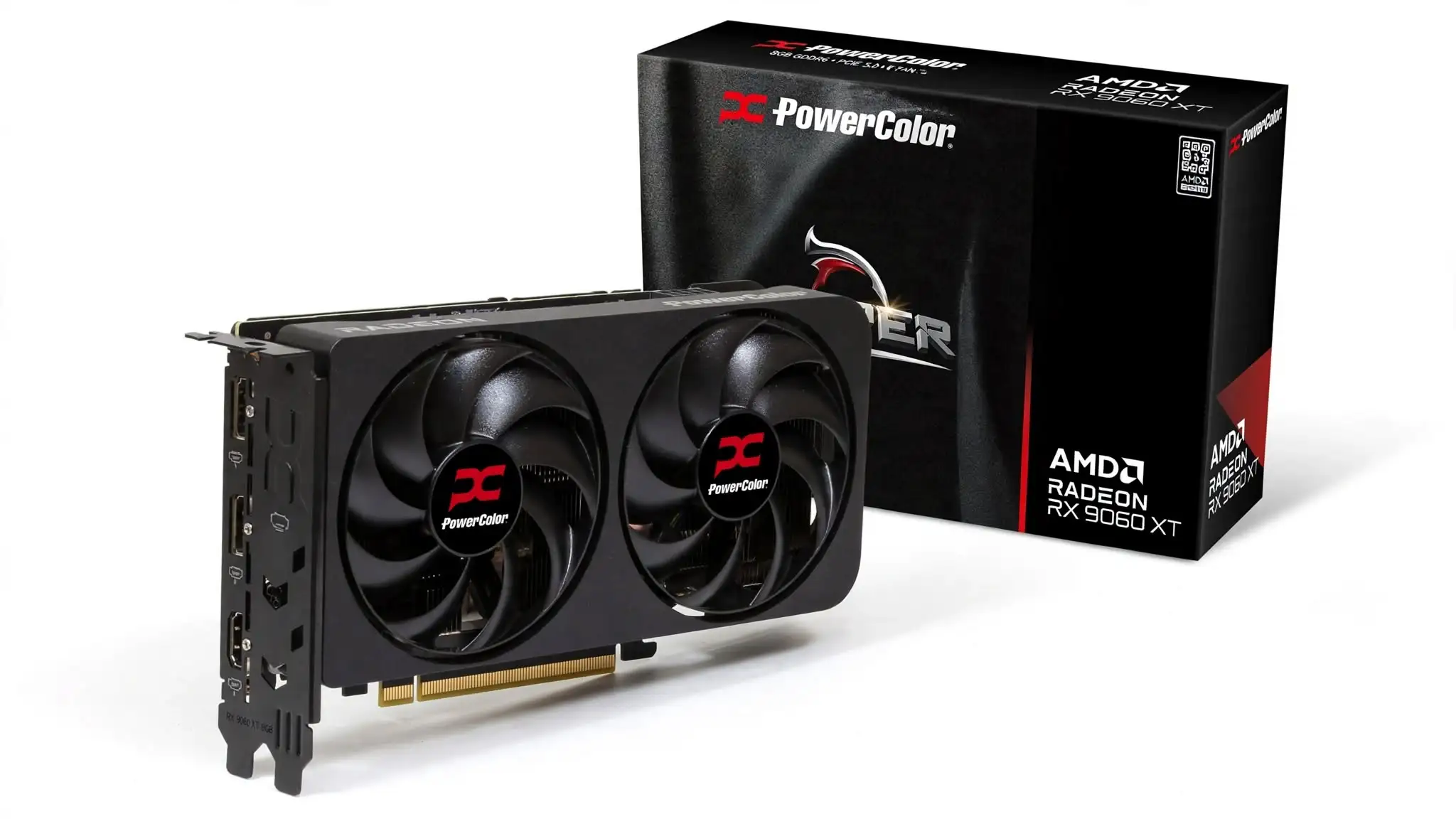
2. PowerColor Reaper AMD Radeon RX 9060 XT 8GB GDDR6
Specification Details
| Exact Amazon name | PowerColor Reaper AMD Radeon RX 9060 XT 8GB GDDR6 |
| GPU | AMD Radeon RX 9060 XT |
| Architecture | AMD RDNA 4 |
| Compute units | 32 |
| Stream processors | 2,048 |
| Ray accelerators | 32 |
| AI accelerators | 64 |
| Game clock | Up to 2,530MHz |
| Boost clock | Up to 3,130MHz |
| Video memory | 8GB GDDR6 |
| Memory speed | 20Gbps effective |
| Memory interface | 128-bit |
| Memory bandwidth | Up to 320GB/s |
| Infinity Cache | 32MB |
| PCIe interface | PCI Express 5.0 x16 |
| Typical board power | Approximately 150W |
| Minimum system power | 500W |
| Power connector | One 8-pin PCIe connector |
| Cooling system | Dual-fan Reaper cooler |
| Internal board dimensions | 200 × 100 × 39mm |
| Dimensions with bracket | 220 × 120 × 40mm |
| Slot requirement | Two slots |
| Display outputs | Two DisplayPort 2.1a and one HDMI 2.1b |
| Media capabilities | AV1 encoding and decoding |
| Gaming technologies | AMD FSR 4, HYPR-RX, Radeon Anti-Lag and ray tracing |
Remarks-
The PowerColor Reaper RX 9060 XT 8GB takes a more practical approach than the factory-overclocked Sapphire PULSE. Its main advantage is not a higher advertised clock or premium appearance, but a genuinely compact 200mm board that brings current-generation AMD gaming performance to cases where larger cards may not fit.
The first impression created by the Reaper is that PowerColor has removed everything that does not directly contribute to gaming. There is no oversized shroud, elaborate lighting system, or thick three-slot heatsink. The card has a plain black finish and occupies two expansion slots, so it looks more like a functional upgrade than a showcase component. That approach will appeal to someone building inside a small case or using a closed side panel where decorative features provide no benefit.
Its 200mm internal length is the characteristic that separates it from most RX 9060 XT models. A smaller graphics card is easier to position around front-mounted radiators, drive cages, and restricted cable-routing areas. It also places less physical weight on the motherboard slot. The bracket increases the complete installed length to approximately 220mm, so buyers must use that larger measurement when checking case clearance.
The Reaper runs at AMD’s reference game and boost-clock specifications rather than using an aggressive factory overclock. That may appear disappointing beside models advertising higher frequencies, but the practical gaming difference between RX 9060 XT variants is normally small. The benefit is a simpler power and thermal profile. Someone who wants to install the card, enable the latest driver, and start gaming is unlikely to miss the additional clock speed offered by a more expensive edition.
At 1080p, the GPU provides enough performance for visually demanding single-player games and high-frame-rate competitive titles. Medium and high settings are the sensible target when a game uses large texture files, while many less demanding releases can run comfortably at ultra settings. It can also deliver a good 1440p experience when graphics options are adjusted carefully, but buyers should not interpret 1440p support as permission to enable every setting at its maximum level.
The Reaper has good gaming value when it is one of the least expensive RX 9060 XT models. Its original GPU class was designed around the $299 market, and this basic model makes the most sense close to that figure. Paying a large premium would work against the reason for choosing it because additional money would be better directed toward a 12GB or 16GB graphics card. The Amazon listing confirms one eight-pin connector, a 500W minimum system-power recommendation, and the compact board dimensions.
This card is likely to attract value-focused gamers rather than buyers chasing a particular premium design. PowerColor’s Reaper range sits below its more decorative Hellhound models, which helps keep the purchase focused on performance per dollar. Its compact measurements also give it a specific audience among small-form-factor builders. That practical demand can make the Reaper more appealing than a heavily overclocked model, even when both cards use the same GPU.
Before ordering it, buyers should confirm that the Amazon product is the 8GB version because PowerColor also sells a visually similar 16GB Reaper. The computer needs one free eight-pin PCIe power lead, a suitable 500W or higher power supply, and two unobstructed expansion slots. Case airflow also deserves attention. A short dual-fan graphics card has less heatsink surface area than a long triple-fan model, so it depends more heavily on a clear supply of cool air from the case.
The 8GB memory capacity remains its central compromise. It is enough for normal 1080p gaming, but high-resolution texture packs and memory-heavy ray-tracing effects can push that capacity beyond. When this happens, reducing shadows or general graphics quality may not solve the issue; texture quality is usually the setting that needs to be lowered. A buyer who regularly installs extensive game modifications or intends to play at 1440p for several years should calculate whether the 16GB version offers better long-term value.
Its compact cooler can also require higher fan speeds than a larger three-fan card during prolonged gaming sessions. That does not make it unsuitable, but users who demand the quietest possible system may prefer a physically larger design with more heatsink area. The absence of RGB lighting, a decorative backplate focus, and premium styling may discourage appearance-conscious buyers, while the three display outputs are less flexible than cards offering four connections.
The PowerColor Reaper is therefore not the most elaborate best GPU under $300 candidate. Its appeal comes from fitting where other RX 9060 XT models may not, delivering the same underlying RDNA 4 gaming capabilities and avoiding a price premium for cosmetic additions. It is a sensible purchase at or below $299, but the compact design alone does not justify paying more than the price of a better-equipped 12GB or 16GB alternative.
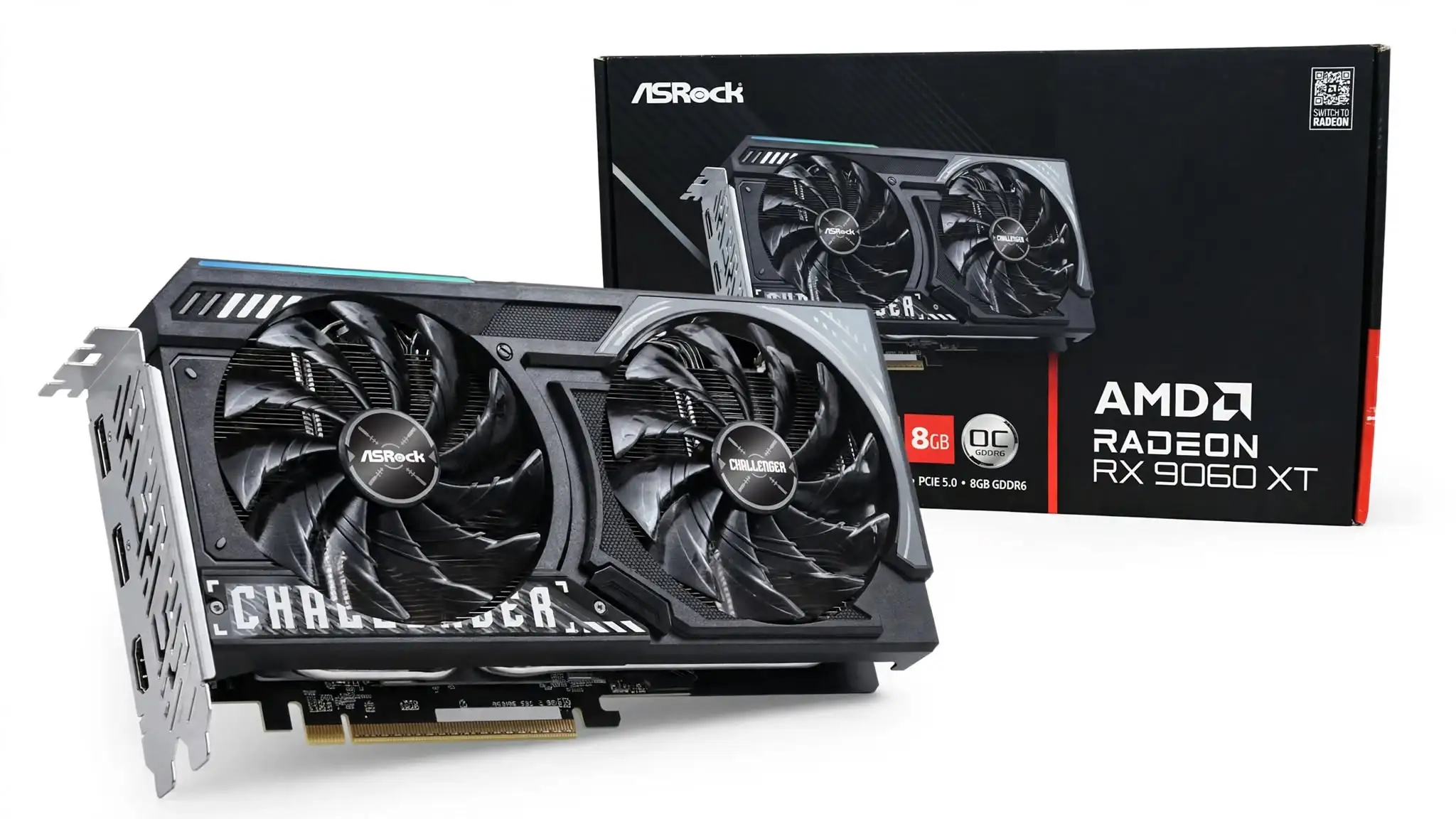
3. ASRock AMD Radeon RX 9060 XT Challenger 8GB OC
Specification Details
| Exact product name | ASRock AMD Radeon RX 9060 XT Challenger 8GB OC |
| Model number | RX9060XT CL 8GO |
| Graphics processor | AMD Radeon RX 9060 XT |
| GPU architecture | AMD RDNA 4 |
| Compute units | 32 |
| Stream processors | 2,048 |
| Ray-tracing hardware | Third-generation ray accelerators |
| AI hardware | Second-generation AI accelerators |
| Game clock | 2,700MHz |
| Maximum boost clock | Up to 3,290MHz |
| Video memory | 8GB GDDR6 |
| Effective memory speed | 20Gbps |
| Memory bus | 128-bit |
| Memory bandwidth | Up to 320GB/s |
| Infinity Cache | 32MB |
| Expansion interface | PCI Express 5.0 x16 |
| Power input | One 8-pin PCIe connector |
| Recommended PSU | 550W |
| Cooling arrangement | Two Striped Axial fans with 0dB mode |
| Card dimensions | 249 × 132 × 41mm |
| Card weight | 645g |
| Display connections | Two DisplayPort 2.1a and one HDMI 2.1b |
| Maximum simultaneous displays | Three |
| Maximum digital resolution | 7680 × 4320 |
| Construction features | Metal backplate, Dr.MOS power stages and 90A power chokes |
| Lighting | Integrated LED indicator with physical on/off switch |
| API support | DirectX 12 Ultimate and OpenGL 4.6 |
Remarks-
The ASRock Challenger 8GB OC is built for buyers who want a factory-tuned RX 9060 XT with stronger physical construction than the most basic models. Its metal backplate, semi-passive fans, and switchable lighting give it a more finished appearance, while the 249mm length remains manageable for most mid-tower cases.
The Challenger is noticeably more refined than a stripped-down entry model. The metal backplate strengthens the card and reduces visible PCB exposure, while the black-and-copper styling fits into most gaming builds without forcing a particular colour scheme. Its lighting is limited compared with a fully illuminated graphics card, but ASRock includes a physical switch for turning the LED off. That small control is useful for someone who wants a dark system and does not want to install another application merely to disable a light.
ASRock’s Striped Axial fans are designed to direct more air through the heatsink instead of allowing it to escape around the fan blades. The card also uses a zero-RPM function, which stops the fans when the GPU is cool enough. This means browsing, document work, and video playback should not produce constant fan noise. Once a game places sustained load on the GPU, both fans restart automatically. The official ASRock specifications confirm the 0dB mode, metal backplate, LED switch, and factory-overclocked frequencies.
The 2,700MHz game clock and 3,290MHz boost ceiling place this model above AMD’s reference frequency targets. We would not buy it solely because of that overclock, since the improvement over a reference-clocked RX 9060 XT is likely to be modest. Its stronger argument is that the overclock comes as part of a balanced package with a better cooler and reinforced construction. There is no need for the owner to adjust voltage or frequency settings to obtain the advertised performance.
Games built around conventional rasterized graphics are where the Challenger provides its best experience. It is well matched to a 1080p high-refresh display and can produce smooth results at high settings in a broad range of current games. At 1440p, performance depends more heavily on the game engine and selected quality preset. FSR 4 can recover frames in supported titles, but a clean image still depends on selecting an appropriate quality mode rather than automatically choosing the fastest upscaling setting.
Third-generation ray accelerators make this card more capable with ray-traced lighting than older Radeon products in the same price class. Even so, demanding combinations such as 1440p resolution, ultra-quality ray tracing, and maximum textures place too much pressure on an 8GB card. A more balanced setup would retain high general settings, reduce the heaviest ray-tracing options, and activate quality-focused upscaling only when necessary. That approach preserves much of the visual improvement without allowing one demanding feature to undermine the entire gaming experience.
The Challenger name is familiar among budget-conscious builders because ASRock uses it below the more decorative Steel Legend and Taichi product lines. This positioning works in its favour: buyers receive several practical upgrades without moving into a premium price category that makes little sense for an 8GB GPU. Its market value is strongest when it costs no more than approximately $299. A small premium over a plain reference-clocked card can be justified by the cooler and backplate, but a large premium cannot.
There are several compatibility details to check before purchasing it. Its 249mm length is reasonable, but its 132mm height can create a problem in narrow cases once the eight-pin cable is connected along the upper edge. The 41mm thickness also means the card occupies slightly more than two physical slots, so the adjacent expansion area should remain clear. ASRock recommends a 550W power supply, which is higher than some competing manufacturers specify for the same GPU. Buyers with a good-quality 500W unit may have enough electrical capacity, but following the official 550W recommendation removes uncertainty.
Anyone upgrading from an older PCIe system should also check whether the motherboard supports Resizable BAR or AMD Smart Access Memory. The card will still operate without it, but enabling the feature can improve performance in supported configurations. The processor matters as well. Pairing this GPU with an aging four-core CPU may create uneven frame delivery in multiplayer games, even when average GPU utilization appears low.
The restriction that deserves the most attention is not the cooling system or clock rate; it is the fixed 8GB memory pool. Modern games do not all use video memory in the same way. One title may run correctly at its highest texture setting, while another may begin replacing assets or producing inconsistent frame delivery before its average frame rate looks problematic. Buyers who prefer installing high-resolution texture modifications should regard this card as an unsuitable long-term choice, even if its raw GPU performance appears sufficient.
There are smaller compromises too. Only three displays can be connected simultaneously, whereas some competing cards provide four outputs. The factory overclock offers little room to justify a high selling price, and the two-fan cooler will not have the same acoustic headroom as an oversized three-fan design. The lighting implementation is also modest, so it should not be selected primarily for visual customization.
Within the best GPU under $300 category, the ASRock Challenger makes sense for someone who values build quality, quiet operation during light use, and a ready-made overclock. Its benefits are easy to understand and useful in daily ownership, but they do not overcome the underlying 8GB limit. It remains a worthwhile 1080p card at the correct price, while buyers considering a substantial markup should move toward a higher-capacity GPU instead.
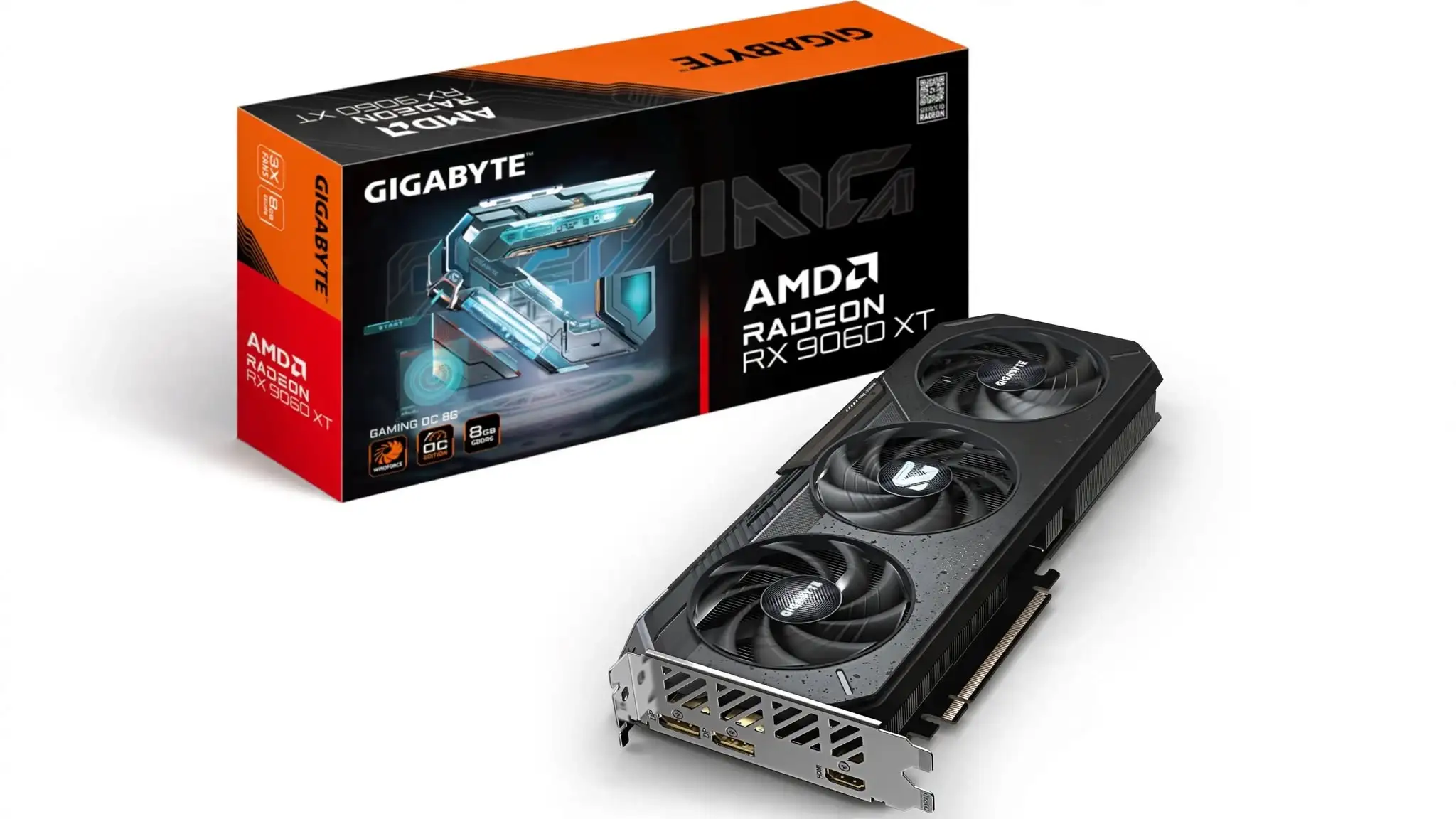
4. GIGABYTE Radeon RX 9060 XT GAMING OC 8G
Specification Details
| Exact Amazon product name | GIGABYTE Radeon RX 9060 XT Gaming OC 8G Graphics Card, PCIe 5.0, 8GB GDDR6, GV-R9060XTGAMING OC-8GD Video Card |
| Model number | GV-R9060XTGAMING OC-8GD |
| Graphics processor | AMD Radeon RX 9060 XT |
| Architecture | AMD RDNA 4 |
| Compute units | 32 |
| Stream processors | 2,048 |
| Game clock | Up to 2,780MHz |
| Reference game clock | 2,530MHz |
| Boost clock | Up to 3,320MHz |
| Reference boost clock | 3,130MHz |
| Video memory | 8GB GDDR6 |
| Memory speed | 20Gbps |
| Memory interface | 128-bit |
| Estimated memory bandwidth | Up to 320GB/s |
| Infinity Cache | 32MB |
| Card interface | PCI Express 5.0 x16 |
| Cooling system | WINDFORCE triple-fan cooler |
| Fan behaviour | Semi-passive cooling with fan-stop operation |
| Card dimensions | 281 × 118 × 40mm |
| Form factor | ATX, dual-slot class |
| Recommended power supply | 450W |
| Power connector | One 8-pin PCIe connector |
| DisplayPort outputs | Two DisplayPort 2.1a |
| HDMI outputs | One HDMI 2.1b |
| Maximum displays | Three |
| Maximum digital resolution | 7680 × 4320 |
| Software support | GIGABYTE Control Center |
| Graphics APIs | DirectX 12 and OpenGL 4.6 |
Remarks-
The GIGABYTE Radeon RX 9060 XT GAMING OC 8G is the cooling-focused option among the 8GB RX 9060 XT cards. GIGABYTE gives it three fans, a longer heatsink, and one of the highest factory clock configurations in this group. This makes it attractive for extended gaming sessions, although its larger size removes one of the installation advantages normally associated with a power-efficient mainstream GPU.
GIGABYTE has taken a GPU that can operate with a modest dual-fan cooler and placed it beneath a longer three-fan WINDFORCE system. The result is not a compact card, but it has more cooling surface area available during sustained workloads. This matters less during a short benchmark and more during long gaming sessions, where a smaller heatsink may gradually require higher fan speeds to maintain the same temperature.
Published testing of the GAMING OC cooler found that its fans stop completely during idle operation and settle at approximately 1,700 RPM under sustained gaming loads. The resulting sound was described as a low fan hum rather than a distracting high-pitched noise. That behaviour makes the card suitable for a system that remains quiet during ordinary desktop use but still needs dependable cooling when the GPU remains fully loaded. Individual samples and case airflow can change the final acoustic result, so these findings should be treated as a useful indication rather than a guarantee. HotHardware’s GIGABYTE RX 9060 XT testing
Clock speed is another area where this model separates itself from cheaper alternatives. GIGABYTE specifies a game clock of up to 2,780MHz and a boost clock reaching 3,320MHz. These figures are respectively 250MHz and 190MHz above AMD’s reference targets. The overclock may provide a small frame-rate advantage, but buyers should keep their expectations sensible. All RX 9060 XT cards use the same 2,048-stream-processor GPU, so the cooler and clock adjustment refine its performance rather than move it into a higher GPU tier. The complete frequencies and physical specifications are available on the official GIGABYTE product page.
The gaming experience suits players who prioritise high frame rates at 1080p. Competitive games can make good use of 144Hz and faster displays when paired with an appropriate processor, while demanding story-driven titles should remain comfortable at high settings. Moving to 1440p is possible, but it changes the way the card should be configured. Instead of selecting an ultra preset and accepting whatever performance follows, the better method is to preserve textures within the available memory, reduce the most demanding effects, and use FSR 4 Quality mode where the game supports it.
The triple-fan cooler becomes more useful in warm rooms and cases with moderate airflow. A lower GPU temperature can allow the processor to hold its boost behaviour more consistently, while slower-moving fans are generally less intrusive than two smaller fans working harder. However, a larger cooler cannot correct a case with blocked front ventilation. The card still needs a clear path for fresh air and somewhere for its heated exhaust to leave the chassis.
GIGABYTE is a familiar name in the graphics-card market, and that recognition can make this model easier to choose than a similarly priced card from a less established manufacturer. The GAMING OC range also tends to attract buyers who want something more substantial than an entry-level board without paying for a flagship cooler. Its Amazon listing uses the correct model number GV-R9060XTGAMING OC-8GD, which buyers should verify because the 8GB and 16GB versions share nearly identical styling.
Before placing an order, the case should be measured from the rear expansion slots to the front fans or radiator. A length of 281mm is not extreme for a modern graphics card, but it is considerably longer than the 200mm PowerColor Reaper reviewed earlier. The 118mm height is relatively moderate, and its 40mm thickness keeps it within a dual-slot-class footprint. One standard eight-pin PCIe cable is required, while GIGABYTE recommends a 450W power supply. A higher-capacity unit may be appropriate when the computer also contains a high-power processor, numerous drives, or additional expansion hardware.
This card has only three display connectors, so users running four monitors should rule it out before considering its gaming performance. Two DisplayPort 2.1a connections and one HDMI 2.1b port are sufficient for a typical one- or two-monitor gaming arrangement, but the limited output count is a surprising restriction on a card with such a large cooler.
Its 8GB capacity creates a different mismatch: the cooler and clock configuration suggest a performance-oriented product, but the memory capacity remains that of a budget-focused card. The GPU may still have adequate processing power when a game begins reducing texture detail or moving assets through system memory. This is more likely at 1440p with ultra textures, detailed ray-traced environments, or heavily modified games. Lowering textures before reducing unrelated settings usually provides the most direct solution.
The buyer should also compare its price with the 16GB version rather than looking only at other 8GB cards. Paying a modest amount for the improved cooler can make sense, but spending close to the price of a 16GB RX 9060 XT does not. More memory will usually provide a more meaningful long-term benefit than the small performance increase produced by the higher factory clock.
As a candidate for the best GPU under $300, the GIGABYTE GAMING OC 8G works best for gamers who have enough case space and care about controlled temperatures during lengthy sessions. It should be chosen at $300 or less. Above that point, the large cooler and factory tuning cannot compensate for the 8GB memory limitation, and a higher-capacity card becomes the more defensible purchase.
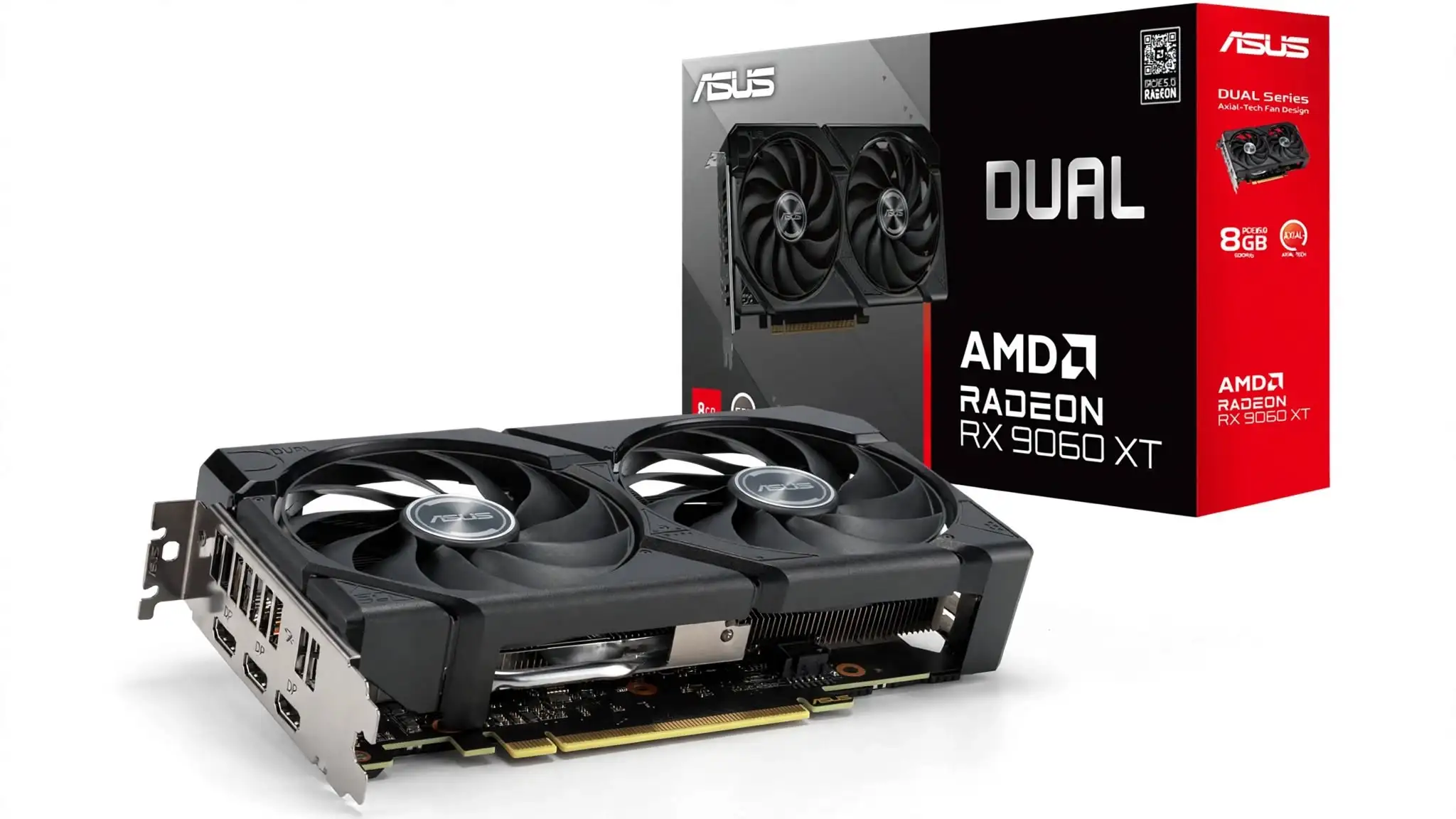
5. ASUS Dual Radeon RX 9060 XT 8GB
Specification Details
| Exact product name | ASUS Dual Radeon RX 9060 XT 8GB GDDR6 |
| Model number | DUAL-RX9060XT-8G |
| Part number | 90YV0MI1-MVAA00 |
| Graphics engine | AMD Radeon RX 9060 XT |
| GPU architecture | AMD RDNA 4 |
| Compute units | 32 |
| Stream processors | 2,048 |
| Default game clock | Up to 2,530MHz |
| OC-mode game clock | Up to 2,550MHz |
| Default boost clock | Up to 3,130MHz |
| OC-mode boost clock | Up to 3,150MHz |
| Video memory | 8GB GDDR6 |
| Memory speed | 20Gbps |
| Memory interface | 128-bit |
| Memory bandwidth | Up to 320GB/s |
| Infinity Cache | 32MB |
| Bus standard | PCI Express 5.0 |
| Cooling system | Two Axial-tech fans |
| Fan bearings | Dual-ball bearings |
| Fan-stop temperature | Fans stop below approximately 55°C under low power |
| BIOS profiles | Performance and Quiet modes |
| Card dimensions | 202 × 120 × 49mm |
| Slot requirement | 2.5 slots |
| Recommended power supply | 550W |
| Power connection | One 8-pin PCIe connector |
| Display outputs | Two DisplayPort 2.1a and one HDMI 2.1b |
| Maximum displays | Three |
| Maximum resolution | 7680 × 4320 |
| HDCP support | HDCP 2.3 |
| Tuning software | ASUS GPU Tweak III |
| Manufacturer warranty | Three years in supported regions |
Remarks-
The ASUS Dual Radeon RX 9060 XT 8GB is designed for builders who need a short graphics card but do not mind giving up additional slot space. It measures only 202mm from end to end, yet ASUS uses a thick 2.5-slot heatsink, two Axial-tech fans, and dual BIOS profiles to provide more cooling flexibility than its small footprint initially suggests.
This card solves a different installation problem from the GIGABYTE GAMING OC. GIGABYTE uses extra length to accommodate three fans, whereas ASUS keeps the board at 202mm and builds outward with a deeper heatsink. In a case with limited front-to-back clearance, the ASUS design is much easier to accommodate. The trade-off appears below the card, where its 49mm thickness can obstruct an adjacent PCIe slot.
The short length makes it suitable for many micro-ATX and selected Mini-ITX systems, but it should not automatically be labelled a small-form-factor card. Compact cases impose restrictions in several directions. A case may accept its 202mm length but still lack enough room for a 2.5-slot cooler, or it may position a power-supply shroud too close to the fans. Measuring the available thickness and checking airflow beneath the card are therefore just as important as confirming its length.
ASUS uses two Axial-tech fans with smaller hubs, longer blades, and surrounding barrier rings. This arrangement is intended to push air downward through the heatsink rather than allowing it to spread away from the fins. The dual-ball bearings are also a worthwhile ownership feature. ASUS states that they can last up to twice as long as conventional sleeve bearings, which matters on a component expected to run for several years. ASUS Dual RX 9060 XT product details
The card remains silent when the GPU temperature falls below approximately 55°C and power use is low because its fans stop completely. That creates a pleasant desktop experience when the computer is being used for browsing, writing, or video playback. Once temperatures rise, the fans restart gradually. This behaviour does not mean the entire computer becomes silent, but it removes the graphics card as a noise source during light workloads.
The dual BIOS switch offers a straightforward choice between Performance and Quiet profiles. Performance mode uses a more active fan response to control temperature, while Quiet mode accepts slightly warmer operation in exchange for reduced fan noise. The underlying GPU performance should remain close between the two profiles, so Quiet mode is useful for someone more sensitive to acoustics than small thermal differences. The switch must be moved while the computer is turned off.
ASUS lists default game and boost clocks of 2,530MHz and 3,130MHz. Selecting OC mode through GPU Tweak III raises those figures to 2,550MHz and 3,150MHz. This is a mild adjustment rather than an aggressive factory tune, and the frame-rate change will often be too small to notice without measurement software. GPU Tweak III remains useful for monitoring temperature, adjusting fan behaviour, and applying a custom power target, but the card does not require additional tuning to perform correctly.
Gaming value comes from predictable 1080p performance rather than headline specifications. The GPU is capable of running competitive games at high frame rates and visually demanding releases at carefully selected high settings. It can extend into 1440p when the game is not unusually memory-intensive, although the owner may need to reduce texture quality or activate FSR 4. The card should be bought for a high-quality 1080p experience, with 1440p treated as an additional capability rather than its guaranteed operating target.
ASUS products often receive attention from buyers who already use the company’s motherboards, monitors, or other components. Brand familiarity, a widely recognised warranty structure and accessible tuning software can make this model easier to trust. The compact length also gives it a clear market position rather than making it another visually different version of the same GPU. However, ASUS branding frequently carries a price premium, and that premium must remain small for an 8GB graphics card.
Before buying, check the complete model number. The standard card reviewed here is DUAL-RX9060XT-8G. Listings for DUAL-RX9060XT-O8G, 16GB variants, and ASUS Prime models can look similar but do not represent the same product. Buyers should also confirm that the seller is authorised and that the regional three-year warranty applies, since marketplace imports may be covered under different terms.
ASUS recommends a 550W power supply and one standard eight-pin PCIe cable. That requirement is not difficult for a current gaming system, but the power supply should have suitable protection circuitry and enough capacity for the processor as well. A low-quality unit should not be kept simply because its printed wattage appears sufficient.
The most frustrating part of this model is the way its physical quality exceeds its memory configuration. Its durable fan bearings, dual BIOS, and compact engineering are features worth keeping for several upgrade cycles, but 8GB may become the reason the card is replaced first. Texture-heavy games can already show poorer frame consistency when their preferred memory allocation exceeds the available capacity. FSR can reduce rendering workload, but it does not double the physical VRAM installed on the card.
The ASUS Dual also has only three display outputs, and its 2.5-slot body may be inconvenient for users with a Wi-Fi card, capture card, or sound card installed directly below the main PCIe slot. Its conservative OC mode gives buyers little reason to pay extra for clock speed, while owners interested in elaborate lighting will find the design visually restrained.
For a short gaming PC, this is one of the more thoughtfully constructed choices in the best GPU under $300 category. It is worth considering when priced close to $299 and when its compact length solves a genuine case-clearance problem. If it costs noticeably more than other RX 9060 XT 8GB cards, the additional money is better saved or redirected toward a 16GB graphics card.
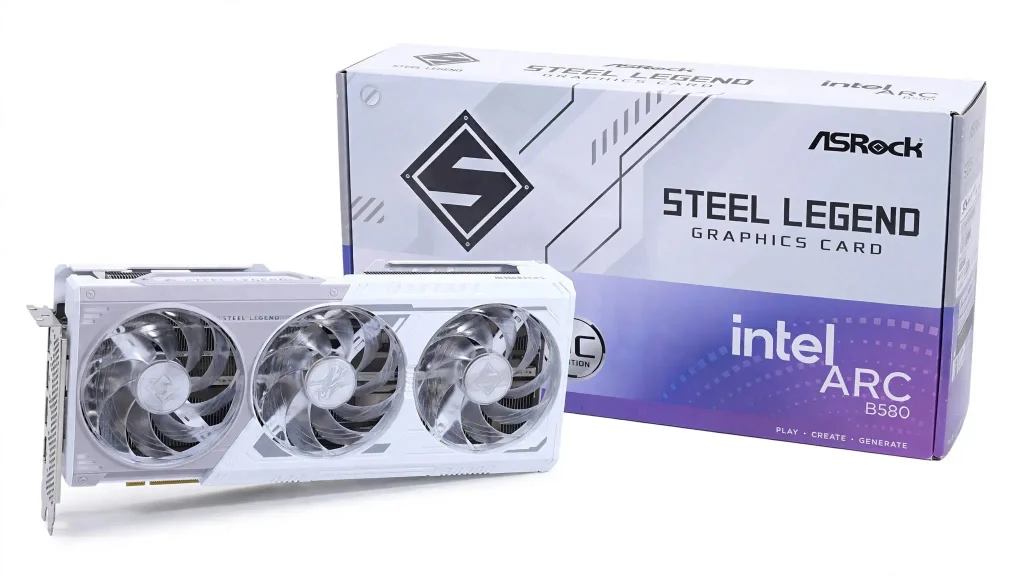
6. ASRock Intel Arc B580 Steel Legend 12GB OC
Specification Details
| Exact Amazon product name | ASRock Intel ARC B580 Steel Legend 12GB OC 2800MHz 19Gbps 192-bit GDDR6 Triple Fan Graphics Card |
| Model number | B580 SL 12GO |
| Manufacturer part number | 90-GA5CZZ-00UANF |
| Amazon ASIN | B0DNV4NRK5 |
| Graphics processor | Intel Arc B580 |
| GPU architecture | Intel Xe2-HPG, also known as Battlemage |
| Xe cores | 20 |
| Vector engines | 160 |
| XMX AI engines | 160 |
| Ray-tracing units | 20 |
| Shader units | 2,560 |
| ASRock engine clock | 2,800MHz |
| Intel reference graphics clock | 2,670MHz |
| Video memory | 12GB GDDR6 |
| Memory speed | 19Gbps |
| Memory interface | 192-bit |
| Memory bandwidth | 456GB/s |
| PCIe connection | PCI Express 4.0 x8 |
| ASRock recommended PSU | 650W |
| Power connections | Two 8-pin PCIe connectors |
| Cooling arrangement | Three-fan Steel Legend cooler |
| Idle fan mode | 0dB fan-stop cooling |
| Dimensions | 298 × 131 × 51mm |
| Slot thickness | 2.6 slots |
| Weight | 959g |
| DisplayPort outputs | Three DisplayPort 2.1 connections |
| HDMI output | One HDMI 2.1a |
| Maximum displays | Four |
| Maximum resolution | Up to 7680 × 4320 |
| Upscaling and frame generation | Intel XeSS 2 |
| Media support | Hardware AV1 encoding and decoding |
| Lighting | Polychrome Sync ARGB with an on/off switch |
| Essential platform feature | Resizable BAR |
Remarks-
The ASRock Steel Legend Arc B580 is the first product in this selection that changes the buying decision rather than merely offering another cooler for the same Radeon GPU. Its 12GB memory, 192-bit interface, and 456GB/s bandwidth give it more room for detailed textures at 1440p, while its white triple-fan construction targets buyers who also care about the appearance of their build.
The Steel Legend does not try to disappear inside a computer. Its white shroud, metal backplate, and addressable lighting are intended to become part of the build’s visual identity. This makes it a natural match for white motherboards and cases, where a black budget card can look out of place. A physical lighting switch is included, so the card can still be used in a restrained system without relying entirely on software control.
This visual treatment comes with considerable physical size. At 298mm long and 51mm thick, the card needs almost three expansion slots and substantially more case space than the PowerColor or ASUS models covered earlier. Its 959g weight is not excessive for a triple-fan card, but supporting the outer end can help prevent gradual sag. The front of the case must also leave enough clearance for the card and unrestricted intake airflow.
ASRock raises the engine clock to 2,800MHz, above Intel’s 2,670MHz reference specification. The triple-fan heatsink gives that factory overclock room to operate without concentrating the thermal load beneath two small fans. Its zero-RPM mode stops the fans during light workloads, allowing the system to remain quiet when the GPU is not being used heavily. The complete dimensions, clock settings, and power requirements are confirmed by the official ASRock Steel Legend specifications.
The reason to consider this card is its 12GB frame buffer. Four additional gigabytes may appear modest on paper, but the difference becomes relevant when a game loads detailed textures, complex environments, and ray-tracing data at the same time. The wider 192-bit memory interface also gives the B580 more bandwidth than the 128-bit RX 9060 XT models. This does not guarantee that the Intel GPU wins every performance test, but it reduces the likelihood that memory capacity becomes the first restriction.
Its most convincing gaming role is affordable 1440p. The card can also deliver high frame rates at 1080p, but purchasing 12GB of VRAM solely for lightweight competitive games does not use its main advantage. At 1440p, the extra memory permits more generous texture settings and can improve frame consistency in titles that exceed an 8GB allocation. XeSS 2 provides AI-assisted upscaling, frame generation, and a low-latency component in supported games, giving owners another way to improve smoothness when native rendering becomes demanding.
Ray tracing is not merely a checkbox on the Arc B580. Intel’s second-generation Xe architecture includes 20 dedicated ray-tracing units and XMX engines that support AI-assisted rendering. Moderate ray-traced effects can be practical when combined with XeSS, although full path tracing remains outside the comfortable range of this GPU. The sensible objective is improved lighting at playable settings, not reproducing the output of a high-end card through aggressive frame generation.
The card also has value outside gaming. Intel’s media engine supports AV1 encoding and decoding, which is useful for streaming, screen recording and modern video production. Users working with supported editing applications can benefit from Intel’s hardware media capabilities, although software support should be checked against the exact application and version before purchase. A strong specification does not guarantee that every creative program uses the hardware equally well.
Market interest in the Arc B580 has been driven by something buyers rarely received in this price range: a current-generation GPU with 12GB of memory. The Steel Legend adds a premium cooler and white design to that foundation. This makes it more desirable than the reference card for a themed build, but it also creates a pricing problem. If the Steel Legend rises far above $300, its appearance begins competing with faster cards rather than similarly priced budget models.
Platform preparation matters more here than with the Radeon products. Resizable BAR must be supported and enabled to obtain the performance expected from Intel Arc. Buyers should verify motherboard compatibility, update the BIOS if necessary, and confirm that Above 4G Decoding and Resizable BAR are active. Installing this card in an old system without those features can lead to inconsistent or substantially reduced performance.
The power arrangement is another unusual point. ASRock requests a 650W power supply and fits two eight-pin PCIe connectors, despite the reference Arc B580 carrying a 190W total-board-power specification. This provides electrical headroom for the factory-overclocked design, but it makes the card less convenient for an inexpensive upgrade. Two separate PCIe power cables are preferable when the power supply provides them. Buyers using a basic unit with only one connector may need a power-supply replacement before the card can be installed properly.
Intel’s software has improved since the first Arc generation, but game-to-game consistency remains a consideration. Current DirectX 12 and Vulkan releases are the safest environment for the B580. Older DirectX 9 or DirectX 11 games can behave differently depending on the title, driver version, and processor. A buyer with a large library of older games should check the specific titles they play instead of assuming that performance in new releases represents every part of their collection.
Driver maintenance is also more important with Arc. A new driver may correct a game-specific problem or improve performance noticeably, so owners should keep the software current and read the release notes when a game behaves unexpectedly. Users who expect every older title to work predictably without configuration may find Radeon or GeForce ownership more straightforward.
Four display outputs give the Steel Legend an advantage for multi-monitor users. Three DisplayPort connections and one HDMI port allow a four-screen arrangement without adapters, while the primary DisplayPort supports a higher UHBR 13.5 link rate. This flexibility is useful for streaming desks, development setups, and workstations that use several monitors alongside gaming.
The ASRock Steel Legend Arc B580 becomes one of the more interesting best GPU under $300 options when its selling price remains within that limit. Its 12GB memory, four display outputs, and polished white design provide benefits that are easy to recognise. Its weaknesses are equally clear: it is large, requires two power connectors, depends on Resizable BAR, and may demand more driver awareness than an AMD alternative. Buyers with a compatible modern platform can receive strong value, while anyone upgrading a much older computer should verify the complete system before choosing it.
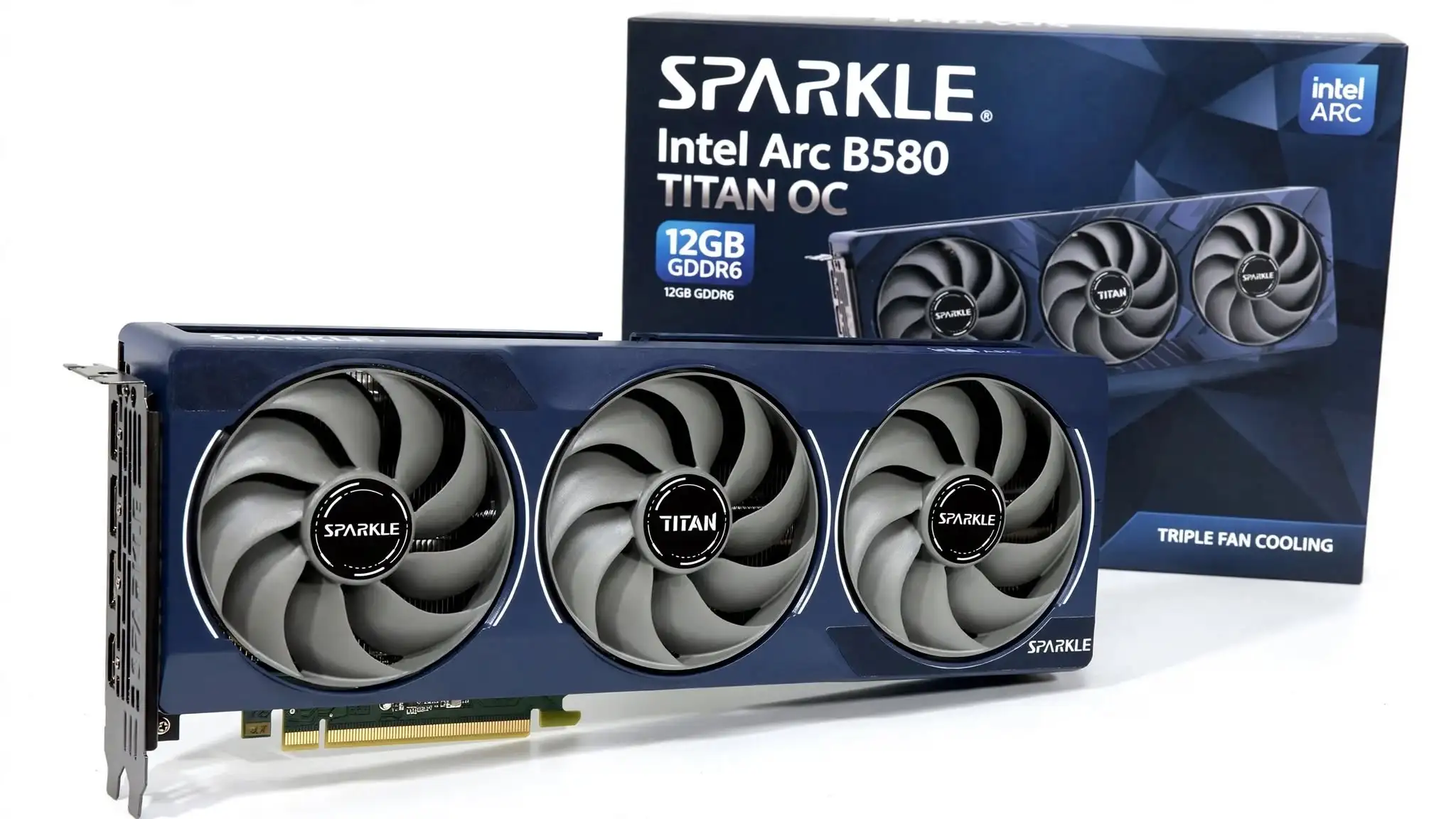
7. SPARKLE Intel Arc B580 TITAN OC 12GB
Specification Details
| GPU | Intel Arc B580 |
| Architecture | Intel Xe2 “Battlemage” |
| Model number | SB580T-12GOC |
| Boost clock | 2,740 MHz |
| Xe cores | 20 |
| Ray-tracing units | 20 |
| Intel XMX engines | 160 |
| Video memory | 12GB GDDR6 |
| Memory interface | 192-bit |
| Memory bandwidth | 456GB/s |
| PCIe interface | PCI Express 4.0 x8 |
| Total board power | 200W |
| Recommended power supply | 600W or greater |
| Power connector | One 8-pin PCIe connector |
| Cooling system | TORN Cooling 2.0 with three axial fans |
| Card thickness | 2.2 slots |
| Dimensions | 315 × 117 × 44mm |
| Weight | 954g |
| Display outputs | 3 × DisplayPort 2.1, 1 × HDMI 2.1 |
| Maximum resolution | Up to 7680 × 4320 at 120Hz through HDMI with DSC |
| Media support | AV1 encode and decode, VP9 decoding |
| Lighting | Blue breathing light |
| Backplate | Pre-installed metal backplate |
| API support | DirectX 12 Ultimate, Vulkan 1.3, OpenGL 4.6 and OpenCL 3.0 |
| Operating-system support | Windows 11 64-bit or Windows 10 64-bit |
| Required platform feature | Resizable BAR or AMD Smart Access Memory |
Remarks-
The SPARKLE TITAN OC is the type of Arc B580 I would consider when cooling quality and straightforward power installation matter more than owning the most familiar graphics-card brand. It keeps Intel’s useful 12GB memory configuration but places it beneath a large three-fan cooler. Its dark-blue finish, metal backplate and restrained blue breathing light also give it more character than Intel’s plain reference card without making it look excessively decorated.
Its gaming value comes primarily from the combination of 12GB of GDDR6 memory, a 192-bit memory bus and Intel’s improved Xe2 architecture. That memory capacity gives modern games more working space for detailed textures than many 8GB cards in the same general price class. At 1080p, the card is capable of targeting high settings and strong frame rates in demanding games. At 1440p, it is better treated as a high-quality mainstream option: use high settings where performance permits, reduce the heaviest effects when necessary, and enable XeSS in supported games when extra frame rate is more valuable than native rendering.
SPARKLE raises the boost clock to 2,740MHz, but the modest factory overclock should not be treated as the main reason to buy this model. The more meaningful advantage is the TORN Cooling 2.0 assembly. Three fans spread the cooling workload over a larger heatsink, which can help the card maintain its operating frequency without requiring one or two smaller fans to work as aggressively. The cooler also makes the TITAN OC a long card, however, so that thermal headroom comes with a genuine compatibility cost.
The single eight-pin power connector is a welcome practical detail. Some heavily customized graphics cards add extra power sockets even when their real-world performance does not justify the additional wiring. This model has a 200W total board-power rating and requires only one conventional PCIe power lead. SPARKLE officially recommends a 600W or better power supply, so buyers should check both PSU capacity and the condition of the available cable instead of relying only on the wattage printed on the PSU label.
The Arc B580 has attracted attention among value-focused gamers because it offers 12GB of VRAM at a level where 8GB remains common. That interest does not automatically make every partner version a good purchase. The TITAN OC belongs in a best GPU under $300 shortlist only when its actual checkout price is below $300 or very close to it. At the time checked, Amazon displayed a substantially higher price, which weakens its value against less expensive B580 cards and newer alternatives. Since graphics-card pricing changes frequently, the current seller, shipping cost, and return terms matter more than an old list price or promotional discount.
Before ordering, measure the case rather than judging compatibility from photographs. The card is 315mm long, 117mm high, and 44mm thick. Allow additional space in front of it for case fans or a radiator, and make sure another expansion card will not obstruct its 2.2-slot cooler. SPARKLE includes a limited GPU holder, which is useful because the card weighs 954g, but the case still needs a suitable mounting position for that support.
Platform compatibility deserves equal attention. Intel requires a modern motherboard and processor combination with Resizable BAR enabled; AMD systems use the equivalent Smart Access Memory name. Arc graphics cards can lose meaningful performance when this feature is unavailable or disabled. A buyer upgrading an older PC should therefore confirm BIOS support, update the motherboard firmware if necessary, and verify that Resizable BAR is active after installing the card.
The main hesitation is not the hardware specification but the ownership trade-off. SPARKLE is less widely stocked than ASUS, Gigabyte, or ASRock in many regions, so warranty handling and replacement availability may depend heavily on the retailer. Intel’s Arc drivers have improved considerably, yet unusual behavior in older games and less common APIs can still be more likely than with mature AMD or Nvidia alternatives. The card is also unnecessarily long for someone building in a compact chassis.
The SPARKLE Arc B580 TITAN OC makes the most sense for a gamer with a modern Resizable BAR-compatible system who wants 12GB of VRAM, a substantial cooler and a simple single-connector power arrangement. It becomes difficult to recommend when its price moves well beyond $300. The GPU underneath remains capable, but a premium retailer price can erase the very value that makes the Arc B580 attractive.
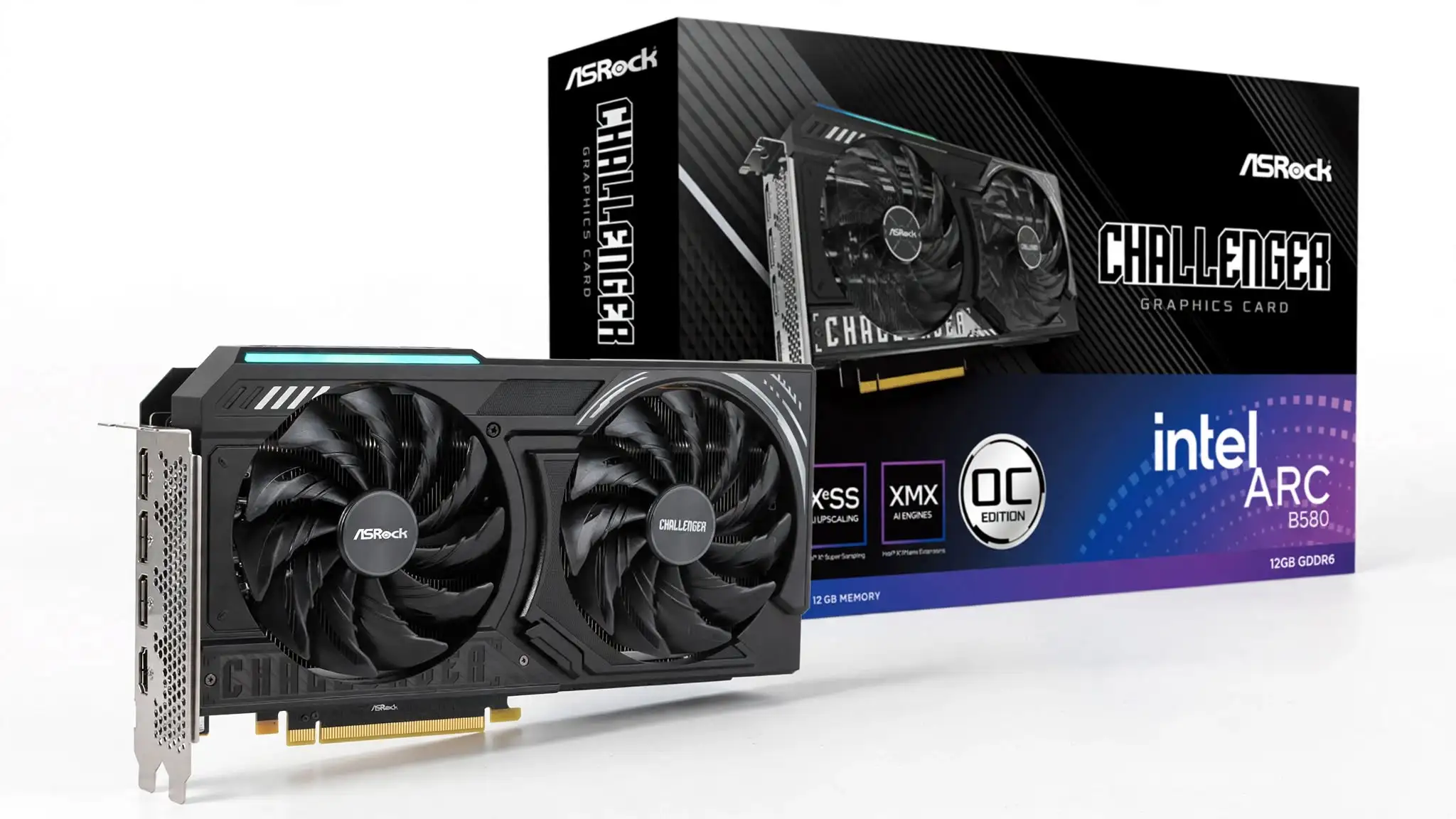
8. ASRock Intel Arc B580 Challenger 12GB OC
Specification Details
| Graphics processor | Intel Arc B580 |
| Architecture | Intel Xe2-HPG |
| ASRock model number | B580 CL 12GO |
| GPU clock | 2,740MHz |
| Compute units | 20 |
| Intel XMX engines | 160 |
| Video memory | 12GB GDDR6 |
| Memory speed | 19Gbps |
| Memory interface | 192-bit |
| Memory bandwidth | 456GB/s |
| Bus interface | PCI Express 4.0 x8 |
| DirectX support | DirectX 12 Ultimate |
| OpenGL support | OpenGL 4.6 |
| Cooling system | Dual Striped Axial fans |
| Fan-stop feature | 0dB Silent Cooling |
| Card dimensions | 249 × 132 × 41mm |
| Card thickness | Two slots |
| Net weight | 720g |
| Power connector | One 8-pin PCIe connector |
| Recommended power supply | 650W |
| Display outputs | 3 × DisplayPort 2.1 and 1 × HDMI 2.1a |
| Maximum digital resolution | 7680 × 4320 |
| Maximum displays | Four |
| Backplate | Metal backplate |
| Lighting | Multicolour LED indicator with on/off switch |
| Upscaling technology | Intel XeSS 2 |
Remarks-
The ASRock Challenger takes the Arc B580 in a more practical direction than the larger premium models. Its purpose is not to deliver an elaborate appearance or an oversized cooling system. Instead, it fits the same 12GB Intel GPU into a 249mm-long, two-slot card that is easier to accommodate in an ordinary gaming PC. From a system-building perspective, this is one of the more manageable B580 designs for buyers who have limited clearance but do not want to move down to a weaker GPU.
That smaller construction is the strongest reason to choose the Challenger over a triple-fan B580. At 720g, it places less physical strain on the motherboard slot and is unlikely to need a separate support bracket. The two fans stop at low temperatures through ASRock’s 0dB Silent Cooling feature, so the card should not add fan noise while the computer is handling light desktop work. Under gaming load, the smaller heatsink may require more noticeable fan activity than a longer three-fan card, but that is the expected compromise for saving space.
The 2,740MHz GPU clock is a modest increase over Intel’s reference specification. It does not transform the performance class of the card, but it means the buyer is not giving up the factory overclock found on more expensive B580 versions. The 12GB memory capacity, 192-bit interface, and 456GB/s bandwidth remain the features that define its gaming value. These specifications provide a healthier memory arrangement for current 1440p gaming than the 8GB configurations still found on several competing cards.
For gaming, I would position the Challenger as a strong 1080p card that can also handle 1440p when settings are chosen sensibly. Competitive games should leave enough performance for high-refresh-rate monitors, while graphically demanding single-player releases may require a mixture of high and medium settings. Intel XeSS can increase frame rates in supported games, and XeSS 2 adds frame generation and latency-management features where developers have implemented them. These tools are useful, but buyers should not assume every game includes them.
Its market appeal comes from offering the full B580 specification in one of the more compact partner designs. There is little reason to pay a large premium for this card over another B580 because the underlying processor and memory configuration remain similar. The ASRock Challenger becomes one of the better candidates for the best GPU under $300 when it is available around $250 to $279. Once its price reaches or exceeds $300, its value should be compared carefully with newer Radeon and GeForce offers rather than justified by the 12GB label alone.
Case clearance remains important even though the card is relatively short. Its 132mm height can create a cable-routing problem in narrow cases, and additional room is required for the eight-pin power plug above the card. Buyers should confirm maximum GPU height as well as length. A specification sheet that lists only a case’s maximum card length does not guarantee that the side panel will close without pressing against the power cable.
The power arrangement is simple: one eight-pin PCIe connector. ASRock recommends a 650W PSU, which provides a comfortable allowance for the remaining system components. A well-made power supply with adequate output and the correct cable matters more than purchasing the highest advertised wattage. The card should be powered through a direct PCIe lead from the PSU rather than an unsuitable adapter.
Resizable BAR is another buying requirement that should be checked before placing the order. Intel Arc cards rely heavily on this feature for proper performance. A compatible motherboard, a suitable processor, and the correct BIOS settings are required. Owners of older systems should verify support for Above 4G Decoding and Resizable BAR instead of assuming the card will deliver its expected gaming performance after a basic installation.
The most important limitation is still Intel’s software ecosystem. Arc driver support has progressed, but performance can vary more between games than buyers may expect from established Radeon and GeForce products. Older DirectX titles, uncommon game engines, VR equipment, and recently released games should be checked individually when any of them is central to the buyer’s library. The B580 is easier to recommend to someone who mainly plays current DirectX 12 games than to someone who depends on broad compatibility with older software.
The dual-fan cooler is another point to consider. It keeps the card compact, but buyers who prioritize the lowest possible gaming noise may prefer a larger B580 with three fans and a wider heatsink. The multicolour LED indicator is also decorative rather than a fully customizable RGB system, although ASRock provides a physical switch for turning it off.
The ASRock Arc B580 Challenger 12GB OC is a sensible choice for a modern mid-tower or compact gaming build because it preserves the B580’s 12GB memory and 1440p capability without demanding a long three-fan case. It earns its position only at a competitive price. Below $280, its compact dimensions and balanced specifications make a convincing case; above $300, the buyer should compare faster alternatives before ordering.
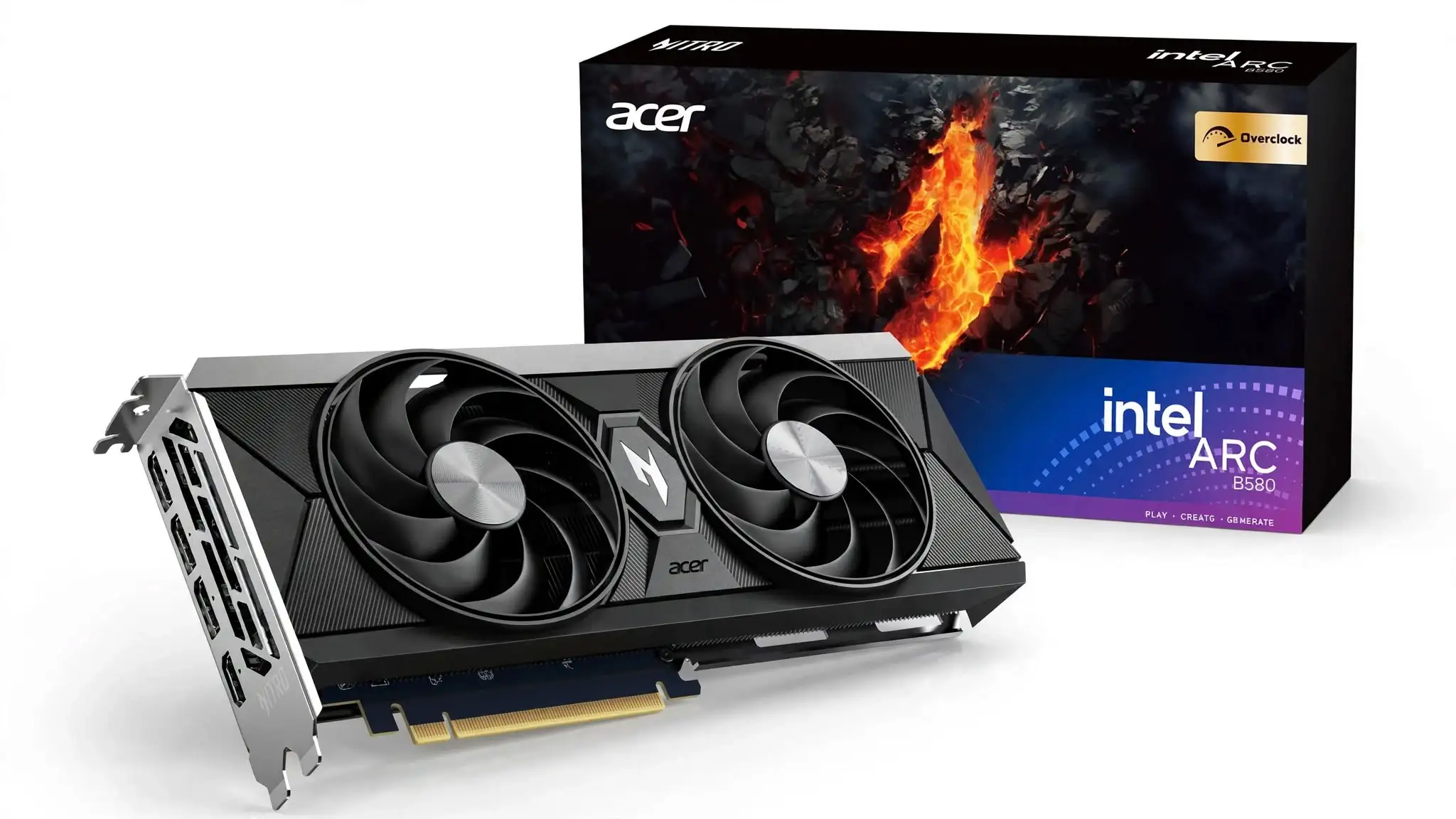
9. Acer Nitro Intel Arc B580 OC 12GB
Specification Details
| Graphics processor | Intel Arc B580 |
| GPU architecture | Intel Xe2-HPG “Battlemage” |
| Acer model | AN-B580-OCA |
| Manufacturer part number | DP.Z4BWW.P01 |
| Standard GPU clock | 2,670MHz |
| Boost clock | Up to 2,740MHz |
| Xe cores | 20 |
| Ray-tracing units | 20 |
| Intel XMX engines | 160 |
| Video memory | 12GB GDDR6 |
| Memory speed | 19Gbps |
| Memory interface | 192-bit |
| Memory bandwidth | 456GB/s |
| Host interface | PCI Express 4.0 x8 |
| Cooling system | Dual Nitro FrostBlade fans |
| Card length | Approximately 268mm |
| Card height | Approximately 113–118mm, depending on regional specification |
| Card thickness | 40mm |
| Approximate weight | 780g |
| Power connector | One 8-pin PCIe connector |
| Display outputs | 3 × DisplayPort 2.1 and 1 × HDMI 2.1 |
| Maximum displays | Four |
| Maximum resolution | 7680 × 4320 |
| Graphics API | DirectX 12 Ultimate |
| Upscaling technology | Intel XeSS 2 |
| Media support | Hardware AV1 encoding and decoding |
| Colour | Black |
Remarks-
The Acer Nitro Arc B580 OC feels designed for buyers who want the B580’s core capabilities without making the graphics card the visual centre of their PC. Its black shroud, subtle Nitro styling and two-fan cooler suit understated builds better than brightly coloured or heavily illuminated alternatives. Acer also keeps the card close to a conventional two-slot form, which makes it simpler to install than many oversized midrange models.
What stands out about this version is how little space Acer needs to house 12GB of graphics memory. The card measures about 268mm in length and 40mm in thickness, placing it between the shorter ASRock Challenger and the much longer SPARKLE TITAN. This middle-ground size should fit many mainstream cases while providing more heatsink area than a highly compressed design. It is still important to measure clearance around front-mounted radiators, drive cages and intake fans before buying.
The gaming experience centres on the Arc B580 processor rather than Acer-specific tuning. Its 20 Xe cores and 160 XMX engines provide enough graphics and AI-processing capacity for high-quality 1080p gaming. At 1440p, the card works best when the player adjusts demanding settings instead of automatically selecting the highest preset. Texture quality can often remain high because the 12GB memory pool provides more room than a typical 8GB card, while shadow quality, volumetric effects, and ray tracing may require more careful adjustment.
The 192-bit memory bus and 456GB/s bandwidth also contribute to its value. VRAM capacity alone does not determine gaming speed, but the wider memory arrangement allows the processor to access game data at a suitable rate. This matters when a game loads high-resolution textures, complex environments, and detailed geometry at 1440p. The Acer Nitro is therefore a more balanced option than cards that pair a capable processor with a narrow interface and limited memory.
Acer sets the maximum clock at 2,740MHz. That is a mild factory increase rather than an aggressive overclock, so buyers should expect performance close to other overclocked B580 cards. The advantage is that Acer has not increased the card’s physical size or added another power connector merely to advertise a slightly higher clock. It requires one standard eight-pin PCIe lead, keeping installation straightforward for a suitable modern power supply.
Intel XeSS 2 adds another route to improved performance in supported games. Its upscaling component renders the game internally at a lower resolution and reconstructs the image for the selected output resolution. Frame generation can insert generated frames between rendered ones, while Intel’s low-latency technology attempts to control the additional response delay. These features can make demanding games feel smoother, but availability depends on developer support and should not be included when estimating performance in every title.
The Acer name may make this model easier to trust for buyers who know the company through its Nitro laptops, desktops and monitors. However, Acer has a shorter public history in retail desktop graphics cards than established board partners such as ASUS, Sapphire, Gigabyte and ASRock. That does not indicate poor hardware, but it makes regional warranty handling, replacement stock, and component-specific support worth checking. The retailer’s return policy may prove more useful than brand familiarity if a problem appears shortly after installation.
From a pricing standpoint, this model deserves attention when it costs between $240 and $280. At that level, its 12GB memory, compact dual-fan design, and 1440p potential give it a logical position among the best GPU under $300 choices. A price approaching $300 reduces its appeal because it does not provide a meaningful performance advantage over lower-priced B580 cards. Paying extra for the Nitro name makes sense only if the card’s dimensions, appearance, or seller support fit the buyer’s needs better.
There are several checks I would complete before ordering it. The motherboard should support Resizable BAR, and that feature must be enabled in the BIOS. Above 4G Decoding may also need to be activated. The power supply requires a proper eight-pin PCIe cable, while the case needs enough clearance around the 268mm card for unobstructed airflow. Buyers should also confirm that the product number is DP.Z4BWW.P01 because marketplace sellers sometimes combine several similarly named Arc cards on one page.
Cooling software requires attention as well. Acer promotes its Nitro graphics-card utility for monitoring and adjustment, while Intel provides its own driver and graphics software. Software control can change as drivers and utilities are updated, and some users have reported difficulty accessing fan-tuning controls when the required Intel graphics service was not running. Anyone who considers manual fan curves essential should check the current utility support before purchasing rather than assuming every control will be available.
The usual Arc limitations remain. Resizable BAR is close to mandatory for satisfactory performance, older games can behave less consistently than newer DirectX 12 titles, and VR users should verify support for their exact headset and software. Drivers should be updated before testing a newly released game, but a new driver cannot guarantee that every title will perform equally well.
The Acer Nitro Intel Arc B580 OC is best viewed as a restrained, space-conscious version of Intel’s 12GB budget gaming GPU. It offers the memory configuration and display connectivity that make the B580 attractive while avoiding an unnecessarily large cooler. Its value depends on price and platform compatibility: below $280 in a modern Resizable BAR-enabled system, it is a credible purchase; near or above $300, stronger alternatives should be considered first.
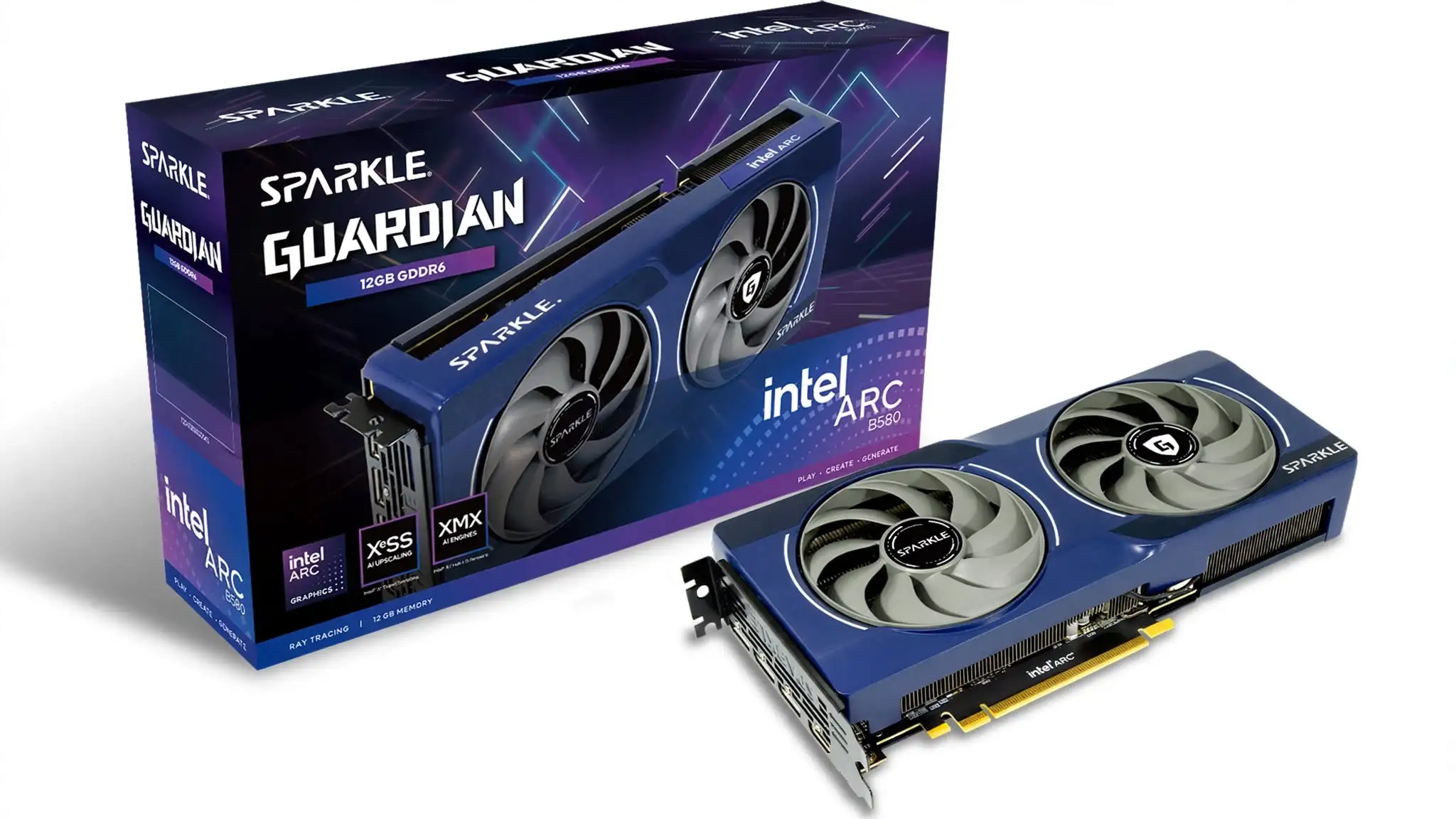
10. SPARKLE Intel Arc B580 GUARDIAN OC 12GB
Specification Details
| Graphics processor | Intel Arc B580 |
| GPU architecture | Intel Xe2-HPG “Battlemage” |
| Manufacturer model | SB580G-12GOC |
| GPU clock | 2,670MHz |
| Xe cores | 20 |
| Ray-tracing units | 20 |
| Intel XMX engines | 160 |
| Video memory | 12GB GDDR6 |
| Memory speed | 19Gbps |
| Memory interface | 192-bit |
| Memory bandwidth | 456GB/s |
| PCIe interface | PCI Express 4.0 x8 |
| Cooling system | TORN Cooling 2.0 with two axial fans |
| Approximate dimensions | 242 × 105 × 44mm |
| Card thickness | Approximately 2.2 slots |
| Total board power | Approximately 200W |
| Recommended power supply | 600W or greater |
| Power connector | One 8-pin PCIe connector |
| Display outputs | 3 × DisplayPort 2.1 and 1 × HDMI 2.1 |
| Maximum resolution | Up to 7680 × 4320 |
| Upscaling support | Intel XeSS 2 |
| Graphics API support | DirectX 12 Ultimate, Vulkan 1.3 and OpenGL 4.6 |
| Media features | AV1 hardware encoding and decoding |
| Backplate | Metal backplate |
| Card colour | Dark blue and black |
Remarks-
The SPARKLE Guardian approaches the Arc B580 differently from the company’s larger TITAN model. Instead of using three fans and a 315mm body, it places the same 12GB graphics processor inside a 242mm dual-fan card. That reduction in size changes who should consider it. The Guardian is better suited to compact mid-towers, micro-ATX systems and other cases where a long graphics card would block front fans, storage cages or radiator space.
Its dimensions are the feature I would examine first. A length of 242mm makes it one of the easier Arc B580 partner cards to accommodate, while its 105mm height should leave more room around the case side panel and power cable. The 44mm thickness means it occupies slightly more than two slots, so a neighbouring expansion slot may still be covered. Buyers using a Wi-Fi adapter, capture card or other PCIe device should check motherboard slot spacing before ordering.
The Guardian does not sacrifice the specifications that give the B580 its gaming value. It retains 12GB of GDDR6 memory, a 192-bit interface and 456GB/s of memory bandwidth. This is a well-proportioned memory system for its performance class. The card has enough VRAM for high-resolution texture packs in many current games, although 12GB should not be interpreted as proof that every game can run at maximum settings.
At 1080p, the Guardian is suited to high-quality settings and high frame-rate competitive gaming when paired with a capable processor. Its greater appeal lies at 1440p, where the 12GB memory capacity provides more flexibility than an 8GB card. Demanding lighting, shadows, and ray-traced effects may still need to be reduced. Texture settings often have a smaller performance cost when sufficient VRAM is available, making them a better place to preserve image quality.
Intel XeSS 2 can extend the card’s useful performance in supported games through image upscaling, frame generation and latency reduction. These technologies can help when native 1440p rendering falls short of the desired frame rate. They should be treated as game-dependent options, however. A buyer whose favourite games do not support XeSS should judge the card according to its standard rendering performance.
The “OC” name requires some perspective. Listings commonly specify a 2,670MHz GPU clock, which matches Intel’s reference graphics-clock figure for the B580. Buyers should therefore avoid paying extra on the assumption that the Guardian provides a large factory overclock. Its reason for existing is the compact TORN Cooling 2.0 design, not a meaningful clock-speed advantage over competing B580 cards.
Its single eight-pin power connection is another sensible design choice. A 600W or better power supply is generally recommended, but PSU quality, available current, and cable condition matter alongside total wattage. The card should be connected with a direct PCIe power cable from the supply. Buyers upgrading an older office or prebuilt computer must check whether the installed PSU includes this connector because many proprietary systems do not.
SPARKLE has a smaller retail presence than the major graphics-card brands, which creates both an opportunity and a concern. The Guardian may appear at an attractive price when better-known B580 cards are unavailable. On the other hand, regional stock, warranty processing, and replacement availability can be inconsistent. The seller should be checked as carefully as the graphics card, including whether the product is new, which company handles returns, and how long the regional warranty lasts.
The model number also requires attention. Retailers use several versions of the name, including “Guardian,” “Guardian OC,” SB580G-12G, and SB580G-12GOC. Before purchasing, compare the listing photographs, dimensions, outputs, and part number with the intended product. Marketplace pages can merge reviews or product details from related models, and a similar title does not confirm that the seller is shipping the exact version shown.
For the best GPU under $300 category, the Guardian is most convincing at $279 or less. At that price, it offers the B580’s 12GB configuration in a shorter card than the TITAN. It becomes less appealing above $300 because the cooler and clock specifications do not provide enough added gaming performance to justify a premium. Availability may also make the Guardian harder to recommend through an Amazon-focused article if the listing is supplied by an overseas marketplace seller with costly shipping.
The major compatibility limitation is Resizable BAR. Intel Arc performance depends heavily on this motherboard feature, and installing the card in an older system without it can produce poor or inconsistent results. Buyers should confirm processor and motherboard support, update the BIOS where necessary, enable Above 4G Decoding, and activate Resizable BAR before evaluating performance.
Intel’s driver situation is the second limitation. Support for current games has matured, but older releases, uncommon APIs, and VR applications may not behave as consistently as they do on long-established Radeon or GeForce platforms. Anyone purchasing the card for one particular game, emulator, or VR headset should verify that workload rather than relying on general B580 recommendations.
Cooling expectations should also remain reasonable. The dual-fan Guardian has less heatsink area than the three-fan TITAN, so it may run its fans faster under sustained gaming loads. That does not automatically make it unsuitable, but buyers who prioritize low noise over compact dimensions may prefer the larger model. Reports about fan noise or buzzing should be handled through the retailer’s return process if the sound indicates a faulty individual unit rather than assuming every Guardian behaves the same way.
The SPARKLE Arc B580 Guardian OC suits a buyer who wants 12GB of VRAM and credible 1440p gaming without placing a 300mm-plus card inside the case. Its compact dimensions and single power connector are more important than the OC label. When sold below $280 by a reliable retailer, it completes this top-ten list as a practical alternative for space-restricted builds; when priced above $300, its limited availability and standard-level clock make other models the safer purchase.
How to Choose the Best GPU Under $300?
The best GPU under $300 is not necessarily the card with the highest clock speed or the largest cooler. It should deliver suitable performance for your monitor, fit inside your case, work correctly with your motherboard, and stay below the budget after shipping and taxes. Current retail prices should guide the decision because a good graphics card becomes poor value when marketplace sellers charge well above its intended price.
Match the GPU to Your Gaming Resolution
For 1080p gaming, prioritize stable frame rates and consistent driver support. An 8GB card can still handle many games at this resolution, but texture quality may need to be reduced in memory-heavy releases. Competitive players should also consider processor performance because a CPU limitation can prevent a capable GPU from reaching high frame rates.
A 1440p buyer should place more weight on VRAM capacity, memory bandwidth, and upscaling support. The 12GB Intel Arc B580 models have an advantage over many 8GB alternatives when a game uses detailed textures or large environments. However, extra memory does not make the B580 suitable for every game at maximum settings. Ray tracing, shadows, and volumetric effects can remain demanding even when sufficient VRAM is available.
None of the cards in this price category should be treated as a dependable native-4K solution for new demanding games. A card may output a 4K signal and run lighter titles at that resolution, but display support is different from gaming performance. Buyers using a 4K monitor should expect to reduce settings, use upscaling, or render demanding games at a lower resolution.
Consider VRAM Alongside the Entire Memory System
VRAM stores textures, geometry, frame data, and other resources used during gameplay. More capacity can reduce texture swapping and memory-related stuttering when a game exceeds the available buffer. This is why 12GB cards are attractive for buyers who intend to keep their GPU for several years.
Capacity should not be examined alone. Memory speed, bus width, and bandwidth determine how quickly the graphics processor can access stored data. A GPU with 12GB of memory is not automatically faster than an 8GB card with a stronger processor. The correct comparison combines memory specifications with measured gaming performance at the resolution and settings the buyer intends to use.
Check the Platform Before Choosing Intel Arc
An Intel Arc B580 can provide strong value, but it requires a suitable system. Resizable BAR allows the processor to access a larger portion of the graphics memory at once. Arc cards depend heavily on this feature, and performance can suffer when it is unavailable or disabled.
Before purchasing an Arc model, confirm that the processor and motherboard support Resizable BAR. AMD motherboards may identify the corresponding feature as Smart Access Memory. The system BIOS may also require Above 4G Decoding to be enabled. Older systems without these options are generally better matched with a Radeon or GeForce card that is less dependent on Resizable BAR.
Game selection matters as well. Arc is more convincing for a player who spends most of their time in current DirectX 12 games. A buyer with a large collection of older games, uncommon applications, or VR software should verify compatibility with those workloads before choosing it.
Measure the Case, Not Just the Graphics Card
Graphics-card compatibility involves length, height, and thickness. A card can fit within the case’s stated maximum length but still conflict with a front radiator, intake fan or drive cage. Height also affects whether the side panel can close over the power connector without bending the cable sharply.
Card thickness determines which neighbouring expansion slots remain usable. This is important when the PC also contains a Wi-Fi adapter, sound card, capture card or other PCIe device. A 2.2-slot card can cover more space than a standard two-slot model even when the difference appears small in a product photograph.
Cooling requirements should influence the size decision. A triple-fan card can distribute heat through a larger heatsink, but it requires more internal space. A shorter dual-fan card works better in a compact case, though its fans may operate faster during long gaming sessions. Neither arrangement is automatically superior; the right choice depends on available clearance and the buyer’s tolerance for fan noise.
Confirm Power-Supply Compatibility
Check the manufacturer’s recommended PSU capacity and required connectors before ordering. Most Arc B580 cards use a conventional eight-pin PCIe power connection, although individual partner designs can differ. The power supply must provide the correct cable without relying on an unsuitable adapter.
Wattage alone does not establish PSU quality. Age, voltage regulation, available current, protection features, and cable condition also matter. Prebuilt computers require extra caution because some use proprietary power supplies without standard PCIe connectors. A GPU upgrade that also requires a new PSU can push the total project beyond the intended $300 budget.
Compare Features That Affect the Games You Play
Upscaling can improve performance by rendering a game below the selected output resolution and reconstructing the image. Intel offers XeSS, AMD provides FSR, and Nvidia uses DLSS on compatible GeForce cards. Support varies by game, so the presence of an upscaling technology on the specification sheet does not guarantee that it will benefit every title.
Frame generation can make displayed motion appear smoother, but generated frames are not identical to traditionally rendered frames and do not remove the need for a reasonable base frame rate. Competitive players should prioritize native performance, latency, and frame consistency rather than selecting a GPU only because it supports frame generation.
Ray tracing should also be treated as an optional workload in this price range. It can improve reflections, shadows, and lighting, but it places a considerable demand on the GPU. A card that performs well with standard rasterized graphics may require upscaling or reduced settings once ray tracing is enabled.
Conclusion
The best GPU under $300 should match your games, monitor resolution, PC platform, and case rather than winning through one specification alone. The Radeon RX 9060 XT 8GB models are strong choices for buyers who prioritize modern gaming performance, while Intel Arc B580 cards provide 12GB of VRAM, a wider memory interface, and convincing 1440p value when Resizable BAR is available. Compare the final checkout price, exact model number, power requirements, dimensions, seller reputation, and warranty before ordering. A modestly priced version of the right GPU usually offers better value than an expensive factory-overclocked model with similar gaming performance.
This page contains Amazon affiliate links. If you purchase through these links, we may earn a commission at no additional cost to you. Our recommendations are based on official product specifications, gaming value, compatibility and current market pricing. Affiliate partnerships do not influence our rankings or conclusions. As an Amazon Associate, we earn from qualifying purchases.