Best Portable Computer | 8 Types, Features, Prices, and Uses
Carrying a desktop computer from one place to another is difficult because it comes with several separate components, including a monitor, keyboard, mouse, CPU tower, and connecting cables. You can’t easily carry this entire setup whenever you need to work at your university, office, or another location. That’s why portable computers are a practical option for people who need to work from different places. But what exactly is a portable computer?
A Portable computer is a compact computing device you can carry and use wherever you need it. Unlike traditional desktop systems, most portable computers have essential components, such as a screen, processor, memory, and rechargeable battery, built into a single device. Laptops, tablets, and other portable computer systems let students, business professionals, and everyday users get work done without relying on a permanent desktop setup.
What is the Best Portable Computer for You?
We’ve selected some of the best portable computers worth considering based on their features, performance, and practical uses. Whether you need a computer for everyday tasks, business work, programming, or demanding activities like video editing and graphic design, with the right specifications, many of these portable computers can handle heavy workloads without requiring a separate desktop computer.
1. Laptop Computers
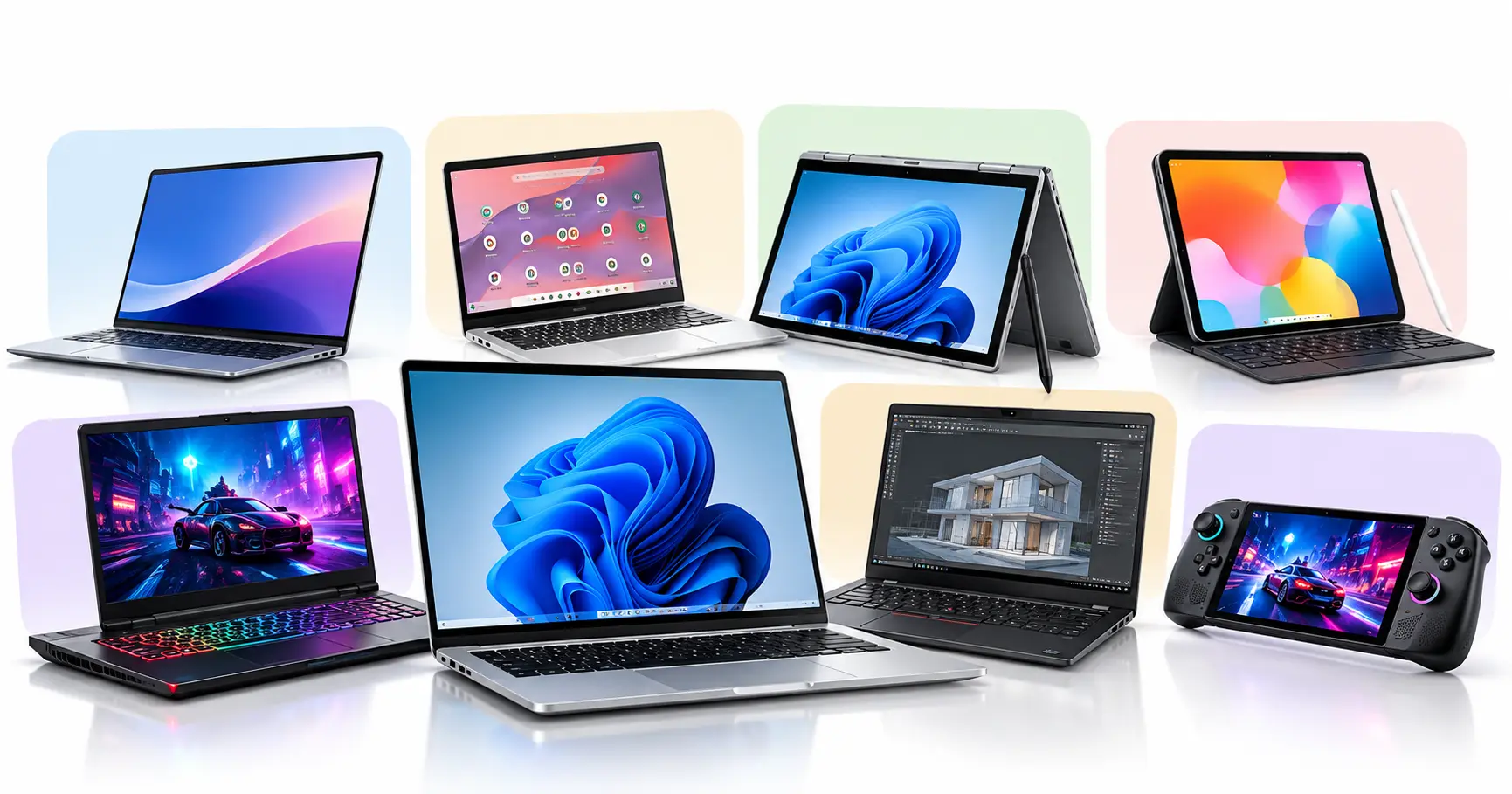
Laptop computers are one of the most commonly used portable computer systems among students, office employees, and business professionals. A typical laptop has a folding design with a built-in screen, keyboard, touchpad, rechargeable battery, and storage, usually in a 14-inch to 16-inch form factor.
Most everyday laptops can fit inside a regular backpack or office bag, although their weight depends on the model. Brands such as HP, Dell, Lenovo, Acer, and ASUS offer laptops with different processors, RAM capacities, and storage options, with many mainstream models priced around $450 to $1,200 in the US market.
If you’re a university student, a standard laptop is suitable for preparing assignments, conducting research, attending online classes, creating presentations, and working with educational software. Business owners and office employees can also use these computers for spreadsheets, accounting applications, reports, emails, and routine administrative tasks.
2. Ultrabooks (Thin-and-Light Laptops)
Ultrabooks are thin-and-light laptops designed for users who prefer a slim computer without giving up the features of a traditional laptop. They generally have compact 13-inch or 14-inch designs, efficient processors, fast SSD storage, and displays that provide good image quality while keeping the overall weight low.
Devices such as the Apple MacBook Air and Dell XPS 13 are familiar examples of this style of portable computer, although the term ultrabook is not used for every thin laptop. Many models are priced around $800 to $1,800, depending on their specifications, with premium configurations costing more.
I would consider an ultrabook if I had to carry my computer between offices, travel frequently for business, or spend long days moving between university departments. These computers are well suited to writing, programming, business documentation, presentations, and general productivity, although some slim designs have limited ports and upgrade options.
3. Chromebook Computers
Chromebooks look similar to traditional laptops, with a folding display, physical keyboard, touchpad, and rechargeable battery, but they use Google’s ChromeOS operating system instead of Windows or macOS. These computers are designed to work with web applications, supported Android applications, and cloud services, while also offering offline functionality for selected tasks.
Most Chromebooks have relatively simple hardware configurations, which can make them affordable, with many models priced between $200 and $850 in the US market. For example, a student who uses Google Docs for assignments, Google Slides for presentations, and a browser for online research may find a Chromebook sufficient for daily academic work.
However, if your university or workplace requires specialized Windows applications, you should check compatibility before purchasing because ChromeOS cannot run every desktop program directly.
4. 2-in-1 Convertible Laptops
A 2-in-1 convertible laptop combines the functionality of a regular laptop with touchscreen controls, allowing users to work in different positions. Most convertible models have a flexible hinge that lets the display fold backward for tablet-style use, while detachable models allow the keyboard to be removed completely.
Devices such as the Lenovo Yoga and HP OmniBook Flip series are examples of this category, with many configurations costing approximately $700 to $1,800, although high-end models can exceed that range. Their designs make them convenient for people who prefer switching between typing and touchscreen interaction, and selected models support digital pens for writing or drawing directly on the screen.
For instance, an engineering student can type an assignment using the keyboard and then use a compatible stylus to draw diagrams or annotate mathematical formulas. These devices are also useful for teachers, designers, and professionals who regularly review presentations or handwritten notes.
5. Tablet Computers
Tablet computers are compact portable devices that use touchscreen displays as their primary input method rather than permanently attached keyboards. They generally have thin, flat designs, rechargeable batteries, built-in cameras, and operating systems optimized for touch controls.
Popular examples include Apple’s iPad family and Samsung’s Galaxy Tab series, with many tablet models available between $250 and $1,200, while premium versions can cost more. Since tablets are usually smaller and lighter than conventional laptops, they can be carried in a compact bag and used while sitting, standing, or traveling.
A university student can use a tablet to read books, highlight PDF documents, attend online lectures, and take handwritten notes with a compatible stylus. Graphic artists can use supported drawing applications, while business professionals can review documents and manage communication. However, users who depend on complex desktop software should check whether the tablet’s operating system supports their required applications.
6. Gaming Laptops
Gaming laptops are portable computers built with powerful processors, capable graphics hardware, advanced cooling systems, and displays that often support high refresh rates. Compared with ordinary laptops, many gaming models have thicker bodies, larger ventilation openings, and distinctive designs that may include RGB keyboard lighting.
Popular product families include ASUS ROG, Lenovo Legion, Acer Nitro, and MSI gaming laptops, with many configurations priced around $900 to $2,500, while high-end models can cost considerably more. Their weight and larger charging adapters make them less convenient to carry than lightweight notebooks, but they offer the processing and graphics performance needed for modern PC games.
Apart from gaming, these computers can also be useful for video editing, 3D rendering, graphics-intensive applications, and software development projects that benefit from dedicated graphics hardware. I would choose a gaming laptop when computing performance matters more than having the thinnest possible device.
7. Mobile Workstations
Mobile workstations are high-performance portable computers designed for demanding professional applications such as engineering, architecture, scientific computing, and complex content creation. They often feature powerful processors, larger RAM capacities, fast SSD storage, and professional graphics options, with selected models offering certifications for specialized software.
Mobile workstations generally look like business laptops, although performance-focused models may have larger 16-inch displays, thicker bodies, and more substantial cooling systems. Product families such as Lenovo ThinkPad P Series, Dell Pro Max workstations, and HP ZBook illustrate this category, with many models costing approximately $1,500 to $5,000 or more, depending on their configuration.
For example, an architect can use a mobile workstation to work on detailed building designs, while an engineer can run compatible CAD and simulation software without relying entirely on a fixed office computer. These systems are expensive, so I would recommend them only when professional applications justify the additional processing power and specialized hardware.
8. Handheld PCs
Handheld PCs are small portable computers designed to be held and operated directly in your hands instead of being placed on a desk. Many modern handheld PCs resemble gaming consoles, with built-in screens, physical controls, rechargeable batteries, processors, and internal storage.
Devices such as the ASUS ROG Ally, Lenovo Legion Go, and Steam Deck are examples, with many current gaming handheld configurations priced around $550 to $2,000, depending on performance and storage. Their compact designs make them convenient for traveling, although they are not as comfortable as laptops for extended typing or detailed office tasks.
Most consumer handheld PCs focus on portable gaming, but compatible models can also run other applications, connect to external displays, and work with keyboards or mice. I would consider this category for gaming or a specialized compact computing setup rather than for preparing university assignments every day.
Why Are Portable Computer Systems Better Than Desktop Computers?
Desktop computers are undoubtedly a good choice for people who need powerful hardware, extensive upgrade options, and a permanent workstation. A desktop system can accommodate large graphics cards, advanced cooling solutions, powerful processors, and additional storage drives, making it suitable for demanding tasks such as 3D rendering, professional video production, complex simulations, and high-end gaming.
In fact, a properly configured desktop can provide stronger sustained performance than many laptops at a comparable price because its larger enclosure allows more room for cooling and hardware components.
However, desktop computers become less convenient when you need to move between different locations. Suppose you’re a businessman visiting another office to present a project or a university student working on an assignment with classmates. Carrying a computer tower, monitor, keyboard, mouse, and necessary cables would be inconvenient, even if the desktop provides excellent performance.
A portable computer allows you to take your applications, files, and working environment with you in a single device. That’s why I would prefer a laptop or another suitable portable system for traveling, studying, business meetings, and work that regularly takes place outside a fixed office.
Advantages of Portable Computers Over Desktop Computers
Conclusion
Portable computers are a practical solution for anyone who needs computing access without being restricted to a particular location. From standard laptops and lightweight ultrabooks to tablets, gaming laptops, and mobile workstations, each category offers different features, performance levels, and prices for different types of users.
If you’re a university student, a businessman, or a professional who frequently works outside a fixed office, choosing a suitable portable computer can make your daily tasks more convenient. Desktop computers still have clear advantages for powerful workstations and demanding workloads, but when portability matters, a well-chosen laptop or other portable system is usually the more sensible option.