
How the Right Business ICT Setup Drives Innovation
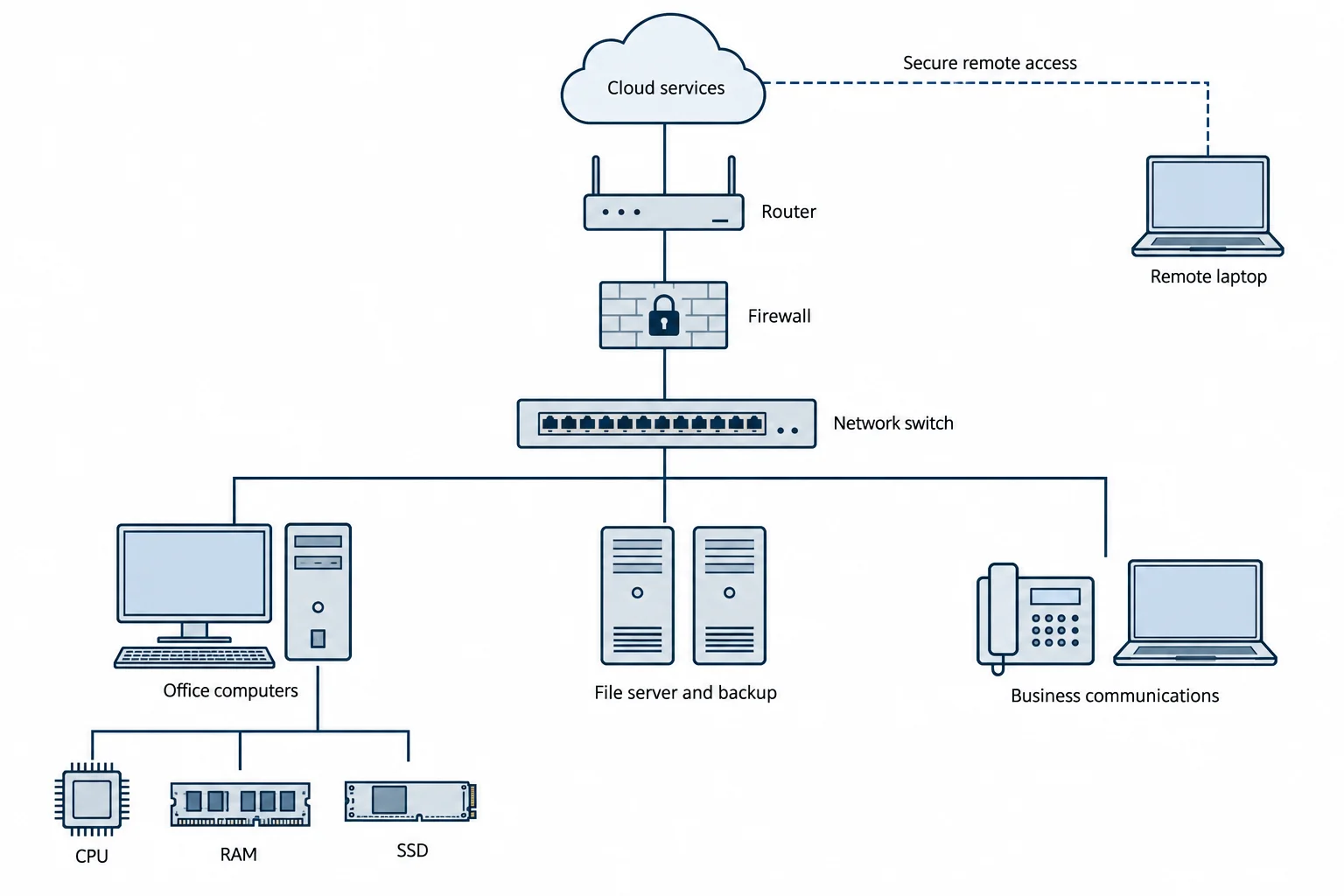
A well-planned ICT setup helps a business turn ideas into useful improvements by removing the technical delays that interrupt everyday work. Information and communications technology connects the computers, networks, cloud services, and communication tools employees depend on.
For Australian businesses, the value appears in practical outcomes: colleagues can update the same proposal, staff can serve customers away from the office, and new services can be tested without rebuilding the entire system. Achieving those outcomes requires attention to both shared infrastructure and the hardware on each employee’s desk.
Build around the work your business needs to do
Start with the tasks that consume time or repeatedly go wrong. A design studio waiting for file uploads has a different problem from an accounting practice struggling with document versions. Buying faster computers will only help when the computers are part of the constraint.
A coordinated approach to business ICT brings network capacity, cloud applications, communications and device management into one plan. Map how information moves from enquiry to delivery, then identify where staff repeat entries, wait for access, or switch between disconnected systems.
For example, connecting a customer enquiry form to a shared work queue can reduce manual copying and make responsibility visible. Measure the time taken to assign an enquiry before and after the change. That gives the business evidence to guide its next investment.
Make collaboration easier to manage
Shared documents, team messaging and video meetings help employees work from the same information. Version history can make edits traceable, while access permissions let managers decide who can view or change a file. These features are most useful when the team agrees where approved documents belong.
A cloud platform needs clear working rules. Give each project a shared location, assign document owners, and record decisions where colleagues can find them. Staff in Perth and Sydney can then continue work across time zones without waiting for someone to email the latest attachment.
Communication tools should support those arrangements. Shared call queues and business calling applications can help staff handle enquiries across locations. Clear escalation rules prevent a customer request from being lost between a phone conversation and an internal message.
Support remote work with dependable connections
The Australian Bureau of Statistics reported that 36% of employed Australians usually worked from home in August 2025. Remote access therefore deserves ongoing support, including suitable equipment and a process for reporting problems.
Check the whole connection
An internet plan’s download speed does not describe every aspect of performance. Upload capacity matters when staff send large files, while latency, packet loss and Wi-Fi coverage affect calls and remote sessions. Test connections during busy periods and compare wired and wireless performance before replacing office PCs.
For regional sites, check service availability at the actual address and consider a backup connection where an outage would stop essential work. Test whether the backup can carry priority traffic. A mobile connection may support email and calls while being unsuitable for large design uploads.
Choose PC hardware that matches each role
Cloud software still relies on local hardware to run browsers, display documents and handle meetings. A slow laptop can undermine an otherwise capable ICT system. Match purchases to the applications employees use together, including background security and communication software.
Balance processing power and memory
The CPU handles application instructions, but more cores do not improve every task equally. Test representative spreadsheets, exports, or development builds when comparing machines. Staff working mainly in browser applications may need a different configuration from colleagues compiling software or processing large datasets.
RAM provides working space for active applications. Microsoft’s computer memory guidance explains that greater memory capacity can support more simultaneous activity without slowdowns. Assess memory use with a normal working session open, then allow room for expected workloads. Check upgrade options before buying laptops with soldered memory.
Match storage and graphics to the workload
SSDs generally improve responsiveness compared with mechanical hard drives when loading applications and accessing local files. Capacity also matters: allow space for synchronised folders, temporary project files and updates. A cloud storage subscription does not remove every local storage requirement.
Consider a dedicated GPU when the software benefits from graphics acceleration, such as certain CAD, rendering, and video workflows. Routine email and document work rarely justify a high-end graphics card. Check application requirements, driver support, cooling, and power needs before approving an upgrade.
Investigate PC bottlenecks before replacing an entire machine. Monitor CPU, memory and disk activity during the slow task, and review unnecessary startup applications. Keep security tools enabled while troubleshooting.
Make security part of everyday operations
The Australian Signals Directorate (ASD) identifies patching, multi-factor authentication, restricted administrative privileges and regular backups among its Essential Eight mitigation strategies. These controls provide a useful foundation for protecting business systems as more work moves online.
Give staff access appropriate to their roles and remove it promptly when employment or responsibilities change. Maintain an inventory of devices and software so someone can track updates and support expiry dates. Remote workers also need a clear way to report a lost device or suspicious message.
Backups need verification. ASD’s backup requirements include testing restoration of data, applications, and settings during disaster recovery exercises. Decide how much work the business can afford to lose and how quickly essential services must return, then test against those targets.
Plan for growth without buying everything upfront
The US National Institute of Standards and Technology includes rapid elasticity and measured service in its cloud computing definition. These characteristics allow computing resources to expand or contract with demand and make consumption measurable. They can help a business trial a service before committing to permanent infrastructure.
However, growth also increases subscriptions, storage, support, and data transfer costs. Review these alongside hardware warranties and replacement schedules. Before adopting a platform, check how records can be exported and whether it connects with existing applications.
For businesses developing their own software, investigate system bottlenecks before adding server capacity. An inefficient database query or a slow external service can remain a problem after a hardware upgrade.
Set a quarterly review around practical measures such as application response times, failed calls, support requests and recovery test results. Use those findings to prioritise spending and identify where a small pilot could improve service delivery.
Turn reliable technology into better business processes
Innovation becomes easier when employees can access dependable systems and have time to improve how work gets done. Start with one measurable problem, match the network and hardware to the workload, and train staff to use the tools consistently. Expand the changes that produce useful results. This approach keeps ICT investment connected to customer service, staff productivity and the business’s next stage of growth.
Conclusion
The right business ICT setup gives employees dependable tools to improve how they work and serve customers. Reliable networks, suitable cloud services and balanced PC hardware help reduce delays, while security controls and tested backups protect business continuity. Australian businesses can make better investment decisions by starting with a specific operational problem, checking its cause and measuring the outcome of each change. This keeps technology spending focused on improvements that support daily work and future growth.