How AI Video Generators Work — From Prompt to Video
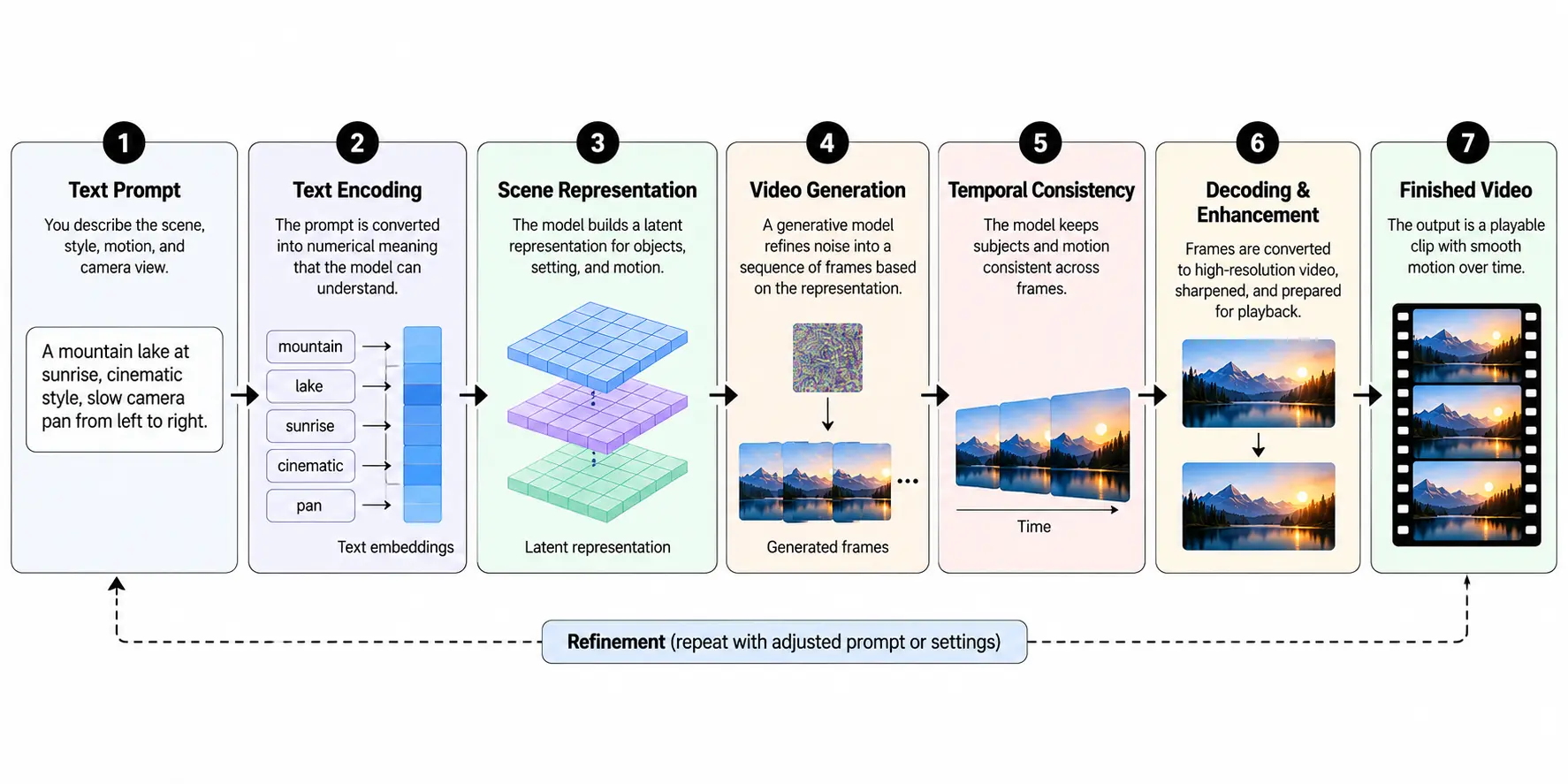
AI video generators turn written descriptions into moving visuals using machine learning models trained on images, videos, and their accompanying descriptions. You can describe a scene, such as a car driving through a rainy city at night, and the system generates a short clip showing that action. Behind the process, the model interprets your instructions, creates visual representations, and predicts how objects should appear and move over time.
The interesting part is that the software isn’t simply finding existing footage that matches your words. It generates new visual content based on patterns learned during training. Understanding how this works can help you write better prompts, avoid common mistakes, and produce clips that require less correction afterward.
How Do AI Video Generators Turn Text Into Video?
When you enter a description into an AI video generator, you’re telling the model what should appear on screen and how the scene should develop. The description can include objects, people, movements, lighting, camera angles, and the overall visual style. The system uses these details to guide the generation of a sequence of connected frames.
Consider a simple prompt: “A golden retriever runs across a grassy field while the camera follows from the side.“ The model needs to represent the dog, the environment, the running movement, and the camera’s position. It also needs to keep those elements visually consistent as the clip progresses. That makes video generation more complicated than creating a single image, where the model only needs to produce one convincing moment.
Most modern systems use some combination of language understanding, learned visual representations, and generative modeling. Diffusion-based methods are widely used, although different models implement these components in different ways. The process becomes easier to understand when we separate it into the stages that happen between entering a prompt and receiving a playable video.
Step 1: The AI Interprets Your Text Prompt
Everything begins with the prompt, which acts as the model’s creative instructions. A text encoder converts the written description into numerical representations called embeddings. These representations carry information about the words and their relationships, allowing the video model to use the description when constructing the scene.
For example, “a motorcycle parked beside a mountain road” describes a mostly static scene. Add “the motorcycle accelerates around a sharp corner as the camera tracks alongside it,” and the model receives additional information about action and camera movement. These details influence both what appears in the video and how the scene changes from one moment to another.
A useful prompt separates the subject, action, setting, and camera movement without becoming unnecessarily complicated. Google DeepMind’s guide to writing video prompts recommends describing elements such as shot framing, motion, lighting, location, and visual style to communicate the intended result. The more clearly those instructions fit together, the easier it is for the model to follow them.
However, adding more words doesn’t always improve the output. A prompt asking for several unrelated actions, camera movements, and scene changes within a short clip may create conflicting instructions. Describing one clear action in a specific setting often gives the model a more manageable task.
Step 2: The Model Builds a Visual Representation
After interpreting the prompt, the system needs a way to represent the video before producing the final visible frames. Many video generation models work in a compressed mathematical space called latent space. Rather than directly processing every pixel throughout generation, they use compact representations that capture important visual information.
This compression matters because video contains much more data than a still image. A moving scene must represent objects across multiple frames while accounting for changes in position, shape, lighting, and perspective. Processing all that information at full resolution throughout every generation step would require considerable computing resources.
Researchers have developed techniques that make this process more manageable. For example, NVIDIA’s research on latent diffusion for video explains how image-generation methods can be extended with temporal modeling to generate moving sequences. The approach allows a model to work with compressed visual information while learning relationships between frames.
Think of this representation as a working version of the scene that the model can gradually develop. It isn’t a conventional storyboard or a collection of finished pictures. Instead, it consists of numerical data that will eventually be decoded into recognizable video frames.
Step 3: The AI Generates Visual Content Through Repeated Refinement
In a typical diffusion-based video generator, the generation process begins with random noise in the model’s working representation. The model then performs a sequence of refinement steps, gradually transforming that noise into visual content that matches the prompt. Each step uses learned patterns and the supplied instructions to guide the developing result.
Imagine describing a wooden boat moving across a quiet lake at sunrise. The model needs to produce a boat, water, reflections, and a surrounding landscape while representing the boat’s movement. During generation, the underlying visual representation becomes progressively more structured until it can be decoded into the requested scene.
This doesn’t mean the AI first draws a perfect boat and then simply moves it across the water. In many video diffusion systems, appearance and motion are generated through connected representations of the sequence. That allows the model to consider how different moments relate to one another rather than treating every frame as an independent picture.
The technical components vary across systems, but Hugging Face’s overview of video generation models describes common elements such as text encoders, denoising networks, latent representations, and sampling procedures. These components help explain why generation takes computational work even when the finished video lasts only a few seconds.
Not every AI video system follows the same diffusion process. Some architectures use autoregressive methods or combine different generation techniques. The underlying objective remains similar: produce a sequence that follows the instructions while maintaining believable visual and temporal relationships.
Step 4: The Model Maintains Movement Between Frames
Generating a convincing image is one problem; keeping it convincing while everything moves is another. A person walking across a room should retain the same clothing, facial features, and general appearance throughout the shot. The background should also behave consistently as the person or camera changes position.
This requirement is known as temporal consistency. Video models learn relationships across time so that movement and appearance remain connected. Depending on the architecture, they can use mechanisms such as temporal attention and representations that capture information across both space and time.
OpenAI’s published research on video generation models describes a diffusion-transformer approach that works with compressed spacetime patches. Instead of representing video as completely separate images, the architecture processes information spanning spatial regions and temporal intervals. This helps the model learn how visual elements relate across a sequence.
Temporal consistency is also one of the reasons AI video generation remains challenging. A character may look correct in the opening frame but develop an unusual hand shape later. An object might change size unexpectedly, or the camera may move in a direction that contradicts the prompt.
These problems become more noticeable when several subjects interact, or the scene contains complicated motion. A short shot of steam rising from a coffee cup is generally a simpler generation task than a crowded street where pedestrians, vehicles, and the camera all move independently.
Step 5: The Visual Data Becomes Playable Video
Once the generative process produces its final representation, a decoder converts that information into visible frames. The frames form a moving sequence that can be played back at the output frame rate. Depending on the system, further processing may improve resolution, reduce artifacts, or prepare the generated sequence for delivery.
Three settings affect how the resulting video looks: resolution, frame rate, and aspect ratio. Resolution determines the number of pixels in each frame, while frame rate describes how many frames are displayed per second. Aspect ratio determines the proportions of the picture, such as a wide landscape shot or a vertical clip intended for mobile viewing.
These settings serve different purposes. A higher resolution may improve visible detail, but it cannot automatically correct distorted movement or inconsistent objects. Similarly, a smooth frame rate doesn’t guarantee that the underlying action follows the prompt accurately.
Some systems also generate audio alongside the visuals, while others produce silent clips that require a separate soundtrack. The finished result is usually made available for preview and export, though supported formats, resolutions, and audio capabilities depend on the selected model and platform.
How Does Image-to-Video Generation Work Differently?
Text-to-video generation creates a scene primarily from written instructions. Image-to-video generation starts with a picture that already contains information about the subject, composition, colors, and visual style. The model uses that image as a visual condition while generating the motion described in the accompanying prompt.
The Image to video process can be useful when the appearance of the starting scene matters as much as its movement. Suppose you have a product photograph showing a wristwatch on a wooden table. Instead of asking the model to invent a watch from scratch, you can provide the photograph and request a slow camera movement around the product.
The original image gives the model a clearer reference for the watch’s appearance and its surroundings. The AI then generates subsequent visual content that attempts to preserve those details while introducing motion. Some systems can also use starting and ending images to guide the transition between two visual states.
However, a source image does not guarantee perfect preservation of every detail. If the requested camera movement reveals a side of the watch that isn’t visible in the photograph, the model must infer what that part should look like. This can produce inaccurate markings, altered product shapes, or other visual differences.
For products, branded objects, and recognizable people, the generated result still needs careful inspection. Image conditioning provides more control over the starting appearance, but it doesn’t eliminate the model’s tendency to invent missing information.
How Do AI Video Models Learn to Create Movement?
AI video models learn from training data that helps them recognize patterns involving objects, environments, actions, and camera behavior. Depending on the system, training may involve videos, images, descriptive captions, and other forms of associated information. During training, the model adjusts its parameters to improve its ability to predict or reconstruct visual information.
Consider the movement of ocean waves. A model trained on relevant footage can learn patterns associated with rising, breaking, and receding water. When asked to generate a wave approaching the shore, it can use those learned relationships to produce a plausible sequence of motion.
The same principle applies to walking, driving, falling rain, and other familiar actions. However, learning what movement commonly looks like is not the same as accurately calculating every physical force involved. A generated scene may appear convincing while still containing errors in gravity, object interactions, or cause and effect.
Training also affects the kinds of scenes a model handles well. Familiar camera movements and common activities may be easier to represent than unusual interactions involving several objects. This is why even advanced generators can produce impressive cinematic shots but struggle with simple actions requiring exact physical or spatial relationships.
Why Doesn’t the First Generated Video Always Match the Prompt?
A prompt describes what you want, but it doesn’t specify every visual detail. If you request “a man entering a restaurant,” the model still has to determine the man’s appearance, the entrance, the lighting, the camera position, and how the movement unfolds. Different generations can interpret those missing details differently.
Randomness also influences many generative systems. Two runs using the same prompt may produce different compositions or movements, depending on the model’s settings. Some tools offer seed controls that can make iterations more repeatable, although identical settings do not guarantee identical results across different models or software versions.
When a video looks wrong, the most useful response is to identify the specific problem. If the camera moves too quickly, describe a slower movement rather than rewriting the entire scene. If a person changes appearance, try a shorter shot, a reference image, or a less complicated action.
It also helps to avoid asking for an entire story in one generation. A short clip showing someone opening a door is easier to control than a prompt that asks the same person to enter a building, climb stairs, meet another character, and leave through a different exit. Separate clips can later be arranged into a longer sequence.
From Generated Clip to Finished Video
A generated preview is not necessarily ready for publication. It may contain unwanted movement, inconsistent details, an awkward ending, or a composition that doesn’t fit the intended platform. Reviewing the footage before exporting it is an important part of the workflow.
Start by watching the entire clip rather than judging only the opening frame. Look for changes in faces, hands, product details, backgrounds, and object proportions. Check whether the camera movement matches the prompt and whether the scene ends at a useful point for editing.
Next, decide whether the problem needs another generation or can be fixed during editing. A poorly formed object usually requires regenerating the shot, while an unnecessary second at the beginning may be solved by trimming. Color adjustments, transitions, captions, and sound can then be added to support the video’s purpose.
Editing platforms increasingly connect generation with traditional video workflows. For instance, Adobe’s documentation on text-to-video creation covers prompt-based generation, camera controls, output settings, and options for taking generated footage into editing software. This illustrates why producing the visual sequence and preparing the final video are often separate tasks.
Audio deserves attention as well. A clip showing a busy café can look incomplete without background conversation, cups touching the counter, or other appropriate sounds. If the generation model does not create usable audio, these elements can be added separately, along with music or narration where needed.
Before publishing, confirm that the final video has the correct dimensions, timing, sound levels, and export quality. Any copyrighted material, recognizable likenesses, or branded elements should also be checked for appropriate permissions. Where AI-generated footage could be mistaken for an actual event, clear disclosure helps prevent viewers from drawing the wrong conclusion.
A Practical Example: Creating a Short Coffee Advertisement
Imagine a small coffee shop needs a short promotional video for social media but doesn’t have the equipment or budget for a filmed advertisement. The owner wants a close-up of an iced coffee sitting beside a café window, with condensation on the glass and a gentle camera movement. This is a manageable concept because it focuses on one product and a limited amount of movement.
A suitable prompt could read: “Close-up cinematic shot of an iced coffee in a clear glass on a wooden café table, soft morning sunlight coming through the window, visible condensation on the glass, gentle camera push-in, realistic lighting, shallow depth of field.”
The description identifies the subject, location, lighting, visual style, and camera movement. After generating the clip, the owner can check whether the glass retains its shape, whether the liquid moves naturally, and whether the camera motion creates a useful composition. If the product’s appearance changes, starting from an actual photograph may provide a more dependable reference.
Once the visual result is satisfactory, the owner can trim the clip, add suitable café ambience, and place promotional text over the footage in an editor. The final export can then be prepared in the aspect ratio required by the intended social platform. In this example, AI handles much of the visual generation, while the human still directs the concept, checks accuracy, and completes the presentation.
The same workflow can be adapted for product demonstrations, short storytelling clips, background visuals, and concept previews. The important difference is that more complex scenes usually require more planning, review, and editing.
What Are the Current Limitations of AI Video Generators?
AI video generation has improved considerably, but visual realism should not be confused with complete accuracy. A model may produce beautiful scenery while struggling to preserve exact product labels, readable text, or the identity of a character across several shots. Complex hand movements and interactions between multiple objects can also produce unexpected results.
Longer sequences create another challenge because the system must preserve information across more moments. Even if individual shots look convincing, connecting them into a consistent story may require reference images, repeated generation, and conventional editing. The available level of control also differs across models.
There are practical limitations beyond visual quality. Generation can require considerable computing power, and some services restrict clip duration, resolution, or the number of attempts available under a particular plan. These factors matter when planning projects that require many scenes or frequent revisions.
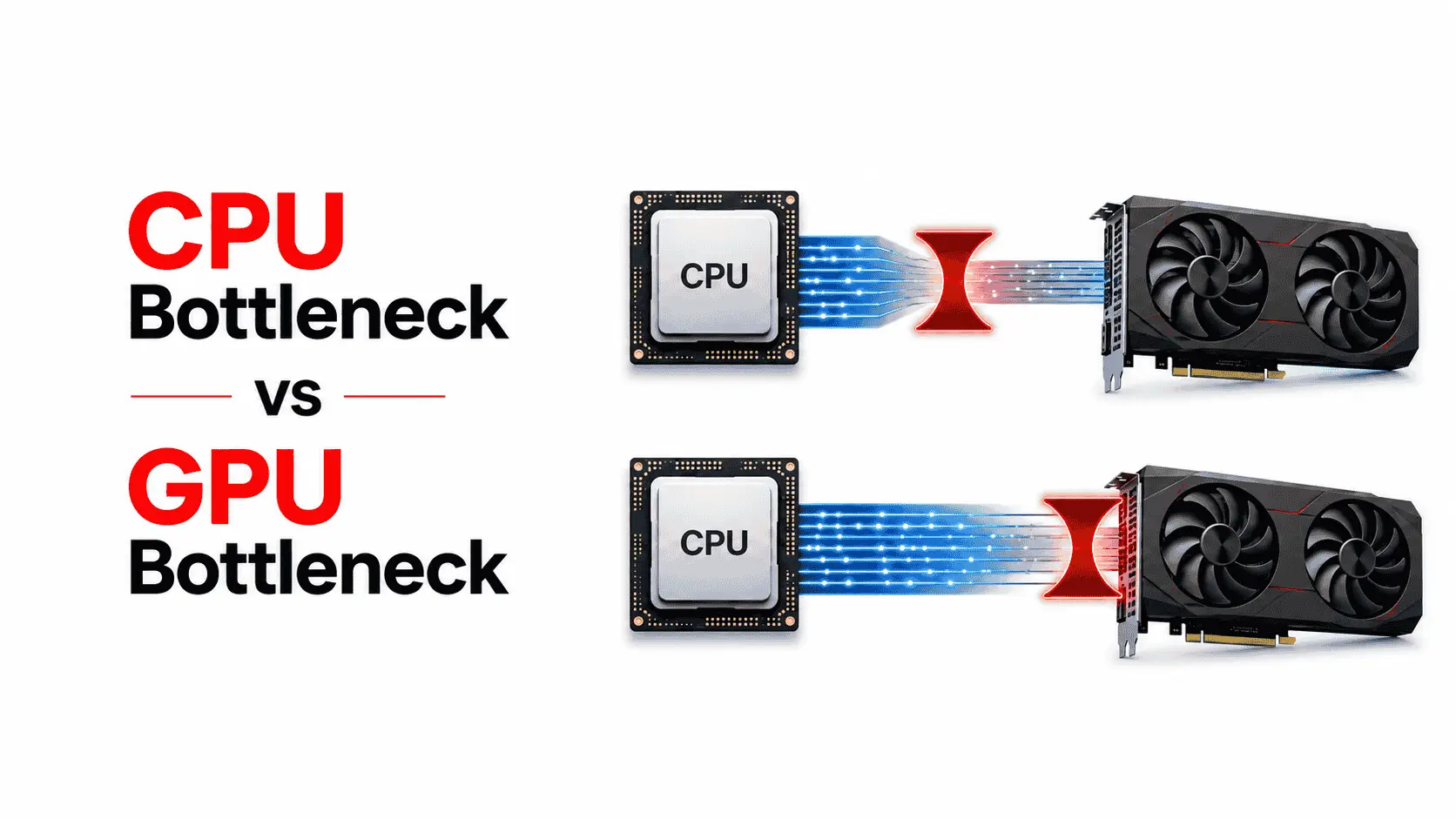
Hardware also matters when generating AI videos directly on your computer. Local models can place heavy demands on the GPU, and an outdated processor or limited video memory may affect performance or prevent a model from running. Before installing such software, check its system requirements and use a bottleneck calculator to get an initial idea of how well your CPU and GPU work together. Keep in mind that GPU memory, software compatibility, and model-specific requirements determine whether a particular tool can run. Online generators generally handle the intensive processing on cloud servers, so even a low-end computer may be able to use them through a browser.
For factual demonstrations, technical tutorials, or advertisements showing a specific product, generated footage should not be treated as verified evidence. The model can create details that look believable without matching the actual object or event. Checking those details is part of producing trustworthy video content.
Conclusion
AI video generators work by translating prompts into machine-readable instructions, creating visual representations, and generating connected frames that form a moving scene. In many systems, diffusion-based techniques gradually refine visual information, while temporal modeling helps maintain consistency between moments. Image-based generation adds a visual reference that can guide the appearance of the resulting clip.
The technology can reduce the work needed to create certain kinds of footage, but a useful finished video still depends on clear direction and careful review. A well-defined scene, a manageable motion request, and a focused editing process usually provide more control than an overly complicated prompt. Understanding what happens between the initial description and the final export makes it easier to recognize what the model can handle and where human judgment is still necessary.